
KINESIS Advantage360 Professional Split Ergonomic Keyboard
4.1Editor score
Fully programmable layout
Quiet mechanical switches
Adjustable separation and tenting
Ergonomic keyboards for programmers can reduce wrist strain, support a more natural typing posture, and make long coding sessions feel less punishing. The best option depends on hand size, preferred layout, work habits, operating system, and whether programmability or familiar full-size controls matter most.
This guide compares ten ergonomic keyboards using their stated design features, including split geometry, palm support, key switches, wireless connections, layout options, programmability, and device compatibility. It covers membrane, mechanical, and traditional ergonomic designs suited to different programming workflows and budgets.
Each review explains who the keyboard is best suited for, where it offers a clear advantage, and where compromises may appear. Product listings and availability can change, so readers should confirm current specifications, compatibility, and accessories directly before purchasing.
4.1Editor score

4.4Editor score

4.3Editor score
As an Amazon Associate we earn from qualifying purchases.
The comparison below highlights the major differences among split and wave-style layouts, membrane and mechanical feedback, wired and wireless operation, programmability, and multi-device support.




The Logitech ERGO K860 combines a gently curved split frame, a sloping profile, and a substantial pillowed wrist rest. Its 4.4 rating reflects a balanced approach to ergonomic support and everyday productivity. It is particularly appealing to programmers who want relief from wrist and forearm strain without abandoning a conventional full-size layout.
We may earn a commission when you buy through this link, at no additional cost to you.
Its standout feature is the way the split keyframe, curved design, and palm lift work together rather than functioning as isolated adjustments. The keyboard can rest at zero, negative four, or negative seven degrees, allowing users to change the angle while seated or standing. Scooped keys are designed to meet fingertips naturally, while the memory foam wrist rest supplies substantially more support than a basic palm pad.
The K860 also balances ergonomic geometry with familiar productivity features. It retains a full-size layout and CAPS LOCK indicator, connects through a USB receiver or Bluetooth, and allows customization of Fn keys and shortcuts through Logitech Options. The trade-off is that the key arrangement is fixed rather than freely remappable, and the split geometry may require an adjustment period for people accustomed to a flat keyboard.
This is the strongest general recommendation for programmers who want a recognizable layout, robust wireless connectivity, and meaningful wrist support without moving into a specialized custom-keyboard workflow. It suits both desktop users and people switching among computers, tablets, or other supported devices, while Logitech Options adds useful control over shortcuts and notifications.
The sloping split frame keeps the hands in a more natural arrangement, while the adjustable palm lift offers three positions to refine wrist angle. Together with the curved memory foam rest, these features make the K860 especially practical for programmers who spend extended periods typing.
The full-size layout preserves familiar navigation and number entry, reducing the relearning burden associated with compact or column-staggered keyboards. Bluetooth and USB receiver options also make it easier to move between a primary workstation and portable devices.
We may earn a commission when you buy through this link, at no additional cost to you.
The KINESIS Freestyle2 is built for programmers who want more control over keyboard geometry than a conventional ergonomic model provides. It carries a 4.3 rating and stands apart through adjustable module separation and tenting. Unlike fixed split designs, the two key modules can rotate and move apart by as much as nine inches.
We may earn a commission when you buy through this link, at no additional cost to you.
The included VIP3 lifters allow tenting at five, ten, or fifteen degrees, while integrated cushioned palm supports help keep forearms neutral and wrists supported. The low-activation-force custom membrane switch adds tactile feedback while reducing the force required to activate keys, a useful characteristic during long sessions that involve repeated typing and command entry.
Despite its unconventional geometry, the Freestyle2 uses a standard Windows layout. Cut, copy, paste, multimedia controls, and an embedded numeric keypad remain accessible, and no software or special drivers are required. That makes it a practical choice for PC-centric programmers who want a full-size workflow without maintaining separate external controls, although the USB-A connection is less universal than contemporary wireless options.
The main trade-off is visual and physical disruption. A split, tented keyboard takes time to learn, particularly for users who switch frequently between ergonomic and traditional layouts. Even so, the ability to tune separation and angle makes this one of the strongest choices for programmers seeking a personalized split configuration without the complexity of a fully programmable board.
Moving the key modules independently lets users tailor the distance between hands to shoulder width and preferred wrist position. The three available tenting angles add another layer of adjustment, reducing the guesswork involved in choosing a fixed ergonomic keyboard.
Standard Windows shortcuts, multimedia keys, and an embedded numeric keypad preserve a productive PC workflow. The absence of required drivers also reduces setup complexity for programmers working in managed or restricted environments.
We may earn a commission when you buy through this link, at no additional cost to you.
The Logitech Wave Keys offers a less radical alternative to a strongly split keyboard. Its wavy frame is designed to place hands, wrists, and forearms in a more natural position, while the compact construction and cushioned memory foam palm rest provide support without the width of a traditional full-size board.
We may earn a commission when you buy through this link, at no additional cost to you.
With a 4.2 rating, the Wave Keys stands out for accessibility. The curved design preserves the general appearance of a conventional keyboard, easing the transition for programmers who want some ergonomic relief but do not want to relearn an entirely different key arrangement. The Logi Options+ app allows shortcut personalization, while Easy-Switch supports movement among up to three devices.
Bluetooth and Logi Bolt connectivity make it well suited to a flexible workstation. The product is compatible with Windows, macOS, iPadOS, and ChromeOS, and Logitech states a battery life of up to three years. The trade-off is that its sculpted wave geometry does not offer the same degree of hand separation or tenting as the Kinesis models.
Wave Keys is a strong recommendation for programmers who work across several operating systems, value wireless convenience, and prefer a subtle ergonomic adjustment. It is especially useful for laptop users who want to move between a desktop setup and portable devices without repeatedly reconnecting a traditional keyboard.
The wavy keyframe changes hand and forearm positioning while keeping the keyboard visually and functionally familiar. That balance can make it easier to adopt than a fully separated or tented board, particularly for programmers with a shared or frequently changing workstation.
Easy-Switch and support for major operating systems suit programmers who move among a desktop computer, laptop, tablet, or ChromeOS device. Logi Options+ shortcuts add further convenience for frequently used commands.
We may earn a commission when you buy through this link, at no additional cost to you.
The Arteck Split Ergonomic Keyboard delivers the defining features of a split design at a budget-friendly level. Its 4.3 rating indicates a strong reception among buyers, while the separated keyframe helps position wrists and forearms more naturally during extended computer work.
We may earn a commission when you buy through this link, at no additional cost to you.
The principal comfort feature is the soft cushioned wrist and palm rest, which provides a place for the hands to settle between or during typing. Setup is straightforward because the nano USB receiver stores at the back of the keyboard and connects to a compatible computer without a more involved configuration process.
Its rechargeable lithium battery is stated to last up to six months when used for two hours per day. The package includes the keyboard, nano receiver, USB-C charging cable, welcome guide, warranty, and customer support. As a trade-off, it uses 2.4G wireless rather than Bluetooth, and the geometry offers less adjustment than premium split models.
For programmers seeking a dedicated ergonomic keyboard without paying for extensive programmability or advanced connectivity, this Arteck model is a sensible entry point. It works especially well for Windows desktop and laptop users who primarily need a stable wireless connection and a visibly split layout.
The central split separates the left and right key groups so each hand can approach from a more natural angle. Combined with the padded rest, it offers a meaningful ergonomic upgrade over many standard wireless keyboards.
The stored nano receiver makes installation straightforward, and the rechargeable design avoids routine battery replacement. It is a practical choice for a fixed workstation where Bluetooth pairing is not necessary.
We may earn a commission when you buy through this link, at no additional cost to you.
The ProtoArc EK01 Plus combines a curved split frame, backlighting, and multi-device wireless control in a full-size keyboard. Its 4.3 rating makes it a strong contender for programmers who work across multiple systems, especially in low-light environments where visible key labels are important.
We may earn a commission when you buy through this link, at no additional cost to you.
The keyboard can pair with up to three devices using Bluetooth and 2.4G USB connectivity. Compatibility extends across Windows, macOS, Android, and Microsoft systems, allowing developers to move between a laptop, tablet, and desktop computer. Its curved wrist rest and four adjustable tilt feet add comfort and positioning flexibility at the same desk.
Backlighting offers low, medium, and high levels, with the option to turn it off. Battery use varies considerably depending on illumination, and the listed performance ranges from 12 to 13 hours at high brightness to 90 to 100 days with the backlight off. The 2000mAh rechargeable battery is a substantial upgrade, while automatic sleep after inactivity helps conserve power.
The primary compromises are the absence of wired operation and the need to check desk dimensions because the full-size curved frame may occupy substantial space. Nevertheless, programmers who alternate among devices or work in dim rooms will appreciate the combination of backlighting, wireless switching, and ergonomic shaping.
Three brightness levels let users balance visibility and battery use, while the ability to switch the illumination off is useful during travel or bright daytime work. This is a practical feature for programmers who maintain the same keyboard across changing environments.
Bluetooth and 2.4G support allow up to three paired devices, making the keyboard suitable for developers who alternate between a workstation, laptop, and tablet. The simple key-press switching mechanism reduces the friction of changing environments.
We may earn a commission when you buy through this link, at no additional cost to you.
The Logitech ERGO K860 for Business is aimed at organizations that want ergonomic hardware alongside centralized deployment and security capabilities. Its 4.1 rating reflects a design focused on managed use, with Logi Bolt wireless technology, Secure Connections Only mode, and Logitech Options app management.
We may earn a commission when you buy through this link, at no additional cost to you.
It retains the familiar strengths of the standard ERGO K860: a split, curved frame, sloping profile, pillowed wrist rest, and three palm-lift positions. Programmers benefit from a full-size numeric keypad, while the ability to connect to three devices supports switching between work computer and portable equipment.
The business model is the principal distinction. Remote mass deployment and device management can help IT departments maintain consistent configurations across many users. Certification across more than 100 countries also makes the keyboard easier to specify for broadly distributed teams. The trade-off is dependence on compatible management tools and infrastructure that a home user may not need.
This model is a strong choice for corporate development teams, managed workstations, and enterprise IT departments prioritizing security and centralized oversight. Individual programmers with a single computer can usually get a more streamlined experience from the standard ERGO K860, but organizations may value the business model's deployment advantages.
Remote deployment and Logitech Options support give administrators a way to manage keyboards across an organization. This makes the model more relevant to enterprise development teams than to individual hobby programmers.
Logi Bolt technology and fully encrypted Secure Connections Only mode address the security requirements of managed business environments. Wireless convenience is retained without sacrificing an organization’s connection policy.
We may earn a commission when you buy through this link, at no additional cost to you.
The KINESIS Advantage360 Professional is the most specialized keyboard in the guide and the leading choice for programmers who want to redesign their input workflow. Its 4.1 rating reflects a feature-rich product whose learning curve is part of the appeal. The patented shape includes split key wells, thumb keys, an orthogonal layout, integrated tenting, and palm supports.
We may earn a commission when you buy through this link, at no additional cost to you.
Programmability is the defining advantage. Users can reconfigure the base layout through GitHub or a web-based graphical interface, making it possible to optimize uncommon key combinations for an editor, terminal, or language-specific workflow. The design permits separation up to ten inches and offers three tenting heights, producing a much more individualized fit than a fixed split board.
The supplied Kailh Box Pink Silent stems deliver low activation force and a linear feel, while their stated durability is 50 million presses. Bluetooth, optional white backlighting, and compatibility with Windows, macOS, Linux, and Chrome broaden the platform appeal. The package includes two braided charging cables, extra keycaps, a puller, a bridge connector, and a quick start guide.
The trade-offs are substantial. This is a premium-class purchase, the hardware and software demand a learning period, and premium palm pads are sold separately. Even so, no other product in this guide combines open-source programmability, true mechanical feedback, broad platform support, and such a wide range of physical adjustment. It is best suited to experienced programmers willing to invest time in configuration.
The open-source configuration environment allows programmers to remap keys and optimize the base layout for their own development environment. For users who live in a terminal, IDE, or editor and routinely use uncommon shortcuts, that control can eliminate persistent friction.
Kailh Box Pink Silent stems provide a low-force, linear mechanical experience without the noise associated with louder switches. The stated 50-million-press durability makes the mechanism suitable for sustained, high-volume programming work.
We may earn a commission when you buy through this link, at no additional cost to you.
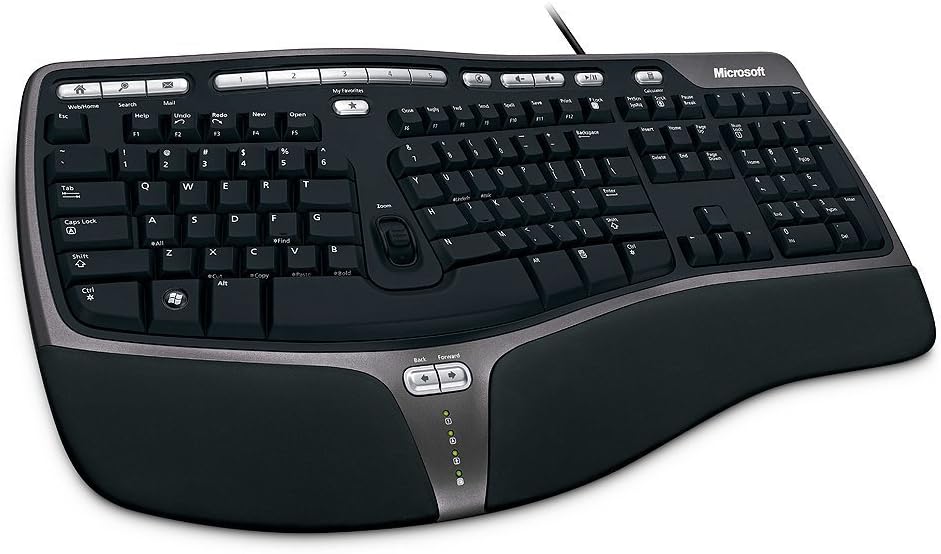
The Microsoft Natural Ergonomic Keyboard 4000 is a proven wired design that prioritizes stable typing and a neutral hand position. Its 4.4 rating is among the highest in this guide. The split layout encourages natural positioning of the hands, wrists, and forearms, while a cushioned palm rest provides a supported resting surface.
We may earn a commission when you buy through this link, at no additional cost to you.
An adjustable palm lift changes the angle of the keyboard so users can find a more relaxed wrist position. Dedicated media keys provide quick access to common playback controls, preserving useful functionality without altering the core typing area. The wired design is especially dependable for fixed development workstations where uninterrupted input and a simple connection are priorities.
The main limitation is obvious but manageable: the cable can occupy desk space and offers no device switching. It also lacks the wireless flexibility and advanced adjustment of newer split models. Users accustomed to managing a laptop dock, several machines, or a frequently changing workspace may consider that restriction before committing.
For programmers who work at one desk and want a straightforward ergonomic keyboard without software, the Microsoft 4000 remains a sensible pick. Its established split geometry, integrated cushioning, and stable connection make it especially suitable for long sessions involving conventional typing, code editing, and terminal navigation.
A wired connection avoids wireless pairing, battery management, and interference concerns. That predictability is valuable in a development environment where latency, charging, and device switching are secondary concerns.
The palm lift and cushioned rest work together to reduce wrist extension and support a more natural position. The split geometry further helps the forearms approach the desk from a less sharply angled direction.
We may earn a commission when you buy through this link, at no additional cost to you.
The Microsoft Natural Keyboard Elite offers a gentler approach to ergonomic design. Its 4.3 rating reflects a well-regarded layout that adds comfort through curved geometry without relying on the dramatic split and tenting seen in specialized boards. It is a practical option for programmers who want more support but prefer a less radical transition.
We may earn a commission when you buy through this link, at no additional cost to you.
Multimedia controls provide direct access to music and video functions, while enhanced F-key commands support customizable shortcuts. Connection through USB or PS/2 offers flexibility for older and newer PC setups, making it especially relevant to workstations with legacy hardware or established enterprise configurations.
Compared with the Natural Ergonomic 4000, this model offers fewer explicitly detailed ergonomic adjustments. There is no mention of the same integrated palm lift system, and its overall form is less strongly separated. The trade-off is that the keyboard may feel more approachable to users who want a subtle upgrade rather than a new typing pattern.
The Natural Keyboard Elite is a sound choice for general-purpose coding productivity, particularly for users of legacy Windows systems. It offers useful programmable commands and multimedia access, though programmers seeking stronger wrist correction or modern multi-device connectivity should examine one of the newer wireless split designs.
The curved body offers a more natural hand position without forcing the pronounced separation of a specialist board. This makes it a reasonable starting point for programmers who want to experiment with a different shape.
Enhanced F-key commands and dedicated multimedia controls put common actions within easy reach. USB and PS/2 support also suits established PC environments where broad device compatibility is more valuable than wireless convenience.
We may earn a commission when you buy through this link, at no additional cost to you.
The Microsoft Natural Ergonomic Keyboard 4000 for Business builds on the established 4000 platform with an emphasis on productivity. It holds a 4.4 rating and combines a split ergonomic frame, cushioned palm rest, palm lift, media keys, and an improved number pad with additional Windows-oriented shortcut features.
We may earn a commission when you buy through this link, at no additional cost to you.
The split design is intended to promote more natural hand, wrist, and forearm positions, while the integrated plush rest offers support during pauses and less active typing periods. The number pad places frequently used symbols such as equals, parentheses, and Backspace above the numeric area, improving access for programmers who alternate between code and calculations.
Taskbar Favorites provide quick access to programs pinned to the Windows 7 taskbar, making this model especially suited to older business Windows environments. Media controls add convenience without taking space from the primary typing area. The main historical limitation is that Mac OS X 10.2.x users must install the enclosed IntelliType Pro and IntelliPoint software before connecting.
This is a dependable productivity keyboard for business developers using wired Windows workstations. Its strongest attributes are the established ergonomic shape and useful number-pad refinement. However, organizations seeking modern wireless deployment, broad device switching, or centralized cloud management may find a newer business-focused model more aligned with current infrastructure.
Moving common numeric symbols above the number pad shortens the distance to characters that often appear in code, formulas, and configuration tasks. This subtle rearrangement helps preserve productivity while the keyboard maintains its familiar full-size format.
Taskbar Favorites and dedicated media controls suit established Windows workflows. The wired connection is stable and straightforward, although teams with modern multi-device requirements may prefer a wireless model.
We may earn a commission when you buy through this link, at no additional cost to you.
The right ergonomic keyboard should reduce strain without creating a new productivity problem. Consider layout geometry, adjustment, key feel, connectivity, programmability, operating-system support, and desk space before choosing.
A split keyboard separates the left and right key groups so each hand can approach from a more natural angle. The amount of separation matters: fixed split boards are convenient and familiar, while adjustable models allow programmers to align each half with shoulder width and reduce outward forearm rotation. Tenting raises the inner key sections and can further support a neutral wrist position, but it also creates a more unfamiliar visual layout.
Choose a fixed split if you want an easier transition, and choose adjustable separation if you can fine-tune the fit. Consider how the board looks and feels before committing.
Palm rests help keep the wrists neutral when the hands pause between bursts of typing, while palm lift features alter the keyboard angle. A cushioned memory foam surface may feel more supportive than a hard rest, and an integrated support can prevent the keyboard from sliding as the hands settle. However, a rest should support the palm area rather than create pressure on the wrist crease during active typing.
Prioritize adjustable angle and comfortable cushioning rather than maximum softness. A supportive rest is useful, but its shape must complement the keyboard rather than force the hands into an awkward angle.
Membrane switches are generally quieter and require less activation force, while mechanical switches provide a more pronounced tactile or linear response. Low-force options can reduce finger fatigue during long typing sessions, and silent mechanical switches offer a compromise for shared offices or video calls. The most suitable choice depends on sound tolerance, typing intensity, and personal preference.
Try comparable switches whenever possible. A switch that feels excellent for short bursts may become tiring during an all-day programming shift, so choose comfort before visual appeal.
Programmable keyboards let developers move frequently used commands, move actions, debugger controls, or terminal functions into positions that are easier to reach. Fully remappable layouts are especially useful for complex editors, custom key combinations, and users who alternate between several languages. Softer customization focused on Fn keys or application shortcuts may be sufficient for programmers who want familiar layouts with a few convenient enhancements.
Remapping offers major productivity potential but requires setup and maintenance. Confirm that the software works with your operating system and is manageable before buying solely for programmability.
Wireless keyboards reduce cable clutter and make it easier to move between a laptop, desktop, and tablet. Bluetooth enables broad compatibility and direct pairing, while a dedicated USB receiver can provide a straightforward connection on a fixed workstation. Some models support only 2.4G wireless, which is perfectly usable but less convenient for switching among modern portable devices. Wired designs remain dependable where a permanent connection is preferred.
Match the connection method to your work pattern. Choose multi-device wireless for a mobile setup, 2.4G for a dedicated computer, and wired for a stationary workstation.
Split, tented, thumb-key, and orthogonal layouts can improve posture but require practice. Full-size conventional layouts preserve familiar navigation and a separate number pad, while compact boards can free desk space but may omit keys. Programmers who type at high volume often benefit from spending a week or more adapting before judging comfort, particularly when editor shortcuts are tied to familiar positions.
Estimate the transition effort before making a major layout change. A slightly less dramatic ergonomic design may be more sustainable if it encourages you to use the keyboard consistently.
Ergonomic keyboards frequently occupy more desk space than standard models because of their curved frames, palm supports, and separated halves. Full-size layouts retain a number pad but may push a mouse farther away, while compact models leave more room for mouse movement and monitor positioning. Adjustable feet and tenting can also affect the footprint and viewing angle of the keyboard.
Measure the available area before ordering. Ensure the chosen keyboard leaves enough space to position the mouse and forearms comfortably.
Rechargeable or long-life wireless models reduce interruptions, but battery behavior depends on usage and features such as backlighting. Mechanical construction and replaceable or supplied keycaps can affect longevity, while premium palm pads may be sold separately. A business keyboard may also include management tools that are unnecessary at home, so inspect the complete package and intended deployment environment.
Check battery claims, included accessories, and any extra purchases before ordering. The best keyboard is one whose support system and accessories match your setup.
Begin by placing the keyboard directly in front of your body and adjust the monitor so your head remains neutral. Position the mouse close enough that your elbow stays near your side and avoid reaching across the desk. Let the keyboard's feet, palm lift, separation, or tenting features establish the intended angle rather than compensating with raised shoulders or sharply bent wrists.
During the first week, reduce the amount of unfamiliar movement rather than abandoning the keyboard immediately. Type at a comfortable pace, pause regularly, and allow the palms to rest on the support when they are not actively typing. If using programmable software, begin with a small set of frequently used shortcuts and keep a backup layout until the new arrangement becomes automatic.
For maintenance, disconnect the keyboard before cleaning it and use a soft, lightly dampened cloth on the keys and palm rest. Avoid spraying liquid directly onto the surface, particularly with membrane or electronic keyboards. Charge wireless models according to the manufacturer’s instructions, keep receivers accessible, and replace batteries promptly if the model uses removable cells.
Yes. A split layout can help the forearms approach the keyboard from a more natural angle and reduce the need to rotate the wrists outward. Programmers should still adjust the separation, tenting, palm lift, and desk height until the hands and shoulders feel relaxed. A familiar layout and consistent practice can make the transition easier.
Mechanical switches provide distinct tactile or linear feedback and may appeal to users who want a pronounced typing experience. Membrane models are often quieter and require less activation force. The best choice depends on finger fatigue, noise tolerance, and personal preference rather than the programming task alone.
It can be valuable if your workflow relies on editor commands, terminal shortcuts, debugger controls, or custom key combinations. Remapping can place those actions closer to your fingers and reduce repetitive reaches. It does add setup complexity, so programmers who rarely change commands may receive more value from a simpler keyboard with adjustable ergonomics.
It depends on the design. Full-size split models and those with wide palm rests can occupy considerably more space than compact wave-style keyboards, while separate number pads also require room. Measure the desk and consider mouse placement before ordering. A narrower keyboard can reduce strain if the mouse remains close to the body.
Many modern models support Bluetooth or a USB receiver and can switch among several paired devices. Check the stated compatibility for Windows, macOS, Linux, ChromeOS, Android, and iPadOS before buying. Older wired business models may depend on legacy ports or operating-system software.
A well-designed palm rest can support a neutral wrist position and reduce pressure during pauses, but it cannot correct an unsuitable workstation height or eliminate every source of strain. Adjust the keyboard, chair, monitor, and mouse as a complete setup. Persistent discomfort should be discussed with an appropriate medical or ergonomic professional.
The adjustment period varies according to your previous layout and how much time you spend typing. Many users become more comfortable after several days of regular use, while a fully tented or orthogonal design may require longer. Short daily sessions and gradual integration into normal work can make the transition smoother.
Wireless models provide dependable everyday operation when properly charged and paired, but battery level, receiver placement, and interference can affect the experience. Wired keyboards eliminate charging and pairing concerns, while multi-device wireless models are better for mobile workflows. Choose based on how often you move between systems and whether uninterrupted operation is critical.
The Logitech ERGO K860 is the most balanced overall recommendation, combining a familiar full-size layout, wireless flexibility, a curving split frame, and meaningful wrist support. The KINESIS Freestyle2 serves programmers who want adjustable separation and tenting, while the Arteck Split Ergonomic Keyboard offers the most approachable entry into the category.
Your priorities should determine the remaining choice. Choose the KINESIS Advantage360 Professional for deep programmability and silent mechanical switches, the ProtoArc EK01 Plus for backlighting and three-device switching, and the business-focused Logitech model for centralized management and secure wireless deployment. Microsoft’s ergonomic designs remain dependable wired options for established PC workstations.
Before purchasing, verify the current listing, operating-system compatibility, included accessories, dimensions, and connection method. Product details and availability can change, so confirm the current configuration directly and choose the model that offers the support your hands and workflow need rather than the most dramatic design alone.