
Creality Otter Lite Basic 3D Scanner
4.8Editor score
0.05mm stated accuracy
Object range from 0.8–78 inches
Spray-free dark surface scanning
Full-color RGB capture
A useful 3D scanner turns real-world objects and environments into accurate digital geometry, but the best choice depends on your subject, working space, and required precision. Handheld models prioritize flexibility, while desktop and industrial systems offer greater specialization for repeatable workflows.
We compared ten scanners using their stated accuracy, resolution, scan speed, lighting tolerance, working volume, tracking methods, color support, software, connectivity, and export formats. The list covers portable consumer devices, desktop systems, photogrammetry tools, and higher-end industrial scanners.
Each pick highlights a different reason to consider it, from detailed figurine capture to full-body scanning and precision measurement. Specifications and availability can change, so check the current product listing and software requirements before buying, especially if your work depends on exact tolerances.
4.8Editor score

5.0Editor score

As an Amazon Associate we earn from qualifying purchases.
This side-by-side comparison focuses on the specifications that materially affect a purchase: measurement precision, capture speed, working range, lighting tolerance, color capture, and workflow flexibility.


The Creality Pika stands out as the most versatile pick in this guide, combining a stated 0.03mm accuracy with two different optical approaches. Its 5.0 rating and unusually broad feature set make it particularly compelling for users who want one scanner for small objects, large pieces, and human-body capture rather than a narrowly specialized device.
We may earn a commission when you buy through this link, at no additional cost to you.
Seven parallel blue laser lines support detailed geometry, while NIR structured light handles full-body work and 24-bit color. The stated 110fps rate helps keep handheld acquisition smooth, and the 10–2000mm working range gives it more flexibility than many compact alternatives. AI body completion, retexturing, and hole filling can reduce repetitive cleanup after a scan, while Wi-Fi 6 and a 3-inch touchscreen support cable-free operation.
There are reasonable compromises. The 260g body and compact screen suit portability rather than prolonged desktop use, and marker-free operation is specifically described for wired PC mode and may not apply identically in every workflow. The supplied claims of professional-grade precision should also be understood as manufacturer specifications whose real-world results depend on calibration, surface finish, setup, and the object being captured.
This is the strongest recommendation for makers, designers, educators, and technically curious consumers who want detailed results without choosing between figurine, object, and body-scanning functions. Choose the Pika if you value portability, fast capture, detailed geometry, and useful automated cleanup in a single device.
Switching between seven-line blue laser and NIR structured light lets users match the capture method to the subject. The blue laser mode targets fine detail, while the NIR mode is positioned as a practical option for full-body scans and textured captures.
AI body completion, retexturing, and hole filling address several common post-processing burdens. These functions are especially useful when the goal is a clean, printable model rather than an untouched raw point cloud.
We may earn a commission when you buy through this link, at no additional cost to you.
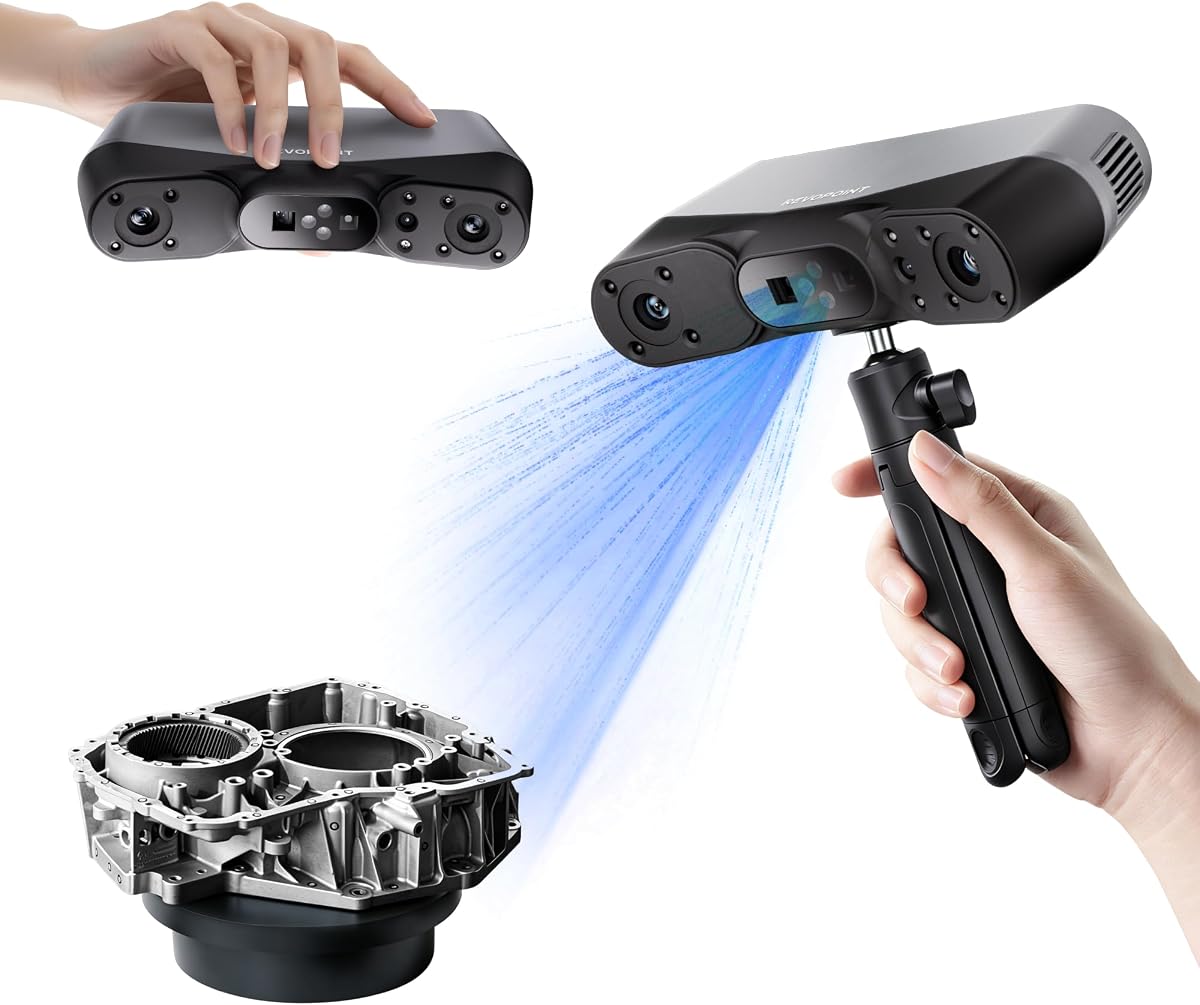
The Revopoint POP 4 is an ambitious hybrid scanner whose strongest argument is variety. It combines full-field structured light, hybrid structured light, VCSEL, cross-laser, and single-line modes, allowing it to address small parts, deep cavities, dark surfaces, reflective metal, and larger objects without relying on one capture method.
We may earn a commission when you buy through this link, at no additional cost to you.
Its stated single-frame accuracy reaches 0.03mm, while volumetric accuracy is given as 0.03mm plus 0.05mm multiplied by working length. The device reaches up to 105fps with NVIDIA acceleration and can produce up to 5,000,000 points per second in full-field structured light mode. AI segmentation identifies and tracks a target, while the Gaussian Splatting workflow adds photorealistic representation and photo-based texturing.
Outdoor operation is another strength: multi-line laser mode supports 50,000 lux, the filter increases that to 100,000 lux, and VCSEL mode is also rated for 100,000 lux. The included battery grip offers up to four hours of continuous outdoor scanning, and Wi-Fi 6 allows live viewing and control on a phone or tablet. Revo Design and Revo Measure are optional paid software, and AI segmentation is limited to Windows.
The POP 4 suits experienced users who want a broad professional toolkit and may need to move between indoor and outdoor projects. It is less attractive if you want a simple dedicated desktop scanner or need every advertised software function on macOS or mobile devices.
The mode selection is unusually comprehensive. Cross lasers address reflective and dark objects, VCSEL supports rapid markerless capture, and single-line mode reaches into deep holes and narrow grooves.
Live cross-screen previews let the operator move around a subject while remaining aware of blind spots. That makes the system more practical for construction, archaeology, and industrial environments than a fixed-screen handheld workflow.
We may earn a commission when you buy through this link, at no additional cost to you.
The Revopoint INSPIRE 2 emphasizes portability without abandoning precision. At 190g, it is one of the lightest scanners in the list, yet it claims up to 0.05mm accuracy, 0.03mm precision, and a calibration board that improves point-cloud accuracy by 75%. That combination makes it appealing for mobile capture and field documentation.
We may earn a commission when you buy through this link, at no additional cost to you.
Eleven infrared laser lines help it handle reflective and dark surfaces without scanning spray. Infrared structured light and multi-line laser modes provide flexibility across object sizes and environments, while 1.5x and 2x optical zoom can improve detail on mixed-geometry subjects. The integrated RGB camera synchronizes color with geometry, and Wi-Fi 6 supports structured-light mobile scanning and interactive PC-to-phone streaming.
The stated 20,000-lux outdoor rating is enough for shaded or moderately bright conditions, though it is not the strongest figure in this guide. The aluminum alloy front panel improves perceived durability, and the included tripod, markers, turntable, calibration board, and filters make the package more complete. Revo Design remains a paid, Windows-only extension for users who need a direct scan-to-CAD workflow.
Choose the INSPIRE 2 for heritage preservation, education, product visualization, and field users who value a lightweight body and full-color results. It is particularly attractive when spray would be undesirable on the object or when a compact, all-in-one accessory package is important.
The 190g housing and wireless connection let the scanner travel beyond a desk. This is valuable for site visits, artifact documentation, and projects where bringing the subject to a stable workstation is inconvenient.
The synchronized RGB camera preserves surface appearance, while adjustable optical zoom focuses projected light for finer geometry. Together, they support models intended for visualization, archiving, and color-oriented printing workflows.
We may earn a commission when you buy through this link, at no additional cost to you.
The Revopoint MetroY Ultra is the most technically advanced scanner in this roundup, with a stated 0.01mm single-frame precision and volumetric accuracy of 0.015mm plus 0.04mm multiplied by working length. Those specifications position it for tight-tolerance measurement, industrial inspection, reverse engineering, and detailed models where small geometric differences matter.
We may earn a commission when you buy through this link, at no additional cost to you.
Five modes cover different tasks: 34 laser cross-lines for rapid capture, 15 parallel lines for fine detail, a single-line mode for deep holes, marker-free full-field blue structured light, and one-click turntable scanning. It can reach 90fps with an NVIDIA GPU or 60fps with a CPU, while outdoor laser modes tolerate 100,000 lux. Dark, glossy, and metallic parts can be scanned without spray.
The trade-off is equipment complexity and a premium-tier purchase commitment. The included 5500mAh battery grip provides about 2.5 hours, which may be shorter than some field sessions. Revo Metro includes point-cloud editing, model processing, and alignment tools, and exports include PLY, OBJ, STL, ASC, 3MF, GLTF, and FBX, but advanced metrology still requires careful calibration and a controlled process.
The MetroY Ultra is a compelling choice for industrial designers, engineers, inspection teams, and advanced fabrication studios. It is less likely to be necessary for casual hobbyists, but for professional workflows its combination of precision, mode flexibility, speed, and outdoor support is exceptionally well rounded.
The 0.01mm single-frame precision claim gives the MetroY Ultra a clear advantage for tight-tolerance work. Real results still depend on calibration, fixturing, surface condition, and correct operating distance.
Cross-line, parallel-line, single-line, structured-light, and turntable modes let the operator change strategy without buying separate scanners. This is valuable in studios handling prototypes, tools, components, and display models.
We may earn a commission when you buy through this link, at no additional cost to you.
The Revopoint MetroX Pro brings professional blue-laser scanning to design and inspection workflows. It states up to 0.01mm single-frame precision, 0.02mm single-frame accuracy, and volumetric accuracy of 0.02mm plus 0.04mm multiplied by working length, placing it among the most precise devices here.
We may earn a commission when you buy through this link, at no additional cost to you.
Four modes cover 30 cross-line lasers, 15 parallel lines, 62-line full-field blue structured light, and automated turntable scanning. The full-field mode can process up to 7 million points per second, while cross-line and parallel modes support spray-free capture of shiny or dark surfaces at up to 2 million points per second. The HD RGB camera adds color in automatic turntable mode.
Revo Mirror streams the scan to a phone, tablet, or display, helping operators spot gaps without remaining beside the computer. Feature tracking works well on detailed subjects, marker tracking suits flat surfaces, and global marker mode supports complex shapes. Revo Design and Revo Measure are sold separately and limited to Windows, so budget for software if those tools are essential.
The MetroX Pro is a strong fit for industrial design, reverse engineering, quality inspection, prototyping, and professional 3D printing. It may be excessive for simple character models, but its precision, automation, and tracking options make it a more focused industrial alternative to the broader MetroY Ultra.
The dual-axis turntable automates rotation and acquisition with one click. Combined with color capture, it reduces repetitive handling and supports a more consistent repeatable workflow.
Rich textures, flat planes, and complicated shapes do not all track equally well. The three available modes let users match the tracking strategy to the object rather than forcing every job into one method.
We may earn a commission when you buy through this link, at no additional cost to you.
The 3DMakerpro Fox is positioned as an approachable medium-format scanner for beginners and hobbyists. Its stated 0.07mm accuracy and 0.10mm resolution are respectable for entry-level equipment, while the handheld design makes it approachable for users building their first practical scanning workflow.
We may earn a commission when you buy through this link, at no additional cost to you.
The central convenience is markerless AI visual tracking. If the user moves too quickly and loses alignment, pointing the scanner back at a previously captured area allows the software to recognize the object and resume rather than immediately restarting. JMStudio combines scanning, editing, and optimization in one package, reducing the need to stitch together separate utilities.
Its 3.2 rating indicates that the experience has not been uniformly received, so buyers should consider the support ecosystem and exact feature set carefully. Compared with the other devices, the Fox provides less detail about frame rate, lighting limits, maximum object dimensions, and advanced capture modes, making it harder to compare for specialized professional work.
The Fox makes sense for students, first-time users, hobbyists, and budget-conscious makers who need dependable dimensional capture for printing, modeling, or inspection. It is best suited to conventional visible objects and general-purpose workflows rather than extreme precision, deep cavities, or demanding outdoor capture.
Fast movement can interrupt alignment and waste a capture session. The markerless recognition system can reacquire a familiar surface, which is especially helpful while users are still developing smooth scanning technique.
JMStudio integrates acquisition, editing, and optimization. That unified workflow is useful for beginners because it keeps the process within a familiar interface from the first scan through model preparation.
We may earn a commission when you buy through this link, at no additional cost to you.
The Creality Otter Lite delivers the strongest overall balance for many buyers, combining a 4.8 rating with a stated 0.05mm accuracy, 30fps speed, full-color capture, and an unusually broad working range. It is a particularly compelling value-oriented option for makers who need to move from coins and figurines to much larger objects.
We may earn a commission when you buy through this link, at no additional cost to you.
A four-camera arrangement pairs dual long-focal lenses for detail with dual short-focal lenses for broad coverage. The stated object range extends from 0.8 to 78 inches, and a single-frame area reaches 1460 by 1017mm at 1200mm distance. DOE structured light supports spray-free scanning of dark, shiny, and metallic surfaces, while the RGB camera and two fill lights record 24-bit textures.
The scanner supports marker, geometry, and texture alignment and exports to PLY, OBJ, STL, ASC, 3MF, GLTF, and FBX. CrealityScan 4 runs on Windows, macOS, iOS, and Android, and includes AI-assisted head-mesh repair. Outdoor use is rated to 30,000 lux. The optional Scan Bridge is not included, and maximum speed is lower than the 90–110fps models in the guide.
Choose the Otter Lite if you want one capable handheld scanner for printing, reverse engineering, prototypes, color visualization, heritage work, and general inspection without moving to a premium industrial system. It is the best budget recommendation here for broad household and studio use.
Long- and short-focal lenses let the scanner move from detailed small parts to large surfaces. This removes the need for separate equipment when your collection or project list includes very different scales.
The 24-bit RGB camera adds realistic texture while concentrated infrared light helps with black and reflective objects. The combination supports visualization, display models, and digital archiving without powder on every subject.
We may earn a commission when you buy through this link, at no additional cost to you.
The Creality CR-Ferret SE is a straightforward desktop-oriented scanner aimed at users who need dimensionally useful models, full color, and a straightforward 30fps workflow. Its stated accuracy is 0.1mm and resolution is 0.16mm, placing it below the finest scanners but within a practical range for many forms of 3D printing and visualization.
We may earn a commission when you buy through this link, at no additional cost to you.
One-shot 3D imaging improves tracking when the operator's hands move or the subject shifts. A 2MP color camera records the original appearance, and the scanning range extends from 150 to 2000mm with a single capture area up to 560 by 820mm. The device is also optimized to scan black or metallic objects without the white powder often used to increase contrast.
The 3.0 customer rating is the main reason not to recommend it as the top choice. It may still provide solid value for casual users, but buyers should verify the included software experience, export options, and accessories for their particular platform. The lower stated precision also means it is less suitable for close-tolerance industrial metrology than the Revopoint professional models.
The Ferret SE is most appropriate for beginners, classroom work, hobbyist 3D printing, and quick color captures of medium or large objects. Choose it when simplicity and basic functionality matter more than the highest precision or the broadest professional feature set.
One-shot imaging is intended to preserve tracking despite hand movement and faster passes. That makes the scanner easier to use when the operator is still learning a smooth, consistent path.
A 150–2000mm range and broad single-capture area suit figurines, props, and larger household objects. It is a practical middle ground for users who do not need the extreme reach of multi-camera systems.
We may earn a commission when you buy through this link, at no additional cost to you.
The Creality CR-Ferret Pro adds wireless operation to the familiar Ferret formula, with Wi-Fi 6 and a dedicated bridge for iOS and Android workflows. It retains a stated 0.1mm accuracy, 0.16mm resolution, 30fps capture speed, anti-shake tracking, and full-color output, making it an appealing upgrade for mobile users.
We may earn a commission when you buy through this link, at no additional cost to you.
The scanner supports OBJ, STL, and PLY exports and is rated for outdoor ambient light up to 30,000 lux. Wireless control removes the need to remain physically tied to a computer, which is useful around larger objects or when a separate display is more convenient. The product also supports USB connections to PCs and compatibility with Windows, Mac, and Android devices.
Its platform requirements are more involved than a simple scanner-and-cable proposition. Windows needs an i5 Gen 8 or later processor, 64-bit Windows 10 or 11, more than 8GB RAM, and software version 2.3.0 or later. Compatible Macs and mobile devices also have minimum processor, operating-system, memory, app, and connectivity requirements. Highly reflective, transparent, and extremely dark surfaces should still be avoided.
Choose the Ferret Pro when you want the core benefits of a compact color scanner with genuine wireless flexibility and broader device support. It is well suited to mobile makers and small studios, although the Otter Lite provides stronger stated accuracy and a more detailed optical system.
The dedicated bridge allows supported phones and tablets to act as part of the scanning workflow. Operators can move around a subject while maintaining a view of the scan rather than working around a fixed cable.
The scanner supports several operating systems, but compatibility depends on processor generation, memory, app version, and connectivity. Confirm that your intended computer or phone meets the listed requirements before ordering.
We may earn a commission when you buy through this link, at no additional cost to you.
The Revopoint MIRACO Plus is the most distinctive entry because it combines a quad depth-camera scanner with integrated photogrammetric metrology. Its kit includes four carbon-fiber scale bars and 208 coded targets, allowing it to approach measurement work that normally requires a separate photogrammetry setup.
We may earn a commission when you buy through this link, at no additional cost to you.
The metrology kit provides a stated length accuracy of 0.02mm plus 0.05mm multiplied by working distance, while the improved calibration board raises single-point-cloud accuracy by 20% to 0.04mm. Near mode handles tiny details and Far mode captures larger machinery. Optical zoom at 1.5x and 2x reduces noise and improves surface smoothness, and a 48MP RGB camera with flash LEDs produces detailed color scans.
Internally, the system uses an eight-core 2.4GHz processor, 32GB RAM, and 256GB storage, with capacity stated for up to 10,000 captured frames. It supports single-shot acquisition and continuous scanning at up to 20fps, while a six-inch 2K AMOLED flip screen can be viewed from different angles. Revo Design and Quicksurface features handle scan-to-CAD conversion, although the software is limited to x86_64 architecture.
The MIRACO Plus is best suited to users who need both textured digital twins and dimensional records, such as industrial documentation, heritage preservation, product visualization, and design references. It is heavier than the portable laser scanners, but its integrated metrology kit and color system compensate for that trade-off in professional workflows.
Scale bars and coded targets provide the references needed for photogrammetric measurements of larger subjects. Including them from the start creates a more coherent workflow than assembling a separate target kit later.
The 48MP camera and flash lighting improve texture capture on detailed, colorful objects. Paired with optical zoom, it supports lifelike models for presentation, simulation, archival, and design reference.
We may earn a commission when you buy through this link, at no additional cost to you.
The right scanner depends on what you scan, how accurate the result must be, where you will work, and how much post-processing your workflow can support. Comparing specifications alongside those practical requirements prevents an expensive mismatch.
Choose tighter stated accuracy for metrology, reverse engineering, and inspection. For display models, figurines, and general printing, a slightly broader tolerance may be sufficient.
Match the scanner's stated working range to your smallest and largest subjects. For varied work, a multi-camera or dual-mode system offers useful flexibility.
For dark or shiny items, prioritize a scanner that explicitly handles them. Outdoors, check the lux rating for the exact mode you intend to use.
Favor speed for large objects and rapid field capture. Favor point density or volumetric accuracy when documentation quality is the main objective.
Choose a dedicated RGB camera when surface appearance is essential. Geometry-only workflows can often use a less complex capture system.
Verify operating-system limits, optional software costs, and required export formats before buying. A polished scanner can still be a poor fit if its software does not connect to your workflow.
For frequent mobile work, prioritize device weight, battery endurance, and wireless control. For studio use, plug-in stability may matter more.
Begin with a clean, stable subject and a well-defined scan area. Read the device's calibration instructions, complete the prescribed calibration process, and verify that the computer or mobile device meets the software and hardware requirements. Before a large job, test a small area of the subject to confirm the correct mode, distance, brightness, and tracking method. Stable lighting and a matte or contrasting surface generally produce more consistent first results.
Move the scanner or turntable smoothly while keeping the subject within the recommended distance and field of view. Watch the live preview for gaps, drifting edges, and tracking loss, and pause to correct those problems rather than continuing to accumulate incomplete data. Use markers when the subject has little distinguishing texture, and use feature or global tracking only where the geometry provides stable features. For color scans, avoid mixed lighting and allow the camera to expose the surface evenly.
After capture, inspect the mesh for holes, noise, and floating fragments, then use the included editing tools to crop, align, repair, and simplify the model. Retain the raw point cloud until the final mesh is verified. Clean the scanner windows and projector surfaces with a dry, lint-free method recommended by the manufacturer, store batteries partially charged when appropriate, and protect optics from dust, impact, moisture, and direct heat. Recalibrate whenever results appear to drift or after the device is moved.
For most decorative prints, hobby models, and general visualization, the stated 0.05mm to 0.1mm accuracy offered by several scanners is adequate. Industrial inspection and tight-tolerance reverse engineering benefit from systems advertising 0.01mm to 0.02mm single-frame precision or accuracy. Always consider the size of the object, because the same scanner can represent a much larger relative error on a miniature than on a large industrial part.
Several models in this guide are specifically designed to scan dark, glossy, or metallic surfaces without powder, including the Pika, POP 4, INSPIRE 2, MetroY Ultra, MetroX Pro, Otter Lite, and Ferret SE. Results still vary with reflectivity, curvature, and geometry. The Ferret Pro explicitly advises avoiding highly reflective, transparent, and extremely dark surfaces, so model-specific limitations remain important.
Yes, when the device is used within its intended operating range and the subject provides trackable geometry. Professional options such as the MetroX Pro, MetroY Ultra, and POP 4 offer tighter stated accuracy and multiple tracking methods. For dimensionally critical parts, calibrate the scanner, use appropriate fixturing, validate results against known dimensions, and keep scan data in a format accepted by the CAD or metrology software.
Accuracy concerns dimensional agreement with the real object, while resolution concerns the size of features the scanner can distinguish. A high-resolution scan may still contain dimensional errors, and accurate dimensions do not guarantee that every tiny surface feature is captured. Compare both figures and evaluate the device on an object similar to your intended use.
The Pika is explicitly positioned for full-body scanning with AI body completion, while the Otter Lite supports face and full-body scanning in about a minute according to its listing. Other systems may capture body parts or larger subjects depending on their working range. Use adequate space, even lighting, stable tracking, and appropriate software, and follow all laser-safety and privacy requirements.
Markers or spray may still be useful on featureless, shiny, transparent, or extremely dark surfaces, even when a scanner advertises spray-free capture. Markerless feature tracking works best when there is enough geometric or texture detail to identify the surface. If acquisition repeatedly fails, try a different mode, improve lighting, change the viewing angle, or add the references recommended in the manual.
STL is widely useful for 3D printing, while OBJ and PLY can carry geometry and sometimes color or texture information. ASC is common in professional scanning workflows, and 3MF, GLTF, and FBX can suit modern fabrication, visualization, game, or animation pipelines. Export your final model in the format required by the downstream application, and check whether the chosen format supports texture data.
Faster processors, ample memory, and compatible graphics hardware can improve tracking, alignment, and large-project handling. The Ferret Pro lists minimum Windows, Mac, Android, and iOS requirements, while several Revopoint workflows use NVIDIA acceleration for the highest stated frame rates. Review the current system requirements before purchasing, particularly if you plan to use AI segmentation, Gaussian Splatting, high-density capture, or measurement software.
The Creality Pika is the most complete general recommendation, combining a stated 0.03mm accuracy, dual scanning systems, fast acquisition, wireless operation, color support, and AI cleanup. The Otter Lite is the best budget-oriented all-rounder for its 0.05mm accuracy, four-camera coverage, broad size range, and full-color output, while the MetroY Ultra is the strongest premium choice for professional precision and industrial versatility.
Prioritize the subject and workflow over headline specifications. A broad working range matters for changing jobs, lighting tolerance matters outdoors, optical detail matters for miniatures, and metrology accessories matter for dimensional records. Also account for the software, platform limits, optional licenses, and export formats because the scan file must move smoothly into your printing, modeling, inspection, or visualization pipeline.
Finally, check the current listing before purchasing. Specifications, software requirements, included accessories, ratings, promotions, and availability can change, and manufacturer accuracy claims depend on correct setup. Comparing the live listing with the needs established in this guide will help you select a 3D scanner that is capable, compatible, and practical for your actual projects.