
YAOHUOO 2-Tier Desktop Printer Stand
4.8Editor score
Holds two compact printers
Includes a fabric drawer
Compact 17.3-inch depth
A printer stand for two printers should do more than provide two surfaces. It should organize bulky equipment, protect valuable work areas, improve access to paper and accessories, and remain stable during printing. The right model depends on printer size, available floor or desk space, mobility needs, and whether built-in charging is important.
We compared ten printer stands on tier count, shelf dimensions, stated load capacity, adjustability, wheels, storage features, charging options, and installation requirements. The list includes compact desktop shelves, rolling carts, and large under-desk models designed to hold two printers, scanners, paper, or other office equipment.
Each recommendation highlights the stand's strongest use case and any practical compromises. Ratings reflect the supplied customer feedback, while dimensions and capacities come directly from the listed product information. Product prices and availability can change, so confirm the latest details before purchasing.
4.8Editor score

4.8Editor score

4.8Editor score
As an Amazon Associate we earn from qualifying purchases.
This side-by-side comparison covers ten stands suited to two-printer setups, ranging from compact desktop organizers to rolling and under-desk carts. It highlights differences in capacity, footprint, shelf configuration, mobility, charging, and storage so you can identify the most practical option for your workspace.




The Fannova 2-Tier Under Desk Printer Stand is a strong all-around choice for households and offices that need room for two substantial printers or a printer and scanner. It carries a 4.8 rating, and its defining advantage is flexibility: each shelf measures 20 by 20 inches, while the top shelf can be removed and repositioned across five height settings. That combination makes the stand useful for different printer shapes without forcing every machine into the same fixed opening.
We may earn a commission when you buy through this link, at no additional cost to you.
Its construction is designed for demanding equipment. The product information lists a robust weight capacity of 100 pounds per tier, steel-tube braces beneath the shelves, and X-shaped reinforcement at the rear. A water- and wear-resistant particle-board surface should be easier to maintain than exposed fabric or unfinished board. The lower tier can hold reams of paper, ink cartridges, or other accessories, while the adjustable top tier creates clearance for printers with taller paper trays and output compartments.
Mobility is handled unusually well. Four casters are included, with two offering locking control, and matching foot pads allow the unit to function as a stationary stand. The caster option is valuable in shared workspaces because the entire organizer can be rolled out when a printer needs servicing and pushed back beneath the desk afterward. The included tools, clearly numbered parts, aligned holes, and spare fasteners are thoughtful assembly details, although the reinforced frame and adjustable top may make setup more involved than a small desktop shelf.
This is the recommendation for buyers who prioritize two-printer capacity, adjustability, and useful shelf depth more than a minimal footprint. It is particularly well suited to under-desk placement where 20-inch-square shelves can pass beneath the work surface. Buyers with very small desks should confirm clearance before ordering, and those wanting simple lightweight shelving may find a smaller model easier to handle. Within the category, though, it offers the most complete balance of capacity, flexibility, stability, and organization.
The removable top shelf moves through five positions, allowing the lower clearance to suit printer bodies, paper trays, and scanner lids. This adjustability makes the two-tier arrangement practical for mixed equipment rather than limiting it to identically sized machines.
Locking casters make it easy to move the loaded stand when needed, while the supplied foot pads create a stable stationary alternative. That flexibility is especially useful in offices, studios, and home workspaces where equipment must sometimes be repositioned.
We may earn a commission when you buy through this link, at no additional cost to you.
The GreenForest Printer Stand with Lockable Wheels is a premium option for two large printers, scanners, or other heavy office machines. Its 4.8 rating and 300-pound support claim distinguish it from lighter shelves in this roundup. The stand uses a thickened metal frame with X-shaped reinforcement, while the 19.7-by-17.7-inch top shelf provides a substantial surface for equipment that would overwhelm a compact desktop organizer.
We may earn a commission when you buy through this link, at no additional cost to you.
Three tiers turn the stand into a broader equipment hub. The top is intended for a large printer, the middle organizes paper, files, and frequently used accessories, and the bottom holds bulk supplies or decorative items. This arrangement keeps bulky hardware elevated while making consumables easier to reach. The black finish is designed to blend into professional offices and modern home workspaces without looking like a purely utilitarian kitchen cart.
The mobility system is another major strength. Industrial-style smooth casters are described as suitable for movement over hardwood and carpet, and two lock securely to prevent movement during printing. Included foot pads provide a completely stationary configuration. That choice is useful if the stand must remain in one place for years, while the casters offer convenience when reorganizing a room or bringing equipment closer to a scanner station.
The main compromises involve footprint and assembly. The three-tier steel structure is more substantial than a lightweight desktop model, and the listed assembly time of 25 to 35 minutes may require two people. It also needs adequate floor space around the desk. For buyers handling heavy equipment, multiple printers, or demanding office workflows, this stand offers the strongest premium construction and the highest stated capacity in the list.
The 300-pound support capacity provides substantial headroom for multiple printers or heavier office machinery. Reinforced metal construction also addresses the wobbling that can occur when a large laser printer operates on a lightweight shelf.
Use the locking casters when frequent movement is necessary and switch to the supplied foot pads for permanent placement. Both options are intended to keep the loaded stand steady during demanding office tasks.
We may earn a commission when you buy through this link, at no additional cost to you.
The YAOHUOO 2-Tier Desktop Printer Stand is an economical choice for people who need to organize two compact printers without allocating a large floor area. The product carries a 4.8 rating and measures 17.3 inches deep by 11.8 inches wide by 15.7 inches high. The open middle space is listed at 11.8 inches tall, making the stand most suitable for compact printers, scanners, fax machines, or 3D printers.
We may earn a commission when you buy through this link, at no additional cost to you.
Its dual-purpose design adds value beyond equipment placement. A fabric drawer supplies concealed storage for small office items, while the open middle shelf can hold files, documents, plants, magazines, or printer accessories. The upper surface serves as a practical work area and supports up to 44 pounds, according to the product information. That makes it more versatile than a simple two-shelf riser with no dedicated organization.
The structure combines MDF panels with a stable metal frame. A waterproof tabletop is listed for easy cleaning and maintenance, which is helpful in busy work areas where toner dust and paper debris are unavoidable. Assembly requires the included hardware and clear instructions, but the design avoids the complexity of a rolling cart and does not require caster installation.
This is the best budget-style recommendation when desk space is limited and both printers are relatively small. Its limitations are predictable: a fixed shelf opening may not clear a tall printer, and the 11.8-inch width is narrower than a full-size scanner or wide-format device. Buyers should measure their machines and confirm that the stands can be placed where cords still reach outlets. For compatible compact equipment, it delivers useful storage and a neat appearance at a straightforward, uncomplicated design level.
The two open levels allow compact printers to share a single stand, reducing the number of devices crowding the desktop. The narrow width works particularly well in a home office where every horizontal inch of work surface matters.
The fabric drawer contains smaller office essentials that would otherwise collect around the printer area. Meanwhile, the open shelf remains convenient for files, paper, or accessories used frequently.
We may earn a commission when you buy through this link, at no additional cost to you.
The niffgaff Mobile Printer Stand is designed for buyers who want both a generous printer surface and the ability to reorganize equipment as needs change. It has a 4.5 rating, a 24.4-inch overall height, and three tiers. The large top is intended for bulky printers, scanners, and all-in-one machines, while the lower levels provide room for paper trays, ink cartridges, files, and office accessories.
We may earn a commission when you buy through this link, at no additional cost to you.
Adjustable shelf heights are the stand's most useful technical feature. Equipment of different heights can be placed without forcing a large printer into an opening that is too short or wasting an entire level. The shelves can also be reorganized to place the most frequently accessed supplies at a comfortable height. This makes the stand appropriate for a growing home office, a craft room, or a shared professional workspace.
Mobility comes from smooth rolling casters with brakes. Braking the wheels is important during printing because movement or vibration can interrupt feeding and paper alignment. A metal-and-wood hybrid construction gives the unit a more refined appearance than an all-metal cart, which may be valuable in a room where office equipment is also part of the decor.
The absence of a numerical load rating in the supplied information means buyers with particularly heavy equipment should investigate the manufacturer details carefully. Its 24.4-inch height may also be taller than necessary beneath a shallow desk. Even so, it is a versatile recommendation for two-printer setups that value shelf flexibility, attractive construction, and easy movement more than a compact footprint.
Adjustable shelf positions accommodate printers with different body heights and allow the lower levels to be reorganized around paper storage or accessories. The result is a stand that can evolve as the office equipment changes.
The wood-and-metal finish is less industrial than many rolling racks, helping the stand blend into a home office. Braked casters allow the entire unit to move without leaving it vulnerable to shifting during operation.
We may earn a commission when you buy through this link, at no additional cost to you.
The YAOHUOO 3-Tier Large Printer Stand is built for users who want to combine two-printer storage with a centralized charging area. It has a 4.5 rating, measures 22 inches wide by 15 inches deep by 25.5 inches high, and includes three shelves. According to the product information, it can accommodate two or three printers, a 3D printer, a fax machine, a heat press, or a laser printer.
We may earn a commission when you buy through this link, at no additional cost to you.
Its charging station is the defining convenience. Two standard power outlets, one USB port, and one Type-C charging port allow supported electronics to connect in one location. This can reduce dependence on nearby wall outlets and streamline a workspace containing several powered devices. The middle shelf has four height positions, spaced at two-inch intervals, allowing clearance to be tailored to different equipment.
The stand is built around a metal frame and board construction, with each shelf rated to support up to 120 pounds. A waterproof board is listed for easy cleaning. Four rotating caster wheels provide mobility, and all four are described as lockable, which offers more stable positioning than a mixture of locking and non-locking wheels. Four adjustable feet are included for users who prefer a fixed installation.
Its height and depth make it less suitable for shallow desks, and a power-equipped stand requires careful cable routing to prevent cords from becoming trip hazards. Even so, it is a strong recommendation for offices with multiple powered devices, shared workrooms, or creators using a printer and 3D printer together. The combination of adjustability, charging, mobility, and substantial shelf support is more complete than that of most compact stands.
Built-in outlets and USB connections consolidate power for printers and compatible accessories. This is particularly useful when wall outlets are scarce or cables would otherwise spread across the floor.
The middle shelf can move through four positions to accommodate changing equipment, while all four casters can lock. Adjustable feet provide a stationary alternative for spaces where the stand should remain fixed.
We may earn a commission when you buy through this link, at no additional cost to you.
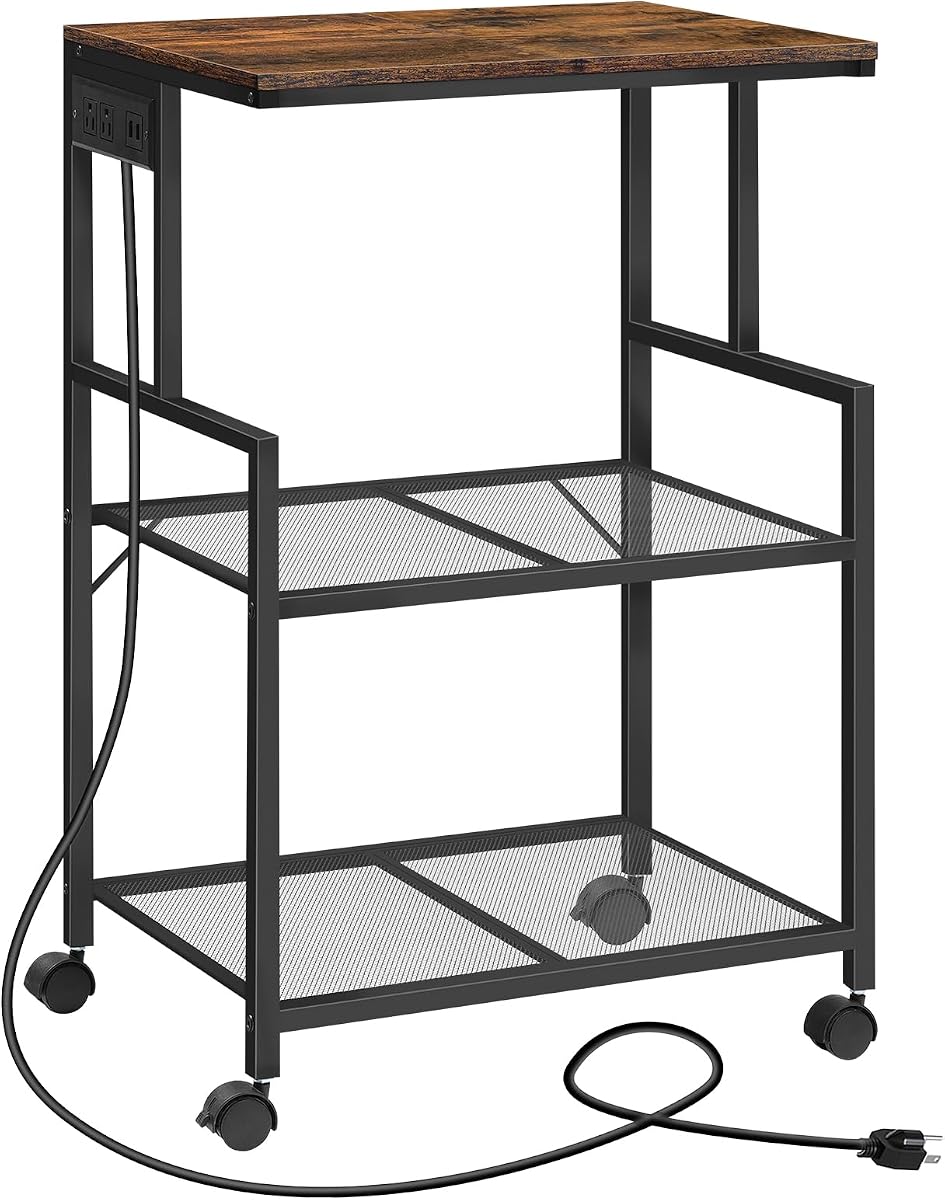
The MAHANCRIS Mobile Printer Stand combines printer storage with a 4.2 rating and a rustic brown finish that distinguishes it from conventional black office carts. It measures 20.5 inches long by 15.7 inches wide by 32.1 inches high and uses an open three-tier structure. The vertical arrangement can free considerable desk space while keeping printers, scanners, and related supplies accessible.
We may earn a commission when you buy through this link, at no additional cost to you.
A practical charging panel beneath the top provides two standard outlets and two USB ports. The included 4.9-foot power cord is long enough to reach a suitable wall outlet in many room layouts. This feature allows printers and household electronics to be organized around one station. The construction combines particle board, metal mesh shelves, and a supporting frame, with an anti-tip device intended to improve safety.
Each shelf is listed as supporting up to 44 pounds. That is sufficient for many consumer and compact office printers, but it offers less headroom than stands rated at 100 or 120 pounds per shelf. Four casters rotate 360 degrees, and two lock to prevent the cart from shifting. The open mesh shelves are also useful for storing books, collectibles, or kitchen items, although those alternate uses should not distract from the primary printer-storage function.
At 32.1 inches tall, this is the tallest stand in the list, so it may not fit below a standard desk. The lower capacity and open shelves also make it less suitable for particularly heavy equipment than the GreenForest or YAOHUOO three-tier models. Its appeal lies in the combination of rustic styling, useful power connections, and flexible household placement. For a home office that values appearance and multi-function storage, it is a distinctive option.
Two outlets and two USB ports make the charging panel useful beyond a single printer. The long power cord also gives buyers more freedom when choosing where to position the cart.
The three open tiers can separate printers, paper, books, or household items without the visual bulk of enclosed cabinets. Mesh shelves also make stored contents easy to identify.
We may earn a commission when you buy through this link, at no additional cost to you.
The Unionly Large Rolling Printer Stand is a straightforward three-tier rack for two printers, scanners, and related equipment. It holds a 4.2 rating and measures 22 inches wide by 15 inches deep by 24.8 inches high. The open layout provides separate levels for equipment and supplies, helping reduce the amount of printer-related material occupying the desktop.
We may earn a commission when you buy through this link, at no additional cost to you.
Its middle shelf can be placed at different heights, which makes the stand useful for equipment with varying vertical requirements. The top and lower levels provide space for printers, CPUs, paper, plants, and office accessories. This adjustability gives the rack more flexibility than a model with three permanently fixed levels, although the extent of each available position should be checked before ordering for unusually tall equipment.
Mobility is comprehensive. Four 360-degree swivel caster wheels are included, and all four are described as lockable. Four adjustable leveling feet are also supplied for stationary use. A heavy-duty metal frame and waterproof board form the main structure, and the board is intended to resist moisture and clean easily. The absence of built-in outlets or USB ports means cables must be managed separately.
The product information does not state a numerical load capacity, so buyers should not assume it matches the heavier stands in this roundup. It is best for two moderate-sized printers and general office organization. The combination of an adjustable shelf, three tiers, four lockable casters, and leveling feet makes it versatile, while the lack of charging hardware and a lower customer rating place it behind some alternatives. It remains a practical mobile option for spaces where the ability to reposition equipment matters.
The adjustable middle shelf can adapt to different equipment, while the straightforward metal-and-board design avoids the cable-management complexity of a built-in charging station.
All four casters lock for stable operation, and the included feet create a stationary alternative. This makes the stand practical for offices where printers are shared but may need to move between rooms.
We may earn a commission when you buy through this link, at no additional cost to you.
The ELITEROO 2-Tier Desk Printer Stand is a compact organizer for people who want two small printer positions, a visible storage drawer, and quick assembly. It carries a 4.7 rating and shares the same general 17.3-by-11.8-by-15.7-inch dimensions used by the YAOHUOO compact model. The open shelf provides 11.8 inches of middle clearance, so printer dimensions remain the primary compatibility consideration.
We may earn a commission when you buy through this link, at no additional cost to you.
The distinguishing feature is its wire mesh drawer. Unlike an opaque fabric drawer, the metal mesh makes paper, ink, notebooks, and smaller supplies visible while still keeping them contained. The drawer is also durable and easy to access, making the stand useful as a general desktop organizer rather than solely a printer base. The shelf can support up to 44 pounds and is supported by an MDF-and-metal-frame structure.
A rustic wood-grain finish adds warmth to the workspace and distinguishes it from stark industrial carts. The product information also identifies broader uses, including a scanner shelf, desktop organizer, nightstand, side table, and support for a game console, projector, speakers, or monitor. Those functions make it a practical choice for a multipurpose home office where a dedicated printer table would feel excessive.
The fixed shelf spacing cannot be adjusted, so one of the printers must have sufficient clearance. The relatively narrow top surface also limits placement of wide scanners or other large devices. The stated assembly time is only five minutes, however, and the package includes the necessary parts, tools, and instructions. For compact printers and buyers who value quick setup, visible storage, and attractive styling, this is a highly approachable recommendation.
The wire mesh drawer keeps supplies contained while allowing their contents to remain visible. It provides the organization benefits of a drawer without the footprint or visual weight of a large cabinet.
The listed five-minute assembly process and included hardware make this one of the simplest stands to set up. It can quickly turn an unused corner or section of a desk into a dedicated printer area.
We may earn a commission when you buy through this link, at no additional cost to you.
The HOOBRO 2-Tier Under Desk Printer Cart is a compact solution for placing a printer beside the user while keeping the desktop clear. It has a 4.5 rating and measures 19.1 inches long by 15.7 inches wide by 14.4 inches high. The relatively low profile is designed to fit beneath a desk, while the upper shelf supports a printer and the lower shelf stores paper and accessories.
We may earn a commission when you buy through this link, at no additional cost to you.
The upper level has a stated capacity of 88 pounds, providing solid support for a printer. The lower panel is rated for 33 pounds and is suitable for several reams of paper, cartridges, stamps, clips, and similar supplies. Iron components and P2 chipboard panels form the structure, with thick black legs and under-shelf support rods contributing to stability.
Two lockable wheels allow the cart to be moved without manually lifting the printer and then secured in place. This is especially convenient for printing, scanning, or copying tasks because the machine can be brought close to the chair and then returned under the desk. The open-shelf arrangement also keeps supplies visible and easy to reach.
The lower tier's lower capacity means the stand is best for relatively light accessories rather than another heavy printer. Only two of the four wheels are described as locking, so the other two remain free to swivel, which may introduce slight movement compared with models where all wheels lock. Despite these limitations, it is a strong choice for compact under-desk setups that value easy access, a substantial top shelf, and storage below the printer.
Moving the printer off the work surface creates more usable desk area, while the low cart can be rolled closer when scanning or copying. Locking wheels help keep it steady during those tasks.
The lower shelf keeps paper reams, cartridges, and small supplies close at hand. Its 33-pound limit is appropriate for light accessories and neatly stored consumables.
We may earn a commission when you buy through this link, at no additional cost to you.
The 2-Tier Desktop Printer Stand is a wide, fixed shelf designed to hold two printers while making efficient use of vertical or under-desk space. It carries a 4.6 rating and measures 22.5 inches wide by 14.8 inches deep by 15 inches high. The broad top gives two moderately sized printers more placement flexibility than the narrower compact stands in this roundup.
We may earn a commission when you buy through this link, at no additional cost to you.
Its stated bear capacity of up to 80 pounds indicates solid support for typical office equipment. Round-edged sides are intended to reduce the risk of bumps or injury during everyday use. The smooth surface offers a sleek appearance and is described as easy to clean, helping maintain a professional appearance in spaces where the stand remains visible.
A notable feature is the choice between using it on top of a desk or placing it underneath one. This dual positioning makes the stand useful in offices, home workspaces, and kitchens. It can also serve as a desktop rack, bookshelf, microwave shelf, plant stand, or robot vacuum stand, extending its value beyond printer storage.
The fixed two-level arrangement does not offer the clearance adjustment found in the Fannova model, and the listed installation time of 10 to 20 minutes is longer than the most basic desktop stands. It also has no wheels, charging ports, or enclosed drawer. Its strength lies in combining a relatively broad footprint, strong support claim, and flexible placement at a straightforward design level. It is well suited to buyers who want a permanent home for two printers and additional equipment.
The 22.5-inch width provides more side-by-side placement room than narrower two-tier stands. That additional width can make it easier to accommodate two printers, a printer and scanner, or nearby accessories.
Using the stand above or below a desk makes it easy to adapt to different furniture layouts. Its broad utility also extends to bookshelves, microwaves, plants, and robot vacuum storage.
We may earn a commission when you buy through this link, at no additional cost to you.
The best two-printer stand depends on equipment size, available space, and how the workspace is used. Compare footprint, clearances, load ratings, mobility, and storage features rather than focusing only on the number of shelves.
Begin with the full occupied dimensions of each printer, including paper trays, output bins, scanner lids, cables, and any side-loading compartments. A stand can support two devices by weight while still being unusable if a tall printer cannot fit beneath the upper shelf. Measure the width and depth of the work area as well as the vertical clearance under a desk.
Choose enough room for paper to feed and output without forcing the printer against a wall. Also consider whether the printers need ventilation around their sides or rear. Measure the complete setup before choosing a model with fixed or adjustable shelves.
Weight capacity is one of the most important structural specifications. Some listings describe a total bear capacity, while others rate each tier separately, so the two figures are not always directly comparable. Add the weight of both printers, paper, accessories, and any equipment stored below.
Prefer a margin above the combined load rather than matching the maximum exactly. Also check the lower shelf separately if it will hold another printer. Stronger frames, under-shelf braces, and cross-bracing add useful stability even when a stated capacity seems adequate.
Desktop stands are compact but usually best for smaller printers. Rolling carts provide more room for large equipment but require a clear route and enough floor space. Under-desk models save visible work area, although their top shelves must be low enough to slide beneath the desk while leaving printers accessible.
For a two-printer arrangement, a wide desktop stand may work better than a narrow one with separate shelves. For rolling models, account for the full footprint and the space needed to pull the stand outward. Measure the location before considering product dimensions.
Wheels are useful when printers need to be moved between rooms, brought closer for scanning, or temporarily removed during desk work. Locking casters are essential for keeping a loaded printer stable while it operates. Models where all wheels lock generally offer the most controlled positioning.
If the stand will remain in one place, locking wheels are still useful because they prevent accidental movement. Feet can provide a steadier fixed setup and may be preferable on uneven flooring. Check whether both caster and foot options are included.
Two open shelves can hold both printers, but adjustable shelf positions help accommodate different equipment heights. Extra tiers create space for paper, ink cartridges, scanners, and 3D printers, although a taller frame may be harder to place under a desk. A drawer adds concealed storage but takes up internal volume and can make the unit less open.
Choose storage based on the items used most often. Paper and cartridges benefit from wide, easy-to-reach shelves, while small office accessories are well suited to a drawer. A wire or fabric drawer is useful for visibility, while a solid drawer offers a cleaner appearance and greater privacy.
A stand with power outlets, USB ports, and a Type-C port can serve as a central charging station for two printers and related electronics. This is particularly valuable when wall outlets are limited. Confirm the number and type of connections, as well as the length of the power cord.
Built-in charging does not eliminate cable management. Route printer cords along the frame and secure loose lengths so they do not cross walkways. If the stand is moved frequently, use suitable connections and avoid pulling equipment by a taut cable.
Metal frames, reinforced shelf supports, and water-resistant boards are useful indicators of durability, but component quality varies across designs. Rounded edges improve safety in tight work areas, while a wood or rustic finish may blend more naturally into a home office. A black metal frame tends to suit professional environments.
Consider assembly time, included tools, and whether parts are labeled. Designs with prealigned holes, numbered components, and spare fasteners are easier to assemble correctly. Stronger welded or reinforced frames may take longer but provide better support for heavy printers.
A printer vibrates during operation, so the stand must remain stable with the equipment loaded. Lock the wheels, level the feet, and avoid placing the unit on an uneven floor. Wide shelves, lower cross-bracing, and a broad base help reduce wobble. Leave enough room to open scanner lids and remove paper trays.
The best arrangement also keeps consumables accessible without creating a tall obstacle. Consider whether both printers will be used simultaneously, whether one serves as a backup, and how often paper and ink must be replenished. Long-term convenience depends on stable placement, easy access, and enough surrounding space to work.
Unpack the stand near its intended location, inventory the parts, and review the instructions before tightening the frame. Assemble the structure on a level surface, then attach shelves and adjustable hardware. If it will function as a rolling cart, install the casters and test each brake. If it will sit beneath a desk, confirm the upper clearance before adding printers.
Place the heaviest printer on the shelf with the greatest stated capacity, keeping the load centered rather than pushed to an edge. Secure each device according to the manufacturer guidance, route cables without creating tension, and make sure paper trays have room to extend. Lock the wheels or level the feet before beginning a large print job.
Clean the shelves with a soft, slightly damp cloth and dry them thoroughly. Keep the frame free of dust, and avoid placing wet cleaning products directly on the surface. Check wheel locks, shelf fasteners, and leveling feet periodically, especially after moving the stand. Store paper in a dry area, and keep printer vents unobstructed for consistent operation.
A stand can hold two printers when its dimensions, clearance, and load rating fit both machines. Check the total weight of the printers, paper, and accessories against the applicable capacity. You should also confirm that each printer has enough space for its paper trays, scanner lid, cables, and ventilation.
The best size depends on the printers rather than a universal measurement. Measure the width and depth of both devices, including output trays, then compare those figures with the shelf dimensions. Height matters most when a printer will sit below another shelf, while a wider top is helpful when both machines are placed side by side.
A rolling stand is better when equipment must move between rooms or be brought closer for scanning and copying. Locking casters are important for stable printing. A fixed stand is simpler, often takes less space, and may be more appropriate when the printers remain in one workstation.
It can fit if the stand's total height is below the available desk clearance and the shelves have enough room for the printers. Measure from the floor to the underside of the desk, including any rails, drawers, or power strips. Also check that the stand can be rolled into and out of the opening.
A built-in outlet is useful when a printer and accessories need convenient access to power without occupying nearby wall outlets. It is not essential for basic storage, but integrated USB or Type-C charging can simplify a shared workspace. Consider cable routing and whether all required connections are supported.
Use a stand with cross-bracing and under-shelf support, center the equipment, and keep the combined load within the stated limits. Lock all available casters or level the feet on an even floor. Avoid extending a printer's paper tray without confirming that the stand is stable enough for the extra leverage.
Paper reams, ink cartridges, manuals, and lightweight office supplies are practical choices. Check the lower shelf's separate weight rating before adding supplies, especially when it is rated lower than the top. Avoid placing heavy equipment on a tier specifically designed for paper and small accessories.
Yes, as long as the device fits within the shelf area, clear height, and stated capacity. Many stands are also designed as general organizer shelves for scanners, fax machines, 3D printers, speakers, and other equipment. Check heat ventilation and the manufacturer's recommended operating surface for the specific device.
The Fannova under-desk stand is the strongest all-around recommendation because its 20-by-20-inch shelves, adjustable top, 100-pound tier capacity, and included wheels and feet offer exceptional flexibility. The GreenForest table is the premium choice for heavy equipment and high stated capacity, while the YAOHUOO desktop model delivers the most approachable budget solution for two compact printers.
Prioritize the dimensions and clearances of your actual printers before any other feature. Then consider whether the stand needs to move, how much paper and accessory storage you need, whether built-in charging will simplify the area, and if the material matches the rest of your workspace. A simple two-tier shelf is often sufficient for compact equipment, while heavy or bulky printers justify a reinforced rolling cart.
Before ordering, confirm the latest dimensions, load ratings, included components, and product availability. Prices and configurations can change, and manufacturer updates may affect details. Taking a few minutes to compare the physical fit of both printers with the selected stand will help avoid clearance or stability issues and lead to a more organized workspace.