
TERRAMASTER D4-320
4.2Editor score
Four hot-swappable drive bays
Up to 10Gbps USB bandwidth
Tool-free Push-lock trays
Supports HDD and SATA SSD
Quiet temperature-controlled cooling
Direct Attached Storage provides a fast, straightforward way to add multiple hard drives or SSDs to one computer without deploying a network. A good DAS balances useful throughput, expandability, cooling, drive accessibility, and compatibility with the way you move, back up, and organize data.
The enclosures in this guide were compared by bay count, supported drive types, connection speed, RAID options, capacity, cooling design, hot-swap functionality, and operating-system support. The list includes diskless multi-bay systems, a two-bay QNAP model, and a hybrid design that combines SATA drives with NVMe SSDs.
Each review explains where the enclosure stands out and where its limitations may matter for your workflow. Ratings and product details reflect the supplied information, while pricing and availability can change, so compare the current listing and your storage requirements before buying.
4.2Editor score

5.0Editor score

4.2Editor score
As an Amazon Associate we earn from qualifying purchases.
The table below compares all ten enclosures by the factors that most directly affect capacity, performance, drive flexibility, and everyday usability.


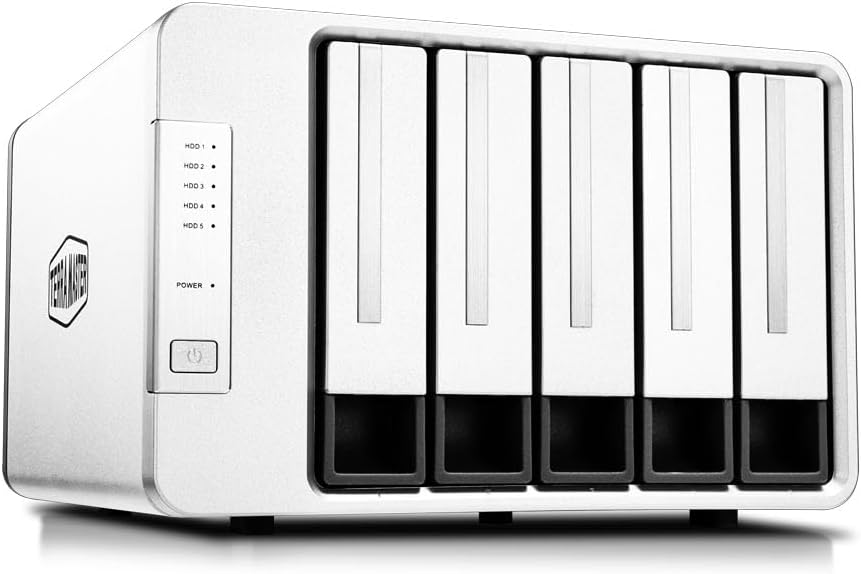


The TERRAMASTER D4-320 is a four-bay direct attached storage enclosure with a 4.2 rating and no preinstalled drives. Its strongest combination is a 10Gbps USB 3.2 Gen2 interface, hot-swappable tool-free bays, broad compatibility, and a cooling design intended to remain quiet during ordinary use.
We may earn a commission when you buy through this link, at no additional cost to you.
The enclosure supports 3.5-inch SATA hard drives, 2.5-inch SATA hard drives, and 2.5-inch SATA SSDs. A single drive may reach 30TB, and four drives can provide up to 120TB in aggregate. Supplied performance figures reach 1,016 MB/s with four SATA III hard drives, while a single SATA III SSD can reach 510 MB/s. Actual results will vary with the drives, files, host, and workload.
Its main limitation is the absence of built-in RAID. It behaves as a direct storage device, and its four disks are managed individually rather than as a hardware RAID set. That is sensible for users who want flexible volumes, but it means anyone requiring RAID 0, RAID 1, RAID 5, or another hardware mode should look at the QNAP TR-004 or TERRAMASTER D5-310 instead.
The D4-320 is best for creative professionals, video editors, and home lab users who want several large disks connected to one computer. Its balance of throughput, capacity, tray convenience, and quiet operation makes it a strong general recommendation for anyone who does not specifically require network storage.
The 10Gbps interface gives the enclosure ample bandwidth for large media libraries and active projects. Because each disk can be handled as independent storage, you can separate archives, scratch files, and working sets without depending on a RAID configuration.
Hot swapping and the Push-lock tray design simplify adding or replacing drives. The locking mechanism helps keep a seated disk secure while avoiding the need for separate tools during routine maintenance.
We may earn a commission when you buy through this link, at no additional cost to you.
The QNAP TR-004 is a four-bay USB Type-C DAS with a 4.2 rating. It stands out from basic external enclosures because its hardware controller supports RAID 0, RAID 1, RAID 5, JBOD, and individual-disk operation, giving buyers several ways to balance performance, redundancy, and capacity.
We may earn a commission when you buy through this link, at no additional cost to you.
Its four bays accept 3.5-inch SATA drives and include a USB Type-C to Type-A cable. The enclosure can serve as general external storage, provide NAS backup space, expand a compatible QNAP NAS, or operate as individual storage. This makes it more versatile than a plain direct enclosure for users already invested in the QNAP ecosystem.
Compatibility requires care. The listed restrictions exclude several older QNAP TS models and NAS systems that cannot be updated to the required QTS version. The TR-004 can only appear as an individual pool or volume on a connected NAS, its storage cannot be merged into the NAS pool, and NAS applications cannot be installed on it. Data moved between the enclosure and other systems may also not be recognized.
Choose the TR-004 if hardware RAID, lockable bays, and QNAP integration matter more than having the highest stated transfer rate. It is a premium-oriented enclosure for buyers who understand that a DAS is still directly controlled by a host and cannot reproduce every NAS feature.
RAID 0 prioritizes aggregate performance, RAID 1 emphasizes redundancy, RAID 5 balances those goals, JBOD combines disks without RAID parity, and individual mode exposes each drive separately. This range makes the enclosure adaptable to changing storage requirements.
The TR-004 can provide backup space or capacity expansion for supported QNAP systems. Check the complete NAS compatibility list before purchase, especially if the enclosure may later move between different QNAP models.
We may earn a commission when you buy through this link, at no additional cost to you.
The TERRAMASTER D8 Hybrid has a 3.5 rating and a distinctive eight-position layout that accepts four SATA hard drives or SSDs alongside four M.2 2280 NVMe SSDs. It is built for users who want high-capacity magnetic storage and high-speed flash storage in one enclosure rather than choosing one drive type for every task.
We may earn a commission when you buy through this link, at no additional cost to you.
The maximum stated configuration reaches 152TB: four drives at up to 30TB each plus four M.2 SSDs at up to 8TB each. That flexibility lets frequently accessed working files reside on NVMe while less active archives remain on hard drives. The USB 3.2 Gen2 interface provides up to 10Gbps bandwidth, with supplied figures of 521 MB/s for an SSD and 980 MB/s for an NVMe SSD.
The lower rating suggests the product may not be as universally satisfying as the enclosure's technical feature set implies. Mixed SATA and NVMe storage can also make initial configuration more complex than a conventional all-SATA DAS. It is essential to confirm how the host operating system exposes each drive and how the included TPC Backupper software handles the desired backup workflow.
This enclosure makes the most sense for editors, photographers, developers, and advanced users managing both hot and cold data. Its tool-free trays, Push-lock mechanism, power-on recovery, and temperature-controlled fan make it a versatile choice when both speed and capacity are priorities.
NVMe drives suit active projects, caches, and frequently accessed working files, while large SATA hard drives are well suited to archives and less frequently modified data. Keeping both types in one enclosure can simplify a tiered storage strategy.
The hybrid arrangement provides eight drive positions rather than the four available in many similarly sized enclosures. Maximum capacity calculations depend on fitting the largest supported SATA and M.2 drives at the same time.
We may earn a commission when you buy through this link, at no additional cost to you.
The CENMATE four-bay enclosure carries a 4.3 rating, the highest supplied rating among the conventional multi-bay SATA options reviewed here. It offers a direct, uncomplicated way to connect multiple 2.5-inch or 3.5-inch SATA hard drives and SSDs to one computer.
We may earn a commission when you buy through this link, at no additional cost to you.
Its aluminum-alloy shell supports heat dissipation, while a two-inch fan provides active cooling. The stated fan noise is around 40–50 decibels, making noise a meaningful consideration for quiet offices, editing suites, and living-room installations. Tool-free, hot-swappable drive bays improve maintenance, and the included 12-volt power adapter supports stable high-speed transfers.
The connection is USB 3.0 with a maximum stated bandwidth of 5Gbps under UASP. This is ample for many personal and professional workflows, although it sits below the 10Gbps interfaces offered by several competitors. The enclosure explicitly has no RAID or NAS functions, so buyers should plan on individual volumes or storage management performed by the host computer.
This is a practical recommendation for users who want straightforward external storage, tool-free maintenance, and broad platform support without paying for hardware RAID. Choose it when easy access and a conventional SATA-only layout matter more than maximum transfer bandwidth or quiet cooling.
The aluminum shell and active fan help remove heat during sustained transfers. Users sensitive to sound should account for the stated 40–50 decibel fan noise, particularly in a quiet workspace.
USB A/C 3.0 cables are included, making it easier to connect to systems with different port layouts. Plug-and-play operation and support for Windows, Mac, and Linux broaden its practical appeal.
We may earn a commission when you buy through this link, at no additional cost to you.
The SABRENT DS-SC5B is a five-bay USB-C DAS rated at 4.1. It is designed for dependable multi-drive access, with a dedicated ASMedia ASM1351 controller for each bay and an included USB-C to USB-C cable for the most reliable host connection.
We may earn a commission when you buy through this link, at no additional cost to you.
Five 3.5-inch SATA HDDs or SSDs fit inside the diskless enclosure, producing up to 100TB when each drive reaches 20TB. A single 10Gbps USB-C port connects to the computer, while USB 3.1 Gen 2 remains backward compatible with USB 3.0 and USB 2.0 interfaces. Each bay also has its own power switch and activity LED.
Like many direct enclosures, it provides no hardware RAID. Drives mount individually in a JBOD-style setup, and the host computer controls their formatting and storage management. The separate controllers can improve reliability by avoiding one controller being responsible for every drive, but they do not transform the enclosure into a RAID appliance.
The rear USB-C port can connect peripherals or another dock, which makes this more useful as a workstation centerpiece. It is well suited to users who need five large disks, independent bay controls, and tidy cabling without a network appliance or external power brick.
A dedicated controller in each bay gives the five drives independent paths to the host. Per-bay power switches also allow individual drive control when a full shutdown is unnecessary.
The rear USB-C port expands the enclosure beyond a basic drive box. It can support a peripheral connection or a daisy-chained second dock, reducing the need for another direct USB port.
We may earn a commission when you buy through this link, at no additional cost to you.
The TERRAMASTER D8 Hybrid 2 has a 5.0 rating, the highest supplied score in the group. It builds on the hybrid DAS concept with four SATA positions, four M.2 2280 NVMe positions, independent drive management, 10Gbps bandwidth, and a one-touch power mode control.
We may earn a commission when you buy through this link, at no additional cost to you.
Each of the eight drives operates independently, and the enclosure includes no built-in RAID. Users who need RAID can use compatible third-party software, but that introduces an operating-system and configuration dependency that hardware-RAID enclosures avoid. Maximum combined capacity is 152TB with four 30TB SATA drives and four 8TB M.2 SSDs.
The USB 3.2 Gen2 interface can reach 10Gbps, and supplied performance reaches 1,020 MB/s with a single M.2 SSD. TERRAMASTER's power management control switches between energy-saving and active modes, offering a choice between power efficiency and quicker drive response. The enclosure also supports USB 4.0, Thunderbolt 5, Thunderbolt 4, and Thunderbolt 3 interfaces listed in its specifications.
This is the most compelling hybrid option for users who can take advantage of both flash and hard-drive storage in one enclosure. It is particularly attractive to video editors, developers, and high-capacity data workers who want flexible tiering without purchasing separate external drive boxes.
Four SATA and four NVMe drives can be mounted separately, providing room for active projects and larger archives at the same time. The absence of built-in RAID preserves flexibility but requires separate consideration for redundancy.
The one-touch control provides an easy way to favor energy efficiency or active responsiveness. Power Save mode suits occasional access, while Active mode is more appropriate for sustained workflows that prioritize fast drive wake-up.
We may earn a commission when you buy through this link, at no additional cost to you.
The TERRAMASTER D5-310 is a five-bay hardware RAID enclosure with a 3.6 rating. Its defining feature is a rear RAID knob that lets users select RAID 5, RAID 0, RAID 1, RAID 10, or single-disk mode without relying on host-based software.
We may earn a commission when you buy through this link, at no additional cost to you.
The enclosure supports 3.5-inch and 2.5-inch SATA hard drives along with SSDs. It accepts drives up to 24TB each, for a stated aggregate capacity of 120TB. A hot spare feature is available in RAID 1, RAID 5, and RAID 10 configurations, adding a recovery option when one of the participating drives fails.
Its USB 3.1 interface provides up to 5Gbps and a stated read/write rate of 220 MB/s. That is lower than the headline performance available from 10Gbps models, although RAID writes also introduce overhead. The relatively low supplied rating may reflect buyer experience or product expectations, so careful investigation is advisable for a critical application.
The D5-310 makes sense for buyers who specifically want five-bay hardware RAID with a convenient physical mode selector. It is less attractive when maximum speed is the priority, and changing RAID modes requires planning because the selected layout defines how data is organized across disks.
The rear knob gives direct physical control over RAID 0, 1, 5, 10, and individual operation. It is a convenient alternative to navigating software-based RAID controls on the host.
In supported RAID configurations, a hot spare can take over after a disk failure. This can reduce recovery downtime, although it does not replace regular backups of irreplaceable files.
We may earn a commission when you buy through this link, at no additional cost to you.
The WAVLINK 4-Bay Dock is a 4.0-rated storage enclosure that combines four SATA drive bays with display and peripheral connectivity. Its distinguishing feature is HDMI output supporting up to 4K at 60Hz under DisplayPort 1.4, turning it into a multifunction docking solution.
We may earn a commission when you buy through this link, at no additional cost to you.
The host connection uses USB 3.2 Type-C with up to 10Gbps bandwidth. A second USB-C port supports peripherals or daisy-chaining, while four bays accept both 3.5-inch and 2.5-inch SATA hard drives and SSDs. Maximum stated capacity is 88TB using four 22TB drives. Additional 2.5-inch-to-3.5-inch mounting brackets are required for 2.5-inch drives and are not included.
Display output depends on the host computer's USB-C port supporting video and the use of a USB-C-to-C cable. The enclosure is therefore not a universal monitor adapter. Its dual fans activate at 48°C, adding active cooling for sustained workloads while allowing the drives to remain in an aluminum shell that promotes heat dissipation.
Choose this model for a compact workstation that needs storage, peripherals, and a display connection through one host interface. It is less suitable as a simple portable drive box, and users should verify USB-C video support, monitor compatibility, and the host's available bandwidth before installation.
The HDMI output can simplify a workstation by adding a display connection alongside storage and peripheral ports. Compatibility depends on the computer, cable, and display chain, so confirm that the host USB-C port supports DisplayPort Alt Mode.
The two built-in fans activate when the enclosure reaches 48°C. This approach supports cooling during intensive transfers while avoiding constant fan activity when demand is lower.
We may earn a commission when you buy through this link, at no additional cost to you.
The ORICO 5-Bay Enclosure has a 4.0 rating and prioritizes capacity, quick installation, and a five-position SATA layout. Magnetic chips on the cover allow drives to be installed without screws or separate tools, and the enclosure supports 2.5-inch and 3.5-inch SATA hard drives and SSDs.
We may earn a commission when you buy through this link, at no additional cost to you.
With up to 22TB per drive, the stated maximum capacity reaches 110TB. The USB 3.1 Gen 1 Type-C interface operates at up to 5Gbps, and the product information cites transferring 1GB in about three seconds. That rate is suitable for common file transfers, although it cannot exploit the full bandwidth of a 10Gbps host connection.
The supplied Linux note is important: in a Linux system, only one of the hard drives in a multi-drive enclosure can be read at a time. Windows and Mac support is more straightforward. There is also no hardware RAID, so drive organization depends on the host operating system or separate software.
This enclosure is a good fit for home archives, family media collections, and general backup expansion where the priority is more bays and high capacity rather than maximum transfer speed. Verify your operating system's multi-drive behavior before committing to a workflow that depends on simultaneous access.
Magnetic chips on the cover help position and secure drives without screws. This reduces installation effort and makes it more convenient to reorganize the enclosure as storage needs change.
A 60mm double-ball-bearing fan and honeycomb rear openings support airflow. Overvoltage, overcurrent, overheating, short-circuit, and leakage protections add safeguards during operation.
We may earn a commission when you buy through this link, at no additional cost to you.
The QNAP TR-002 is a compact two-bay USB Type-C DAS with a 4.0 rating. It offers a smaller alternative to the four-bay TR-004 while retaining useful features such as hardware RAID, lockable drive bays, and compatibility with Windows, macOS, and Linux.
We may earn a commission when you buy through this link, at no additional cost to you.
Its two bays accept 2.5-inch or 3.5-inch SATA drives. RAID 0, RAID 1, JBOD, and individual-disk operation are available, and the enclosure can serve as external storage or as expansion storage for a compatible QNAP NAS. A USB Type-C to USB 3.0 cable is included.
The obvious limitation is scale. Two drives cannot provide the storage volume of the larger enclosures in this guide, and RAID 1 requires two suitably sized drives while reducing usable capacity. QNAP expansion also depends on the connected NAS and its supported workflows; the TR-002 is not a replacement for a full NAS operating system.
The TR-002 suits a desk that needs only two additional disks, a compact mirrored backup, or straightforward QNAP capacity expansion. It is a particularly sensible choice when physical footprint and RAID flexibility matter more than maximum bay count.
RAID 1 can mirror data between two drives, providing redundancy against a single-drive failure. The enclosure still depends on one host computer, so it should not be treated as a substitute for an independent network backup.
For supported QNAP systems, the TR-002 can add external storage capacity over USB Type-C. Confirm the NAS model's support and intended usage before purchasing it for an established QNAP setup.
We may earn a commission when you buy through this link, at no additional cost to you.
A useful DAS decision starts with the host, the drive types you own, and the storage pattern you need to support. Capacity, interface speed, RAID behavior, cooling, and maintenance convenience should then be balanced against one another.
A 10Gbps USB interface provides greater headroom than 5Gbps for large media files, active backups, and multiple simultaneous transfers. The faster link is most meaningful when the computer, cable, storage controller, and individual drives can all sustain suitable throughput; a faster enclosure cannot make a single slow mechanical drive substantially quicker. A 5Gbps model may still be sufficient for archives, routine document storage, and occasional backups.
Confirm that the host has the correct USB-C, USB-A, or Thunderbolt connection and that the included cable supports the enclosure's rated generation. Fast specifications also describe theoretical interface capability, not guaranteed real-world file-transfer speed. Prioritize a 10Gbps connection for demanding workflows, but consider the drives and workload before paying for extra bandwidth.
In short, choose 10Gbps for demanding multi-drive work and 5Gbps for more conventional storage tasks.
Match the number of bays to realistic storage needs rather than simply selecting the largest enclosure. Two bays suit a compact mirrored setup, four bays provide a useful balance for expanding archives, and five or eight positions allow more media, backups, or tiered storage. Also verify the maximum supported capacity of each drive and the enclosure's stated aggregate maximum.
Capacity ceilings are useful limits, not a guarantee that every combination will behave identically. Leave room for future growth if possible, and consider whether the host operating system can mount and manage every disk. Enclosures with mixed SATA and NVMe positions can offer both large archives and high-speed scratch storage, although they require more deliberate configuration.
In short, count your current and planned disks, then verify that both bay quantity and per-drive limits match.
RAID can combine disks for larger usable volumes or create redundancy, but it is not a backup. RAID 0 increases capacity and may improve performance while offering no protection from a single-disk failure. RAID 1 mirrors data across two disks, while RAID 5 and RAID 10 offer more advanced redundancy across larger sets. JBOD and individual-disk modes preserve visibility of separate volumes.
Hardware RAID is handled by the enclosure and can work across compatible hosts, while software RAID depends on the computer's operating system and configuration. Some hybrid products support third-party RAID software but have no internal RAID controller. Reviewing your need for redundancy, the cost of rebuilding, and the consequences of a failed disk should guide this decision.
In short, use RAID for availability and capacity planning, but maintain separate backups for critical data.
Most DAS enclosures are designed around 3.5-inch and 2.5-inch SATA hard drives and SATA SSDs. Some models add M.2 2280 NVMe slots, allowing high-speed solid-state storage to sit beside high-capacity mechanical disks. This hybrid arrangement is valuable for separating frequently used working files from slower archival data.
NVMe support is not universal, and M.2 drives may require specific form factors, capacities, or protocol features. Likewise, an enclosure that supports SATA SSDs may not offer the same performance as one designed around NVMe. Check every bay type, supported drive size, and capacity ceiling before assembling a mixed storage plan.
In short, confirm both physical fit and protocol support for every SATA SSD, hard drive, or NVMe drive you intend to use.
Hard drives generate heat and vibration during sustained transfers, so a DAS should provide both airflow and secure drive mounting. Aluminum cases, ventilated panels, temperature-controlled fans, and damping measures all contribute to a stable operating environment. However, cooling often comes with noise, which matters in an office, studio, or living room.
Some enclosures use variable-speed fans that remain quiet during lighter activity and increase output under heat. Others use a continuously running fan with a stated noise level. Consider both the maximum sound level and the device's likely location. For frequent high-volume transfers, effective cooling should take priority over complete silence; for occasional archival use, a quieter design may be more comfortable.
In short, match the cooling design to the workload and noise tolerance of the room where the enclosure will live.
Hot-swappable bays let you replace or add a drive without powering down the entire enclosure. This is valuable for backup rotation, media workflows, and storage that changes over time. Tool-free trays simplify installation further, while locking mechanisms can prevent accidental removal or provide physical security in shared spaces.
Hot swapping does not mean a filesystem or application will tolerate every drive change without precautions. Safely eject the volume, confirm which physical bay maps to it, and never interrupt an active write. Individual bay power switches are useful when only one drive needs attention, but the host must still recognize the replacement before data is written to it.
In short, prioritize safe, accessible trays if you will add or replace drives frequently, and always eject volumes before removal.
Windows, macOS, and Linux support gives an enclosure broader usability, but universal file-system recognition is not automatic. Filesystems, permissions, RAID metadata, and drive formatting can limit what one operating system sees after another system has used the enclosure. If several computers will connect to the same DAS, verify operating-system and filesystem support in advance.
Some QNAP enclosures can expand a compatible NAS, but the restrictions may limit storage-pool integration, application installation, or data migration. Check the complete model list rather than assuming that all QNAP systems are supported. A direct-attached enclosure remains dependent on the connected computer for availability, unlike a NAS that can serve users independently over a network.
In short, verify the exact operating systems, filesystem, and NAS models you plan to use before committing to a mixed or networked workflow.
A DAS adds storage capacity, but good backup software determines how easily you can protect the data placed on it. TERRAMASTER's TPC Backupper is included with some models and supports scheduled backup workflows, while the D5-310 specifically offers Windows tools for scheduled, incremental, and differential backups. Software features differ, so check whether your preferred platform is supported.
Power-on recovery can help a system restart after an unexpected power loss, but it does not guarantee that every write operation was completed. A UPS may provide safer shutdowns for a computer and enclosure, while regular verification of backup jobs provides greater assurance. Recovery features are useful supplements rather than substitutes for tested backups.
In short, look for scheduling, verification, and power-recovery features, but retain an independent backup strategy for important files.
Before installing any drives, confirm that the enclosure's drive formats, maximum capacities, and bay types match your hardware. Install each HDD or SSD according to the tray instructions, connect the enclosure with the appropriate USB or Thunderbolt cable, and power it on only when the manufacturer recommends. Format the drives for the intended operating system and create separate volumes when no RAID is configured.
Build your folder and backup structure before moving important files. Use the enclosure's hardware RAID modes only after understanding how the selected layout affects capacity, redundancy, and rebuild behavior. For independent-drive setups, label each volume and map it clearly to a physical bay so that a replacement drive is installed in the correct position.
Before removing a drive, eject its volume from the host operating system and confirm that no backup, indexing, or transfer is still running. Keep the enclosure's vents clear, use the supplied power adapter, and avoid moving it abruptly during active writes. Periodically verify backup logs, test critical restorations, and check drive temperatures and operating-system warnings.
No. A DAS connects directly to one computer through USB or Thunderbolt, while a NAS provides storage over a network and can serve multiple users independently. A DAS can be simpler and faster for local work, but it is generally unavailable when the connected computer is offline and cannot provide the same network services as a NAS.
Yes, all ten enclosures in this guide are sold as diskless products. You must purchase compatible SATA hard drives, SATA SSDs, or—in hybrid models—M.2 NVMe SSDs separately. Check bay size, protocol, and maximum supported drive capacity before buying storage.
No. The 10Gbps figure describes the connection's theoretical bandwidth, while actual speed is limited by the host, cable, drives, file sizes, and workload. A single mechanical hard drive may be much slower than the link, while NVMe storage and suitable host hardware can take better advantage of the available bandwidth.
Many models support both platforms, but a drive formatted on one operating system may not be readable on the other without reformatting. File systems, permissions, and RAID metadata can also create compatibility issues. Use separate media or separate storage sets when working across multiple operating systems.
No. RAID can maintain availability after certain disk failures, especially with RAID 1, RAID 5, or RAID 10, but it does not protect against accidental deletion, malware, ransomware, controller failures, or loss of the entire enclosure. Keep an independent backup of important data.
Some models, including the QNAP TR-002 and TR-004, are designed for compatible QNAP NAS expansion or backup use. Compatibility is model-specific and may include restrictions on storage-pool merging, application installation, and data migration. Check the manufacturer's current support list before connecting the enclosure.
A hybrid enclosure is useful when you want high-capacity hard drives and high-speed NVMe storage in one device. Place active projects and frequently accessed files on NVMe, then use hard drives for larger, less frequently accessed archives. If every workload benefits from hard-drive capacity and speed is not important, a conventional SATA-only enclosure may be simpler.
Hot swapping is convenient, but the drive must first be unmounted or ejected from the host and no active write may be occurring. Even when the enclosure supports power control per bay, always use the operating system's safe-eject function and confirm that backups are not running before removal.
The TERRAMASTER D8 Hybrid 2 leads for advanced users who want four SATA and four NVMe positions in one flexible enclosure, while the D4-320 offers a balanced four-bay experience with quiet cooling and easy maintenance. The QNAP TR-004 is the premium choice for buyers who prioritize hardware RAID and compatible QNAP workflows.
Your priority should be clear before choosing: capacity for archives, 10Gbps bandwidth for active data, hardware RAID for redundancy, hybrid bays for tiered storage, or a smaller footprint for a desk. Match the enclosure to the host operating system, the drive types you already own, and the amount of noise and maintenance your environment can tolerate.
Finally, check the current listing, included cables, supported accessories, and availability before ordering. Prices and product details can change, and a product that appears inexpensive may lack the interface, cooling, or drive support required by your actual workflow.
