
2×2 4K Video Wall Controller
4.6Editor score
HDMI and DVI input
Eleven splicing modes
Bezel and rotation controls
Analog audio extraction
Our HDMI Video Wall Controller guide compares ten processors for resolution, inputs, outputs, splicing modes, control, audio, and ease of use.
An HDMI Video Wall Controller turns one video source into a coordinated image across multiple commercial or consumer displays. A worthwhile processor should provide the required resolutions, flexible wall layouts, reliable bezel adjustment, convenient controls, and audio options needed for the installation.
We compared ten controllers based on their supplied specifications, including input and output formats, supported resolutions, splicing modes, image rotation, edge masking, audio extraction, control methods, and installation features. The list covers four-screen designs, larger six-screen models, and matrix-based professional systems.
Each review identifies the product’s strongest use case, practical limitations, and most appropriate buyer. Ratings and technical details reflect the supplied information, while current prices and availability can change, so shoppers should confirm the latest listing before purchasing.
4.6Editor score

4.8Editor score

4.2Editor score
The table below compares the ten controllers by output capacity, supported video modes, control options, and key installation features, making it easier to identify the model that matches a particular display wall.



The OREI UHD-14VW is a capable four-output processor for installers who want flexible layouts, useful alignment features, and a broad selection of audio formats. Its supplied rating is 4.2, and its most attractive feature is the combination of HDMI and USB-C source connectivity with extensive configuration options.
We may earn a commission when you buy through this link, at no additional cost to you.
It can divide one source across four displays in 2×2, 1×2, 2×1, 1×3, 3×1, 1×4, and 4×1 arrangements. A separate 1×4 splitter mode can also show the same source on every display at 4K per display. Bezel adjustment, EDID management, and 180-degree flipping in 2×2 mode help installers deal with physical display placement.
Audio is a major strength: optical and left/right outputs support numerous compressed and surround formats, while the HDMI output supports additional formats. The trade-offs are notable, however. HDR10 and Dolby Vision are not supported, and the supplied specifications indicate that some multi-screen modes use 1080i rather than progressive video.
This is a strong choice for a four-panel commercial display, presentation room, or command area where source flexibility and installation controls matter. It is less appropriate for a modern home theater that depends on high-dynamic-range formats, but for conventional SDR video walls, the UHD-14VW offers a well-rounded feature set.
The processor supports numerous row-and-column arrangements, including standard 2×2, linear 1×4 and 4×1, and 1×3 or 3×1 configurations. This makes it adaptable to portrait or landscape screens, unusual display furniture, and installations that may need more than a single fixed layout.
Bezel adjustment helps compensate for physical screen borders, while 180-degree rotation can correct inverted upper panels in a 2×2 wall. Optical and analog audio outputs allow the video signal to be sent to separate speakers, amplifiers, or a sound system.
We may earn a commission when you buy through this link, at no additional cost to you.
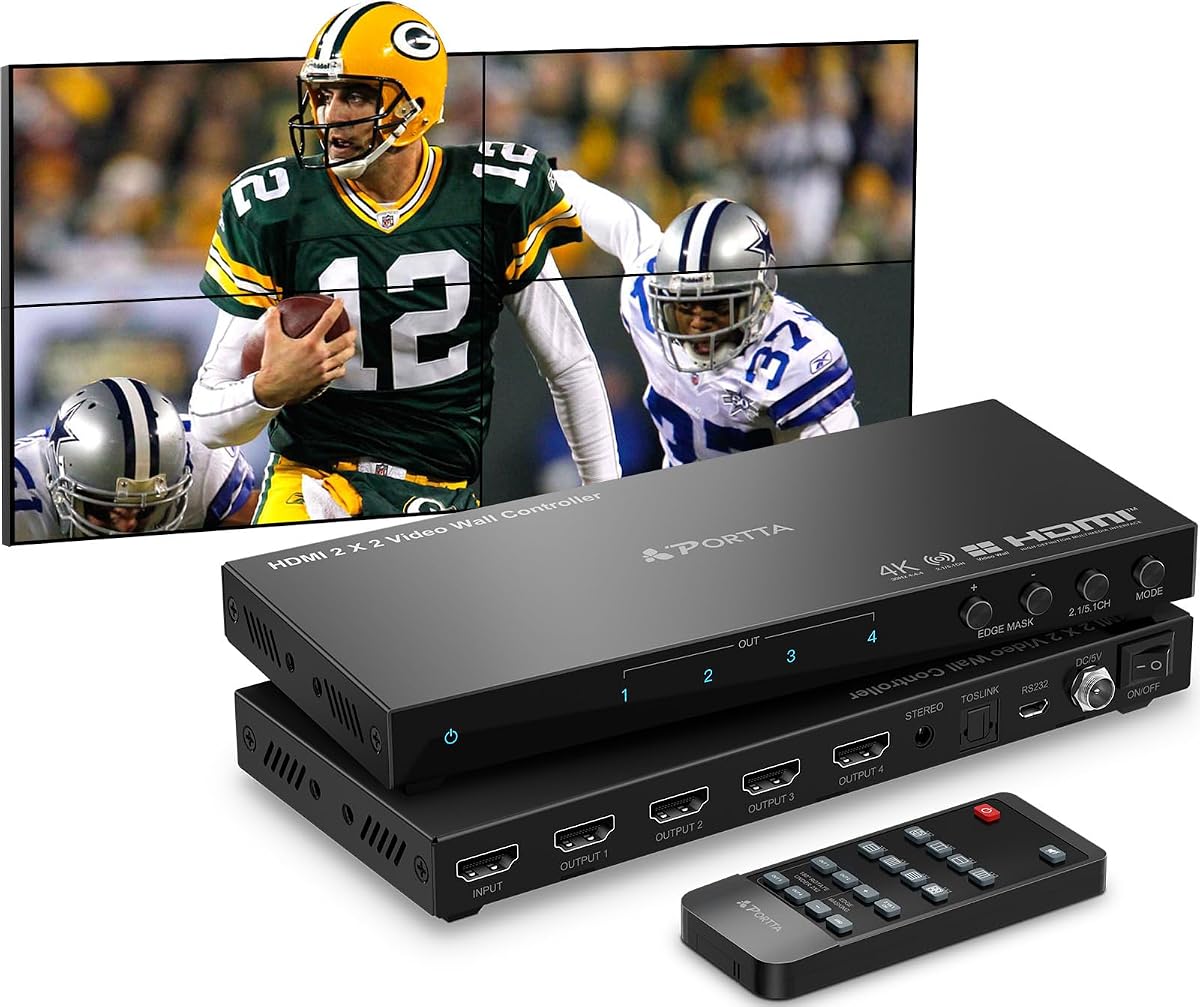
The PORTTA 2×2 Controller is a straightforward four-screen processor with a supplied rating of 4.4. It supports eight wall arrangements, three control methods, 180-degree rotation, edge masking, and extracted audio, making it suitable for installers who need practical flexibility without an advanced matrix system.
We may earn a commission when you buy through this link, at no additional cost to you.
The controller can send one HDMI source to four outputs in 2×2, 1×2, 2×1, 1×3, 3×1, 1×4, 4×1, and 1×1 modes. It can be operated from the front panel, an infrared remote, or RS-232. Portrait use is possible when a PC is configured for a portrait desktop, although the appropriate horizontal mode must also be selected.
The most important limitation is output resolution. Although the source can accept 4K at 30Hz, all four HDMI outputs are fixed at 1080p 60Hz. It also provides Toslink extraction for 5.1-channel audio and a 3.5mm output for 2-channel audio. These limits are reasonable for a mixed-resolution wall but prevent it from delivering native 4K to every panel.
Buyers creating a conventional 1080p four-screen wall should find the feature set easy to work with, especially if portrait layouts or serial control are important. It is less suitable for premium 4K installations in which every display must receive a 4K signal.
Manual, infrared remote, and RS-232 operation provide several ways to configure the processor. Edge masking can trim up to eight pixels from an output edge, and 180-degree rotation helps accommodate displays installed in an inverted orientation.
The PORTTA accepts a 4K30 source but sends 1080p60 to its connected displays. Check every panel’s native resolution before choosing it for a wall where crisp 4K rendering on each screen is the primary goal.
We may earn a commission when you buy through this link, at no additional cost to you.
The J-Tech Digital JTECH-VW0104-AE combines a 4.8 supplied rating with the features buyers commonly seek in a compact four-screen controller. It supports eight display arrangements, 180-degree image rotation, edge masking, and audio extraction through both optical and 3.5mm outputs.
We may earn a commission when you buy through this link, at no additional cost to you.
Its 2×2 configuration can combine up to four HDMI displays into one wall. Other modes include 1×2, 2×1, 1×3, 3×1, 1×4, 4×1, and a 1×4 splitter arrangement. A 4K30 source is accepted, while the listed output resolution is 1080p, making the unit more appropriate for mixed-resolution or 1080p panel arrays.
Installation tools include rotation for individual screens and edge masking that can adjust up to eight pixels. The specification notes that rotation and edge masking are unavailable in 1×1 splitter mode. A one-year manufacturer replacement warranty and lifetime technical support add useful service considerations, although support hours are listed as weekdays from 9AM to 6PM CST.
This is a compelling choice for a small professional or business display wall where layout options, audio routing, and fine alignment matter. The high supplied rating is encouraging, but buyers requiring native 4K on every panel should look toward a controller with 4K60 output rather than this 1080p-output model.
Individual 180-degree rotation can correct differently mounted screens, while edge masking adjusts the visible image boundary. These tools help create a more unified picture when bezel spacing or screen orientation would otherwise disrupt the composed image.
The processor can send source audio through an SPDIF optical connection for 5.1-channel systems or a 3.5mm connection for 2-channel equipment. This lets the wall displays handle video while an amplifier or external speaker system provides the sound.
We may earn a commission when you buy through this link, at no additional cost to you.
The OREI Multi-Screen Controller has a supplied rating of 4.6 and combines 4K60 source support with HDMI and USB-C inputs. It is designed to distribute one source across four television screens, with several common wall arrangements and installation controls included.
We may earn a commission when you buy through this link, at no additional cost to you.
Supported configurations include 2×2, 1×2, 2×1, 1×3, 3×1, 1×4, and 1×4 splitter mode. Bezel adjustment and image rotation are provided to improve alignment, while EDID management can help displays negotiate a suitable operating mode. Control is available through RS-232 and an included infrared remote.
The controller supports HDMI 2.0, HDCP 2.2, and DP 1.2a according to the supplied information, with video support reaching 4K60 on the source side. Separate optical and analog audio outputs provide sound extraction. The listed output resolution is 1080p, so its primary appeal is flexible source acceptance and wall management rather than native 4K on every output.
For offices, retail displays, classrooms, or information boards using mixed 1080p screens, this OREI offers useful features and a strong supplied rating. The supplied product description contains a few apparent typographical errors in its technical wording, so buyers should verify the manual and detailed listing specifications before finalizing an installation.
HDMI and USB-C inputs let the controller accept devices such as laptops, media players, and gaming consoles without requiring a separate desktop connection. The supplied information identifies 4K60 as the maximum source resolution.
Bezel adjustment, EDID management, and image rotation address common display-wall issues. These functions are particularly useful when the wall uses different panel sizes, bezels, or mounting orientations.
We may earn a commission when you buy through this link, at no additional cost to you.
The OREI 4×4 HDMI Matrix is more flexible than a basic splitter because it accepts four HDMI sources and sends them to four displays. Its 2×2 video-wall function can also split one source across four screens, making it relevant to control rooms, monitoring areas, and commercial displays.
We may earn a commission when you buy through this link, at no additional cost to you.
The supplied rating is 4.1. Video support extends to 4K60, including common 1080p formats and 4K at 24, 25, or 30Hz. Audio support includes PCM, Dolby Digital, Dolby Digital Plus, DTS, Dolby TrueHD, and DTS-HD, while advanced EDID management is included for display compatibility.
Unlike dedicated wall-only processors, this model provides a four-by-four matrix and web control. That makes it more versatile when several devices need to feed multiple displays, but it may also be unnecessary for a straightforward installation with one source. The supplied information does not describe the same level of bezel adjustment, rotation, or edge masking found on several dedicated wall controllers.
This matrix is best suited to buyers who need source switching as well as a four-screen wall. Choose it over a simpler controller when routing multiple Blu-ray players, computers, media players, or consoles matters; choose a dedicated processor when seamless image alignment is the central requirement.
A four-input matrix allows multiple source devices to be connected at once. Users can route those sources among four displays and choose a synchronized 2×2 presentation when a single source needs to fill the wall.
Support for numerous video resolutions and high-bandwidth audio formats makes the device suitable for mixed media installations. EDID management also helps connected displays request an appropriate signal format.
We may earn a commission when you buy through this link, at no additional cost to you.
The 2×2 4K Video Wall Controller offers an unusually broad set of layout and control features at the value-focused end of this roundup. Its supplied rating is 4.6, and it supports HDMI or DVI input, four HDMI outputs, eleven splicing modes, per-screen rotation, and analog audio extraction.
We may earn a commission when you buy through this link, at no additional cost to you.
The controller accepts a 4K30 source through HDMI, although DVI input does not support 4K. Output resolutions include 1920 by 1080 and 1280 by 800, along with other supported formats. Portrait arrangements can be used with a portrait-oriented PC desktop, and the remote includes hotkeys for direct mode selection.
Control can be performed through the infrared remote, RS-232, or front-panel buttons. A memory function recalls the last configuration after the unit is unplugged, reducing repeated setup work. Audio can be sent to a 3.5mm stereo output for speakers or amplifiers, while HDMI audio remains available even without an external audio connection.
This is a strong choice for a straightforward four-panel wall, especially for buyers who value multiple modes and control options over native 4K output. Its major caveat is that source and output resolution are below the capabilities of the most advanced 4K60 processors in the list.
The broad mode selection includes 2×2, 1×2, 1×3, 1×4, 2×1, 3×1, 4×1, and 1×1 arrangements. It also supports vertical splicing, which adds flexibility for portrait-oriented content and uneven display layouts.
Infrared, serial, and button controls serve different installation preferences. Remembering the last settings means a temporary power interruption does not necessarily require the complete wall configuration to be rebuilt.
We may earn a commission when you buy through this link, at no additional cost to you.
The ISEEVY 2×2 4K60 is built for buyers who want a four-panel wall with 4K60 support on both the source and display outputs. Its supplied rating is 4.4, and the specification lists HDMI and USB-C inputs alongside four HDMI outputs capable of supporting 3840 by 2160.
We may earn a commission when you buy through this link, at no additional cost to you.
Available layouts include 2×2, 1×1, 1×2, 2×1, 1×3, 3×1, 1×4, and 4×1. Each output can rotate its image 180 degrees, which is helpful when a display is mounted upside down. Mode changes are handled through an included remote or three front-panel buttons.
Compared with most four-screen processors in the roundup, the distinguishing advantage is the listed 4K60 output capability. The trade-off is a more compact feature set: edge masking, bezel adjustment, audio extraction, and advanced serial or network control are not identified in the supplied information.
This controller is a good fit for a modern four-display installation using 4K panels, especially when a laptop or media player can connect through USB-C. It is also suitable for simple signage or monitoring walls where 180-degree correction and rapid remote mode changes are more important than detailed multiviewer control.
The supplied specification states that all four HDMI outputs support 3840 by 2160. That makes the model more appropriate than 1080p-output alternatives for walls assembled from native 4K commercial displays.
Per-output 180-degree rotation helps maintain a correctly oriented image when individual screens are installed in unusual positions. The feature is especially relevant to ceiling-mounted or service-access installations.
We may earn a commission when you buy through this link, at no additional cost to you.
The J-Tech Digital JTECH-VWM04 is the most feature-rich matrix processor in this roundup, combining four 4K60 inputs, four outputs, multiviewer layouts, scalable output resolutions, and web-based control. Its supplied rating is 4.2, while the breadth of its capabilities makes it a natural premium choice for professional installations.
We may earn a commission when you buy through this link, at no additional cost to you.
Each output can display one source or use a multiviewer preset such as 2×2, 1x3L, 1x3U, 1×4, or 4×1. The processor can route 4K60 4:2:0 input signals to combinations of displays without switching delay or picture loss, and output resolution can be upscaled or downscaled to 4K30, 1080p, 720p, 2560 by 1440, 1920 by 1200, or 1360 by 768.
Ten wall configurations are supported, including 2×2, 1×4, and 4×1, and any output can be flipped 180 degrees. RS-232 and LAN connectivity, together with web control, distinguish it from simpler remote-controlled processors. One important boundary is that 4K60 is specified for input, while the highest listed output is 4K30.
Choose the JTECH-VWM04 for a control room, command center, or professional monitoring wall where multiple sources, multiview layouts, and centralized control are priorities. It is overkill for a single-source four-screen wall but offers the most complete routing and scaling feature set among the products compared.
Rather than treating every wall as one large canvas, the multiviewer presets can divide an output into several source windows. This is valuable when operators need to watch multiple feeds on a single display rather than dedicating every panel to one source.
RS-232 and LAN control make the processor suitable for integration into a managed system. Web access adds a configuration path that can be more convenient than navigating physical controls on a rack-mounted installation.
We may earn a commission when you buy through this link, at no additional cost to you.
The 4K60 USB Video Controller combines a four-screen wall processor with standalone USB media playback. It has a supplied rating of 4.8, accepts 4K60 signals through HDMI 2.0, and can automatically display supported video, audio, image, and text files when a USB drive is inserted.
We may earn a commission when you buy through this link, at no additional cost to you.
Its wall modes include 1×2, 1×3, 1×4, 2×2, 2×1, 3×1, and 4×1. Each output supports 180-degree rotation for upside-down display placement, while border adjustment and image cropping can reduce black edges. Output image controls include brightness, sharpness, contrast, and several color-temperature settings.
The automatic USB function is the standout feature. Supported files include MP4, MOV, AVI, WMV, MKV, and TS video; MP3, WAV, and FLAC audio; JPG, JPEG, PNG, and BMP images; and TXT documents. Video playback can reach 3840 by 2160 or 4096 by 2160 at 60Hz, according to the supplied information. Analog and optical audio outputs are also included.
This is an excellent candidate for signage, information displays, or retail installations that need to run content without a continuously connected source computer. For more advanced routing, network administration, or multiview control, the JTECH-VWM04 offers a broader management feature set.
USB auto display makes the controller practical for unattended information systems. Inserting a prepared USB drive can initiate compatible content playback, reducing the need to leave a laptop connected to the wall.
Border adjustment, cropping, rotation, brightness, sharpness, contrast, and color-temperature controls give installers several ways to make separate panels look like one more uniform display.
We may earn a commission when you buy through this link, at no additional cost to you.
The ISEEVY 2×3 4K60 is the only product here designed around six HDMI display outputs. It has a supplied rating of 4.3 and supports 4K60 source input, 4K60 output, and numerous layouts extending to 2×3, 3×2, 1×5, 5×1, 1×6, and 6×1 arrangements.
We may earn a commission when you buy through this link, at no additional cost to you.
The controller accepts one HDMI and one USB-C input, with HDMI and USB-C connections offering convenient access for laptops, media players, and other sources. Six outputs can each support 3840 by 2160 according to the supplied specification, allowing six 4K televisions to form a single wall or a more specialized multi-panel arrangement.
Individual outputs can be rotated 180 degrees, helping with screens installed in unconventional positions. Mode changes are available through a remote control or three buttons, and the product is described as a plug-and-play system designed for stable operation around the clock. Edge masking, audio extraction, and network control are not identified in the supplied information.
This model suits buyers planning a six-screen commercial display, especially one made up of 4K panels and powered by a single source. It is less appropriate for installations that need multiple simultaneous sources or extensive multiview routing, because only one active source is listed.
Six HDMI outputs distinguish the controller from the four-output models in the roundup. It can support rectangular 2×3 and 3×2 walls as well as six-screen linear or single-output configurations.
Having both HDMI and USB-C makes it straightforward to connect a modern laptop or media source. The listed 4K60 input and output support makes the model suitable for walls built entirely around high-resolution panels.
We may earn a commission when you buy through this link, at no additional cost to you.
The right processor depends on panel count, native resolution, source type, wall geometry, and control requirements. Comparing these factors before ordering can prevent an installation from being limited by output resolution, missing alignment tools, or insufficient connectivity.
Start with the native resolution of every display that will connect to the controller. Some processors accept a 4K30 or 4K60 source but output 1080p to each panel, while others support 4K60 on every HDMI output. Native 4K output matters most when viewers stand close enough to notice reduced detail, when the source contains fine text, or when all panels are 4K commercial displays. Also count the required outputs rather than assuming a 2×2 device will be sufficient; six-screen installations need a controller with six outputs.
Check which source connections the installation will actually use. HDMI is standard for many media players and computers, while USB-C is convenient for modern laptops. DVI appears on some processors and may help with legacy equipment, although the DVI input on the value-focused controller does not support 4K. Multiple separate inputs offer source switching, while controllers listing only HDMI and USB-C generally present one active source at a time. For unattended signage, USB storage and automatic file playback may matter more than having many source ports.
A standard 2×2 arrangement is only the beginning. A useful controller should support the dimensions, portrait orientations, and unusual shapes required by the installation. The products compared offer modes ranging from 1×1 and 1×2 through 2×2, 3×1, 4×1, and, in one six-output model, 2×3, 3×2, 1×5, 1×6, and 6×1. Vertical splicing and portrait support are useful for digital-signage layouts. Check whether the required mode is available in the wall configuration, and distinguish a true wall mode from a simple splitter mode that repeats the same image on every screen.
Commercial panels have physical borders that become visible when four or more screens are combined. Bezel adjustment compensates for those borders by shifting or cropping the image, while edge masking trims unwanted portions from an output edge. Some controllers can adjust eight pixels on each side, and some include border adjustment and image cropping. These tools do not physically eliminate the gap, but they can reduce visual disruption and create a more convincing single canvas. If the installation prioritizes seamless appearance, prioritize these functions over convenience features.
Physical installation does not always permit every display to face the same way. Per-output 180-degree rotation corrects screens mounted upside down or in other inverted positions. It is commonly available in 2×2 mode, although some models restrict it to specific configurations, and the J-Tech JTECH-VW0104-AE does not support rotation in 1×1 splitter mode. Portrait content also requires a compatible mode and a suitably oriented source, often a PC configured with a portrait desktop. Check both the controller and the source device before installation.
A video wall may need sound from a separate amplifier, soundbar, or surround system. Analog 3.5mm extraction is simple and supports 2-channel audio, while SPDIF or Toslink can carry 5.1-channel audio. Some processors also provide broad HDMI audio-format support, including Dolby, DTS, and TrueHD families. A wall processor with audio extraction is useful because the display’s own speakers can be disabled while the source audio continues through a dedicated sound system. Not every controller offers this feature, so include it in the comparison when the installation requires external speakers.
Front-panel buttons and infrared remotes are convenient for standalone installations. RS-232 is more appropriate when the processor must integrate with an automation or control system. The premium J-Tech JTECH-VWM04 adds LAN and web control, while the OREI 4×4 matrix also provides web control. Some budget-oriented products rely on remote hotkeys, whereas advanced systems benefit from stored or centrally managed settings. Consider who will operate the wall, whether the equipment will be locked away, and how often layouts need to change.
Some installations need the controller to act as a standalone signage player. The 4K60 USB Video Controller supports automatic playback from USB storage and accepts a range of video, audio, image, and text formats, making it useful without a permanent source computer. For continuously operating commercial walls, models explicitly described as designed for stable 24×7 operation may provide additional confidence, but buyers should still plan for proper ventilation, stable power, and regular source checks. Standalone media support should be selected for its own reasons, not assumed from the term video wall controller.
Begin by confirming that every display, source, and cable supports the resolution and refresh rate you intend to use. Connect the source to the controller first, then attach the appropriate HDMI, DVI, USB-C, or audio leads to the outputs and displays. Arrange the panels in their final physical positions before fine-tuning the image, because bezel compensation and cropping depend on the actual gaps and orientation.
Power the controller and use its front controls, remote, serial interface, or web interface to select the required wall mode. Begin with the correct output count and orientation, then adjust each display’s alignment, rotation, brightness, contrast, and image position as necessary. Save or remember the final configuration if the model supports a memory function, and document the selected settings so they can be restored after maintenance.
Keep the controller and power supply in a dry, ventilated location with unobstructed access to cables and controls. Avoid placing heat-generating equipment directly above it, and use stable power appropriate to the included adapter. Periodically inspect connections, clean the exterior vents, update saved settings after replacing equipment, and verify that stored media remains compatible before relying on automatic USB playback.
An HDMI Video Wall Controller processes one or more video sources and divides or routes them across multiple displays. It can create a single large image, repeat content, or provide custom multi-screen layouts. Common capabilities include bezel adjustment, image rotation, edge masking, audio extraction, and remote, serial, or network control.
Some models can, but many accept a high-resolution input and output 1080p to each panel. The ISEEVY four-output and six-output controllers list 4K60 support for their HDMI outputs, while the J-Tech premium processor accepts 4K60 input and lists 4K30 as its highest output. Always verify both input and output specifications rather than focusing on the headline resolution alone.
A video wall controller is not strictly necessary for two displays, and a simple splitter may be enough when both screens only need the same content. It becomes more useful when displays must form one composed canvas, need custom row-and-column arrangements, require bezel compensation, or must support different operating modes.
A wall mode divides the source image into separate portions assigned to different displays, creating one larger canvas. A splitter mode repeats the complete source on every connected display. For example, a 1×4 wall mode can place four slices across four screens, while a 1×4 splitter can show the same complete picture on all four screens.
Several models offer bezel adjustment, edge masking, or image cropping to reduce the visual effect of physical screen borders. The degree of correction varies by product and configuration, and edge masking is unavailable in some modes. You may still see a small physical gap even after the image has been aligned.
USB-C can simplify laptop and modern media-player connections, particularly for installations that already use USB-C equipment. It does not guarantee 4K60 on every model, so verify the stated input resolution. Some USB-C implementations may also provide only video and power rather than broad display or docking functionality.
Many do, usually through a 3.5mm stereo output or an SPDIF optical output for surround audio. The OREI UHD-14VW offers both analog and optical extraction with broad format support, while the J-Tech JTECH-VW0104-AE supports SPDIF and 3.5mm outputs. Some simpler controllers, including the ISEEVY models in this roundup, do not list audio extraction.
Infrared remotes are simple for nearby, line-of-sight setup, while front buttons require no network configuration. RS-232 and web or LAN control are better for professional integration, centralized operation, and installations where the controller is mounted away from operators. Choose the method that matches the complexity and location of the system.
The OREI UHD-14VW offers a broad, well-rounded feature set with many layouts, audio options, and alignment controls. The J-Tech Digital JTECH-VW0104-AE stands out with a 4.8 supplied rating and a useful combination of eight modes, audio extraction, rotation, and edge masking, while the J-Tech JTECH-VWM04 is the premium choice for multi-source routing, multiviewing, and network control.
Prioritize native output resolution, the number of displays, and the exact wall shape before considering convenience features. Bezel adjustment matters for appearance, audio extraction matters for integrated sound, and 4K60 output matters for modern high-resolution panels. Match those requirements to the controller’s stated limits rather than assuming every 4K-compatible device behaves the same way.
Current prices, seller availability, and product details can change, so review the latest listing and technical documentation before ordering. Confirm the input and output resolution, supported mode, control method, and included accessories against the final display arrangement to avoid an installation that falls short of its intended result.