
Amazon Basics 12-Outlet Surge Protector Power Strip
4.8Editor score
4000 joules of surge protection
Twelve AC outlets included
Eight-foot extension cord
Surge Protectors for Gaming Pcs compared by protection, outlet count, USB charging, noise filtering, build quality, and setup convenience.
A gaming PC setup places several sensitive electronics on one circuit, making a surge protector far more useful than a basic extension cord. The best options combine meaningful surge capacity, safe overload handling, clean power delivery, and enough outlet spacing for bulky power bricks without creating a tangled desktop.
This guide compares ten surge protection solutions for gaming PCs, covering desktop power strips, noise filters, AV-oriented power blocks, and a whole-home device. The evaluation focuses on joule ratings, AC and USB connectivity, cord length, mounting options, safety features, filtering, and how each design fits a gaming-room power layout.
Each recommendation highlights a different practical priority, from RGB aesthetics and high outlet counts to advanced power monitoring and broad whole-home coverage. Product specifications and availability can change, so readers should verify the current listing, electrical requirements, and compatibility with their PC and peripherals before making a final purchase.
4.8Editor score

4.8Editor score

4.8Editor score
The comparison below organizes every option by protection capacity, connectivity, physical design, and primary use case, making it easier to identify the right model for a gaming desk, media area, or whole-home installation.



The 4000J Gaming Surge Protector Power Strip with USB Ports is the most directly gaming-focused model in this guide. It carries a 4.8 rating and combines 4000 joules of surge protection with 15A overload protection. That makes it a balanced choice for a gaming PC, monitor, console, router, and selected peripherals, while its RGB lighting and adjustable modes help it fit a deliberately themed setup.
We may earn a commission when you buy through this link, at no additional cost to you.
Its six AC outlets provide enough capacity for a typical core gaming system without making the strip excessively large. The 1.8-inch outlet spacing and 10-degree angled layout are particularly useful for power bricks that are difficult to connect side by side. A built-in EMI/RFI filter is also a meaningful feature for a gaming desk, where reducing electrical interference can support more stable operation of sensitive equipment.
The charging options add convenience without replacing the need to check protocol and power requirements. There is one USB-A port and two USB-C ports rated up to 20W, which makes the strip useful for compatible phones, accessories, and low-power devices. The trade-off is that six AC outlets may feel limited for users with many hard drives, consoles, capture devices, and legacy peripherals.
This is the strongest all-around recommendation for gamers who want a purpose-designed power hub rather than a generic office strip. It combines substantial protection, useful filtering, modern charging, accessible outlet spacing, and gaming aesthetics in one package. Choose it when visual coordination and everyday desktop convenience matter as much as raw outlet count.
The RGB system offers four brightness levels and three lighting modes, allowing the strip to complement a gaming setup without forcing one exact appearance. It is especially suitable for setups with glass-sided cases, RGB accessories, or a dedicated entertainment corner.
The 4000-joule rating handles surge energy, while 15A overload protection and EMI/RFI filtering add separate layers of system safety. This combination is especially relevant when a gaming PC and multiple peripherals share one connected power hub.
We may earn a commission when you buy through this link, at no additional cost to you.
This Belkin 12-outlet power strip is a strong fit for a large workstation where a gaming PC competes with monitors, streaming equipment, storage, networking hardware, and multiple chargers. It has a 4.7 rating, a wall-mountable housing, widely spaced outlets, and a safety light that indicates whether connected devices are protected.
We may earn a commission when you buy through this link, at no additional cost to you.
The product is independently lab tested and certified to UL safety standards, giving it a useful balance of capacity and recognized safety documentation. Its extension cord measures 2.4 meters, or eight feet, and uses a three-prong angled plug for easier placement behind desks or entertainment furniture. The substantial outlet count is more accommodating than the gaming-focused first pick.
Protection is listed at 3,940 joules in the product details, making it suitable for a broad collection of sensitive electronics. The principal limitation is the lack of USB charging, so users with several compatible accessories may still need a separate charging solution. The elongated housing can also be less tidy under a compact desk than a shorter strip.
Buyers should favor this model when outlet count, recognized certification, and a long cord are the priorities. It is less suited to minimalist setups where RGB lighting, USB-C charging, or a compact footprint matters most. For a densely equipped gaming office, however, the practical capacity and indicator light create a strong case.
The twelve-outlet layout reduces the need for multiple daisy-chained extension leads. Wide spacing helps larger desktop adapters coexist, making the strip easier to organize when the system includes several power bricks and charging blocks.
UL certification and a visible protection indicator make it easier to verify proper use. The housing also uses a minimum of 72% post-consumer recycled material and is backed by a two-year limited warranty.
We may earn a commission when you buy through this link, at no additional cost to you.
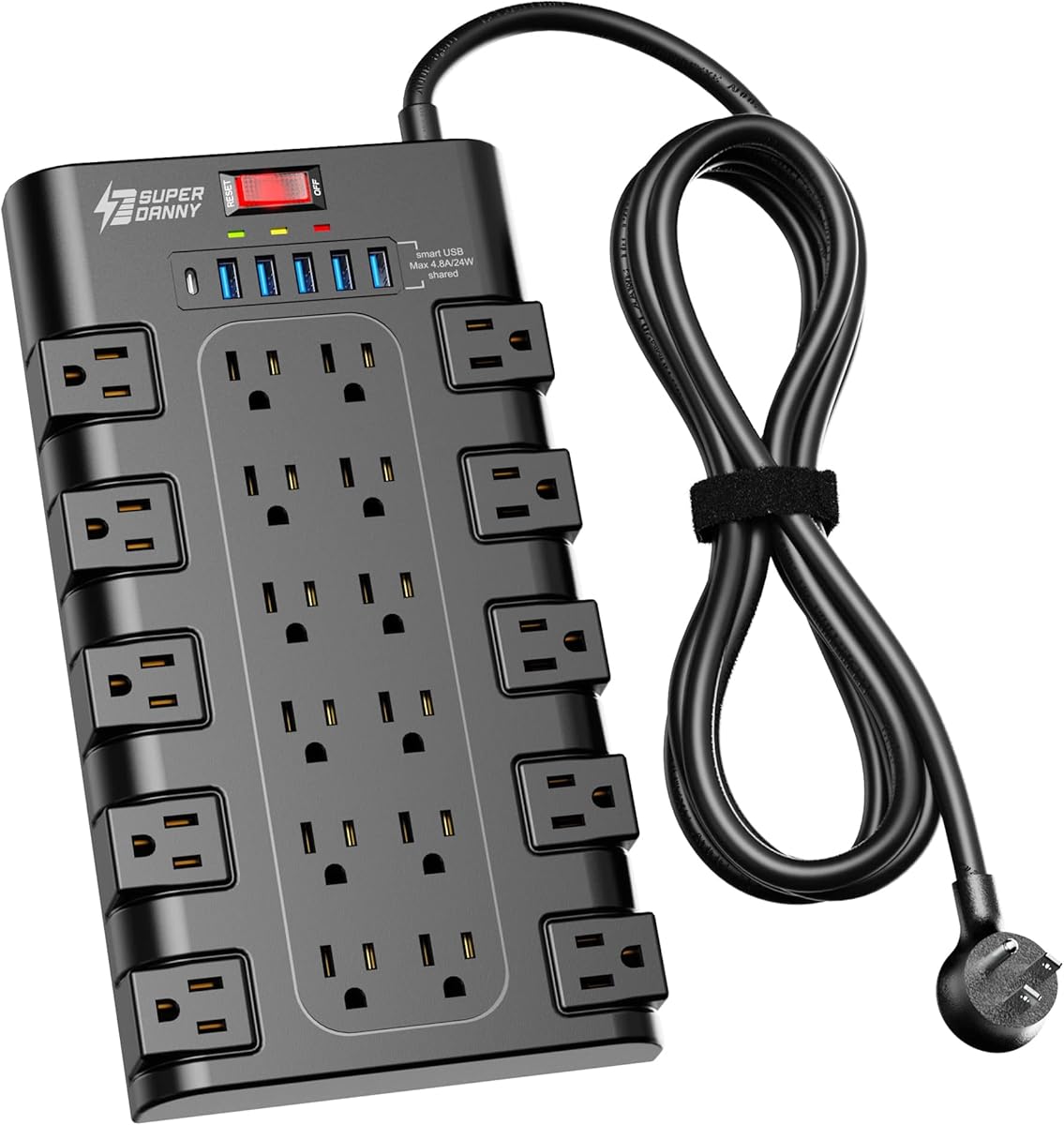
The SUPERDANNY 28-in-1 power strip is built for gamers and media enthusiasts who want one connected hub for an unusually large collection of devices. It has a 4.8 rating and combines 22 grounded three-prong outlets with six USB charging ports. The total 28-device format is the most connectivity-focused design in the list.
We may earn a commission when you buy through this link, at no additional cost to you.
Its outlet arrangement is divided across four rows, with spacing designed to prevent large plugs from blocking neighboring receptacles. A 45-degree flat plug fits narrow locations without covering the lower receptacle of a duplex wall outlet. Four keyholes and included hardware also allow wall or furniture mounting, while the 6.5-foot heavy-duty cord supports flexible placement.
Smart USB charging can detect connected devices and deliver up to 5V/3A through the USB-C port, while five USB-A ports cover additional accessories. Protection includes 2100 joules of surge suppression plus overload, grounded, short-circuit, over-current, over-voltage, and overheat protection. That safety breadth is helpful, although its joule rating is lower than several competing strips.
This model is best for users who value one central connection point more than a compact footprint. The large number of sockets can consolidate a gaming PC, television, surround-sound equipment, consoles, lamps, tablets, and other devices, but it may overwhelm a small desk. It is also well suited to media rooms and workshops where a single power hub offers greater flexibility.
The large AC count can replace several small extension cords around a gaming and media setup. Four outlet rows and generous spacing help maintain access when several bulky adapters are connected at once.
Five USB-A ports and one USB-C port reduce dependence on separate wall chargers. The USB-C output supports up to 5V/3A, making it useful for compatible accessories that fall within that power range.
We may earn a commission when you buy through this link, at no additional cost to you.
This Belkin model is a premium-oriented option for gamers with crowded desks and difficult-to-fit charging bricks. Its 4.8 rating is supported by 4320 joules of overcurrent and overload protection, twelve AC outlets, eight of which rotate, and a flat pivot plug. It is particularly effective when cable management and plug access are more important than USB charging.
We may earn a commission when you buy through this link, at no additional cost to you.
The rotating outlets let users redirect bulky plugs and reduce the frustrating interference that occurs when several laptop bricks, console adapters, and monitor power supplies are placed side by side. Four standard outlets supplement the rotating section, while the eight-foot cord and three-prong angle plug help position the strip behind furniture or near a wall.
Unlike basic power strips, it also includes one-in-two-out RJ11 telephone or fax protection and coaxial cable protection. The eight-point safety system addresses temperature, current, overload, short circuits, clamping, and line-to-line surges. Fire-resistant material, UL certification, a two-year warranty, and a connected-equipment warranty add further support for users who value established protection features.
This is the pick for a premium workstation where multiple power adapters need room to maneuver. It lacks modern USB ports, so it does not consolidate charging as thoroughly as the SUPERDANNY model. Even so, its rotating design, 4320-joule protection, and line protection make it a strong option for a sophisticated gaming-office installation.
Eight outlets rotate to redirect connected plugs, allowing large power bricks to sit without blocking several unused receptacles. This is a meaningful advantage in setups with multiple chargers, display adapters, and other oversized plugs.
Dedicated RJ11 and coaxial protection broaden the unit's usefulness in media rooms where telephone or connected-TV lines may be present. LED indicators provide quick visual confirmation of surge and ground status.
We may earn a commission when you buy through this link, at no additional cost to you.
The 18-outlet USB surge protector offers a generous number of connections in a relatively straightforward package. It has a 4.8 rating, 18 AC outlets, four USB ports, and 2100 joules of surge protection. That makes it a practical selection for a gaming desk that also powers monitors, consoles, network equipment, and numerous small accessories.
We may earn a commission when you buy through this link, at no additional cost to you.
The six-foot cord ends in a right-angle flat plug, which helps it fit behind desks and other furniture. A protected indicator light communicates operating status, while the over-current protection switch limits working current to a safe setting. The fire-resistant PC shell and ETL certification add a clear layer of safety consideration for a device intended to sit close to expensive equipment.
Reusable fastening cable ties are included to manage unused cord length, a helpful detail that can reduce clutter around the back of a gaming setup. The main compromise is the 2100-joule protection rating, which is lower than the 4000- and 4320-joule options elsewhere in the guide. Eighteen outlets also create a sizable housing that may occupy more desk or floor space than necessary.
Choose this model when a large number of devices and USB accessories matter more than maximum surge energy or a compact profile. It is especially useful for shared gaming rooms, streaming stations, and entertainment centers where keeping everything connected to a single strip is the main goal.
Eighteen AC outlets can accommodate a gaming PC, display, audio equipment, console, router, capture device, and supporting accessories. This helps reduce the number of extension leads required behind a complex setup.
The right-angle plug saves space at the wall receptacle, while reusable ties allow excess cord to be coiled neatly. These details make the strip easier to integrate into a cable-managed gaming room.
We may earn a commission when you buy through this link, at no additional cost to you.
Amazon Basics' 12-outlet model is a straightforward, high-capacity power strip for a gaming PC and its main peripherals. It has a 4.8 rating, 4000 joules of surge protection, a 15A circuit breaker, and a rectangular housing with an eight-foot extension cord. Its feature set focuses on core electrical safety rather than visual extras or advanced monitoring.
We may earn a commission when you buy through this link, at no additional cost to you.
Twelve outlets are enough for a standard desktop arrangement, and the included power switch gives users a single point for controlling connected equipment. A back keyhole wall mount offers an alternative to placing the strip loose under a desk. Safety shutters help reduce accidental contact with unused outlets, while the flame-retardant PC material supports safer operation around heat-sensitive equipment.
The biggest limitation is the lack of integrated USB charging. Modern gaming desks often need ports for controllers, phones, headsets, lights, and other accessories, so a separate USB charger may be necessary. There is also no protection-status light mentioned in the supplied specifications, which means users should not rely on visible status confirmation from this unit.
For someone who wants a familiar, uncluttered power strip with substantial surge protection, this remains an effective choice. It is best suited to setups where AC connectivity matters more than fast charging or aesthetic coordination. The combination of 12 outlets, 4000 joules, and an eight-foot cord provides a versatile foundation for a typical gaming room.
The 4000-joule rating and 15A circuit breaker deliver the fundamental safeguards expected from a gaming power strip. A dedicated on/off control adds convenience without complicating the layout.
The eight-foot cord offers useful reach from a wall outlet, and the rear mounting keyholes allow a more permanent installation. Users can choose whether the strip sits behind the desk or mounts to a suitable surface.
We may earn a commission when you buy through this link, at no additional cost to you.
The GE 12-outlet surge protector combines a high 4320-joule rating with a familiar, practical design. It has a 4.8 rating, twelve AC outlets, two tethered USB charging ports, and an eight-foot cord with a space-saving flat plug. It is a solid general-purpose choice for a gaming desk that needs more protection than a basic extension strip.
We may earn a commission when you buy through this link, at no additional cost to you.
Its outlet spacing is designed to accommodate bulky plugs, which is important for desktop towers, monitor power supplies, and console adapters. The flat plug can reach a wall receptacle in tighter locations, while the long cord provides flexibility behind a desk or entertainment unit. Grounded outlets make the strip suitable for the broad collection of electronics associated with gaming.
Automatic shutdown is an important feature because the unit stops supplying power when the surge-protection capacity has expired. Slide-to-close safety covers protect unused receptacles, and a grounding indicator confirms when the wall receptacle is properly grounded. These details help make routine use more reassuring, especially in setups filled with expensive computer hardware.
The two USB ports are tethered rather than built directly into the housing, so their cable length can be convenient for reaching a phone or controller but less tidy for permanent hubs. There are fewer USB connections than competing models. Still, this strip is ideal for users who prioritize the brand, 4320-joule protection, grounded outlets, and clear safety behavior over extensive charging.
When the protection capacity expires, automatic shutdown disconnects connected devices. This behavior is valuable because an exhausted protector should not continue presenting itself as though it can still provide the same level of protection.
The low-profile plug is designed for locations where a projecting plug would be inconvenient. This can be helpful behind a narrow desk, entertainment center, or closely mounted wall receptacle.
We may earn a commission when you buy through this link, at no additional cost to you.
The ESP Next Gen XG-PCS-15D is the most technically specialized option in this guide. Rather than focusing on a large collection of outlets, it provides three protected AC receptacles, RJ45 network protection, RJ11 telephone-line protection, and software-based power monitoring. Its 4.3 rating is the lowest among the ten products, but its diagnostic capabilities serve a different purpose from conventional desktop strips.
We may earn a commission when you buy through this link, at no additional cost to you.
The unit is rated for 120 volts and 15 amps and is designed to protect sensitive electronics from lightning strikes, surges, transients, noise, overvoltage, undervoltage, and wiring faults. Special filter circuits screen electrical noise to reduce disruption, data loss, and the kind of phantom performance problems that can affect complex systems. It also disconnects automatically during extended dangerous voltage conditions.
Its monitoring software can display power-quality information on a computer screen, but a separate XG-PCS-IC-1 interface cable is required to view or download the data. With only three AC outlets, it is not a practical all-in-one power hub for a typical gaming desk. It is better suited to a diagnostic workstation or a smaller set of sensitive network and computing devices.
This recommendation is for a user who wants evidence of power conditions rather than simply a protected power strip. It can help identify voltage anomalies and noise, making it valuable for troubleshooting a specialized setup. The limited outlet count and optional accessory should be considered carefully, but the power monitoring makes it a distinctive tool for technically inclined buyers.
The included software can present power-quality information on a PC, helping users investigate unusual behavior. Viewing or downloading those records requires the optional interface cable, which should be planned before installation.
RJ45 and RJ11 protection broaden the unit's value in networked offices and communication-sensitive environments. These paths support connected equipment beyond the three AC outlets.
We may earn a commission when you buy through this link, at no additional cost to you.
The Furman SS-6B-PRO is built for users who value rugged construction and automatic voltage handling over a high outlet count. It has a 4.7 rating, six protected outlets, a heavy-duty steel housing, and a 15-foot power cord. The design is well suited to stage, studio, AV, or a permanently installed gaming and media corner.
We may earn a commission when you buy through this link, at no additional cost to you.
Extreme Voltage Shutdown monitors both over-voltage and under-voltage conditions. It cuts power when voltage becomes dangerous and restores it automatically after conditions stabilize, reducing the need for manual intervention. Standard surge suppression and EMI/RFI filtration help protect connected gear and screen electrical noise from reaching sensitive equipment.
Its long cord makes the block easy to place near equipment that sits farther from a wall receptacle, such as a studio rack, entertainment center, or display area. The steel enclosure is considerably more robust than typical plastic strips and is well suited to repeated use in equipment environments. A metal housing can attenuate wireless signals, so placement relative to routers and wireless accessories deserves attention.
This is not the first choice for a desk with numerous power bricks because six outlets may be insufficient. It is an excellent option for a fixed AV or media installation where automatic cutoff, filtration, reach, and rugged construction are the defining requirements. The absence of USB charging also reinforces its role as a specialized power-quality block rather than a modern desktop charging hub.
Extreme Voltage Shutdown disconnects power during dangerous high or low voltage and restores it once the supply stabilizes. This makes the block useful where continuous manual monitoring would be inconvenient.
The rugged metal housing is better suited to stage, studio, and AV use than lightweight plastic strips. It offers physical durability and a useful long cord for reaching distant receptacles.
We may earn a commission when you buy through this link, at no additional cost to you.
The Square D HEPD80 operates on a different level from the nine power strips in this guide. It is a universal whole-house surge suppressor designed for installation in a residential load center, with an 80kA rating for one-phase, three-wire systems operating at 120/240 volts. Its 4.7 rating reflects a device intended to protect an entire home rather than one gaming desk.
We may earn a commission when you buy through this link, at no additional cost to you.
Installed at the main electrical distribution point, it can protect computers, televisions, kitchen appliances, HVAC systems, security equipment, and smart-home devices that are not connected to individual surge strips. The LED status indicator gives users an immediate visual indication of whether the device needs replacement, supporting ongoing maintenance without requiring continuous monitoring.
By reducing damaging voltage spikes, the suppressor is intended to help extend the service life of electronics and lower the risk of hazardous electrical conditions. Its scope is the key advantage over a desktop power strip: protection reaches hardwired and networked equipment throughout the home rather than only devices attached to one extension cord.
This is not a plug-and-play gaming accessory. Installation in the load center should be performed by a qualified electrician, and the home's electrical configuration must be confirmed to be compatible. Buyers also need to understand that a whole-home device does not replace a convenient, outlet-rich power strip at the desk. Its ideal role is complementary house-wide protection for a gaming PC and other valuable electronics.
A load-center installation can protect hardwired appliances, smart-home equipment, security systems, and other electronics that cannot be reached by a desk strip. This broad coverage addresses threats at a central point in the home's electrical system.
The LED indicator provides an immediate way to check whether the suppressor is still operational. A clear replacement signal helps owners arrange service when protection is no longer available.
We may earn a commission when you buy through this link, at no additional cost to you.
The right gaming PC surge protector depends on device count, plug size, charging needs, installation location, and the type of electrical threats you want to address. Use the following factors to narrow the options before comparing final features and current listings.
Prioritize greater capacity when several valuable electronics share one strip. Also look for overload protection, over-current handling, and clearly stated behavior when the protection is exhausted.
Choose enough widely spaced outlets for your real equipment, then check whether any adapters rotate. Avoid buying a very large strip only to leave most sockets empty, and rotate plugs where necessary to maintain access.
Match available charging power to your accessories and avoid assuming that a USB-C port provides laptop-level output. Count controllers, phones, headsets, lights, and other devices that can remain connected throughout a session.
Give filtering more weight in audio rooms, recording spaces, and setups with many connected components. For basic computer use, a correctly rated and safely certified strip may be sufficient.
Measure the intended route before selecting a model. Choose enough cord for a secure connection without creating excess that must be tightly coiled, and verify the plug will physically fit the available receptacle.
Check for recognized certification and a clear status indicator or end-of-life behavior. Never ignore a protection warning, and replace a unit that indicates its protective capacity has been exhausted.
Plan the physical location before ordering. Measure the strip, account for plug depth, leave room for cable bends, and ensure that the cord can reach without creating a trip or ventilation hazard.
Choose a desktop strip for outlet access and local convenience. Consider whole-home protection for broader coverage, using a qualified electrician for installation and verifying electrical compatibility first.
Begin by identifying a grounded wall receptacle that can support the combined load of the PC, monitor, and peripherals. Confirm that the strip's amperage and wattage limits are suitable, plug it in fully, and avoid using extension cords to extend the strip's own cord. Arrange the power switch where it remains accessible and keep the strip itself uncovered, dry, and away from excessive heat.
Organize heavy gaming-PC power bricks across widely spaced or rotating outlets. Route the main cord away from foot traffic, do not tightly wrap the cord around the housing, and use the supplied cable ties or another safe method to manage excess length. If the strip includes USB ports, compare each device's charging requirements with the available output before connecting it.
Inspect the protection indicator periodically and respond immediately if it changes or no longer behaves normally. Do not reset, repair, or open a surge protector, and never ignore a warning that its surge capacity has expired. For a whole-home model, inspection and replacement should be handled through a qualified electrical professional.
No. A surge protector diverts or limits transient voltage spikes, but it does not provide continuous battery backup. A UPS supplies power during outages and generally includes surge protection, making it better for preventing sudden shutdowns of a running gaming PC.
Most manufacturers do not recommend daisy-chaining power strips because it can overload a receptacle or create unsafe heat buildup. Plug the gaming PC and its peripherals into one appropriately rated strip, and use a separate outlet for other high-load equipment when possible.
A surge protector adds a layer of protection against voltage spikes and overloads that can damage a PC, monitor, or network device. It is especially sensible in areas with unreliable power, older wiring, or frequent severe weather, although it should not be treated as a substitute for sound electrical wiring.
A higher joule rating generally indicates greater transient-energy absorption capacity, all else being equal. It is only one part of the evaluation, so protection behavior, certification, outlet spacing, grounding, and suitability for the connected load also matter.
USB-C is convenient for compatible accessories, but the output rating must be adequate for the device you intend to charge. A phone, controller, headset, or lighting accessory may be well served by a 20W port, while a demanding laptop usually requires a more capable charger.
Many models include keyholes, mounting slots, or supplied screws for that purpose. Check the manufacturer's guidance, use appropriate fasteners, and ensure the strip remains accessible for switching, inspection, and replacement.
It generally shows that the surge-protection circuitry is operating as intended. A warning state or unexpected shutdown can mean the protective capacity has been exhausted, so the unit should be replaced according to the manufacturer's instructions.
A whole-home device can provide broad protection for hardwired and networked equipment, but a desktop strip remains useful for convenient access to multiple outlets. The two approaches can complement each other when correctly selected and professionally installed.
The 4000J RGB Gaming Power Strip is the leading all-around choice because it combines 4000 joules of protection, EMI/RFI filtering, modern USB connections, generous outlet spacing, and gaming-specific lighting. The Amazon Basics 12-outlet model delivers strong protection with a simple layout, while the Belkin rotating-outlet strip is the premium pick for crowded workstations that need flexible plug positioning and extensive line protection.
Prioritize the factors that match your actual setup: enough outlets, adequate spacing for power bricks, verified charging output, recognized safety certification, and a cord that can reach without creating a hazard. Large media rooms may benefit from the 18- or 22-outlet models, while sensitive installations may place greater value on noise filtering, voltage monitoring, or whole-home coverage.
Before purchasing, verify the current product listing, protection rating, electrical limits, warranty details, and physical dimensions. Specifications and availability can change, and current prices should be compared separately to ensure the selected protector offers the best overall fit for your gaming PC and peripherals.