
WANLUTECH IPC-9800CADH Pro
4.4Editor score
Eight-K camera support
Ninety-watt PoE output
SFP optical testing
A CCTV test monitor gives installers and maintenance technicians a practical way to inspect camera feeds, power supported equipment, diagnose network connections, and identify cable faults at the installation site. A useful unit should combine a clear display with the exact camera, network, and power functions required by your work, rather than adding features you will never use.
We compared these ten monitors based on camera compatibility, display size and control style, PoE or DC power support, Ethernet and Wi-Fi utilities, cable testing functions, PTZ controls, portability, and supported recording formats. The guide covers both professional IP-capable units and more affordable analog and coaxial camera testers for targeted jobs.
Each pick below highlights the strongest use case for that model, along with practical limitations to consider before ordering. Ratings and specifications reflect the supplied product information, while product availability and prices can change, so compare the current listing details with the jobs your installation team actually performs.
4.4Editor score

4.4Editor score

5.0Editor score
As an Amazon Associate we earn from qualifying purchases.
The comparison below organizes all ten units by camera coverage, display, power capabilities, and diagnostic functions. It makes it easier to distinguish full IP and coaxial systems from compact analog-focused tools.


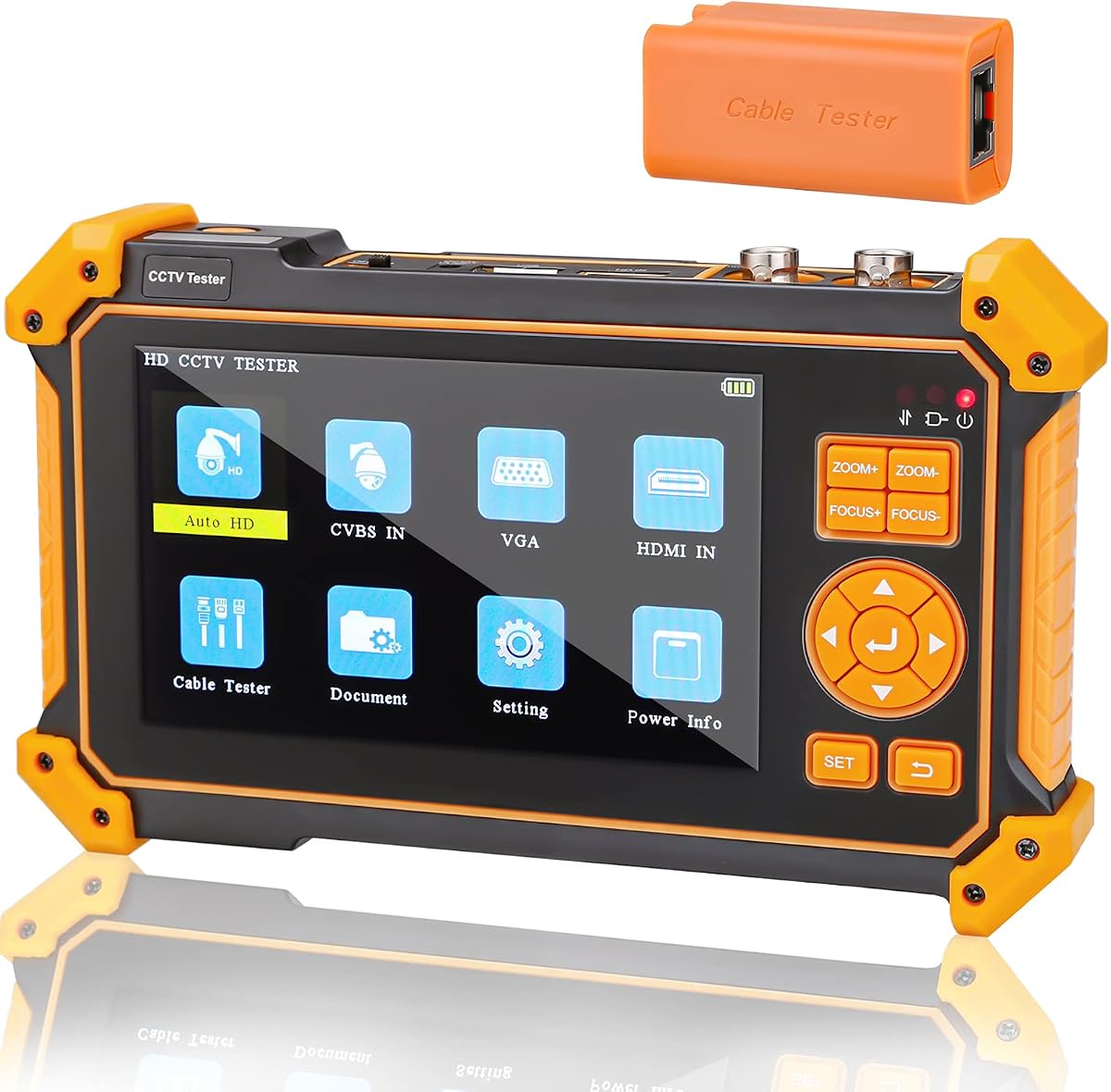
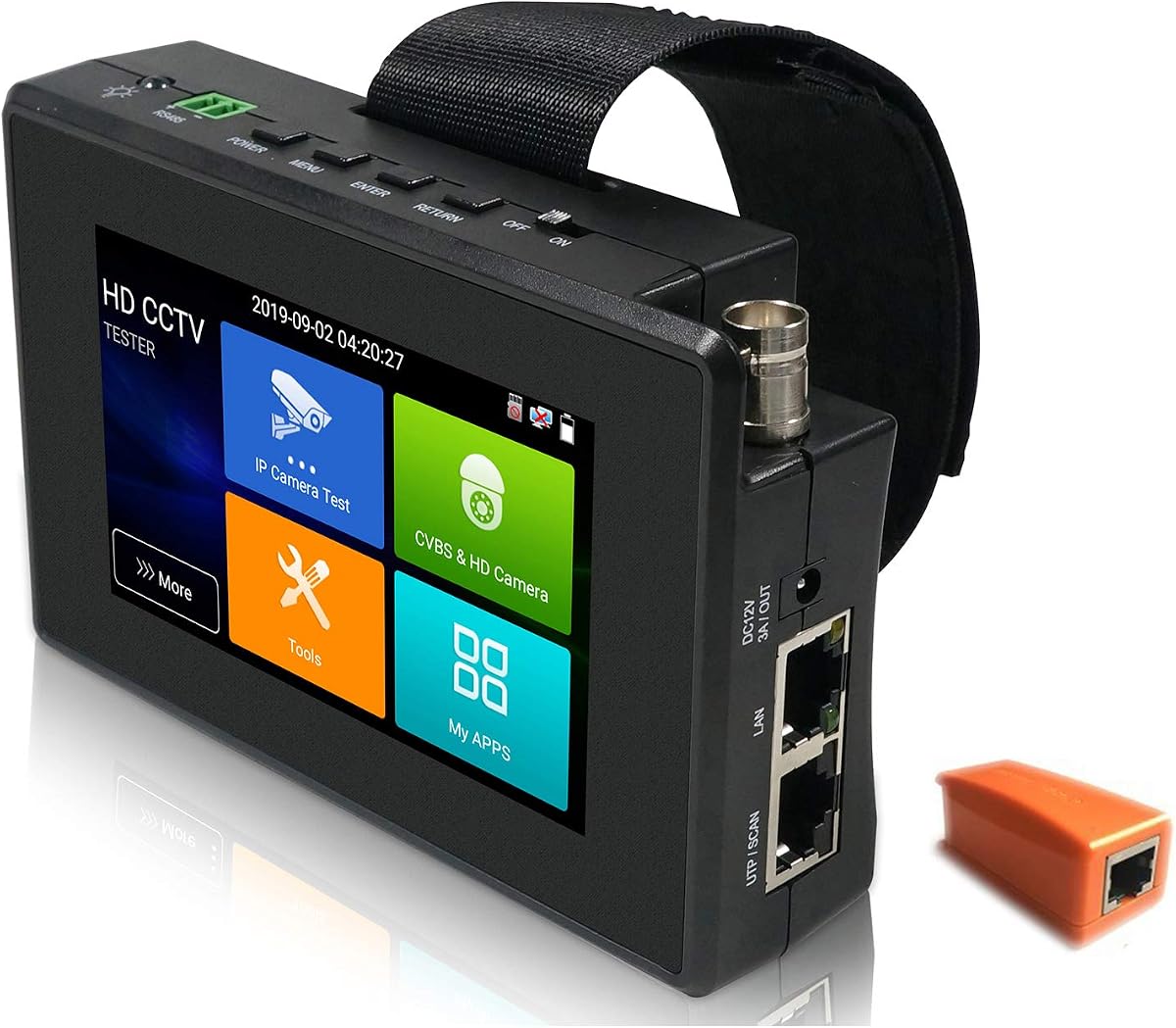
The WANLUTECH E88 is an eight-inch touchscreen CCTV test monitor built for technicians who need broad camera and network coverage in one field unit. Its 4.4 rating reflects a capable general-purpose design, while the standout combination is a 12MP IP camera test capability, 90W PoE output, an SFP optical fiber port, and a substantial collection of cable and network tools.
We may earn a commission when you buy through this link, at no additional cost to you.
Power is one of its most useful distinctions. The tester can temporarily power supported high-power PTZ cameras and other IEEE 802.3af/at/bt devices, making it less dependent on finding a nearby outlet or temporary power supply. DC12V, DC24V, and DC5V outputs broaden its usefulness for other low-voltage equipment. Its large screen also provides room for camera menus, network tools, cable results, and reports.
The diagnostic suite is unusually complete. IP discovery, Quick OVIF, IPC test, Rapid Video, and batch activation for supported Hikvision and Dahua cameras cover common installation workflows. Ping, IP scan, DHCP server, PPPoE, trace route, port flash, LLDP, and link monitor support deeper troubleshooting. RJ45 TDR reports pair status, length, attenuation, reflectivity, impedance, and skew, while cable-length tools cover opens in BNC, RJ45, and RJ11 wiring.
The trade-offs are size and complexity. An eight-inch touchscreen is excellent for detailed work but less pocketable than a four-inch model, and the numerous utilities can take time to learn. Despite that, the E88 is the strongest all-around recommendation for installers who regularly handle IP cameras, powered PTZ equipment, structured cabling, and network troubleshooting. It is especially compelling for technicians who want one device to replace several separate field tools.
For buyers, the E88 makes the most sense when field power availability is uncertain and a single tester must cover camera configuration, feed verification, network discovery, and cable faults. It may be more than a service technician needs for routine analog maintenance, but for mixed or modern installations it offers an unusually balanced and versatile feature set.
The manufacturer also advises removing the insulating paper from the battery compartment before first use. That setup step is important and worth doing before relying on the unit for an extended job.
IP discovery, batch camera setup, report creation, video tests, power delivery, and cable diagnostics are combined in one unit. This reduces tool switching during commissioning and helps technicians isolate whether a problem originates in the camera, network path, power, or physical cable.
The 90W PoE output and SFP module interface make the E88 especially relevant to high-power cameras and fiber-linked installations. Verify that your camera, injector, switch, and optical module use compatible standards before connecting them.
We may earn a commission when you buy through this link, at no additional cost to you.
The WANLUTECH IPC-9800CADH Pro is the most feature-dense premium entry in this guide. It combines a seven-inch touchscreen, IP testing up to 8K and 32MP, support for major coaxial formats, 90W PoE, an SFP optical interface, and a broad collection of media, network, power, and cable tools. Its 4.4 rating indicates a capable product with a broad professional feature set.
We may earn a commission when you buy through this link, at no additional cost to you.
Unlike a unit designed only for legacy analog installations, this model can test IP and analog systems. The IP side includes discovery, Rapid Video, RTSP playback, Quick OVIF, Hikvision and Dahua utilities, and batch configuration. The coaxial side supports AHD, TVI, CVI, and CVBS, with automatic recognition, OSD access, UTC controls, screenshots, recording, and playback. The Auto HD application displays resolution and frame rate to help technicians verify the active signal.
The 90W IEEE 802.3af/at/bt PoE output is especially useful for temporary testing of demanding PTZ cameras. Dual Gigabit Ethernet ports, a gigabit SFP optical port, Wi-Fi analysis, PPPoE, DHCP, ping, trace route, LLDP, and port flash make it a serious commissioning tool. The cable suite adds a tracer for BNC, network, telephone, and shielded wiring, alongside RJ45 TDR and UTP fault-location functions.
Its media options also stand out. An included 8GB TF card supports saved recordings, while HDMI input and output, VGA input, audio input and output, and RS485 broaden the device beyond basic feed testing. The display resolution of 1280×800 provides a more detailed workspace than compact models. These capabilities justify considering it when an installation combines modern IP cameras with older or mixed equipment.
The compromises are portability and learning time. The seven-inch touchscreen and numerous ports make the unit larger and less convenient for quick coax-only calls. Some advanced features may also remain unused by installers who work on simple camera systems. Even so, no other product in this list combines eight-K IP support, mixed-format analog testing, 90W PoE, and SFP in such a clearly premium package.
Choose this model for a broad commercial installation workload, especially when high-power devices, optical links, network configuration, and legacy cameras all appear in the same project. For simpler analog maintenance, one of the compact WSDCAM units would be more efficient.
The ability to move between IP, AHD, TVI, CVI, and CVBS in one unit is valuable during building retrofits and system replacements. Technicians can verify different camera generations without changing equipment, although the appropriate physical adapters remain necessary for each connection.
SFP testing, dual Gigabit Ethernet, 90W PoE, cable tracing, and rich network tools support the later stages of an installation. This makes the unit especially valuable for commissioning complex sites rather than merely checking whether a camera produces an image.
We may earn a commission when you buy through this link, at no additional cost to you.
The Rsrteng IPC-9800ADHS Pro combines strong camera compatibility with a 7-inch IPS touchscreen and an 8K, 32MP IP testing ceiling. Its 4.5 rating is the highest among the listed products, and the supplied specifications position it as a flexible all-in-one unit for both network and coaxial camera work.
We may earn a commission when you buy through this link, at no additional cost to you.
On the IP side, the tester supports resolutions up to 8K and 32MP, rapid video viewing, RTSP playback, IP discovery, IPC testing, and reports. It also includes dedicated tools for Hikvision, Dahua, and third-party cameras. The coaxial section handles up to 8MP TVI, AHD, CVI, and SDI cameras, as well as CVBS. Automatic camera recognition, PTZ control, OSD access, and color bars streamline installation checks.
Its 90W PoE output uses IEEE 802.3af, at, and bt protocols, allowing it to temporarily power high-power PTZ speed dome cameras. A Gigabit SFP interface provides a path for optical network testing. For wired diagnostics, RJ45 TDR reports pair status, length, attenuation, reflectivity, impedance, and skew over a stated 180-meter measurement range, while UTP testing helps identify connector faults.
The Android 11 platform, 1280×800 IPS touchscreen, dual Gigabit Ethernet ports, RS485, audio input and output, HDMI input and output, VGA input, and Wi-Fi create a flexible working environment. App installation can add further utility, though technicians should keep essential functions available and avoid introducing software that could reduce stability.
Compared with the WANLUTECH premium model, the Rsrteng option offers many of the same headline capabilities, including 8K testing, 90W PoE, SFP, and a seven-inch screen. It does not list an equivalent cable tracer or TF card in the supplied information, so buyers should compare those smaller distinctions carefully. The device dimensions of 9.4 by 5.3 by 1.4 inches also suggest a full-size field unit.
This is a strong recommendation for technicians who want extensive camera-format support, app-based flexibility, and professional network power in one package. It suits both installation and service teams that move between modern IP systems and legacy coax installations.
The combination of 8K IP testing and 8MP coaxial formats reduces the need to carry separate monitors for newer and older systems. The Auto HD application simplifies signal identification, which is particularly helpful when technicians are working with unfamiliar equipment.
Android 11 gives the unit more flexibility than a fixed-function display, including downloadable camera tools and client applications. The same flexibility calls for sensible app management, since a stable working environment is more important during a service call than experimental software.
We may earn a commission when you buy through this link, at no additional cost to you.
The WANLUTECH IPC-1800ADH Plus is a compact four-inch touchscreen that brings together IP camera testing, coaxial camera support, PoE, network tools, PTZ control, and cable diagnostics. Its 4.4 rating and broad feature coverage make it an appealing choice for technicians who need versatility without the footprint of a seven-inch professional unit.
We may earn a commission when you buy through this link, at no additional cost to you.
Its IP functions include discovery, Quick ONVIF, IPC testing, RTSP playback, client APK access, automatic video viewing, and report creation. Supported Hikvision and Dahua cameras can be batch activated and configured, including IP addresses, passwords, and channel names. For analog and HD coax work, the tester supports CVBS as well as AHD, TVI, and CVI up to 8MP.
The Auto HD application recognizes AHD, CVI, TVI, and CVBS signals and shows resolution and frame rate. UTC and OSD menu access make it easier to complete camera setup rather than merely inspect the image. PTZ control uses RS485 with baud rates from 600 to 115200 and compatibility with more than 30 protocols, offering broad control over common installed equipment.
Power and networking features are more modest than those of the premium WANLUTECH models but remain practical. The unit supplies up to 30W PoE under IEEE 802.3af/at and offers DC12V output. Ping, IP address scanning, port flashing, and DHCP server functions cover routine network setup, while Wi-Fi analysis and hotspot creation help with wireless troubleshooting. RJ45 TDR and UTP testing provide pair status, length, attenuation, reflectivity, impedance, and skew data.
The main limitation is the four-inch screen. It is suitable for setup menus and feed checks, but a larger touchscreen is easier to use for reports, network scans, and prolonged configuration. The 30W PoE ceiling may also be insufficient for some high-power PTZ cameras. These limitations make the IPC-1800ADH Plus more appropriate for general service work than advanced commissioning.
For mobile technicians handling a mixture of IP and coax cameras, this is one of the strongest compact choices in the guide. It provides the core tools needed for installation and troubleshooting while remaining easier to carry than the larger seven- and eight-inch units.
The four-inch form factor is balanced by IP discovery, batch camera configuration, mixed coax support, PTZ control, and cable diagnostics. It offers a practical middle ground between a simple screen and a full-size professional test station.
Support for more than 30 RS485 protocols and a broad baud-rate range improves the chance of controlling existing camera systems. Protocol compatibility should still be confirmed with the specific camera and recorder in a planned installation.
We may earn a commission when you buy through this link, at no additional cost to you.
The Triplett 8150 CamView IP Pro is a compact five-inch CCTV test monitor from an established test-and-measurement brand. Its 4.1 rating is lower than those of most competitors here, but the supplied functions show a well-rounded tool for technicians who need IP, analog, TVI, CVI, and AHD testing along with practical network and cable diagnostics.
We may earn a commission when you buy through this link, at no additional cost to you.
The tester supports IP cameras and conventional analog systems, including TVI, CVI, and AHD. It also handles 4K H.264 and H.265 streams. Compact construction and a five-inch display make it relatively easy to carry, while HDMI, BNC, and RJ45 connections cover the principal inspection tasks. An HDMI output can provide an additional display path when the built-in screen is not convenient.
Power options include 24W PoE and 12V/3A DC output. That is sufficient for many ordinary cameras, although it falls short of the 90W capability offered by several premium competitors. Technicians working with high-power PTZ equipment should confirm the camera's power requirement before relying on the unit for temporary operation.
Wireless features are useful for a mixed field environment. It can connect to Wi-Fi cameras and create a Wi-Fi hotspot, while the Ookla speed test provides a familiar method of checking connection performance. The RJ45 TDR and cable-quality tests identify opens, shorts, and miswires, making the unit more than a camera display.
Automatic recognition of HD coax camera type and resolution saves setup time. This is a useful field convenience because it lets a technician identify the signal without manually navigating a menu for every camera. The combination of power output, cable testing, and wireless functions creates a compact service toolkit rather than a highly specialized screen.
The main reason to hesitate is its 4.1 rating and the absence of specified 8K IP support, SFP testing, and high-power PoE in the supplied information. It is most attractive for general service teams that value a compact, balanced tool rather than maximum technical reach.
The CamView IP Pro covers the camera formats and network utilities that many field technicians need each day. Automatic coax recognition and a manageable five-inch display support fast diagnosis without the complexity of a large multifunction station.
RJ45 TDR, cable-quality checks, and UTP fault detection help isolate network problems at the source. This is valuable when a camera is reachable over a cable but the installer still needs to determine whether the wiring is sound.
We may earn a commission when you buy through this link, at no additional cost to you.
The Anpviz 5-Inch 4-in-1 is a straightforward coaxial and analog camera tester designed for technicians who do not need IP connectivity. Its 4.3 rating reflects a focused tool with a five-inch TFT-LCD, broad TVI resolution support, cable testing, PTZ control, and convenient battery operation. It is most useful for legacy or analog-focused maintenance.
We may earn a commission when you buy through this link, at no additional cost to you.
TVI is its strongest camera format, supporting 2MP, 3MP, 4MP, 5MP, and 8MP signals. The screen displays the incoming HD TVI image at 800×480 resolution. While the supplied information does not list full AHD, CVI, or IP testing, the product should not be assumed to cover formats absent from that description. Checking the exact camera standards in your service portfolio is essential.
The non-touch display keeps the interface straightforward and helps control both cost and physical complexity. It avoids accidental screen interaction in a tool bag or on a ladder, although detailed menus and data entry are less convenient than on a touchscreen model. A five-inch screen is still large enough for basic image and signal checks.
The built-in battery is specified as 18650, 2600mA, with a stated charging period of three to four hours and up to 11 hours of working time. A removable protective film covers the battery and must be taken out before use. Portable dimensions and a stated 11-hour operating window suit full-day service routes, provided the battery is charged and the isolation film is removed.
PTZ testing and control, UTP cable testing, audio surveillance testing, and power output expand the unit beyond image display. VGA and HDMI 1.1 digital inputs let it debug DVRs and NVRs or act as a display in a temporary setup. These external-input functions can be useful even when the primary task involves older cameras.
The decisive limitation is explicit: this tester does not support IP or PoE cameras. It is a sensible dedicated coax tool rather than a universal CCTV monitor. Buyers should choose it when portability, long battery life, and analog testing matter more than smart-camera configuration and network discovery.
A clear TVI display, PTZ controls, audio testing, and UTP diagnostics cover the common needs of analog service calls. Focusing on those functions keeps the device straightforward for technicians who already know the target camera systems.
The stated battery runtime and compact body make the tester convenient for routes that involve many separate locations. Confirm the battery has a full charge before leaving, and remove the protective film before the first use.
We may earn a commission when you buy through this link, at no additional cost to you.
The EVERSECU 7-Inch Tester is a broad Android-based diagnostic platform for IP, analog, AHD, TVI, and CVI cameras. Its 4.4 rating and 1280×800 touchscreen make it easy to recommend for mixed-service technicians, while unusual additions such as a digital multimeter, optical power meter, video level meter, and visual fault locator extend its use beyond basic camera verification.
We may earn a commission when you buy through this link, at no additional cost to you.
IP capabilities extend up to 8K, while the coaxial side supports cameras up to 8MP and analog CVBS. Auto-login, automatic video viewing, IP discovery, and report creation streamline commissioning. The tester supports H.264 and H.265, displays 4K video, and includes PTZ control. A 10/100M LAN port handles the network connection, with ping, IP scanning, port blinking, and network-state and traffic displays.
Power output consists of 24W PoE and DC12V/2A. That is appropriate for many ordinary cameras but does not cover the highest-powered PTZ models served by 90W units. The included 7.4V, 5400mAh lithium-ion polymer battery has a stated working time of up to 10 hours, which supports long service days.
The recording functions make the device more than an inspection screen. It can capture snapshots with four-times zoom, record and play back video, and save audio from the audio input. HDMI input and output operate at 1080p, while the built-in camera tools are listed as compatible with Hikvision, Dahua, and Axis models across a wide range. A hotspot and Wi-Fi support add further connectivity.
Measurement tools distinguish this model from ordinary camera monitors. TDR identifies RJ45 cable faults, the digital multimeter supports electrical checks, the optical power meter assists fiber-related measurements, and the VFL can help trace visible faults. These functions may save a separate tool in certain workflows, although accessory availability and method-specific requirements should be confirmed before purchase.
Android app installation provides flexibility, but the manufacturer explicitly recommends installing apps only on cameras for stability. That guidance should be followed. Overall, this is a strong choice for technicians who want a large touchscreen, modern camera support, and several diagnostic instruments in a single portable platform.
Digital multimeter, optical power meter, video level meter, and VFL functions give the tester a broader diagnostic role. These tools can streamline mixed electrical and fiber checks, provided the technician understands each measurement procedure.
Eight-K IP capability, H.264 and H.265 support, 4K display, recording, and snapshots keep the unit relevant for current camera systems. The Android environment also supports relevant camera applications when installed carefully.
We may earn a commission when you buy through this link, at no additional cost to you.
The WSDCAM 4.3-Inch 4-in-1 is a focused coaxial camera tester with a 5 rating, making it the budget standout in this comparison. It covers CVBS, TVI, CVI, and AHD signals, adds PTZ and OSD access, and includes UTP cable testing in a compact 4.3-inch package. It is built for legacy and HD coax service rather than modern IP configuration.
We may earn a commission when you buy through this link, at no additional cost to you.
The Auto HD application automatically identifies the camera signal and displays the camera type and frame information. Support extends to 8MP HD coaxial cameras, while the analog CVBS path includes BNC input with automatic NTSC and PAL adaptation. That combination addresses many common service calls without requiring the technician to identify every standard manually.
PTZ control uses RS485 at baud rates from 600 to 115200 and is compatible with more than 30 protocols, including PELCO-D/P, Samsung, and Panasonic. UTC control and OSD menu access make it possible to configure camera options from the field. The 480×272 TFT-LCD is compact, and its high-brightness LED lighting helps when working in dark equipment rooms or outdoor enclosures.
The updated cable tester includes a dedicated UTP port and identifies RJ45 connector fault points. Network-cable length measurement begins at 0.1 meters and extends to a stated maximum of 3 kilometers, although that range should be understood in the context of an open-circuit fault test rather than as a substitute for every certification instrument. An audio input, DC12V/1A output, and LED flashlight round out the field functions.
Battery life is stated at seven hours following a five-hour charge. The 3.7V, 4000mAh lithium-ion battery helps keep the unit compact, although technicians should plan around the stated runtime rather than expecting all-day heavy use without a spare battery.
The decisive limitation is that IP cameras are not supported. This is not an all-purpose smart-camera tester, and attempting network-camera connections would be outside the product's intended function. For installers focused on analog and coax maintenance, however, it provides a capable and highly portable set of essentials at an entry-oriented level.
The [New] wording in the listing title refers to the updated UTP port, charging plug, and current feature version. It should not be interpreted as a laboratory certification or a statement that the buyer will receive a separately branded product with additional functions.
The Auto HD app removes much of the guesswork when meeting an unfamiliar TVI, CVI, AHD, or CVBS camera. Automatic type and frame display can save time while an installer is working directly on a ladder or in a cramped equipment cabinet.
Its small size, flashlight, audio input, and DC output make this a convenient secondary field tool. It is well suited to coax-only technicians and should be kept separate from IP-focused equipment when preparing a service kit.
We may earn a commission when you buy through this link, at no additional cost to you.
The WSDCAM 3200-Plus is a five-inch coax and analog camera monitor with a 4.3 rating. It supports up to 8MP TVI, CVI, AHD, and SDI signals along with CVBS, making it a broader legacy-focused option than the smaller WSDCAM 4.3-inch model. It also includes HDMI and VGA inputs for DVR or NVR debugging.
We may earn a commission when you buy through this link, at no additional cost to you.
HDMI input supports 4K at 30 frames per second, while VGA input supports 1920×1200 at 60 frames per second. Those useful external-display specifications allow the unit to serve as more than a camera tester. A technician can connect a recorder or another video source, inspect its output, and use the screen as a temporary display when a larger monitor is unavailable.
The built-in Auto HD feature identifies coaxial camera type and resolution automatically. PTZ control, OSD menu access, audio surveillance testing, DC12V output, and UTP cable testing cover the essentials of installation and service. The 800×480 TFT-LCD is larger and more readable than the 4.3-inch unit's 480×272 screen, although it is not a touchscreen.
Portability is supported by a 5200mAh rechargeable battery and a stated six-hour operating time. The listing also mentions a strap and tool bag, both useful for keeping the unit and its leads organized. Although the battery capacity is substantial, the shorter stated runtime means technicians with long routes should plan a recharge or carry a spare where practical.
As with the Anpviz and WSDCAM 4.3-inch products, this tester does not support IP cameras. It should be selected for coax, analog, and recorder-display work rather than treated as a general smart-camera commissioning device. Its advantage over smaller analog tools is the larger screen, wider format list, and external digital inputs.
The 3200-Plus is a good fit for legacy security teams that regularly service AHD, TVI, CVI, SDI, and CVBS installations. It offers more visible screen area and recorder compatibility while remaining simpler and more specialized than an IP-capable Android tester.
HDMI and VGA inputs broaden the unit's role beyond direct camera testing. This is particularly helpful when troubleshooting a DVR or NVR that has no convenient local screen or when a temporary display is needed at the rack.
Eight-MP support across TVI, CVI, AHD, and SDI gives the tester wider relevance in older mixed estates. Automatic recognition helps technicians move between systems without manually adjusting settings for each camera.
We may earn a commission when you buy through this link, at no additional cost to you.
The EVERSECU 5-in-1 is a compact four-inch touchscreen for IP, AHD, TVI, CVI, and CVBS camera testing. Its 4.4 rating reflects a well-rounded tool that includes 25.5W PoE, DC12V/3A output, IP scanning, RJ45 TDR, UTP testing, and an optional cable tracer.
We may earn a commission when you buy through this link, at no additional cost to you.
The IP side supports mainstream 4K H.264 and H.265 cameras. Network tools include IP scan, ping, Ethernet bandwidth testing, DHCP server, and trace route. IP discovery scans the current network segment and can align the tester's IP address with detected cameras, which is helpful during initial setup. ONVIF PTZ and analog PTZ control support camera adjustments alongside feed verification.
The coaxial section covers 720p, 1080p, 3MP, 4MP, and 5MP AHD, TVI, and CVI signals alongside CVBS. This makes the unit suitable for mixed estates where a technician may move between IP upgrades and older analog systems. A 800×480 IPS touchscreen is small but responsive enough for menu navigation and camera setup.
PoE output at 25.5W and 48V is suitable for many standard cameras but not high-power PTZ models. DC12V/3A is useful for temporary camera power when PoE is not required. The RJ45 TDR checks pair status, length, attenuation, reflectivity, impedance, and skew, while UTP testing displays connection status. An optional tracer helps identify cables in crowded pathways.
One unusual but valuable feature is 180-degree screen rotation. When a LAN cable enters from the bottom, the display can be rotated to keep the controls in a comfortable viewing orientation without physically turning the entire unit. Interface themes and icon arrangements can also be customized, making repeated tasks more consistent.
This is a sensible choice for technicians who need IP and analog coverage in a small package. It does not reach 8K, SFP, or 90W PoE like the premium models, but it covers the common installation and service functions more completely than a coax-only unit.
IP discovery and 4K H.264/H.265 support sit alongside five camera families from the analog side. This gives the unit broader relevance during upgrades where new and legacy cameras may both remain on the same service route.
Screen rotation is a small feature with a meaningful field benefit when ports face downward or the tester is positioned awkwardly. It can improve menu visibility and reduce awkward repositioning during network setup.
We may earn a commission when you buy through this link, at no additional cost to you.
Choose a CCTV test monitor by matching camera formats, power requirements, diagnostic depth, and portability to the work your technicians perform. The most capable unit is not automatically the most useful one if it is too large, lacks the required connector, or cannot supply enough power.
Start with the camera technologies installed in your service area. IP-capable units support discovery, video viewing, RTSP or RTSP-based checks, and camera configuration, while coax-focused tools address CVBS and high-definition AHD, TVI, CVI, or SDI feeds. The supplied list includes both approaches: the WANLUTECH E88, IPC-9800CADH Pro, Rsrteng, and EVERSECU models support IP functions, while the Anpviz and two WSDCAM products explicitly do not. Resolution claims also require care. A tester advertised for 8K or 32MP IP does not automatically mean it supports every 8MP camera standard, and an 8MP coax specification may refer to a particular family such as TVI, CVI, AHD, or SDI.
Temporary camera power can eliminate a major obstacle during installation. The selection ranges from 24W and 25.5W PoE models to 30W devices and full-featured units offering 90W. Higher output is valuable for power-hungry PTZ cameras, but it is unnecessary for most fixed cameras and may add bulk. Also inspect the voltage and current ratings for DC outputs, such as DC12V/3A, DC24V/2A, or DC5V/2A. Confirm IEEE 802.3af, at, or bt compatibility with the camera or injector. A tester that supplies PoE does not automatically support every passive or proprietary power method, and the target camera should be checked before connection.
Screen size affects menu navigation, image inspection, report reading, and long working sessions. Four-inch models prioritize portability, five-inch units provide a middle ground, and seven- or eight-inch touchscreens offer more workspace for configuration. Some five-inch products use physical controls rather than touchscreens, which may be preferable in rough environments but less convenient for apps and detailed menus. Consider the screen resolution as well: a larger but low-resolution display does not necessarily present more information clearly. For frequent IP discovery and camera setup, a touchscreen is valuable; for basic coax checks in dark spaces, a compact display with a flashlight may be sufficient.
A camera image can fail because of the camera, power, network, or cable, so built-in diagnostics can prevent unnecessary replacement. Basic network tools include ping, IP scanning, DHCP server, trace route, PPPoE, port flash, LLDP, and link monitoring. Cable tools may include UTP connection checks, RJ45 TDR, pair status, length, attenuation, reflectivity, impedance, skew, and fault-point location. Some premium monitors add a cable tracer for locating BNC, network, telephone, or shielded wiring. Check the stated measurement range and understand the limits of a general field tester; it is designed to identify common installation faults rather than replace a certified laboratory cable analyzer.
Look for the connections your equipment actually uses. Common requirements include RJ45 Ethernet, BNC coax, HDMI input and output, VGA input, audio input and output, RS485, and an SFP slot for optical testing. Dual Ethernet ports can help when testing a network path or keeping separate connections available. SFP support is relevant to fiber installations, but the tester does not necessarily include an optical module, so the correct module may need to be supplied separately. HDMI input lets the monitor inspect recorder output, while HDMI output can provide a convenient display path. Always check whether a function is only supported for a particular camera family or standard.
Installers often need to correct aim, focus, menu settings, and motion control after a feed is visible. PTZ control through RS485 is supported by several coax-oriented units, including models compatible with more than 30 protocols and baud rates from 600 to 115200. Compatibility remains essential because protocol names and implementation details vary among manufacturers. IP testers may add camera-specific utilities for Hikvision and Dahua, including batch activation, password changes, IP address modification, and channel-name editing. These tools can save significant commissioning time on larger systems. They also add complexity, so technicians should verify that the brands and functions match their actual inventory before purchasing.
Field runtime and carry weight influence how often the device can do its job away from a vehicle or power outlet. The listed battery runtimes range from approximately six to eleven hours, with charging periods of three to five hours depending on the model. Actual runtime varies with screen brightness, PoE load, wireless use, and battery condition, so treat stated figures as guidance. Larger screens and more capable processors also tend to increase bulk. A 4.3-inch model is easy to carry and useful as a secondary coax tester, while a seven- or eight-inch device is better suited to a dedicated technician who carries it throughout the day. A strap or tool bag can improve organization.
Some monitors include tools that go beyond video and network diagnostics. The EVERSECU 7-Inch Tester lists a digital multimeter, optical power meter, video level meter, and visual fault locator alongside TDR. Such features can reduce the number of separate instruments carried by technicians who work with fiber, electrical, or signal-strength issues. They are not automatically needed for basic CCTV service and may require separate accessories or appropriate probes. The screen snapshot, video recording, audio capture, calculator, LED lamp, Wi-Fi analysis, and hotspot functions are also useful additions. Prioritize these tools only when they map to recurring field tasks rather than choosing a model simply because it has the longest feature list.
Begin by fully charging the tester and reviewing the battery isolation instructions. Several listings specifically state that a protective paper or film separates the battery during shipping, so open the battery compartment and remove it before the first use. Install any required application or camera client, test the display controls, and confirm that the firmware and applications are stable before leaving for a job. Update only when necessary and avoid installing experimental apps that could interfere with the primary testing functions.
Connect the camera or recorder with the appropriate cable, keeping every connector clean and free of bent pins. For an IP camera, connect to the correct Ethernet segment and use discovery before changing addresses. For a coax camera, select the proper standard or let Auto HD detect it. Observe the signal, resolution, frame rate, image quality, and PTZ movement. Generate a report when documentation is required, and save screenshots or clips that demonstrate the result rather than relying only on visual memory.
Treat power outputs as temporary test supplies. Confirm the camera's voltage, current, and PoE standard before connecting a monitor, and disconnect the output when it is no longer needed. After testing, power down the unit, disconnect leads, remove accessories from ports, and return the tester to its protective case. Keep the screen away from sharp tools, charge the battery within the manufacturer's recommended conditions, and periodically check cable functions so a worn probe is not mistaken for a faulty installation.
A CCTV test monitor lets an installer display and configure camera feeds without relying on a permanent recorder, television, or laptop display. Depending on the model, it can power a camera temporarily, discover devices on an IP network, control PTZ movement, inspect recorder outputs, and test network or coaxial cable faults. The most useful model is the one that matches the camera formats and diagnostic tasks performed by the technician.
Yes if your work includes PoE or other network cameras. An IP-capable tester can discover cameras, inspect network video, change supported camera settings, and use tools for specific camera brands. Coax-only units remain useful for AHD, TVI, CVI, SDI, and CVBS work, but they cannot perform those network-camera functions. Choose based on the complete equipment list your service team handles.
No. Higher PoE output is useful for power-hungry PTZ cameras and other high-power devices, but it is unnecessary for most standard cameras. What matters is whether the output supports the camera's required voltage and standard, such as IEEE 802.3af, at, or bt. A smaller monitor with adequate output may also be easier to carry than a heavier model built for demanding equipment.
Many can perform RJ45 TDR, UTP, pair-status, length, and fault-location checks. Some also report attenuation, reflectivity, impedance, and skew. These tools help locate opens, shorts, miswires, and connector faults, but a field tester should not be treated as a substitute for formal certification equipment when compliance-grade measurements are required.
IP discovery finds devices on the current network and can help align the tester's address with a camera's subnet. Opening a stream goes further by retrieving live video and checking whether the image, resolution, frame rate, and encoding are working correctly. A tester that supports both is more useful for diagnosing why a discovered camera is not visible on a recorder.
SFP support is valuable when the tester must connect to a fiber network through a compatible optical module. It allows the technician to test a fiber-linked path and inspect network status at that link. Not every camera installation directly uses fiber, and the required SFP module may not be included, so confirm the network architecture and accessory needs before purchase.
Compact coax-focused units often concentrate their hardware and budget on TVI, CVI, AHD, SDI, CVBS, PTZ control, and analog power output. The absence of Ethernet and PoE testing is deliberate rather than an indication that every IP camera can be viewed. These units remain effective for legacy systems but should be paired with an IP-capable tester if network cameras are part of the workload.
Charge it fully, remove any battery isolation sheet or film, verify the display and controls, and install only the relevant camera applications. Test the Ethernet, coax, and power leads before departure. On site, confirm camera format and power requirements before connecting, and use discovery or automatic HD identification where available to avoid unnecessary menu changes.
The WANLUTECH E88 is the strongest overall choice because it combines a large touchscreen, 90W PoE, IP camera configuration, an SFP port, and extensive cable and network tools. The WANLUTECH IPC-9800CADH Pro is a premium alternative with eight-K IP support, mixed coax testing, and media features, while the WSDCAM 4.3-Inch 4-in-1 is the budget pick for technicians focused on analog and coaxial systems.
Prioritize compatibility before feature count. Confirm the camera standards, maximum resolution, power standard, physical connectors, PTZ protocol, and network architecture that your technicians use every day. A smaller focused tester may serve a coax specialist better than a large multifunction model, while an IP and fiber specialist will get much more value from a dedicated professional unit.
Finally, review the current listing before ordering. Ratings, supported features, accessories, and prices can change over time, and camera ecosystems evolve quickly. Confirm the current product details with the seller and choose the model that matches your service kit rather than simply selecting the device with the longest specification list.