
Monitor Light Bar
4.2Editor score
Wide 11.8-inch task bar
Three selectable color temperatures
USB-powered monitor mounting
Internal PC work lights improve visibility around a computer without requiring a bright room or a conventional lamp taking up valuable desk space. The right model can illuminate a keyboard, documents, and the lower portion of a monitor while reducing screen glare, visible shadows, and the strain associated with prolonged computer use.
This guide compares ten monitor light bars, clamp-mounted task lights, and video-conference panels using the supplied specifications, ratings, mounting methods, lighting controls, and intended uses. The selection covers everything from compact USB-powered fixtures for dual monitors to flexible architect lamps and professional lights for streaming, remote work, and online classes.
Each pick reveals a different way to light an internal PC workspace, including wide task coverage, low-profile monitor mounting, precise positioning, RGB ambiance, or camera-friendly facial illumination. Ratings and product availability can change, and current prices should be checked on each linked listing before making a final purchase decision.
4.2Editor score

4.5Editor score

4.5Editor score
As an Amazon Associate we earn from qualifying purchases.
The comparison below highlights the mounting style, lighting range, adjustment options, and primary use case of every model, from low-profile monitor bars to clamp lamps and video-conference panels.
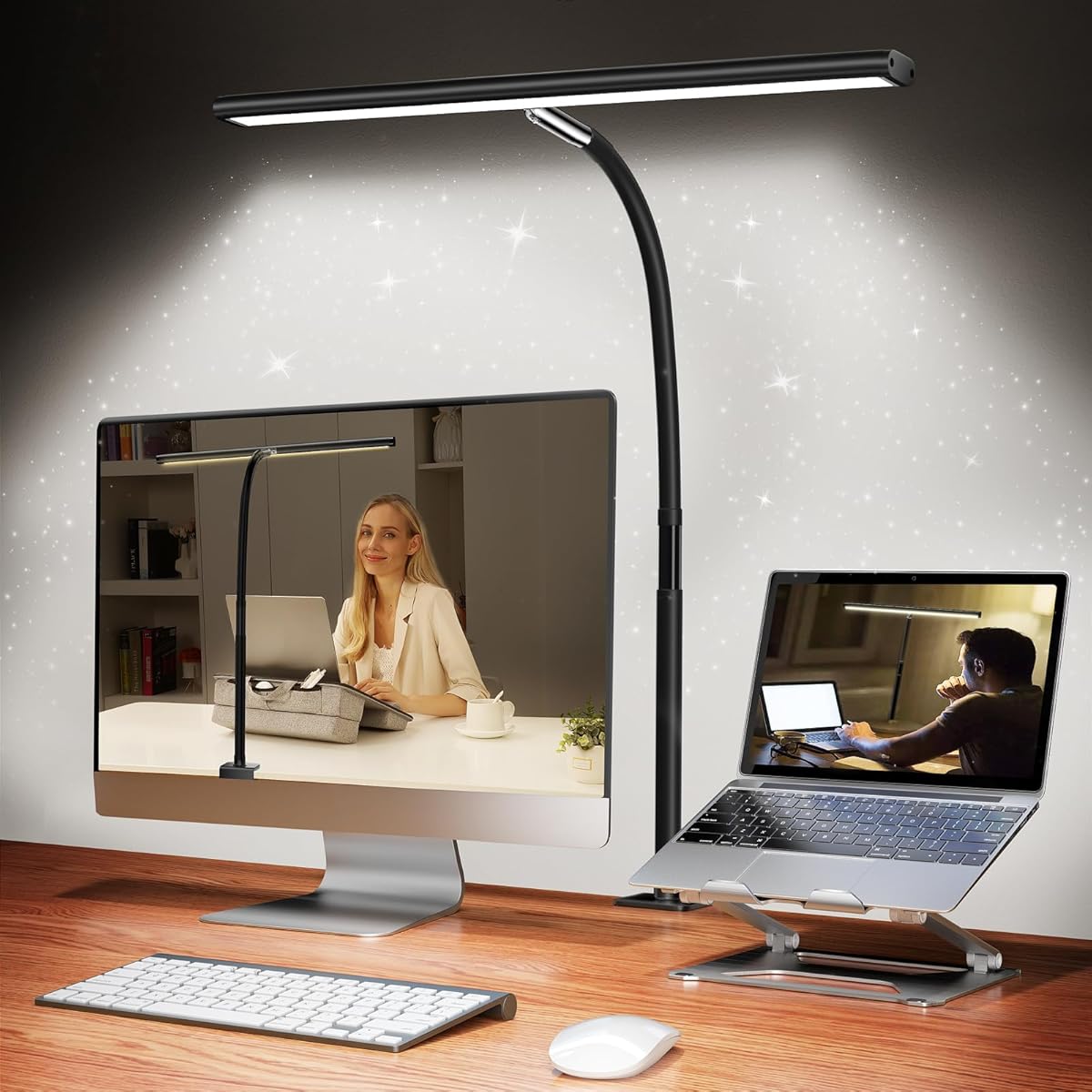




This 11.8-inch monitor light bar is a straightforward way to add dedicated task lighting to a computer desk without installing a traditional lamp. Its 4.2 rating reflects a generally practical feature set, and the strongest attraction is the claimed 800-lux central brightness across a 30-by-20-inch area, designed to remove dark spots around the keyboard and work surface.
We may earn a commission when you buy through this link, at no additional cost to you.
The bar uses a 45-degree lighting angle to direct illumination toward the desk and screen rather than into the user's eyes. Brightness can be adjusted continuously across three color temperatures spanning 3000K, 4000K, and 6500K. A memory function recalls the previous setting, while a side-mounted mechanical switch handles power, color selection, and longer-press brightness adjustment.
Its counterweighted clip is a meaningful alternative to a base that occupies desk space. The design is described as fitting most flat and curved screens, from thin to thick, without tools. That saves workspace, although buyers with unusual monitor shapes, deep bezels, or very narrow attachment areas should verify dimensions and clearance before ordering.
This is the strongest general-value choice for students, office workers, and gamers who need brighter, more uniform desktop lighting but do not need professional camera lighting or RGB effects. It is particularly useful for users who want an inexpensive upgrade over relying on room lighting alone.
The wide bar and angled beam are designed to illuminate a meaningful portion of the desk while keeping direct light out of the eyes. This makes the model useful for typing, note-taking, drafting, and other close-range computer tasks.
Mechanical buttons keep operation straightforward, and the memory function means users can return to a preferred combination without repeating the setup every time the light is switched on.
We may earn a commission when you buy through this link, at no additional cost to you.
The Airlonv LED Desk Lamp is a clamp-mounted task light for users who want precise control over brightness and color. It carries a 4.5 rating and stands out with stepless dimming from 1 to 100 percent across color temperatures from 2700K to 6500K, allowing a much more continuous adjustment experience than fixed brightness steps.
We may earn a commission when you buy through this link, at no additional cost to you.
Its long flexible gooseneck rotates through 360 degrees, and the 17-inch bar is intended to cover a substantial workspace. The lamp is listed as suitable for monitors up to 30 inches, with backward compatibility for 29-, 27-, and 24-inch models. A maximum working height of approximately 31 inches should still be checked against the user's monitor and desk arrangement.
The aluminum and ABS construction is designed for heat dissipation and a stated lifespan of up to 60,000 hours. The included 5V/3A adapter removes the need to source a compatible power supply separately, while built-in wire management helps keep the desk visually organized. One hundred LED beads provide the stated even output.
This lamp is a strong recommendation for drafting, reading, studying, crafts, or a single large monitor. It is less suitable where a completely minimal desk is essential or the desktop cannot support a sturdy clamp. The included adapter and broad adjustment range make it particularly convenient for a ready-to-use office setup.
Stepless dimming is especially valuable during long work sessions because the output can move smoothly from bright task illumination to a low reading level. The color-temperature range supports different activities and times of day.
The flexible neck and 17-inch head can be moved away from a monitor when necessary, providing more directional freedom than a fixed screen bar. Its height compatibility makes it well suited to standard monitor arrangements.
We may earn a commission when you buy through this link, at no additional cost to you.
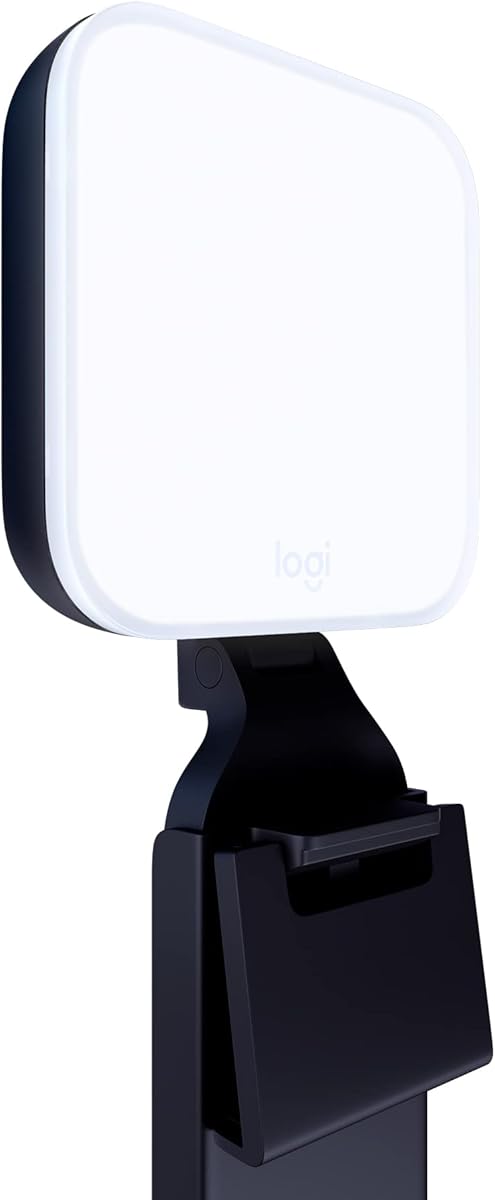
The Logitech for Creators Litra Glow is purpose-built for people who need flattering facial light during video calls, streaming, podcasting, and broadcasting. Its 4.5 rating reflects a polished alternative to ordinary desk lamps, with TrueSoft technology, a wide frameless diffuser, and adjustable brightness and color temperature.
We may earn a commission when you buy through this link, at no additional cost to you.
The diffuser is intended to spread broad, soft illumination and reduce harsh facial shadows. A patent-pending three-way monitor mount provides height, tilt, and rotation adjustments, allowing the light to sit above a desktop display or laptop while remaining out of the way of the camera.
Logitech's free G HUB desktop app adds software-based control over power, brightness, color temperature, and presets. The included USB-powered design is lightweight and portable, so the fixture can move between a home office and a recording location. The product has also cleared strict UL testing guidelines for all-day streaming use.
Choose the Litra Glow when the primary goal is a professional on-camera appearance rather than illuminating a large work area. It is a particularly good fit for remote professionals, online teachers, and creators who want consistent light with simple saved settings. For broad keyboard illumination, a dedicated task lamp would be more appropriate.
The wide frameless diffuser produces soft light across the subject's face, helping reduce the hard shadows that commonly appear when a room ceiling is the only light source. It is designed for a cleaner visual result on calls and streams.
The adjustable monitor mount makes placement more deliberate than with a generic clip-on panel. G HUB presets also allow users to save lighting combinations for different recording or meeting conditions.
We may earn a commission when you buy through this link, at no additional cost to you.
The Pzloz Architect Lamp is built for users who need to direct light precisely around a computer, drafting board, or reading area. It offers 25 lighting combinations built from five color temperatures between 3000K and 5500K, five brightness levels, and dedicated night-light and reading modes.
We may earn a commission when you buy through this link, at no additional cost to you.
The mechanical design is the defining feature. A 360-degree standing section, 180-degree folding swing arms, and a lamp head with 270-degree rotation create numerous working positions. These adjustments can move illumination from a broad desk task to a concentrated area without changing lamps.
A wireless remote handles mode and brightness changes, which is useful when the lamp is positioned beyond arm's reach. The product information describes even illumination without glare, flicker, or blue-light hazards, making it a candidate for extended drafting, studying, sewing, and crafting.
This is a versatile choice for an internal PC workspace shared with hands-on projects. One limitation is that the supplied data provides no numerical customer rating, so its real-world feedback cannot be summarized in the same way as the rated models. The product information also notes that a nonworking remote can be replaced without return.
Multiple rotating joints make it possible to reposition the head over a keyboard, drawing surface, or book. The lamp can also be moved away from the monitor when screen-focused lighting is not required.
The included wireless remote makes frequently used settings accessible from a seated position. Separate reading and night-light modes simplify changes between daytime work and lower-light use.
We may earn a commission when you buy through this link, at no additional cost to you.
The RGB Monitor Light Bar combines practical front illumination with an RGB backlight, making it a distinctive option for a gaming or entertainment-oriented internal PC setup. Its 4.1 rating and dual design distinguish it from conventional task bars focused solely on illuminating the desk.
We may earn a commission when you buy through this link, at no additional cost to you.
The front light uses a 45-degree beam aimed toward the screen and work surface, while the rear-facing RGB section provides nine ambient effects behind the monitor. Three front-light color temperatures support work and reading. The two lighting systems operate independently through separate tactile buttons, allowing task illumination to remain on while the background glow changes.
A smart memory function recalls the last selected settings, which is convenient for a setup that is powered on and off frequently. The universal retractable clip has a soft silicone pad and is described as compatible with thin, thick, flat, and curved monitors, helping protect the screen while maintaining a tidy setup.
The light is powered through USB-C and can connect to a laptop, adapter, or power bank. It is a good pick for a gamer who wants a single bar to handle keyboard lighting and ambient atmosphere. Users seeking only discreet office illumination can ignore the RGB functions, while those wanting natural-looking facial lighting should consider a dedicated webcam panel.
The independent front and rear sections serve different purposes. A focused task beam can illuminate the desk while the RGB backlight adds color around the display without occupying additional desk space.
The silicone-padded clip is designed to grip varied monitor shapes while avoiding direct contact that could damage the screen. Its retractable construction also helps the bar sit neatly along the display.
We may earn a commission when you buy through this link, at no additional cost to you.
The ShineTech LED Desk Lamp is the most comprehensive conventional task lamp in this group, with an expandable dual head that spans 31.5 inches. Its 4.5 rating and wide-coverage design make it especially appropriate for large desks, dual-monitor arrangements, drafting, and other tasks that extend beyond a small screen bar's reach.
We may earn a commission when you buy through this link, at no additional cost to you.
The two heads use touch controls to provide five color temperatures from 3000K to 6000K and ten brightness levels per temperature, producing 50 customizable combinations. A 26.7-inch height clearance allows the light to fit around many monitors and laptops, while a 360-degree gooseneck and 180-degree head adjustment provide directional control.
Built-in memory restores the last brightness and color selection. Ten- and 45-minute automatic shutoff timers offer added convenience during late-night reading or work, reducing the need to remember to switch the lamp off. The metal clamp supports desktops up to 2.9 inches thick and includes a protective EVA pad.
The product is rated for LEDs with a stated lifespan of up to 50,000 hours and is presented for offices, study rooms, and professional workspaces. It is a strong all-around recommendation for a multi-monitor internal PC setup, though users without a compatible desktop edge may need an alternative mounting method.
The dual-head span is the central advantage for users who need light across two monitors or a broad drafting area. It reduces the need to reposition a single narrow lamp when work moves from one side of the desk to the other.
The automatic shutoff options are useful during focused reading or late work sessions. Combined with setting memory, they help maintain a repeatable lighting routine with fewer manual adjustments.
We may earn a commission when you buy through this link, at no additional cost to you.
This two-pack of LitONES lighting panels is designed primarily for close-range illumination around a computer, laptop, monitor, or webcam. The 4.3 rating reflects a useful portable design with edge-lit illumination, a high stated color-rendering index, and numerous adjustment options.
We may earn a commission when you buy through this link, at no additional cost to you.
The edge-lit source and four-layer light guide plate are intended to avoid exposing the LED source directly to the eyes. Eighty-four 10-watt LEDs are listed as producing up to 450 lumens and 1,000 lux at half a meter. A stated color-rendering index above 97.8 supports accurate skin tones, making the panels relevant to meetings and recorded content.
Users can select five color temperatures from 3000K to 6500K and ten brightness levels from 3 to 100 percent for each temperature. The folding bracket rotates 360 degrees horizontally and 180 degrees backward, while a hanging clip accommodates 2- to 2.5-inch laptop or display sections. The adjustable stand can also support phones and tablets.
Two units provide flexibility: one can light a meeting setup while the other remains available for a different computer, or both can be used for balanced face illumination. At 11.7 ounces per light, they are easy to carry between office, home, and travel. Their small size makes them less suitable for illuminating an entire desk.
The high stated color-rendering specification helps preserve realistic skin tones and visible detail. Soft edge illumination also makes the panels more suitable for close-up video than bare-bulb fixtures.
The included two-pack can support separate computers or provide more balanced coverage for one person. USB power and a compact folding design eliminate batteries and simplify relocation.
We may earn a commission when you buy through this link, at no additional cost to you.
The Xiaomi Mi Computer Monitor Light Bar focuses on a clean, low-profile design that adds illumination without taking any of the desktop away from the user. Its 4.4 rating reflects a straightforward product whose strongest qualities are optical design, wireless adjustment, and convenient placement above a monitor.
We may earn a commission when you buy through this link, at no additional cost to you.
The light attaches to the top of the display rather than using a desk base. Its asymmetric polished design, optical glass, and textured hood direct light toward the work area while addressing screen reflection. The stated color-rendering index of Ra95 is designed to reveal natural colors and fine detail, and the output is described as flicker-free.
A 2.4GHz wireless remote adjusts brightness and color temperature, allowing changes without reaching up to the bar. The USB Type-C port also supports automatic operation when the connected computer is switched on, which is convenient for a permanent desk installation.
This is an attractive option for minimalists and office users who want their desk equipment to blend into the setup. It offers fewer effects and customization options than the RGB or multi-mode products, but its focus on even task illumination, reduced reflection, and zero desktop footprint may be exactly what some users need.
Because the fixture is supported by the monitor, no base or clamp occupies the work surface. The result is a cleaner setup that can be useful with a compact keyboard, drafting tools, or documents.
The hood and asymmetric arrangement are intended to direct light away from the screen. This helps maintain a readable display while still illuminating the area immediately in front of the user.
We may earn a commission when you buy through this link, at no additional cost to you.
The Logitech G Litra Beam is the premium lighting choice here for gamers, streamers, and creators who want deliberate control over the shape and character of their illumination. Its 4.5 rating and TrueSoft technology emphasize cinematic color accuracy and a natural, radiant appearance.
We may earn a commission when you buy through this link, at no additional cost to you.
Unlike a uniform monitor bar, Litra Beam can shape and direct light for a customized visual effect. Brightness and color temperature are adjustable from 2700K to 6500K, allowing the output to move from a warm candlelike tone to a cool white while maintaining control over the scene.
The slim design can be positioned using a three-way adjustable stand and three mounting points on the light itself. This allows the fixture to work in several configurations around a gaming desk or streaming setup. On-board controls, USB, and Bluetooth support with the G HUB desktop app provide multiple ways to access and save presets.
The light has cleared strict UL testing guidelines for all-day gaming and streaming. It is an excellent choice for a polished, premium desktop where lighting is part of the camera image or the overall visual design. For illuminating papers or a large crafting table, a wide task lamp would be the more functional option.
The beam-shaping capability is the defining premium feature. It allows a gamer or creator to direct a defined pool of light rather than relying only on broad, even illumination from a standard bar.
TrueSoft color, broad temperature control, and saved presets support a deliberate on-camera look. The fixture's slim form and flexible mounting also help it integrate with a more considered gaming environment.
We may earn a commission when you buy through this link, at no additional cost to you.
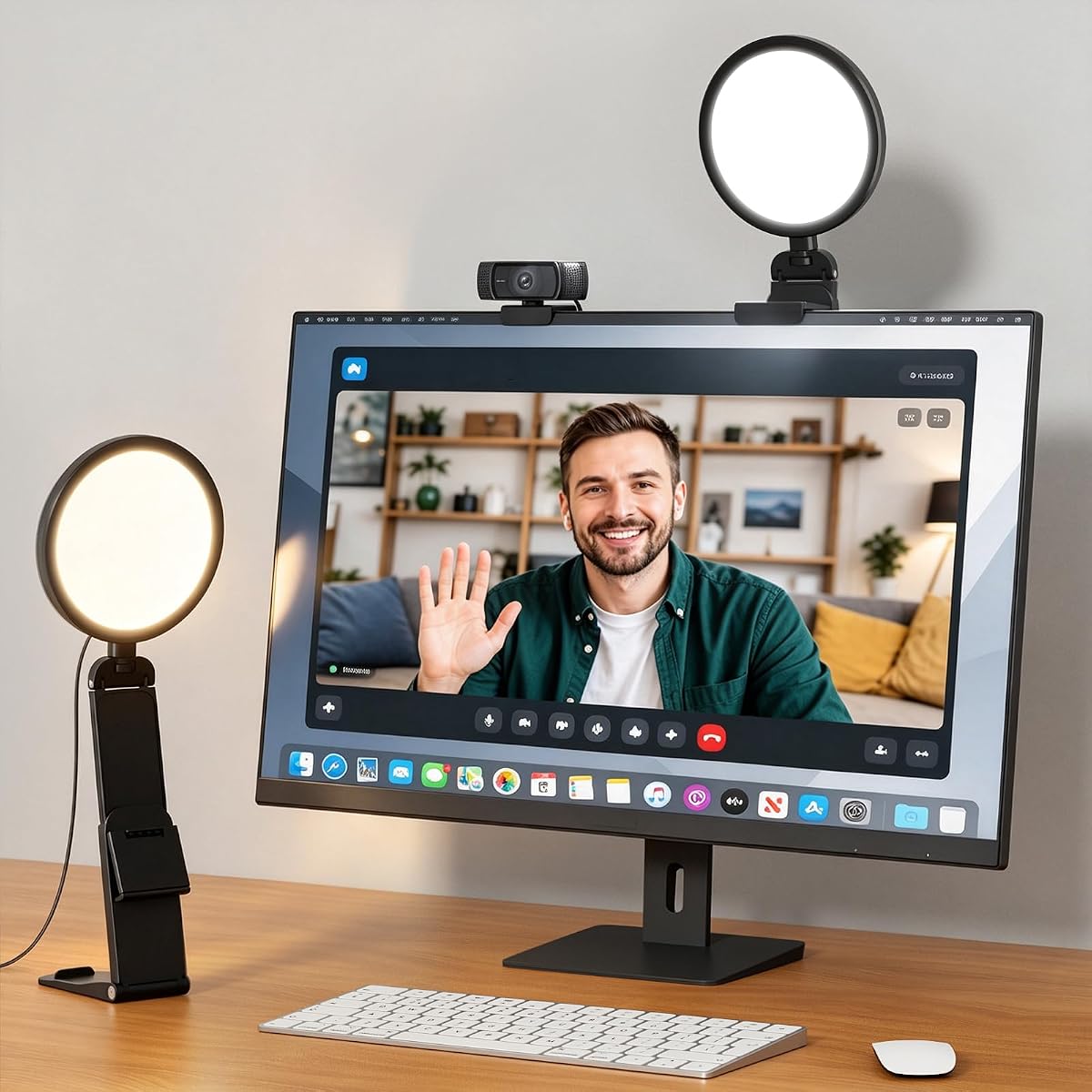
The Video Conference LED Panel is a compact, uncomplicated solution for improving the lighting around a webcam. Its 4.1 rating aligns with a focused feature set: a slim panel, USB power, two mounting options, three color modes, and ten brightness levels without complicated software.
We may earn a commission when you buy through this link, at no additional cost to you.
The light is designed to deliver clear, flicker-free, natural-looking illumination during Zoom meetings, Teams calls, online classes, streaming, and remote work. Its stated purpose is to reduce harsh facial shadows while remaining less bulky than a traditional ring light.
A clip allows the panel to attach to a monitor, while a magnetic base provides an alternative for attachment to a compatible webcam. The inline controller handles three color choices—white, warm, and mixed—and ten brightness levels, allowing quick changes when the user's environment changes.
No batteries, drivers, or applications are required. Plugging the USB cable into a computer is enough to begin using the panel, making it especially practical for temporary workspaces and travel. Its limitation is reach: it is a close-range facial light rather than a wide desk lamp for documents or hands-on projects.
The panel addresses a common problem in home offices, where overhead lighting can create shadows or an uneven camera image. It improves the light closest to the user without requiring a large fixture.
The monitor clip works well for laptop and desktop displays, while the magnetic base can support webcam attachment when compatible. Both options preserve valuable desk space.
We may earn a commission when you buy through this link, at no additional cost to you.
The most useful internal PC work light depends on whether the priority is broad task illumination, facial lighting for a camera, minimal desk usage, or atmospheric effects. Reviewing mount compatibility, coverage, controls, and power requirements before purchasing helps prevent common installation disappointments.
A task light is intended to illuminate the desk, keyboard, documents, and working hands. Monitor bars and architect lamps generally serve this purpose, with wider coverage and directional light that reduces the need for a bright room ceiling. A camera light instead focuses on the user's face and is especially useful for meetings, classes, streaming, and recorded video. Panels such as the LitONES and Video Conference LED Panel prioritize soft facial illumination, high color rendering, and compact placement near a webcam.
Prioritize task coverage for everyday computer work and prioritize camera quality for appearances on screen. Trying to use one fixture equally well for both can compromise the result.
Monitor-mounted bars preserve the entire desktop but require enough room around the top or rear of a display. Clamp lamps provide more directional freedom and broader coverage, though they need a sturdy, compatible desk edge. The ShineTech clamp is listed for desktops up to 2.9 inches thick, while the Airlonv model supports up to 2.36 inches. Webcam panels often use a lightweight monitor clip or magnetic attachment.
Measure the display, bezel, desk thickness, and nearby equipment before ordering. A compact mount is convenient, but a clamp that does not fit is unusable.
Coverage depends on both lamp width and beam direction. A narrow 11.8-inch bar can focus light across a compact keyboard area, while the 31.5-inch ShineTech dual head is intended for large desks and dual monitors. Adjustable arms and rotatable heads improve placement, but they do not increase the underlying width of the illuminated area. RGB fixtures can add rear ambient effects without necessarily increasing front task brightness.
Match the fixture to the work area rather than selecting only by stated brightness. Wider coverage is useful for documents, while focused light works well for a single monitor station.
Color temperature changes the perceived atmosphere of the workspace. Warm light around 2700K to 3000K is comfortable for evening reading, neutral settings near 4000K suit general work, and cooler values around 5500K to 6500K can create a more focused appearance. Stepless dimming allows fine control, while stepped brightness levels are simpler and often easier to remember.
Choose a model with enough range for both day and night use. Remember that maximum brightness does not guarantee comfortable performance, so balance output with dimming flexibility.
Eye-comfort claims should be considered alongside practical design details. Asymmetrical light bars, textured hoods, 45-degree beams, wide diffusers, and edge-lit panels are intended to keep light away from the eyes or reduce direct source glare. Flicker-free output and high color-rendering figures can also improve viewing comfort. None of these characteristics guarantees comfort for every person, so users with specific sensitivity should assess the lighting in their own environment.
Look for optical features that direct the beam and soften the source rather than relying only on broad marketing labels. Proper positioning is just as important as the fixture itself.
USB power is common across this category and keeps cables simple, but the source should provide suitable output. Some products include an adapter, while others expect a laptop, wall adapter, or power bank. Mechanical buttons are durable and direct, touch controls offer a sleeker appearance, and wireless remotes help when a lamp is positioned beyond reach. App-enabled products can save presets but introduce a software dependency.
Choose the control method that matches your routine. Favor direct physical controls for frequent adjustments and confirm that the necessary power cable or adapter is included.
Color-rendering figures can be especially relevant when the light will fall on a face during a meeting or recording. The LitONES panels state an index above 97.8, Xiaomi lists Ra95, and Logitech emphasizes TrueSoft full-spectrum output. Brightness control and a broad color-temperature range are equally important because consistent facial color depends on both the light source and the camera's automatic white balance.
Prioritize high color rendering and soft diffusion for camera use. A low-profile task bar may light a desk effectively but still produce an uneven or unflattering camera image.
LED lifespan figures vary among the supplied products, with several claiming tens of thousands of hours. A metal arm, aluminum housing, or a stated heat-dissipation design may support steady operation, while adjustable joints and clips should also feel secure. Timers and memory functions can make a fixture more convenient over time because users can restore familiar settings and avoid leaving the light on unnecessarily.
Consider the mounting hardware, materials, and support for your exact desk arrangement. A light that is easy to position and feels secure is more likely to become a permanent part of the workspace.
Begin by deciding whether the light is intended for desk tasks, video calls, or both. Mount a monitor bar or panel at the top of the display, position a webcam light near the lens, or secure a clamp lamp to a compatible desk edge. Keep cables routed behind the monitor or through the lamp's cable-management feature, and confirm that the light sits outside the camera frame when its appearance will be visible.
Turn the light to a moderate brightness before selecting the color temperature. For work, start around a neutral setting and angle the beam toward the keyboard or document area rather than directly at the monitor. For video calls, use softer front lighting and adjust the angle until facial shadows are reduced. Save the preferred combination if the model includes a memory function, then use its timer or switching routine to avoid leaving it on.
Care for the fixture by unplugging it before moving the clip or clamp. Clean the light and optical surface with a soft, dry cloth, avoiding harsh cleaners and excessive moisture. Do not force a monitor clip, tighten a clamp against an unsupported surface, or exceed the stated desk thickness. Periodically check the mount, cable connections, and cooling path so the light remains stable and operates as intended.
A monitor light bar is often the simplest option for a single computer because it adds task illumination without taking up desk space. A clamp-mounted architect lamp offers greater reach and positioning flexibility for larger or dual-monitor setups. Choose a webcam panel instead when the main goal is flattering light on your face during calls or recordings.
It can, provided the light is positioned correctly. Asymmetric designs, textured hoods, 45-degree beams, and edge-lit diffusers are intended to direct illumination toward the desk rather than the screen. A badly angled bar can still create reflections, so adjust its position and brightness before assuming the fixture is the problem.
Monitor bars are better when preserving desk space and lighting a compact workstation are the priorities. Clamp lamps are better for broad coverage, dual monitors, drafting, and directing light around a display. The best choice depends on the shape of the desk, the available edge space, and how widely the user needs to illuminate.
Neutral light around 4000K is a versatile starting point for daytime work, while warmer settings around 2700K to 3000K may be more comfortable at night. Cooler light around 5500K to 6500K can create a brighter, more focused appearance. Adjustable models let you change the setting as the day and task change.
A separate light can significantly improve facial visibility when the room does not provide even lighting. The best webcam lights use a wide, soft diffuser, high color rendering, and adjustable brightness rather than a small exposed LED. A task bar may illuminate the desk but still leave the face in shadow if it is mounted too high or aimed downward.
USB-powered lights are convenient when a laptop, power bank, or existing USB supply is readily available. Adapter-powered models may be easier for a permanent office installation because they do not depend on a computer remaining powered. Check the included components and the required power rating before buying, especially if a product does not include an adapter.
Several products are specifically described as compatible with curved screens, while wide clamp lamps are better suited to spanning dual-monitor layouts. Compatibility still depends on monitor thickness, bezel design, and available clearance. Measuring the display and checking the manufacturer's mounting notes can prevent a poor fit.
Stepless dimming, a broad color-temperature range, glare-reducing optics, and a memory function are especially useful for long sessions. Adjustable positioning lets users keep illumination on the work area rather than the screen. For late-night use, an automatic shutoff timer provides additional convenience and helps prevent an unnecessary light from remaining on.
The Monitor Light Bar is the best-value choice for a compact workstation, offering a wide 11.8-inch task beam, three color temperatures, and a memory function in a low-profile format. The ShineTech LED Desk Lamp is the strongest all-around option for large or dual-monitor desks, while the Logitech G Litra Beam is the premium pick for gamers and creators who want refined color and beam control.
Before choosing, prioritize the type of coverage you need, the physical limits of your desk, and the way you will actually control the light. Camera users should examine color rendering and diffusion, while everyday computer users should focus on glare reduction, monitor compatibility, and useful dimming. Additional RGB effects are valuable for atmosphere but are not a substitute for good task illumination.
Ratings, product details, and prices can change over time, so review the current listing and confirm fit, included accessories, and power requirements before purchasing. Comparing the final choice with your monitor arrangement and daily routine will make it easier to identify the most suitable internal PC work light.