
POUND HD Link Cable
4.4Editor score
Native RGB picture quality
720p resolution output
Original 4:3 ratio
Micro USB power included
Compare the best Sega Genesis Saturn HDMI converters for RGB quality, console support, aspect ratios, resolutions, power needs, and easy setup.
Connecting a Sega Genesis or Saturn to a modern television usually starts with the same decision: choose an HDMI converter that preserves the console’s original video signal instead of forcing everything through composite output. The right adapter should provide clean color, useful resolution controls, reliable audio, and a connection method suited to your specific console model.
This guide compares ten Sega Genesis and Saturn HDMI converter options using the supplied specifications, compatibility claims, ratings, resolution options, aspect-ratio controls, included accessories, and installation requirements. It covers dedicated RGB adapters, universal Sega connectors, Saturn-specific converters, and multi-device RCA-to-HDMI boxes so readers can distinguish specialized solutions from broader alternatives.
The reviews reveal that the most important distinction is not merely whether a product says HDMI, but whether it reads the console’s native RGB signal, supports the exact model being connected, and supplies adequate power. Each pick below explains its strongest use case and trade-offs, while current availability, ratings, and product details can change over time.
4.4Editor score

4.4Editor score

4.3Editor score
This side-by-side comparison highlights console support, signal type, output resolution, aspect-ratio flexibility, and power requirements to make the differences between each converter easier to understand.




The Mcbazel RGB to HDMI Adapter is a strong all-around choice for owners of an original Sega Genesis Model 1, Model 2, or compatible Neo Geo console. Its 4.3 rating reflects a generally well-received design, while its standout feature is direct RGB conversion combined with physical controls for picture shape and output resolution. It favors straightforward operation over complicated television-side menus.
We may earn a commission when you buy through this link, at no additional cost to you.
The package includes two conversion cables so the same adapter can connect different supported consoles without requiring a separate cable purchase. The 7.5 by 4 centimeter adapter body carries one button for switching between 4:3 and 16:9 and another for choosing 720p or 1080p. Because those controls are accessible on the unit, users can compare settings immediately rather than navigating unfamiliar display menus.
There are two important limitations. The adapter does not support Sega Saturn or Sega Master System, and the included micro USB power cable needs a suitable five-volt source because a wall plug is not supplied. It also requires an unmodified original console with an RGB output; clone, replica, and heavily modified systems commonly provide only composite video. With those constraints understood, the broad cable package and simple controls make this a particularly practical Genesis option.
This is a good recommendation for someone who wants flexible output settings without relying on television menus. It is especially useful for owners of both Genesis Model 1 and Model 2 hardware, provided they can supply the required power source and use a console with a native RGB signal. It is less suitable for a mixed Genesis-and-Saturn setup or for anyone whose modified console cannot output RGB.
Putting the aspect-ratio and resolution buttons directly on the adapter makes it easy to match the image to a particular television or projector. This is useful when moving between displays or when different games appear to need slightly different presentation settings.
The two supplied conversion cables address a common compatibility problem: supported consoles do not always use the same video socket. Having the appropriate connectors in the box makes the initial setup more predictable, although buyers should still verify their console model before connecting anything.
We may earn a commission when you buy through this link, at no additional cost to you.
The LEVELHIKE HDMI Cable combines a 4.4 rating with one of the broadest stated Sega compatibility lists in this guide. It supports Genesis Model 1, 2, and 3, Sega CD, Sega CDX, Sega 32X, Sega Nomad, and the original Sega Master System. That makes it a compelling choice for collectors who own several Sega machines rather than a single isolated console.
We may earn a commission when you buy through this link, at no additional cost to you.
Its core function is to convert and upscale analog RGB signals into digital HDMI output for modern televisions, monitors, and projectors. A physical aspect-ratio switch supports both 4:3 and 16:9 presentation, allowing the user to decide whether to retain the classic shape or fill a wider display. The product description also emphasizes low latency, which is especially relevant for action games where visual delay can be noticeable.
The detachable design is another useful detail because it allows an existing or extended HDMI cable to be used. The stated image-processing package is positioned as an accurate, detailed upscale rather than a basic signal passage, although the listing does not provide measured color, latency, or resolution figures. The most notable omission is Sega Saturn: despite the broad Sega coverage, the product information does not identify the Saturn as supported.
Buyers should choose this cable when they want a dependable one-cable ecosystem for many Sega systems and value flexible aspect ratios. It is less appropriate for a setup centered on Sega Saturn or for anyone who needs explicit 1080p output and resolution switching, neither of which is specified in the supplied information.
The extensive model list is the defining strength of this option. It can simplify a collection containing add-on consoles and regional hardware, reducing the need to research a separate converter for each Sega platform.
Low-latency processing is particularly useful for fast movement and precise controls. The listing describes lag as unnoticeable, making this converter a sensible choice for players who prioritize responsiveness as well as image quality.
We may earn a commission when you buy through this link, at no additional cost to you.
The TNP Sega Genesis HDMI Adapter is a 4.0-rated option aimed primarily at Model 2 and Mega Drive 2 owners, with its supplied compatibility information extending to Genesis Model 1, Model 2, Model 3, Sega CD, Sega CDX, Sega 32X, Sega Nomad, and the original Sega Master System. It offers a lightweight way to move a Sega setup between a television, monitor, or projector.
We may earn a commission when you buy through this link, at no additional cost to you.
The adapter transfers video and audio into digital HDMI format and uses a built-in chip to process color and resolution. Its plug-and-play design requires no drivers, software, or additional menu configuration, which simplifies initial use. The listing specifically calls out vivid graphics, brighter colors, and high-definition presentation for larger displays, and it includes both a USB power cable and an HDMI cable.
A five-volt, one-amp power source is required, so users must have a suitable USB supply available. The listed compatibility is broad for Sega hardware, but Sega Saturn is not named. Because the product information does not provide a switchable resolution or aspect-ratio control, users should not expect the same display flexibility offered by products with explicit 4:3 and 16:9 buttons.
This is a good fit for someone who wants a compact, simple adapter for a Genesis-centered collection and values digital audio and video in one connection. It is less suitable for a Saturn owner or a user who requires clearly documented 720p and 1080p selection.
The lightweight adapter is easy to move between rooms and can serve televisions, monitors, and projectors. That flexibility makes it attractive for people who do not keep a permanent console station or who regularly connect their system to different displays.
Carrying both sound and picture over HDMI reduces the number of separate connections required. The built-in processing chip is intended to improve color and resolution, although the supplied listing does not provide objective image measurements.
We may earn a commission when you buy through this link, at no additional cost to you.
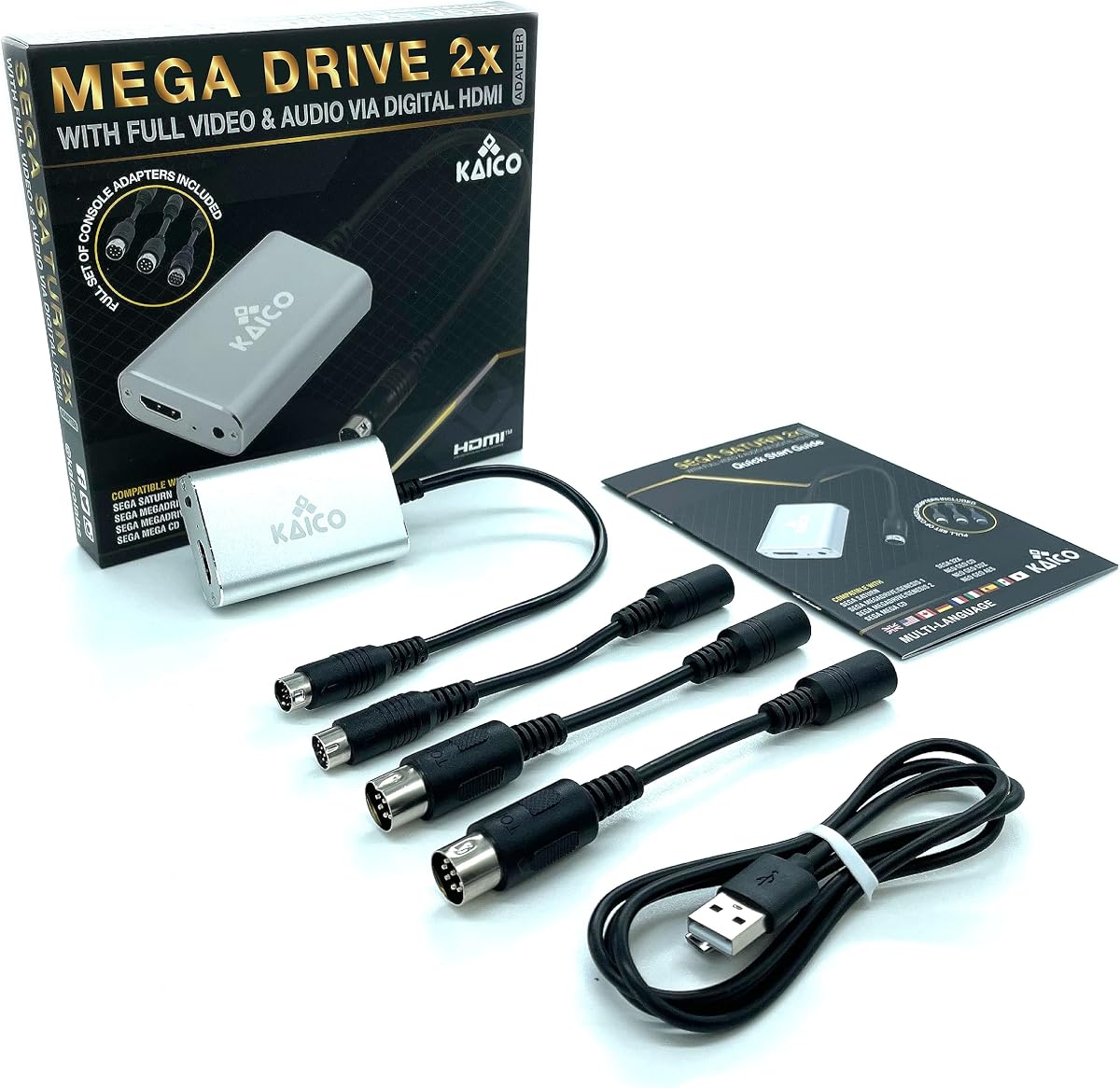
The Kaico Mega Drive HDMI Adapter is unusual because one listed product is designed to cover both Sega Saturn and Mega Drive/Genesis hardware, with additional support for Mega CD, Sega 32X, Neo Geo CD, Neo Geo CDZ, and Neo Geo AES. Its 3.5 rating is the second-lowest numerical score in the list, so buyers should weigh that mixed feedback against its unusually broad platform coverage.
We may earn a commission when you buy through this link, at no additional cost to you.
Video can be taken from RGBS or composite outputs, and the adapter includes a two-times line-doubling function. It operates as a plug-and-play device without additional software or hardware installation. The included attachment cables cover Saturn, Mega Drive 1, Mega Drive 2, Neo Geo CD, and Neo Geo AES, which is a major convenience for anyone assembling a multi-console Sega and Neo Geo library.
The most important caveat is signal quality. Although the device accepts both RGBS and composite, the highest-quality route is the console's RGB output. Using composite may produce a different result from RGB conversion, and the product information does not state whether every supported console exposes RGBS through the same connector. The regional compatibility claim covers systems used in Europe, America, and Japan, but users still need the correct cable for their hardware.
This adapter is best for a collector who wants one product to serve several Sega and Neo Geo machines, particularly when Saturn and Genesis are both in use. It is less attractive for someone who wants the highest-rated dedicated solution or needs clearly stated output resolution and aspect-ratio controls.
Supporting both Genesis-family and Saturn hardware is the central advantage. A collector can avoid maintaining separate HDMI solutions for two systems that occupy prominent places in retro-gaming collections.
The inclusion of RGBS support gives users access to the consoles' sharper native color output. Composite remains available for compatibility, but RGB is the more meaningful connection when comparing picture quality.
We may earn a commission when you buy through this link, at no additional cost to you.
The NORMICHIC Converter is a focused Sega Saturn solution with a 4.1 rating and a clearly stated 1080p output. It accepts an S-video signal from Saturn hardware and supports both 4:3 and 16:9 aspect ratios, making it a straightforward option for owners who primarily want an easy connection to a modern television.
We may earn a commission when you buy through this link, at no additional cost to you.
Saturn compatibility extends across PAL and NTSC consoles, a useful detail for international collections. The product is compatible with televisions that have HDMI input, and its 1080p resolution gives the television a modern digital format with which to negotiate the picture. The supplied information does not indicate a separate power requirement, driver, or complex setup procedure.
The critical distinction is its S-video input. S-video provides separate color and luminance signals and can produce a cleaner result than basic composite, but it does not offer the full benefit of the Saturn's native RGB path. The listing also does not mention switchable output resolutions, audio behavior, or included cables, so those details should be verified before purchase if they are priorities.
This is a good recommendation for a Saturn-focused setup that uses S-video and values explicit 1080p output with selectable aspect ratios. It is not the right choice for a Genesis collection or for a buyer whose main objective is to preserve the absolute highest-quality native RGB signal.
The stated 1080p output aligns well with many modern HD televisions and provides a straightforward digital target. This is particularly useful when a display handles lower legacy formats inconsistently or scales them poorly.
PAL and NTSC compatibility broadens the converter's usefulness for collectors in different markets. The regional claim is valuable, but the console's own video standard should still be considered when matching the physical connection.
We may earn a commission when you buy through this link, at no additional cost to you.
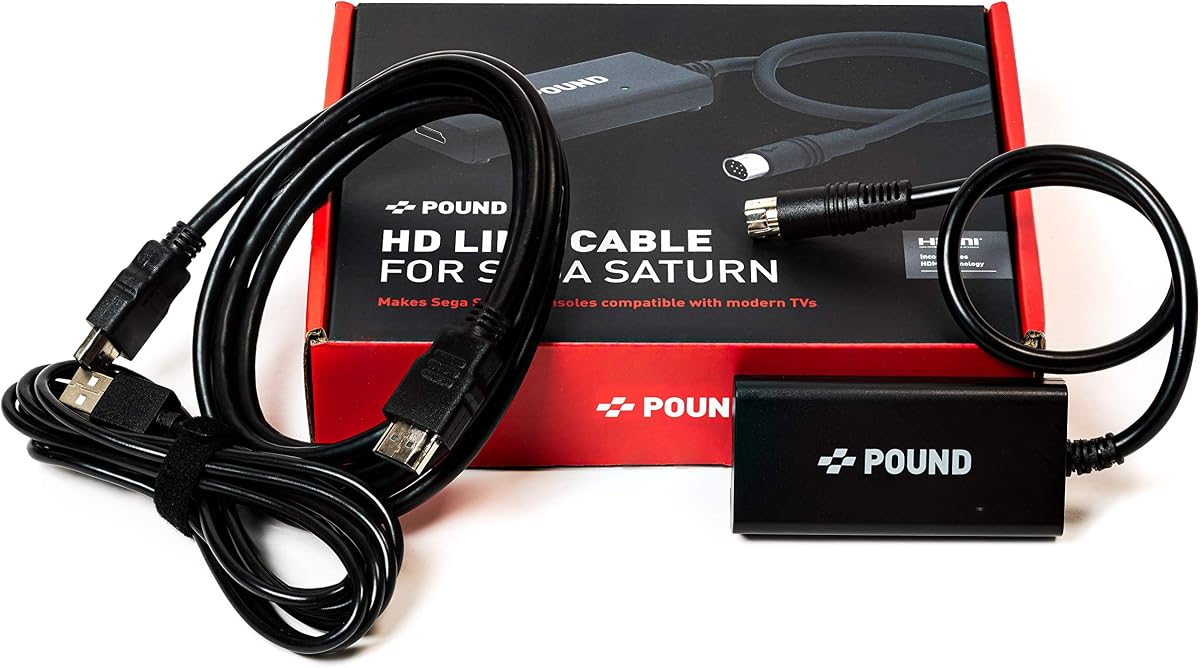
The POUND Saturn HDMI Cable is a 4.3-rated solution designed to deliver the Sega Saturn's native RGB signal through an HDMI connection. Its 720p output and original 4:3 aspect ratio are presented as a practical way to display classic Saturn games on a modern television without stretching the image beyond its intended shape.
We may earn a commission when you buy through this link, at no additional cost to you.
The strongest claim concerns picture quality. The product description highlights sharper textures and text than a standard AV cable, as well as vivid color from the native RGB signal. It converts the Saturn's original 240p output to 720p for compatibility with contemporary HDTVs. A micro USB cable is included to supplement the console's power, which the manufacturer says can reduce stress on the Saturn's aging internal power supply.
The converter does not offer a documented 16:9 option, so it is not as flexible as products with explicit aspect-ratio switching. Nor does the supplied information state that its output is 1080p. For many users, however, a stable 720p image with a preserved 4:3 ratio may be more useful than a higher resolution that stretches the source or relies on television-side scaling.
This is a strong choice for a Saturn owner who values the console's native RGB output and appreciates the included power assist. It is less appropriate for buyers seeking adjustable picture controls, confirmed 1080p output, or a cable that also handles Genesis hardware.
Using the Saturn's RGB output gives the converter a cleaner source than composite video. The listing specifically points to sharper textures and text, which are important advantages in games with detailed sprites and small interface elements.
The included micro USB cable can provide additional power to the Saturn. This is particularly relevant for a three-decade-old console, although it does not replace the need to care for the original internal power supply responsibly.
We may earn a commission when you buy through this link, at no additional cost to you.
The POUND HDMI Converter and Cable is a dedicated Genesis solution connecting Mega Drive or Genesis Model 1, 2, and 3 hardware to a television through HDMI. Its supplied listing specifies 720p output and a 4:3 aspect ratio, but explicitly notes that the ratio cannot be switched. No numerical customer rating is available in the supplied data, so the product should be judged primarily on its stated features.
We may earn a commission when you buy through this link, at no additional cost to you.
The fixed 4:3 presentation is a deliberate choice that respects the geometry of the original Genesis display. It can produce a more familiar image on a modern screen than forcing a widescreen presentation, particularly for games that were designed around a four-column screen layout. The 720p signal provides a modern HDMI format that is broadly suitable for contemporary televisions and monitors.
The lack of aspect-ratio switching is the main limitation for users who prefer to fill a widescreen display manually. There is also no supplied information about power requirements, audio handling, or whether RGB is the input path. Sega Saturn is not included in the stated compatibility, which keeps the product focused rather than universal.
This converter is best for someone who owns a Genesis Model 1, 2, or 3, wants a straightforward 720p HDMI connection, and prefers the classic 4:3 image. It is a weaker choice for users who need a confirmed numerical rating, switchable aspect ratios, or one converter that also supports Sega Saturn.
Maintaining the original aspect ratio is useful for games designed around traditional screen dimensions. It also gives buyers a predictable result without requiring them to adjust television settings every time the console changes.
Support for Genesis Model 1, 2, and 3 makes the product useful across the console line's physical revisions. Owners should still confirm that their specific console exposes the required video connection before installation.
We may earn a commission when you buy through this link, at no additional cost to you.
The MD1 MD2 SNK HDMI Cable offers useful display flexibility, including switchable 1080p and 720p output and a 4:3 or 16:9 aspect-ratio control. Its 3.3 rating is the lowest numerical score among the rated products, so the feature set should be weighed against mixed customer feedback rather than treated as a guarantee of overall refinement.
We may earn a commission when you buy through this link, at no additional cost to you.
The converter reads analog RGB signals and upscales them to digital HDMI output for modern displays. The package includes the main converter, a USB power cable, an MD1 adapter, and an SNK adapter. Installation is described as plug-and-play with no required drivers, while the physical switches provide direct control over resolution and screen ratio.
A compatible power source must be connected for proper operation. The product information does not identify the required amperage, so users should use a dependable USB supply appropriate for the supplied cable and converter. The lower rating may reflect practical or long-term concerns that are not specified in the listing, making careful inspection and confirmed compatibility especially important.
This product is best for a buyer who values having both resolution and aspect-ratio choices for a Genesis or SNK console. It is less suitable for Saturn owners or for anyone who places the highest weight on customer ratings and a minimal need for external power.
Being able to move between 720p and 1080p and between 4:3 and 16:9 is useful for matching different television sizes and personal preferences. The controls also reduce reliance on uncertain automatic scaling.
The converter will not work properly unless it is connected to a suitable power source. Keeping the supplied USB cable and a known-good adapter nearby prevents a blank screen that could otherwise be mistaken for a video failure.
We may earn a commission when you buy through this link, at no additional cost to you.
The Six-Port RCA to HDMI Converter is designed for a broader collection of legacy devices rather than one dedicated Sega console. Its 3.6 rating reflects a middling position, but the multi-input format makes it relevant to users who want to connect Sega, Xbox, PlayStation, Nintendo, VHS, VCR, and DVD equipment through one HDMI display connection.
We may earn a commission when you buy through this link, at no additional cost to you.
The converter processes analog composite video and analog stereo audio, then outputs a digital HDMI signal at up to 1080p 60Hz. It supports NTSC and PAL sources and offers both 4:3 and 16:9 aspect ratios. Sources can be selected with a front-panel button or an included infrared remote, which is convenient when the equipment sits away from the television.
The supplied listing contains an important internal inconsistency. Its title says six ports, one section says up to six composite RCA devices can be connected, and another section says up to four. The package information also does not clarify the exact port arrangement. Buyers should verify the physical inputs and connector quantity against the product images before ordering.
This converter is best for a broad retro-equipment shelf where composite sources are acceptable and only one HDMI input is available. It is not the preferred solution for a Genesis or Saturn enthusiast seeking native RGB quality, and its listing does not identify Sega Saturn compatibility.
Multiple RCA inputs allow several older devices to share one modern television connection. This can be more practical than dedicating separate HDMI sockets to consoles, VCRs, and disc players, especially when each source is selected only occasionally.
The converter accepts standard-definition composite rather than a native RGB signal. It remains a practical shared-device solution, but dedicated RGB converters offer a more direct route to sharper color and detail from supported Sega consoles.
We may earn a commission when you buy through this link, at no additional cost to you.
The POUND Genesis HD Link is a 4.4-rated dedicated Genesis cable that emphasizes native RGB picture quality, a 720p output, and the console's original 4:3 aspect ratio. It supports Genesis Model 1, 2, and 3 through an included converter, making it a focused but polished option for fans who want their classic library on a modern HDTV.
We may earn a commission when you buy through this link, at no additional cost to you.
Rather than relying on composite video, the cable takes the Genesis's native RGB signal and carries it to the display through HDMI. The product description highlights better color reproduction and sharpness than a standard AV cable. Resolution is upscaled from the original 240p to 720p, while the classic 4:3 shape is maintained to avoid distorting the intended image.
A micro USB cable is included to supplement power to the console, which the listing says can reduce stress on the Genesis's three-decade-old internal power supply. The trade-off is limited control: only 720p and 4:3 are stated, with no documented 16:9 switch or 1080p mode. The focus is therefore a predictable native-RGB presentation rather than extensive menu options.
This is an excellent recommendation for a Genesis owner who values color, clarity, and a well-defined cable solution over adjustable aspect ratios. It is less suitable for a mixed Sega setup requiring Saturn support or for a buyer who wants to select 1080p output manually.
The Genesis's native RGB signal is the key attraction. Using it avoids the softer color separation and reduced detail associated with standard composite AV output, making familiar games look more vivid on a contemporary display.
The fixed 720p and 4:3 combination gives a consistent result across games. While some buyers may want a widescreen switch, others will appreciate a setup that preserves classic proportions without relying on television scaling.
We may earn a commission when you buy through this link, at no additional cost to you.
The right converter depends on your exact console, the video signal it produces, the power arrangement, and the degree of control you want over resolution and aspect ratio. These factors determine image quality and setup convenience more reliably than a broad compatibility label.
Sega used different hardware revisions, ports, regional video standards, and add-on configurations across the Genesis and Saturn families. A product named for one model may not cover every version, and claims that sound broadly compatible can still omit an important exception. Match the title, bullet points, included connector types, and the physical sockets on your console before purchasing. For a mixed collection, note whether Sega CD, Sega 32X, Sega Nomad, Neo Geo hardware, or Master System support is explicitly stated.
RGB provides separate red, green, and blue color information and generally offers sharper, more vivid images than composite video. The strongest Genesis and Saturn choices in this guide explicitly read native RGB, while generic RCA converters work with composite. If image quality is the priority, use the console's RGB output and the matching adapter. Composite remains useful for broad compatibility, but it can reveal color bleeding, softer edges, and less distinct text.
Not every adapter accepts the same kind of input. Some require RGB, some use Saturn S-video, and others accept RCA composite. A clone or heavily modified console may not output the signal required by a high-quality RGB adapter, sometimes producing audio without a picture. Conversely, a generic RCA converter can accept a broader range of altered hardware but will not reproduce native RGB quality. Check the console's outputs before assuming any cable is interchangeable.
The products here offer 720p, 1080p, fixed 4:3, switchable 4:3 or 16:9, or some combination. Higher output resolution can help a modern display present an upscaled image, but it does not turn a 240p source into native high-definition detail. Aspect ratio is equally important: 4:3 preserves classic composition, while 16:9 can fill a widescreen display but may stretch or crop the image unless the converter performs the conversion correctly.
Several converters need a separate five-volt power source, and some include a micro USB cable solely for that purpose. A cable without an included wall adapter may require access to a television USB port or a compatible charger. Check the required amperage where stated, use a dependable supply, and confirm that the power cable is actually carrying electricity. Saturn and Genesis hardware also benefits from careful power management because their original internal supplies are old.
A converter cannot connect a console whose video port it does not support. Some products include multiple console cables, while others require the user to supply the appropriate Sega cable or rely on a particular socket. Mcbazel and Kaico stand out for including several attachments, whereas dedicated one-system products may focus on a single cable. Review the package contents before ordering, particularly when collecting more than one regional model or console revision.
The converter also needs an available HDMI input on the television, monitor, or projector. A multi-device RCA box can reduce input clutter, but it introduces composite processing and remote-controlled source selection. A dedicated console cable usually provides a more direct signal path and may remain permanently connected. Think about whether you need one adapter for many machines or a specialized cable for the system you use most.
Customer ratings can indicate broad satisfaction, but they do not reveal every compatibility detail or the cause of a complaint. Some listings contain vague port counts or omit the Sega Saturn, while others have no numerical rating at all. Use ratings as one signal, then read the supported consoles, signal type, power needs, included parts, and output modes. Those concrete details are more useful for preventing an incompatible purchase.
Before connecting the converter, identify the video output on the console and compare it with the required input on the adapter. Connect the appropriate console cable, attach the HDMI cable to the television or monitor, and place any television input switch on the correct HDMI channel. If the adapter requires external power, connect its USB power lead before testing the image. This prevents a dark screen caused by a simple power or input-selection issue.
Start with a conservative display setting and let the television identify the signal. Once a picture appears, use the converter's physical buttons to test supported aspect ratios and resolutions. Compare the 4:3 presentation with any 16:9 option for horizontal stretching, and compare 720p with 1080p only when the adapter supports both. For a console that produces sound without video, check that RGB or the required signal is connected and confirm that the power lead is functioning.
For long-term use, avoid sharply bending the console-side cable at the plug and keep the converter clear of heat, moisture, and unstable surfaces. Unplug power before changing connectors, and do not treat supplemental USB power as a substitute for maintaining the original console supply. Periodically inspect the power bricks and cables for damage, especially when powering hardware that has not been used in a long time.
Some products can, but only if the converter explicitly lists both systems and includes the necessary connection cables. The Kaico Mega Drive HDMI Adapter is the clearest example in this guide because it supports Genesis-family hardware and Sega Saturn and includes multiple attachments. Most dedicated products handle only one Sega family. Always check whether the supported signal is RGB, S-video, or composite as well as checking the console names.
A common cause is connecting a composite-only console or heavily modified system to an adapter that requires native RGB. Another cause is an insufficient or disconnected micro USB power lead. Check the adapter's input requirement, confirm that the correct console cable is attached, and make sure the converter receives the specified power. If the display still remains dark, try the appropriate supported signal path and verify that the television is on the correct HDMI input.
Yes, RGB generally provides separate color information, leading to sharper edges, more distinct colors, and clearer text. Composite blends color information into one signal and commonly shows more softness or color bleeding. The improvement is most visible on a larger modern display. A converter that reads native RGB offers the better dedicated path, while a generic RCA-to-HDMI box is better suited to connecting many composite devices.
Choose 720p when the converter outputs only that mode, when a 4:3 picture is the priority, or when the display presents it well. Choose 1080p only when both the converter and television support it and you want the adapter to provide a higher-resolution digital output. Neither setting creates native high-definition detail in an original 240p game, so aspect ratio and RGB quality are also important.
Some do, and some do not. The Mcbazel adapter includes a micro USB power cable but not a wall plug, while the TNP and MD1 MD2 SNK options explicitly require an external five-volt source. The POUND cables include micro USB leads for power boost, while the NORMICHIC listing does not identify a separate power requirement. Follow the specific product instructions and use a reliable power source.
Yes, but the result depends on how the converter processes the image. A proper 16:9 mode should expand the picture without obvious stretching, while some simple methods crop the sides or leave black bars. Fixed 4:3 adapters preserve the traditional composition without adjustments. If picture geometry matters, compare the available settings on your own display and use a mode that does not distort the characters or game area.
Not necessarily. RGB-based adapters require a console that actually outputs the compatible RGB signal, and many clones or heavily modified systems provide only composite. A composite-to-HDMI converter may connect such hardware, but it will not deliver the same result as a native RGB path. Check the clone's available outputs and select a converter that explicitly supports that signal.
It depends on the converter and the add-on. Dedicated solutions often cover one main console and selected accessories, while universal Sega products may list Sega CD, Sega 32X, and Nomad compatibility. The Kaico product supports a broad mix of Sega and Neo Geo hardware and includes several cables. Check the exact list and included attachments rather than assuming that an add-on shares the base console's connector.
The LEVELHIKE HDMI Cable is the strongest general recommendation for a broad Sega collection, offering native RGB conversion, switchable aspect ratios, low-latency operation, and extensive model support. The POUND Genesis HD Link stands out for a dedicated RGB experience with 720p output and included power assistance, while the Mcbazel RGB to HDMI Adapter provides flexible physical controls and two console cables at a practical entry point.
Prioritize native RGB, exact console compatibility, and a dependable power arrangement before considering extra display controls. Saturn owners should examine the Kaico, NORMICHIC, and POUND Saturn options, paying close attention to whether the preferred signal is RGBS, S-video, or composite. Genesis owners should consider the supported console revisions, included connectors, resolution options, and whether fixed or switchable aspect ratio better suits their display.
Ratings, availability, product configurations, and current market details can change, so check the latest listing and accessory contents before ordering. Most importantly, confirm the signal your console actually outputs and the connection your television requires. With those two facts established, selecting the right HDMI converter becomes a much more straightforward process.

