
Relaxweex L Shaped Desk Mat
3.9Editor score
Compact 90-degree corner fit
Smooth fabric mouse surface
Rubber backing resists sliding
An L Shaped Mouse Pad transforms an awkward corner into a more useful, unified work area. The best options provide ample mouse movement, steady grip, surface protection, and enough room for a keyboard or other essentials while fitting the geometry of a corner desk.
The ten products in this guide were compared using their listed dimensions, materials, surface design, stability features, cleaning requirements, edge construction, customer ratings, and intended uses. The list includes full-length desk mats, compact corner pads, reversible designs, and a multi-piece ergonomic set.
Each review explains where a particular L Shaped Mouse Pad stands out, while also identifying compromises that may matter to different users. Product details and availability can change, so readers should verify the current listing and measure their desk before ordering.
3.9Editor score
4.6Editor score

4.1Editor score
As an Amazon Associate we earn from qualifying purchases.
This side-by-side comparison highlights the dimensions, materials, surface characteristics, and practical features of all ten L Shaped Mouse Pad options, from compact fabric-covered models to large reversible leather and cork designs.





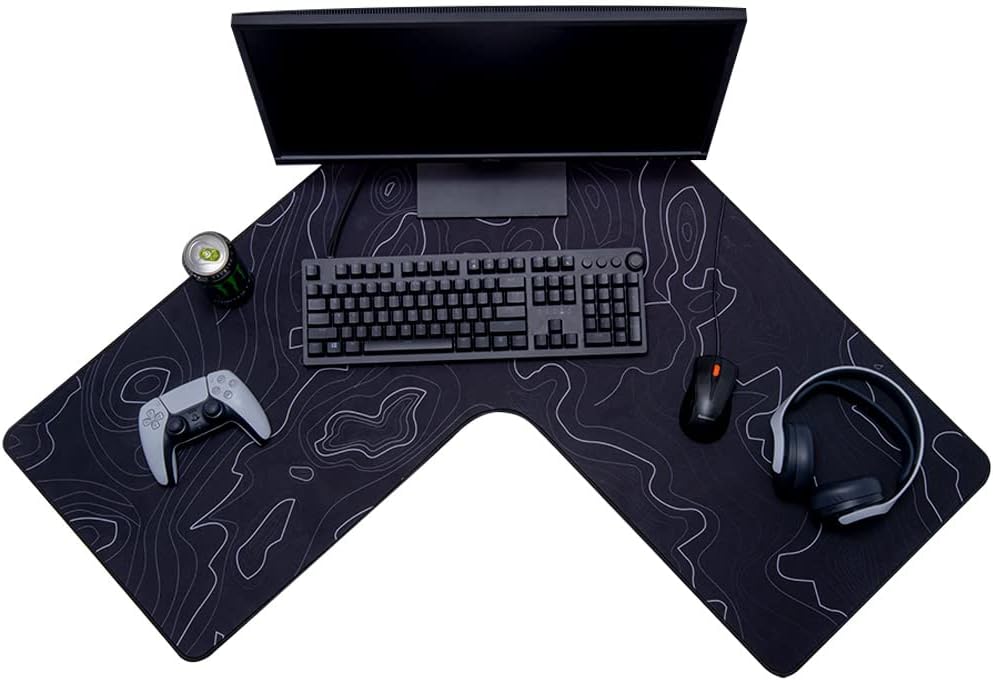
The Con-Tact Brand XL Extended Mouse Pad combines a generous 36.22-by-15.74-inch L-shaped surface with a 4.6 customer rating, making it the strongest all-around choice in this guide. It is designed specifically for corner desks, where a conventional rectangular mouse pad can leave awkward gaps around the keyboard or mouse.
We may earn a commission when you buy through this link, at no additional cost to you.
Its most useful features include a rubberized base that helps prevent sliding, a water-resistant surface that is relatively easy to wipe down, and precise edge stitching that protects the perimeter from fraying. The broad upper section provides room for office supplies in addition to a mouse and keyboard, while the extended side creates a continuous working area.
The main trade-off is its dimensions. At 36.22 by 15.74 inches, it does not create the expansive two-square-foot surface offered by several reversible leather models. Its Topo visual pattern also makes it more noticeable than a plain black desk mat. Even so, the combination of stability, protective construction, and a highly rated customer response makes those limitations relatively easy to accept.
Choose this model if you want one mat that bridges the mouse and keyboard zones of a corner workstation without taking over the entire desktop. It is particularly suitable for home offices, students, and gamers who need dependable grip and a little more usable surface than a small dedicated mouse pad.
The extended L shape fills the area where a standard rectangular pad often stops, allowing the mouse to travel beyond the edge of a traditional pad. It also leaves useful room for a keyboard, notes, and small accessories without requiring several separate surface covers.
A rubberized base supports accurate mouse movement by limiting unwanted movement of the mat. The water-resistant, stain-resistant upper surface adds an extra barrier between the desk and spills, snacks, writing instruments, and ordinary office wear.
We may earn a commission when you buy through this link, at no additional cost to you.
The ZORESYN PU Leather L Shaped Desk Mat is a large option with two 39.4-inch arms and a 13-inch width, earning a 4.0 customer rating. Its equal-arm shape gives users flexibility over which side becomes the longer working section, making it suitable for both left- and right-handed corner arrangements.
We may earn a commission when you buy through this link, at no additional cost to you.
The upper side is smooth PU leather designed to support controlled mouse gliding while also serving as a writing and desk-protection surface. A soft suede underside adds friction so the mat remains stable. Reinforced stitching around the perimeter helps prevent deformation and fraying, while the leather-like finish can be wiped with a damp cloth or paper when spills occur.
One important distinction is that the two sides do not offer the same level of protection. Only the PU leather side is described as waterproof, while the suede base is not fully waterproof. It also does not include a removable or replaceable surface, so care should be taken around liquids and the mat should be cleaned rather than washed.
This mat is a good match for someone who wants to cover most of a large corner desk and values a coordinated black appearance. Choose it over a smaller model if your keyboard, monitor stand, and accessories need substantial protection and you prefer a clean leather-style surface.
Because both sections measure 39.4 inches, the mat can be rotated according to the user's dominant hand or the available desk space. That symmetry is useful in shared offices and for users who may change how their monitors, keyboard, and mouse are positioned.
The non-porous PU surface is well suited to writing, office work, and everyday mouse use. Most marks can be addressed with a damp cloth or paper, making the mat more approachable than a deeply textured fabric surface that traps debris.
We may earn a commission when you buy through this link, at no additional cost to you.
The Mydours L-Shape Desk Pad has a 4.1 customer rating and uses two 38-inch arms with a 13-inch width to cover a substantial corner workspace. Its balanced geometry is especially practical because either arm can be placed along the longer side of the desk, allowing the user to adapt the layout.
We may earn a commission when you buy through this link, at no additional cost to you.
The smooth PU leather top is designed for fluid mouse movement and can also function as a writing surface. Its non-porous finish helps keep dirt and liquids from becoming embedded, while the soft suede base provides cushioning that can reduce noise when typing and protect the underlying desk from abrasion. The surface can be restored with a damp cloth.
Its principal limitation is that it is a general desk protector rather than a dedicated ergonomic accessory. There is no raised wrist rest or forearm cushion, so users who spend long periods leaning on the desk may still want a separate support. The solid black appearance is also deliberately understated and may blend into an office but feel plain in a more decorative setup.
This is a strong choice for a large corner workstation that needs one consistent surface for a mouse, laptop, keyboard, and writing tasks. It is particularly practical for designers, students, and office workers who want broad coverage without moving to a larger, more specialized ergonomic system.
The matching arms reduce the need to think about which section is longer. Users can orient the surface according to desk depth, dominant-hand placement, or monitor layout without sacrificing a large mouse area.
The suede layer adds a softer interface between the rigid mat and the desktop. It may also limit the sharp sound produced by direct keyboard contact, contributing to a more focused work environment.
We may earn a commission when you buy through this link, at no additional cost to you.
The L Shaped Curved Desk Mat has a 3.9 customer rating and uses two approximately 36.22-inch arms to create a broad corner workspace. Its rubber-and-fabric construction is described as waterproof, easy to wipe clean, and suitable for accommodating a computer, keyboard, mouse, and other daily items.
We may earn a commission when you buy through this link, at no additional cost to you.
An anti-skid rubber layer helps keep the mat in position, which is essential for a large surface that may otherwise move when the mouse travels toward an outer edge. The fabric upper layer offers a softer interface for the wrist and forearm than a bare desk, while the waterproof treatment provides useful spill protection.
The product information gives less detail about edge reinforcement and the exact backing construction than some competing listings. Its 3.9 rating is also lower than the leading options, although the lower number should be interpreted alongside the limited information about how many reviews it has received. The black appearance and curved outer corners allow it to blend into many gaming or office arrangements.
This is a sensible option for buyers who want a large fabric-covered mat with a soft mouse surface and uncomplicated cleaning. It is less compelling for someone who needs a premium leather finish or highly specific ergonomic support, but it covers the essential needs of a corner desk well.
The fabric surface gives the hands a more comfortable resting area than a bare wooden or glass desktop. Its low-profile construction keeps the mat visually and functionally closer to a conventional large desk mat.
The waterproof finish allows the mat to be wiped with a cloth, which is useful in offices where coffee, ink, and small spills are common. Regular cleaning also helps preserve a consistent mouse-tracking surface.
We may earn a commission when you buy through this link, at no additional cost to you.
The Cacoy L Shaped Desk Mat combines a 35.4-inch arm with a 39.4-inch arm and a 13-inch width, earning a 4.0 customer rating. Its PU leather upper surface provides a comfortable place for the hands while also creating a protective barrier over the desktop.
We may earn a commission when you buy through this link, at no additional cost to you.
The suede reverse side increases friction to help keep the mat from shifting, while precision-stitched edges are intended to resist fraying and curling. The waterproof, stain-resistant surface is easy to maintain and can help protect the desk from scratches, ordinary wear, and accidental spills. It is also versatile enough for home offices, meeting rooms, and other workspaces.
Unlike the symmetric ZORESYN and Mydours designs, this mat has arms of different lengths. That can be advantageous when the corner desk has a clear short and long side, but it may be less flexible if the user wants to rotate the mat. It also provides no dedicated padding beneath the wrist, making it better viewed as a desk protector than an ergonomic forearm rest.
Choose the Cacoy mat for a traditional professional corner workstation that needs a clean black surface and dependable desk coverage. It offers the most appropriate balance for users who care about appearance, edge durability, and easy maintenance without needing a built-in wrist rest.
The understated black finish suits office furniture and shared workspaces. Covering the exposed corner also creates a more unified visual area, making the keyboard, mouse, and desk accessories appear intentionally arranged.
Stitched edging helps the perimeter retain its shape and reduces the likelihood of fraying. This is a useful construction detail on a large mat that may be repositioned whenever the user adjusts the monitor, keyboard, or mouse.
We may earn a commission when you buy through this link, at no additional cost to you.
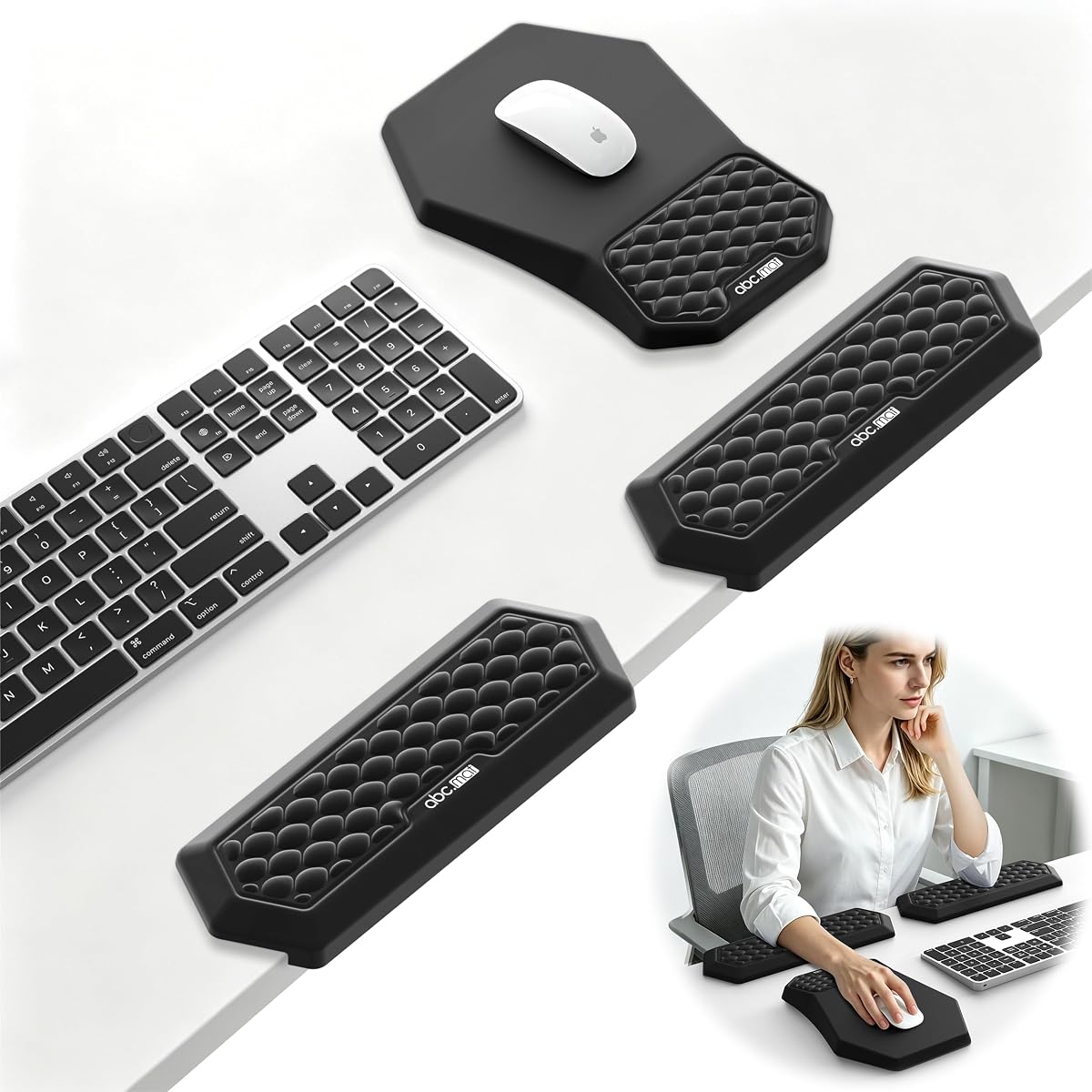
The 2-in-1 L-Shaped Desk Elbow Pads and Mouse Pad Set has a 4.6 customer rating and is the only option in this list built primarily around forearm support. Rather than covering an entire corner desk, it includes two L-shaped elbow pads and a separate ergonomic mouse pad with a wrist rest.
We may earn a commission when you buy through this link, at no additional cost to you.
High-density slow-rebound memory foam is covered with smooth, breathable Lycra to provide cushioning while limiting heat buildup. The elbow pads use a non-slip rubber base and edge-lock design, while the mouse pad has a PU anti-slip backing. Because the three pieces can be positioned independently, the system works on both straight and L-shaped desks and accommodates left- or right-handed mouse use.
The trade-off is coverage. It does not create a continuous writing area or protect a large portion of the desktop, and the separate components take more planning than a single desk mat. It is also a specialized ergonomic system rather than a conventional L Shaped Mouse Pad, so its appeal depends on whether wrist and elbow comfort outweigh surface coverage.
This set is the strongest option for users who spend extended periods typing, gaming, editing, or working at a corner desk and regularly feel pressure at the wrist or elbow. It is also a premium choice for anyone willing to add individual accessories in exchange for adjustable arm support and a dedicated resting area.
The paired elbow pads extend support beyond the mouse pad itself, reducing direct contact between the forearm and hard desk edge. This can be especially useful during long gaming sessions or concentrated keyboard work.
Each component can be placed where it is most useful instead of following a fixed L-shaped layout. That flexibility makes the set suitable for changing postures, different desk shapes, and users who alternate between mouse and keyboard tasks.
We may earn a commission when you buy through this link, at no additional cost to you.
The Vyaaa L Shaped Desk Mat offers two 39.4-inch arms with a 13-inch width and a 4.0 customer rating. Its most distinctive feature is the dual color scheme, with green and pink surfaces that can be reversed to refresh the appearance of a workspace.
We may earn a commission when you buy through this link, at no additional cost to you.
Both sides are made from durable PU leather, while the back includes a non-slip liner that increases friction and helps prevent shifting. The mat can protect the desktop from scratches, stains, spills, heat, and wear, and it may be used as a mouse surface, blotter, writing area, or general desk protector. It is also easy to wipe clean.
The listing notes that the inner corners are straight while the outer corners are curved, and that creases may appear because of packaging. Heavy objects can be used to flatten the mat after unpacking. Its brighter dual-color appearance may also be less suitable for a conservative office than a black model, even though the material is otherwise practical.
This is a strong choice for a creative home office, gaming setup, or student workspace where color and reversibility matter. Buyers who prefer subtle professional styling should look elsewhere, but those who want expansive coverage and the option to change the surface color will find it distinctive and versatile.
Flipping the mat reveals the alternate color, allowing the desk to be refreshed without replacing the entire surface cover. The two finishes can suit different moods or complement seasonal changes in a creative setup.
The dimensions can accommodate monitors, a keyboard, and a mouse with room for writing. That makes the mat useful for users who want one continuous protected zone instead of separate pads for individual accessories.
We may earn a commission when you buy through this link, at no additional cost to you.
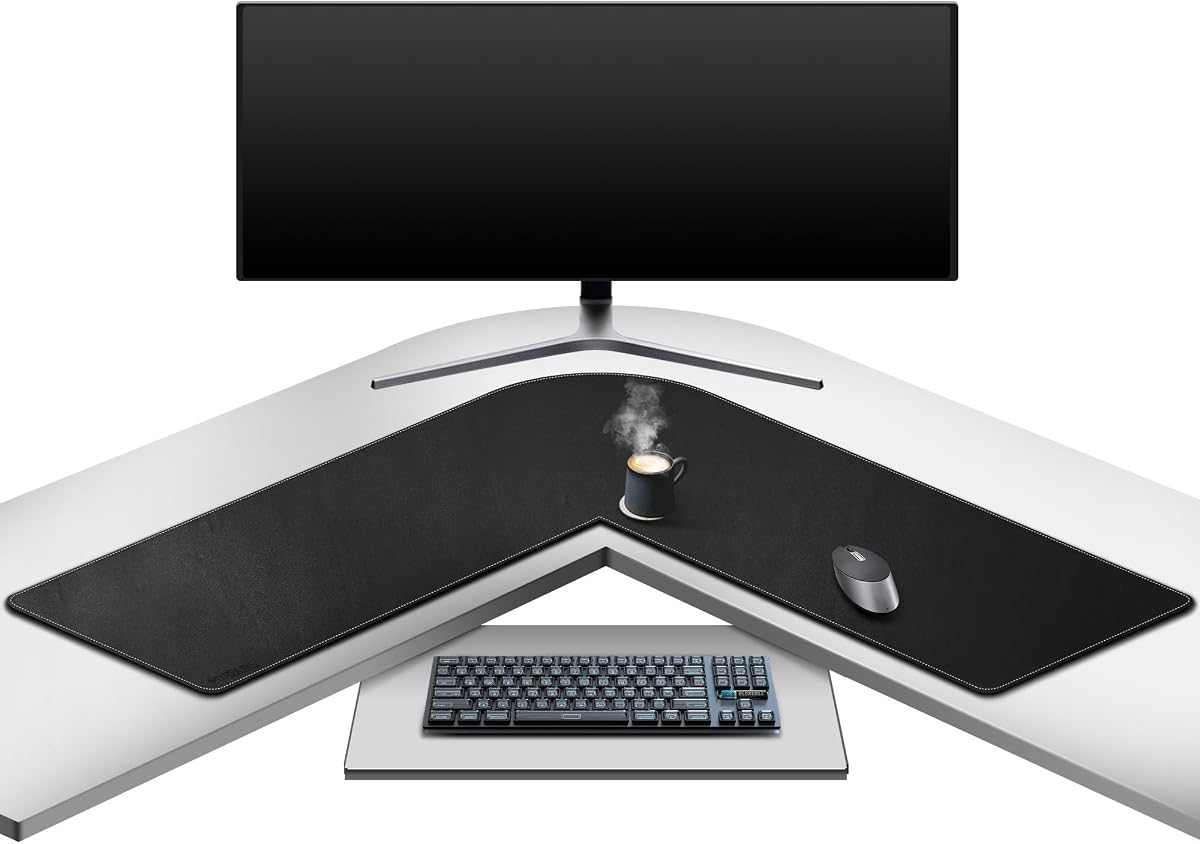
The Relaxweex Corner Desk Mat is a more compact option with 26-inch dimensions and an 18-inch inner corner. Its 3.9 customer rating reflects a practical design aimed specifically at 90-degree corner workstations, where an oversized mat might extend beyond the available surface or interfere with the desk frame.
We may earn a commission when you buy through this link, at no additional cost to you.
The soft fabric upper layer supports smooth mouse tracking for office tasks, study, writing, and casual gaming. A non-slip rubber backing helps keep the mat stable during typing and mouse movement, while the laminated surface is described as resistant to spills, stains, and daily wear. It can be wiped with a damp cloth for routine maintenance.
The primary compromise is usable area. A 26-inch footprint is ample for a mouse, compact keyboard, and notebook, but it offers less room for a full monitor setup or numerous accessories. The manufacturer also notes that a mild rubber scent is normal and recommends ventilating the mat for one to two days after receipt. Buyers sensitive to smells should account for that guidance.
This is the best pick for someone with a smaller corner desk who wants the visual and functional benefits of an L-shaped surface without covering most of the desktop. It is particularly useful for students, casual gamers, and office workers who need a compact, stable, easy-to-clean mouse area.
The compact shape reduces the risk of overhang and can make better use of a modest desk. It also allows the mat to be moved more easily when the user needs access to the corner, storage, or an adjustable desk mechanism.
The fabric top offers a smoother and softer surface than bare wood or glass, while the rubber base helps maintain a consistent relationship between the mouse and the desktop. The result is a practical middle ground between a tiny pad and a full desk cover.
We may earn a commission when you buy through this link, at no additional cost to you.
The MAIDERN Cork & Leather Desk Mat combines two 40-inch arms with a 13-inch width and a 4.1 customer rating. Its defining feature is a reversible construction: one side is PU leather, while the other uses eco cork derived from natural wood, giving the workspace a more distinctive vintage and professional appearance.
We may earn a commission when you buy through this link, at no additional cost to you.
The two-millimeter thickness makes the mat flexible while providing a softly cushioned feel. The leather side offers a smooth surface for mouse movement, while the cork side creates a more natural, textured visual. The product is described as waterproof, non-slip, and oil-proof, with protection against scratches, stains, and spills on glass, wood, or metal desktops.
Because the two materials feel different, it would be misleading to treat them as interchangeable. Mouse tracking, cleanliness, and aesthetics may change after the mat is flipped, and the cream color may make small marks more noticeable than a black model would. The eco-friendly description also applies specifically to the cork side, not the PU leather component.
Choose this premium mat for a large corner desk where natural materials, flexible styling, and abundant coverage matter. It is a good fit for office, home, and gaming users who want a sophisticated desk setup and appreciate the option to reverse the mat when their aesthetic or functional needs change.
The PU side favors a smooth, polished experience, while the cork side provides a warm, organic look. Reversing the mat allows the user to change both the visual character and the texture without buying a separate protector.
The large dimensions leave room for a laptop, monitor, keyboard, mouse, wrist rest, notebook, and other everyday objects. Its flexible two-millimeter construction also allows it to conform more readily to the surface than a rigid protector.
We may earn a commission when you buy through this link, at no additional cost to you.
The Chihein PU Leather Desk Pad uses a 37.4-inch arm and a notably long 49.2-inch arm, with a 12.99-inch width and a 4.0 customer rating. It is especially useful for an L-shaped desk with one long section, giving the mouse and keyboard considerably more linear room than a compact corner pad.
We may earn a commission when you buy through this link, at no additional cost to you.
The PU leather surface is waterproof and easy to clean with a wet towel or tissue. Both sides use the same material but display different colors, allowing the mat to be reversed for visual variety. At two millimeters thick, the flexible construction may also reduce the sound created by mouse sliding and keyboard operation, helping create a quieter working environment.
Its asymmetric shape is both a strength and a limitation. The 49.2-inch arm can cover a long run of desk, but the mat is less flexible than equal-arm products if the user wants to rotate it or change which side sits along the longest desk edge. It also offers no raised support for the wrist, and the listed use cases do not extend beyond desktop protection and mouse or writing surfaces.
This mat is best for a long, irregular corner setup where the extra coverage of one arm is valuable. It suits users who want a black and gray office appearance, easy cleaning, and noise-reducing flexibility, especially those who can accommodate the fixed asymmetric proportions.
The 49.2-inch arm can accommodate a broad keyboard, mouse zone, and writing area along one side of the desk. This makes the mat useful for users who want one protected line of work rather than two equal wings.
Turning the mat over reveals a different color while retaining the same smooth PU leather construction. This provides visual flexibility without requiring users to adjust to a completely different backing or thickness.
We may earn a commission when you buy through this link, at no additional cost to you.
The right L Shaped Mouse Pad depends on the geometry of your desk, the amount of equipment you want to cover, the materials you prefer, and whether your priority is mouse control, surface protection, or forearm comfort.
Choose a footprint that leaves the mat fully supported and does not interfere with desk controls.
Choose PU leather for smooth, easily cleaned tracking and fabric for a softer traditional feel.
Prefer a clearly identified non-slip underside and clean both the mat and desktop before placement.
Choose a large mat for broad equipment coverage and a compact mat for a smaller corner or minimalist setup.
Prioritize a water-resistant top, reinforced edges, and a material that suits your cleaning habits.
Choose a wipe-clean surface for busy offices, and follow the manufacturer instructions for the side facing down.
Choose a padded accessory set for long sessions and a conventional mat for wider desk coverage.
Choose black for a professional look, dual colors for flexibility, or cork and leather for a natural style.
Begin by cleaning and drying the desktop, then unroll or unfold the mat with the intended upper surface facing up. Center the inner corner in the desk corner and align the two arms with the usable work zones. The grippy side should sit directly against the desk, and no surface should be folded or bunched beneath the mouse area.
Place the mouse on the smoother central portion of the mat, keeping the keyboard on one arm and writing materials on the other. For a reversible product, confirm which side is the upper working surface before placing equipment on it. When using an asymmetric mat, position the longer arm along the section with more room rather than forcing it into the shorter section.
Clean the mat according to its material and the manufacturer's care instructions. Most listed PU leather and laminated surfaces can be wiped with a damp cloth, while stains should be addressed promptly rather than allowed to set. Keep liquids away from non-waterproof undersides, avoid aggressive scrubbing, and let the mat dry flat before returning equipment to the surface.
Choose a mat whose two arms fit within the usable dimensions of your corner desk. Compact models around 26 inches per side suit smaller setups, while large options with 38-to-40-inch arms support full keyboards and accessories. Also check the inner-corner depth, because a mat with the right overall dimensions can still overlap the desk frame if its corner is too deep.
They can be well suited to gaming because their smooth surfaces support fast, consistent mouse movement. The key factors are the quality of the grip layer, freedom from raised seams in the mouse zone, and enough room to move without leaving the surface. The Con-Tact fabric option and the ergonomic mouse pad in the 2-in-1 set offer different tracking experiences for different preferences.
Most PU leather surfaces in this guide can be wiped with a damp cloth or tissue, and their non-porous finish helps prevent dirt from becoming embedded. Spills should still be cleaned promptly, and the underside should not be soaked because it may use suede, rubber, or a non-waterproof liner. Always follow the product-specific care guidance.
Most options include rubber, suede, or textured non-slip backing intended to reduce movement. Stability also depends on cleaning the contact area, placing the mat flat, and avoiding any section that hangs beyond the desk edge. A mat that is properly supported and regularly wiped is less likely to shift than one placed over dust or uneven surfaces.
Equal-arm mats are easier to rotate and can work with either side of a corner desk, making them flexible for changing layouts. Asymmetrical mats, such as the Chihein model with a 37.4-inch and 49.2-inch arm, may fit a desk with one clearly longer section more precisely. Measure both options and compare the inner-corner depth before deciding.
They protect the area covered by the mat, not the entire desktop. Large models may accommodate a monitor, keyboard, mouse, and accessories, while compact versions cover only a focused corner. The mat can still reduce scratches, spills, stains, and noise in that region, but exposed sections of the desk remain unprotected.
A reversible design provides two appearances and may allow you to change the surface texture without buying another mat. The Vyaaa offers contrasting green and pink sides, the MAIDERN pairs PU leather with cork, and the Chihein uses black and gray PU leather. Check that the underside is the intended non-slip face and review how each material affects mouse tracking and cleaning.
A conventional L-shaped desk mat mainly provides a smooth surface and may reduce direct friction, but most models do not elevate or cushion the wrist. For dedicated support, the 2-in-1 set includes a wrist-rest mouse pad and two memory-foam elbow pads. This is a better choice for users focused on pressure relief during extended typing or gaming sessions.
The Con-Tact Brand XL stands out as the best overall option because it combines a strong customer rating, stable rubberized base, water-resistant surface, stitched edges, and practical corner coverage. The Relaxweex model is the best compact choice for a smaller 90-degree corner, while the MAIDERN cork and leather design leads the premium group with expansive, reversible coverage.
The right choice ultimately depends on the desk. Measure both arms and the inner corner, then prioritize the surface and support that match your work. Buy broad leather-style coverage for a full equipment setup, a smaller fabric mat for a compact workstation, or a padded multi-piece set when wrist and elbow comfort is the main concern.
Before purchasing, review the latest listing details and current customer feedback, as materials, dimensions, and availability can change. Confirm that the mat will lie flat on your desk and that the cleaning guidance suits your habits, especially if it will share space with food, drinks, or frequently used office equipment.