
ELECBRAIN 100W USB-C Power Adapter
4.4Editor score
Single-port 100W laptop charging
Multi-voltage USB-C power profiles
Included 100W charging cable
Our 100W USB C Charger guide compares 10 powerful options for laptops, phones, tablets, and travel, highlighting ports, portability, safety, and compatibility.
A 100W USB C charger is a versatile power source for fast-charging compatible laptops, smartphones, tablets, and other USB-C devices. The strongest models combine high output, useful port selection, thermal protection, and a portable design, making them practical for work, travel, and shared spaces.
We compared the 10 chargers using their stated output, port configurations, charging capabilities, safety features, included accessories, portability, and device compatibility. The list covers single-port blocks, compact GaN designs, multiport chargers, smart displays, and bundles that include USB-C cables.
Each review explains the charger’s standout benefits, practical limitations, and ideal use case so you can choose confidently. Product availability, promotions, included accessories, and technical details can change, so verify the current listing and compatibility information before ordering.
4.4Editor score

4.7Editor score

4.6Editor score
This side-by-side comparison shows the differences in port count, maximum output, portability, safety systems, and cable inclusion, helping you identify the right charger for laptops, multi-device setups, and travel.




The Anker 100W Max is the most versatile charger in this guide, combining three ports, up to 100W output, GaN construction, and a smart display in a remarkably small enclosure. Its listed 4.7 rating also makes it the highest-rated option among the products compared, reflecting a strong combination of performance, monitoring, and portability.
We may earn a commission when you buy through this link, at no additional cost to you.
The key feature is the ability to deliver a steady 100W through any USB-C port while distributing power intelligently among connected devices. The display reports charging status, temperature, and port performance, giving users useful information that most basic wall chargers omit. A low-current mode also supports compatible earbuds and other devices that benefit from reduced power.
The charger measures 2.72 by 2.17 by 1.34 inches and uses a foldable plug, so it travels more conveniently than a large laptop power brick. However, a three-port design introduces more complexity than a single-port adapter, and connected devices must share the available output. The smart display may also offer less value to someone who only needs an uncomplicated laptop charger.
This is the strongest choice for a traveler, hybrid worker, or technology enthusiast who wants one charger for several devices. It combines meaningful charging information, flexible port placement, and a compact footprint without requiring separate blocks for a phone, earbuds, and laptop. Choose it when versatility and visibility matter more than minimum size.
The smart display makes power allocation easier to understand by showing live charging status, temperature, and port performance. That information is particularly useful when charging several devices or checking whether a cable is delivering the expected output.
Despite accommodating three ports, the GaN body and foldable plug remain compact enough for bags and coat pockets. A single charger can therefore replace several separate adapters without creating unnecessary desk clutter.
We may earn a commission when you buy through this link, at no additional cost to you.
The ELECBRAIN 100W USB-C Power Adapter delivers the essentials without the additional display or multiple ports found on more advanced models. It is a focused laptop charger with a 4.4 rating, broad charging-profile support, and an included 4.9-foot USB-C cable for immediate use.
We may earn a commission when you buy through this link, at no additional cost to you.
Its output profiles cover common USB-C PD levels, including 20V at 5A, 18V at 5A, 15V at 5A, 10V at 5A, 9V at 3A, and 5V at 3A. The adapter automatically identifies connected equipment and is listed as compatible with USB-C laptops and Android devices from Lenovo, Acer, Dell, Asus, and other brands.
Five-fold protection covers over-current, over-voltage, overheating, short-circuiting, and overcharging conditions. A built-in heat-dissipation system is also listed. The tradeoff is that this is a single-port adapter, so it cannot charge a laptop and phone simultaneously, and it provides no display or detailed runtime information.
Choose this charger when you need a simple, capable power source for one USB-C device at a time. It is a practical option for office bags, travel kits, and households that can tolerate bringing a separate adapter for additional devices.
Multiple supported voltage and current combinations allow the adapter to negotiate a suitable output for different USB-C devices. This is especially useful for a portable charger intended to serve more than one modern laptop or phone.
The stated protection suite addresses common electrical risks while a heat-dissipation system supports operation at high output. These features make the adapter suitable for regular charging in offices and travel environments.
We may earn a commission when you buy through this link, at no additional cost to you.
The Anker 317 Compact Charger is a dependable 100W USB C charger for users who need one high-output port and little else. It carries a 4.6 rating, includes a five-foot USB-C cable, and uses a compact folding design that makes it easier to carry than a traditional laptop brick.
We may earn a commission when you buy through this link, at no additional cost to you.
Its USB-C port can charge a wide range of USB-C devices, and the listed specifications state that a 16-inch MacBook Pro with the M1 Max chip can reach full charge in one hour and 20 minutes. PowerIQ 3.0 provides automatic device compatibility, while the foldable plug protects the prongs and reduces bag space.
ActiveShield monitors temperature continuously, adding a layer of thermal management to the charging process. The main limitation is its single port: you cannot charge a phone and laptop at the same time, even if a second cable is available. It also lacks the charging information offered by a smart display.
This charger suits a user who prioritizes reliable laptop charging, compactness, and simple operation. It is a strong fit for commuting with a single primary device or keeping a dedicated adapter in a work bag without adding unnecessary multiport complexity.
The folding plug and small form factor make the charger convenient to pack and less exposed to outlet prongs. It can serve as a straightforward replacement for a bulky manufacturer-supplied laptop adapter.
PowerIQ 3.0 adapts output to connected equipment, while ActiveShield provides ongoing temperature monitoring. Together, they support convenient charging without requiring manual adjustment.
We may earn a commission when you buy through this link, at no additional cost to you.
The Anker Nano 100W Charger stands out for its exceptionally small body and low listed weight of 4.23 ounces. It delivers up to 100W through a single USB-C port, making it a compelling choice for travelers who need serious laptop power without carrying a full-sized adapter.
We may earn a commission when you buy through this link, at no additional cost to you.
The charger is stated to charge a 14-inch MacBook Pro to 50 percent in 27 minutes. Its durable matte prongs are designed to remain stable in an outlet, addressing a common problem with very small travel chargers that can be pushed out of place.
ActiveShield 2.0 monitors temperature three million times per day and adjusts power output to safeguard connected devices. A six-foot USB-C cable is included, and the product comes with a 24-month warranty. The limitation is that it has only one port and no display for observing charging status.
Choose it when every gram and cubic inch matters. It is particularly attractive for minimalists, frequent travelers, and anyone replacing a bulky laptop brick with a small block that can still deliver 100W.
The Nano combines a four-point-three-ounce body with full 100W USB-C output, offering a useful balance for travel. Its folding prongs keep the package compact while maintaining a more substantial power level than ordinary phone chargers.
Durable matte prongs help the charger remain securely positioned. This is a small but meaningful advantage for users who regularly charge laptops in crowded airports, hotels, and shared workspaces.
We may earn a commission when you buy through this link, at no additional cost to you.
The UGREEN Nexode 100W GaN Charger is a complete four-port power hub, offering three USB-C connections and one USB-A port. Its 4.6 rating reflects a balanced design that handles a laptop and several smaller devices while remaining compact enough for travel and business trips.
We may earn a commission when you buy through this link, at no additional cost to you.
When connected to a single USB-C device with a compatible 100W 5A cable, the charger can provide up to 100W. The product information states that a MacBook Air M3 can reach 55 percent in less than 30 minutes under that condition. When several devices are connected, total output is shared intelligently among the available ports.
Compatibility extends to MacBook Pro and Air models, iPhones 8 through 17, Galaxy S10 through S25, iPads, Steam Deck, and other USB-C devices. The stated limitation is important: some Dell and Lenovo laptops cannot charge at full speed because of their charging protocols. Dynamic temperature sensors and an intelligent PWM chip adjust output for safety.
This is the most complete premium-style desktop and travel charger in the list. It earns its place for users who regularly carry several devices, need both USB-C and USB-A connections, and want a single hub capable of replacing multiple stock power adapters.
The three USB-C ports and one USB-A port cover modern laptops, phones, tablets, and legacy accessories. Users should understand that maximum speed on a single device requires the correct cable and that multi-device charging reduces individual output.
GaN technology and a folding plug allow the Nexode to fit in the palm of the hand. That makes it convenient for longer trips where carrying separate laptop, phone, and tablet chargers would consume unnecessary luggage space.
We may earn a commission when you buy through this link, at no additional cost to you.
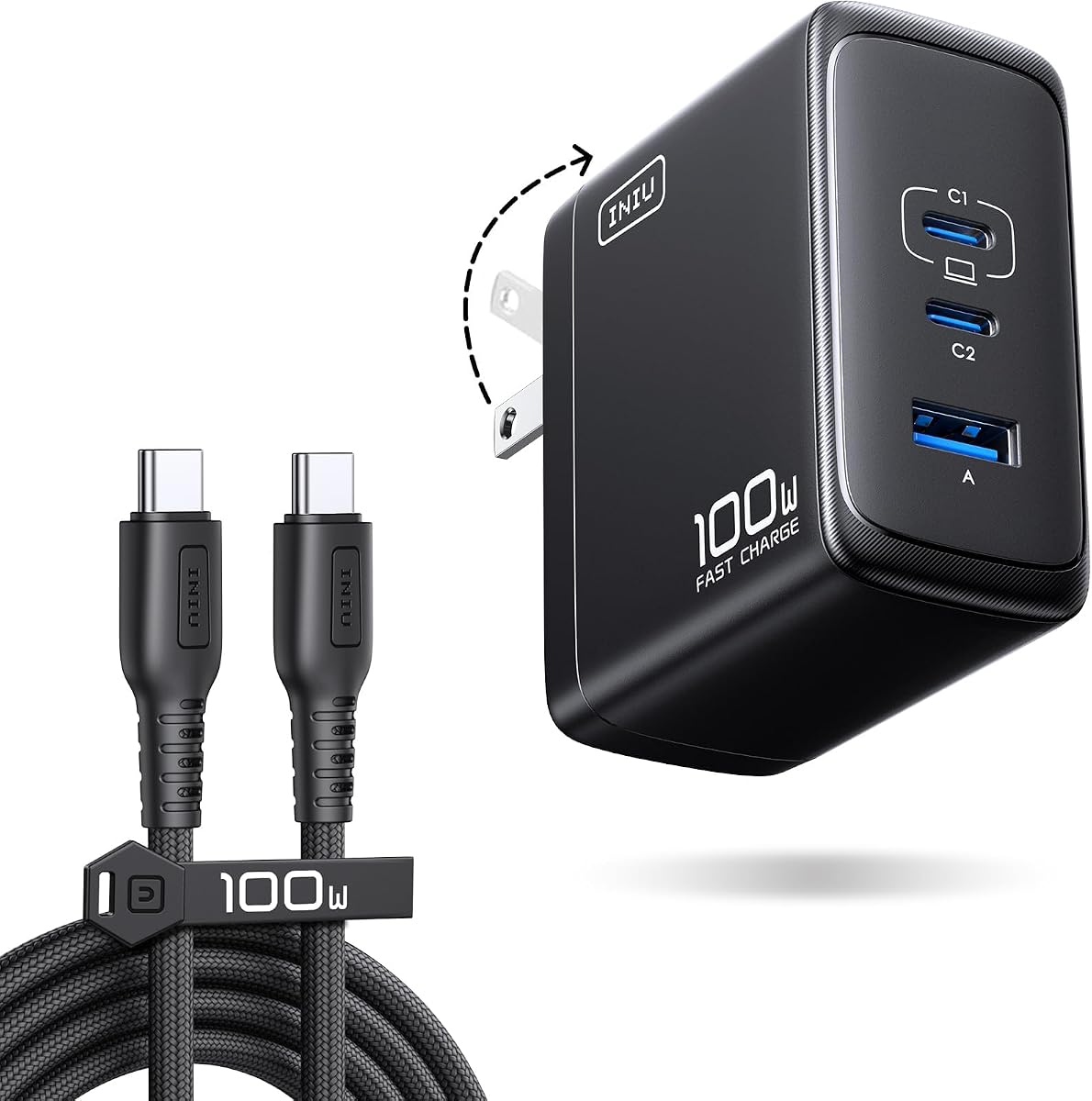
The INIU 100W GaN Charger is designed to preserve useful output when multiple devices are connected, a feature many budget-oriented multiport chargers handle less effectively. Its listed 4.5 rating reflects a flexible charger that can serve as a laptop adapter, travel block, or shared charging hub.
We may earn a commission when you buy through this link, at no additional cost to you.
The stated allocation is up to 100W on one port, 70W plus 30W for two devices, and 45W plus 30W plus 22.5W for three devices. Product information also gives fast-charging examples for a 14-inch MacBook Pro, Galaxy S26 Ultra, and iPhone 17 Pro Max, although actual results depend on the device, protocol, and cable.
The folding plug helps the charger remain stable in outlets, and the body is listed as 30 percent smaller than the original 96W INIU charger. It includes a five-foot nylon-braided 100W cable, described as three times more durable than standard plastic cords. The tradeoff is that only one port can reach the full 100W rating.
Choose this charger for people who regularly alternate between a laptop and two smaller devices, particularly in offices or while traveling. Its intelligent allocation and generous accessory package make it more versatile than a basic single-port block.
The detailed allocation figures make it easier to estimate performance with two or three devices attached. This is a major advantage over treating every port as a full-power connection regardless of the total charger output.
The included braided cable offers a sturdier option for repeated packing and unpacking. Its 100W rating and E-marker-related specification support use with demanding USB-C devices when paired correctly.
We may earn a commission when you buy through this link, at no additional cost to you.
The wegear 100W Wall Charger combines three ports with a compact GaN III body, making it a practical travel option for users who need more than a single-device adapter. Its 4.3 rating places it slightly below the leading products, but the stated charging and safety features cover the essential needs.
We may earn a commission when you buy through this link, at no additional cost to you.
Two USB-C ports support USB Power Delivery, while the USB-A port provides up to 22.5W through Quick Charge. Total output is 100W and is distributed intelligently when multiple devices are connected. The product information states that a 14-inch MacBook Pro with the M3 Pro chip can reach 50 percent in 30 minutes from a single connection.
Thermal safeguards are a major selling point. The charger is listed as operating at or below 113 degrees Fahrenheit at full output, while monitoring voltage and current 100 times per second. It also includes short-circuit and overload shutdown protection, along with a flame-retardant casing.
The most notable drawback is that no USB-C cable is included. That means you need a suitable cable already, particularly one capable of carrying the current required for maximum laptop charging. For a traveler who already owns a 100W USB-C cable, it is a capable and compact three-device solution.
High-frequency voltage and current monitoring helps the charger respond to changing electrical conditions. Automatic shutdown for short circuits and overloads adds further protection during demanding use.
Two USB-C ports and one USB-A port provide enough connections for a laptop, phone, and accessory. The folding plug and GaN III construction reduce the amount of space required compared with a typical 100W block.
We may earn a commission when you buy through this link, at no additional cost to you.
The Auorld Two-Pack Charger is distinctive because it includes two 100W three-port charging blocks and two ten-foot USB-C cables. That makes it well suited to households, couples, or teams that want a ready-to-use charger in more than one location without purchasing separate kits.
We may earn a commission when you buy through this link, at no additional cost to you.
Each adapter combines two USB-C PD ports and one USB-A Quick Charge 3.0 port, with a total maximum output of 100W. Power is distributed across connected devices, and the product information gives fast-charging examples for compatible 14-inch MacBook Pro, iPhone, and Galaxy models.
GaN III technology is used to improve efficiency and reduce size, with the listing stating up to 95 percent charging efficiency and a body that is 68 percent smaller than traditional power adapters. The included cables are listed for up to 5A and 480Mb/s data transfer, adding value for compatible phone and tablet workflows.
The obvious trade-off is that two chargers and two long cables create more items to organize than a single multiport adapter. Choose this package when the ability to place a full charging station in two different rooms or bags matters more than minimalism.
The duplicated chargers and long cables are particularly useful for shared homes, guest rooms, offices, and travel companions. Each location receives a complete high-power charging setup rather than a single adapter that must be moved around.
Each block can serve a laptop and two smaller devices, with power shared intelligently. The included ten-foot cables make it easier to reach a wall outlet while keeping a desk or nightstand less cluttered.
We may earn a commission when you buy through this link, at no additional cost to you.
The Anker Nano 3-Port Charger combines a 100W laptop charging capability with a three-port format and a compact GaN II body. Its 4.2 rating is lower than several alternatives, but the product remains appealing for users who want to replace several smaller adapters with one unit.
We may earn a commission when you buy through this link, at no additional cost to you.
Either USB-C port can deliver up to 100W when it is the only connected device. Three devices can charge at the same time, with the product information specifically describing support for a MacBook, iPhone, and AirPods. The charger is listed as 34 percent smaller than the original 96W MacBook power brick.
GaN II technology is presented as the basis for the reduced size, using a higher operating frequency, stacked design, and upgraded circuit board structure. The included five-foot USB-C cable has an E-marker chip and a stated bend lifespan of more than 5,000 bends, supporting repeated travel use.
The main trade-off is shared power. When several devices are connected, none may receive the full 100W available to a single laptop. Choose this model for people who want a compact three-device charger with trusted high-power laptop capability and little concern for a display.
Providing 100W on either USB-C port when unshared gives users flexibility in how they connect devices. The multiport format is useful for a compact workstation where a laptop, phone, and earbuds all need regular charging.
The stacked GaN II design supports a smaller body while retaining high output. That balance is particularly useful for people who want more connections than a basic laptop adapter without carrying a large power brick.
We may earn a commission when you buy through this link, at no additional cost to you.
This second Anker 317 listing offers the same core proposition as the compact single-port charger: 100W USB-C output, a foldable design, an included five-foot cable, and temperature monitoring. It has a 4.6 rating and may be a practical alternative depending on listing availability, package details, or compatibility.
We may earn a commission when you buy through this link, at no additional cost to you.
The product information states that the charger can bring a 16-inch MacBook Pro with the M1 Max chip to a full charge in one hour and 20 minutes. PowerIQ 3.0 adapts to a broad range of connected mobile devices, helping simplify use across phones, tablets, and laptops with compatible USB-C inputs.
Its folding plug saves space and protects the prongs during travel. ActiveShield monitors temperature around the clock, providing continuous oversight while connected equipment charges. As with other single-port options, there is no way to charge a second device simultaneously and no display showing live output details.
This charger is best for a user who wants a dedicated high-power laptop adapter rather than a shared charging hub. It works especially well as a second travel charger or a simple replacement for an original bulky power supply.
The focused single-port format keeps charging easy to understand. Connect one compatible USB-C device to the included cable, and the charger handles output adaptation without menus or complicated controls.
A compact body, folding prongs, and continuous temperature monitoring make the charger suitable for regular travel. The included cable reduces the need to carry a separate high-current USB-C cable.
We may earn a commission when you buy through this link, at no additional cost to you.
A useful 100W charger should fit your devices, cable requirements, and travel habits rather than simply advertise the largest output number. The following factors help separate a single-device laptop adapter from a flexible multiport charging hub.
Start by confirming that the devices you intend to charge use USB-C and support the relevant fast-charging protocol. High wattage alone does not guarantee maximum speed, because the phone, laptop, cable, and charger must all negotiate a mutually supported power profile. MacBook Pro and Air models are frequently cited, but particular configurations and generations can behave differently.
Check manufacturer requirements for the device that matters most. Some laptops need a specific wattage or protocol, and some Dell and Lenovo models are specifically noted as unable to reach full speed with certain chargers. A device that charges slowly on a compatible charger is not necessarily a sign of a defective product; protocol limitations may be responsible.
A single-port charger can deliver its maximum output most directly to one device and may be preferable for a dedicated laptop. Multiport models are more convenient when you carry a phone, tablet, headphones, and computer, but they share a total power budget. One device may receive the full 100W only when it is connected alone, while other combinations reduce individual outputs.
Look for a stated allocation chart rather than assuming every port can independently provide 100W. Options offering 70W plus 30W for two devices or detailed three-device distributions are easier to plan around. Consider how often you will charge several devices simultaneously and whether one dependable adapter is worth carrying instead of several smaller ones.
To achieve maximum output on many USB-C laptops, you need a cable rated to carry the required current. Several chargers include a suitable USB-C cable, while the wegear model does not. Check the cable length as well: a longer lead can be more convenient at a desk, while a shorter cable is easier to coil and pack without tangling.
Nylon-braided cables and stated bend-lifespan figures can be useful indicators of travel durability. E-marker-equipped cables are designed to communicate supported current levels, which helps ensure that a charger and connected device negotiate a suitable profile. If a cable is included, confirm that it supports the maximum power needed by your largest device.
USB-C is central to modern phones, tablets, and laptops, but USB-A remains useful for older accessories, power banks, cameras, and other peripherals. A charger with both USB-C and USB-A can eliminate the need to carry a separate legacy adapter. The USB-A output is generally lower than the maximum USB-C output, so confirm the stated rating for that port.
Consider the physical shape and number of cables in your regular carry. Three USB-C ports may be ideal for a modern all-USB-C kit, whereas one USB-C and one USB-A port may better serve a mixed collection. Avoid choosing extra ports that you will never use if compactness is the main goal.
High-output chargers generate heat, making temperature management an important part of safe operation. ActiveShield, dynamic temperature sensors, and intelligent power-adjustment chips are among the protective systems listed in this guide. Other products emphasize over-current, over-voltage, overheat, short-circuit, overcharge, and automatic shutdown protections.
Look for monitoring that actively adjusts output rather than relying only on a passive description. Thermal specifications can also help distinguish the design intent of compact GaN chargers, which must dissipate heat in a smaller enclosure. Certification claims and established manufacturer service policies provide additional confidence, but users should still use suitable outlets and cables.
The charger that offers the most features is not necessarily the easiest to carry. Single-port models can be exceptionally compact, while multiport GaN designs trade a little extra size for greater flexibility. The Anker Nano option is particularly lightweight, and the Anker 100W Max combines three ports with a small body and folding plug.
A foldable plug protects the prongs and reduces the chance of snagging the charger in a bag. Very small models may also benefit from wider or matte prongs that help maintain outlet stability. If you will usually leave the charger on a desk, size matters less; if it accompanies every trip, weight, dimensions, and plug design become central purchasing criteria.
GaN construction can reduce charger size, but overall durability also depends on materials, prongs, cable finish, and manufacturer support. Some options include braided cables, while others use standard cords. The included warranty periods and replacement policies differ, giving you another way to compare expected ownership support without considering price.
For frequent travel, inspect the folding mechanism, cable flexibility, and overall fit in your bag. A charger that feels too large may remain at home, while a compact one can be used routinely. The goal is a model you will carry and use, not merely one with the longest written specification list.
Begin by reading the compatibility guidance for your laptop, phone, or tablet and inspecting the charger, plug, and cable for visible damage. Connect the device to the charger first, then plug the charger into a grounded wall outlet. Use a cable rated for the current required by the device, particularly when charging a demanding laptop at its highest supported output.
When using a multiport charger, connect the most power-hungry device first and observe whether charging speed changes as additional devices are attached. Some models automatically reduce output to share the available power, while others move into a low-current mode for earbuds and other small electronics. Allow the charger to remain in an open, ventilated position rather than covering it with clothing or placing it under a tight object.
Periodically inspect the cable connections and wipe the charger with a dry, soft cloth. Do not use liquids, open the housing, or attempt to repair internal components. If a port becomes loose, the plug becomes unusually hot, the cable shows fraying, or charging behavior changes unexpectedly, stop using the charger and contact the seller or manufacturer for support.
It can usually provide power to a compatible USB-C device, but the fastest charging rate requires support from the device and cable. The charger negotiates an appropriate output based on the connected device, so a lower device rating may prevent it from using the full 100W. Protocol limitations can also affect particular laptop brands and models.
It can, provided the MacBook model and charging protocol support the higher input and the connected cable is rated to carry it. The actual improvement varies by model and charging stage. Some laptops with lower requirements may see little difference, while higher-power configurations can benefit from faster replenishment.
Yes, if the charger has enough ports and negotiates shared output appropriately. A multiport model may provide a laptop with 70W while allocating 30W to a phone, for example, or it may use another distribution based on the devices. Check the charger’s power-allocation information because individual speeds decrease when several devices draw power simultaneously.
For maximum output on many laptops, yes. A basic cable that supports data transfer but not high current may charge slowly or may prevent the charger from entering its highest power profile. Look for a cable explicitly rated for 100W, particularly for 5A charging, and confirm that it is firmly connected at both ends.
GaN can enable a smaller, lighter design while maintaining high output, making it especially useful for travel and multiport designs. It does not automatically make every charger better, however. Consider the total power, port allocation, thermal safeguards, included accessories, and compatibility alongside the chipset.
Modern chargers generally manage power and temperature, but you should follow the instructions supplied by the charger and device manufacturers. Leave the charger uncovered in a ventilated position, use a sound outlet, and stop using it if you notice unusual heat, odor, discoloration, or damage. Never place flammable materials around a high-output charger.
First confirm that the charger, laptop, and cable all support the intended protocol and wattage. Check whether another device is drawing power, especially on a multiport charger, and reconnect the cable at both ends. If the laptop is warm or heavily loaded, it may reduce input power. Testing with a known compatible cable can help isolate the cause.
Add the power your devices can accept together and compare that total with the charger’s shared output. A 100W charger is well suited to many laptop, phone, tablet, and accessory combinations, but the largest device will determine the useful allocation. Choose a model with a clear multiport distribution if predictable laptop performance is important.
The Anker 100W Max is the most versatile overall option because it combines three ports, a smart display, flexible 100W output, and a compact body. The ELECBRAIN adapter stands out as a focused single-port solution, while the UGREEN Nexode offers the most complete four-port arrangement for people who regularly carry several devices.
Prioritize the features that affect daily use: confirm device compatibility, determine whether you need one or several ports, and check that the included cable supports your largest device. Compactness, thermal protection, power allocation, and service support are also meaningful differentiators, but they should complement rather than replace proper protocol and wattage compatibility.
Before purchasing, revisit the current listing because included accessories, package configurations, product availability, and promotions can change over time. Confirm the charger’s current specifications and your device requirements, then choose the model that best matches your charging pattern rather than relying only on the largest advertised wattage.