
My Robotic Pet Coding Chameleon
4.1Editor score
Screen-free action-card programming
Color sensor and infrared responses
Three distinct play modes
Coding Toys are compared for age range, learning style, programming features, build difficulty, classroom use, and screen-free appeal.
Coding toys turn abstract programming ideas into visible movement, sound, light, stories, and creative challenges. A worthwhile set matches a child’s age and interests while encouraging sequencing, problem-solving, experimentation, and persistence through hands-on play.
This guide compares ten coding toys across age range, screen-free features, programming environments, robot capabilities, build complexity, expansion options, and classroom suitability. It includes everything from physical command cards and color codes to block-based apps, JavaScript, and advanced robotics platforms.
Each review explains what makes a particular product useful and where its limitations may matter. Ratings reflect the supplied customer feedback, while prices and availability can change, so readers should verify current listing details before purchasing.
4.1Editor score
4.6Editor score

4.6Editor score
This side-by-side overview highlights each robot's age range, programming method, physical features, and practical use, making it easier to identify the coding toy that best fits a child's interests, learning stage, or classroom setting.




The Thames & Kosmos Coding Chameleon is a screen-free STEM kit designed to teach early coding concepts through a robotic reptile that responds to gestures, changes color, and operates its tongue. Its supplied customer rating is 4.1 out of 5, and its strongest appeal is the unusual combination of physical construction, sensor play, and command-card programming. It gives children something more expressive to control than a basic rover moving across a floor.
We may earn a commission when you buy through this link, at no additional cost to you.
Children build a 15-inch model with articulated eyes, torso, and leg joints, then use physical colored action cards to create sequences. A color sensor, infrared sensor, and RGB LEDs allow commands to interact with the surrounding environment. The three modes—Coding, Wild, and Pet—each provide a different reason to experiment. Wild Mode explores camouflage, Pet Mode reacts to touch, and Coding Mode provides the clearest structured lesson in sequencing and cause and effect.
The main compromises are age and complexity. The manual recommends adult assistance at age eight and independent play around age 12, making it less immediately suitable for very young children. Its action-card system is more approachable than writing code, but it does not offer the deeper software progression found in app-based robots. For families seeking a tactile introduction to STEM rather than a screen-based coding platform, however, those limits are reasonable.
This is a strong choice for an eight-year-old or older child who enjoys animals, construction, and physical experimentation. It is particularly useful for families who want coding without a tablet or phone. Choose it when the goal is an engaging introduction to sensors, sequential instructions, and mechanical assembly rather than advanced programming or extensive classroom software.
The colored action cards turn a program into something children can physically arrange, inspect, and execute. This makes abstract sequencing visible and helps explain how a series of instructions produces a predictable result.
Color detection, infrared sensing, lighting, touch reactions, and camouflage behavior give the chameleon more personality than a conventional coding robot. The sensors encourage children to notice how environmental conditions can alter a program.
We may earn a commission when you buy through this link, at no additional cost to you.
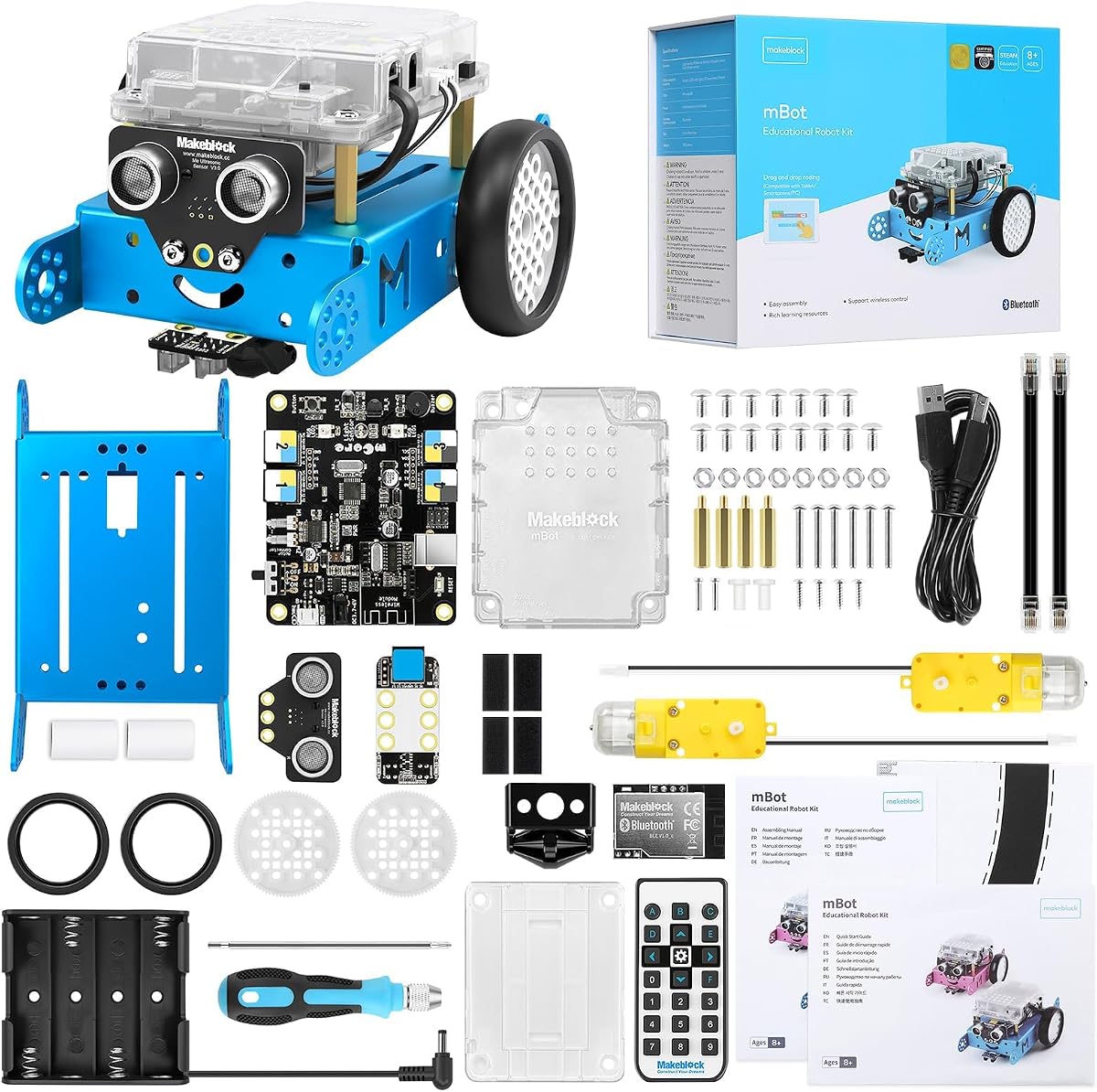
The Makeblock mBot is a programmable robot kit intended for children ages 8 to 12, and it combines approachable construction with meaningful progression into electronics, robotics, and programming. Its 4.6 rating reflects a strong balance of usability and educational value. The robot can be built in about 15 minutes, so children can move quickly from opening the box to experimenting with its sensors and movement.
We may earn a commission when you buy through this link, at no additional cost to you.
Its learning path is one of the kit's major strengths. Children may begin with coding cards, interactive lessons, and mBlock's visual programming environment before progressing toward Arduino. The robot also functions as a remote-controlled vehicle with line-following and obstacle-avoidance behavior, which makes the initial experience approachable even before a child writes a full program. Three included apps support remote control, programming games, and more structured coding activities.
The open-source architecture is what makes mBot more than a short-term activity. It can connect with more than 100 electronic modules and over 500 Makeblock platform parts, plus compatible LEGO parts, allowing children to redesign the robot as their skills improve. The trade-offs are that batteries are not included and the richest coding lessons require compatible software and a device. Some families may also prefer a fully screen-free kit.
mBot is an excellent general recommendation for a child around eight to 12 who wants a robot that can grow with them. It suits birthdays, holidays, summer learning, home projects, and introductory classroom activities. Pick it over simpler card-controlled robots if your child is ready for visual coding and may eventually want to experiment with sensors, electronics, and Arduino.
mBot supports a gradual learning curve through beginner tools, visual blocks, and Arduino. This lets children gain confidence with motion commands before exploring more advanced electronics and text-based programming.
The compatibility with a large collection of modules and parts makes the platform unusually flexible. Children can add capabilities, experiment with different configurations, and turn one robot into a series of increasingly complex projects.
We may earn a commission when you buy through this link, at no additional cost to you.
Sphero Mini is a ping-pong-ball-sized programmable robot with a 4.6 rating and a focus on creative games, quick setup, and accessible coding. It is designed for ages eight and older, with three main ways to program: drawing paths on a screen, arranging drag-and-drop coding blocks, or writing JavaScript. That range makes it useful for beginners and for children ready to progress toward a real programming language.
We may earn a commission when you buy through this link, at no additional cost to you.
The included gyroscope, accelerometer, and colorful LED lights add interactive possibilities while keeping the robot simple enough to use almost immediately. The free Sphero Play App also offers direct-drive modes, including joystick, slingshot, and device-tilt control. Three traffic cones and six bowling pins create immediate obstacle-course and game ideas without requiring a complex construction project.
Sphero Mini's main limitation is its dependence on a device and app for its richest functions. It is less suitable for a family specifically seeking screen-free learning, and its spherical form is less adaptable for attaching elaborate mechanical attachments than an open robotics platform. Even so, its excellent customer rating and simple design make it engaging for short creative sessions, travel, sibling competition, and game design.
This is a strong recommendation for a child who enjoys games, sports, and creating interactive stories as much as traditional robotics. It works particularly well for learning sequencing, control, spatial reasoning, and JavaScript in a compact format. Choose it for portability and creative coding; choose mBot instead when electronics, expansion parts, and a larger robot build are the priority.
Children can move from visual path drawing to drag-and-drop blocks and then into JavaScript. The same robot therefore supports several levels of experience without forcing an abrupt jump into a full development environment.
Traffic cones and bowling pins turn the robot into an obstacle-course and target-gaming toy before a child writes a program. Direct-drive modes also make it easy to alternate between unstructured play and coding practice.
We may earn a commission when you buy through this link, at no additional cost to you.
The Learning Resources Code & Go Robot Mouse Activity Set introduces programming to children as young as four through a robot mouse, physical coding cards, and maze challenges. It carries a 4.5 rating and focuses on fundamental sequencing, directional understanding, logic, and problem-solving. The format is particularly effective for early learners who may not yet read long instructions comfortably.
We may earn a commission when you buy through this link, at no additional cost to you.
Children program the mouse with simple buttons and matching cards, then guide it through a maze assembled from 16 grid sections. The kit includes 22 maze walls, three tunnels, 30 double-sided coding cards, 10 double-sided activity cards, a cheese wedge, and an activity guide. Its reusable grid system supports repeatable activities, making it practical for teachers running STEM-center rotations or small-group work.
The obvious limitation is the depth of programming. The mouse supports early coding concepts rather than advanced software, and children eventually need to master the transition from physical cards to more abstract code structures. Three AAA batteries are also required and not included. Even with those constraints, the set remains unusually well organized for a classroom and avoids the distraction of screens.
This activity set is a strong fit for preschool and early elementary children, siblings of different ages, and teachers seeking a reusable introduction to robotics. It is especially useful for children who learn best through movement, objects, and spoken directions. Families looking for advanced coding should look beyond it, but for foundational sequencing, it is focused and approachable.
The mouse visibly executes each direction, making mistakes easy to understand and correct. Repeated routes build spatial reasoning and cause-and-effect awareness before abstract programming becomes more complicated.
The modular maze, walls, tunnels, and double-sided cards support many challenges without requiring disposable materials. That makes the set useful for home practice as well as structured classroom rotations.
We may earn a commission when you buy through this link, at no additional cost to you.
The Teach Tech Mech-5 is a mechanical coding robot for ages 10 and up, with a 4.5 rating. Unlike most small mobile robots, its defining feature is a mechanical coding wheel onto which children snap physical command buttons. This creates a tactile relationship between programming and the resulting action, making the assembly and operation feel more like engineering than operating a standard remote-control toy.
We may earn a commission when you buy through this link, at no additional cost to you.
After children build the robot, they can make it throw, lift, kick, draw, and perform other actions by arranging commands on the wheel. The product is explicitly presented as an in-depth building project rather than a preassembled toy. Detailed instructions guide construction, while the coding system introduces basic control concepts through visible mechanical behavior.
The tradeoff is time and patience. Multiple hours may be needed to complete the build, and the age recommendation makes it less suitable for younger children or those with limited interest in assembly. A child who wants immediate mobile gaming may find it slow at first. Yet that effort is also the main appeal for a learner who enjoys gears, linkages, and understanding how an instruction becomes physical motion.
Mech-5 is best for a patient tinkerer around age 10 or older who enjoys robots, engineering, and mechanical models. It is a particularly thoughtful choice when screen-free learning and assembly are the priorities. For a younger child or someone seeking immediate app-based activities, a simpler mouse robot or a ready-to-use programmable robot may be a better fit.
Snapping commands onto a wheel makes a program visible as a sequence of parts. The child can see, rearrange, and physically test the instructions without navigating menus or loading software.
The substantial assembly process teaches patience and mechanical awareness before programming begins. For older children who want to understand how the robot works, that investment can be more rewarding than immediate use.
We may earn a commission when you buy through this link, at no additional cost to you.
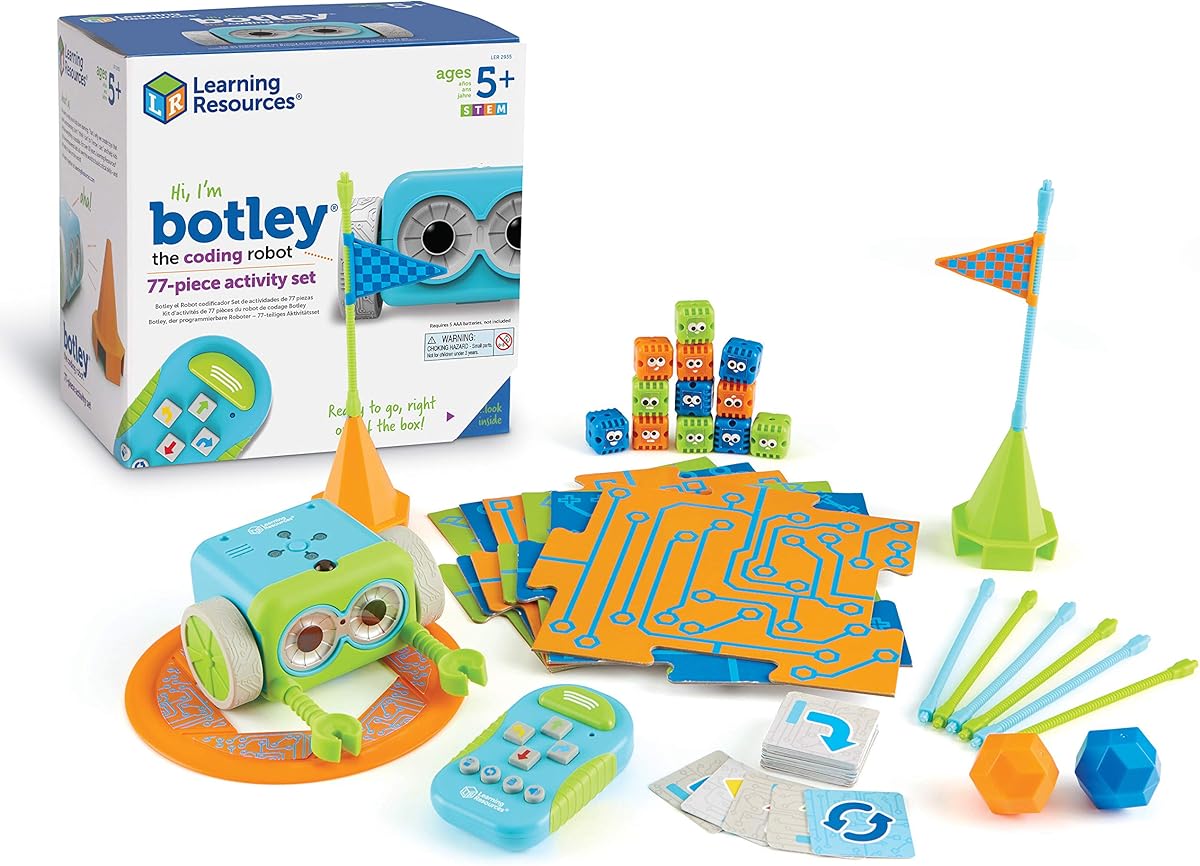
The Learning Resources Botley Coding Robot Activity Set is a comprehensive screen-free coding system for children ages five and older. Its 4.6 rating reflects a balanced combination of approachable controls, meaningful coding challenges, and a large collection of course components. Botley arrives ready for coding, allowing children to move quickly into games and problem-solving rather than beginning with a lengthy build.
We may earn a commission when you buy through this link, at no additional cost to you.
The remote programmer sends commands to the robot, while 40 coding cards guide increasingly complex sequences. Botley can detect objects, avoid them, follow looping commands, travel obstacle courses, and track black lines. The 77-piece set includes detachable robot arms, six double-sided tiles, and 27 obstacle-building pieces, providing enough material for varied challenges and imaginative stories.
Setup requires three AAA batteries for Botley, two AAA batteries for the remote programmer, and a Phillips screwdriver; batteries are not included. Children also need to keep the remote from being dropped or used out of range, and younger users may need help with more intricate routes. Despite these minor practical requirements, the complete avoidance of a phone or tablet is a major benefit.
Botley is an excellent choice for families seeking a traditional coding toy that supports both early learners and more complex challenges. It is also well suited to a classroom because of the included coding cards and obstacle pieces. Choose it when screen-free operation, object sensing, and a generous activity set are more important than advanced text-based programming.
Botley moves according to each command, allowing children to compare expectations with actual behavior. When a route fails, they can inspect the sequence and try a revised plan.
Coding cards, tiles, arms, and obstacle pieces work together to create both structured lessons and open-ended courses. This variety helps a single robot support progression rather than offering only one fixed game.
We may earn a commission when you buy through this link, at no additional cost to you.
The Ozobot Evo Entry Kit is a color-coding robot and educational platform for children ages 5 to 11. Its 4.6 rating and extensive free lesson library make it especially appealing to parents and teachers who want structured progression rather than a collection of disconnected games. The entry kit includes one Evo robot, five dual-tip color-code markers, a guide, and a protective zip case.
We may earn a commission when you buy through this link, at no additional cost to you.
Ozobot supports two approaches. Children can begin with physical Color Codes drawn on paper, giving them a screen-free introduction to commands. They can then move into Ozobot Blockly, which provides five skill levels ranging from beginner to master. The broader resource includes more than 700 free lessons spanning STEAM, computer science, and core subjects, allowing adults to select age-appropriate lessons with less need to create every exercise from scratch.
This breadth can also feel overwhelming for a family seeking a simple, immediately understandable toy. Color codes are intuitive, but the platform's full potential is realized through structured lessons and device-based block coding. A durable robot, organized marker storage, and classroom-ready accessories help justify the greater commitment when the set will be used repeatedly or shared by a group.
Ozobot Evo is a strong pick for teachers, homeschoolers, and families interested in sustained coding education across multiple age levels. It works particularly well when a child needs both physical coding and a digital progression. For a less complex one-time activity or a purely mechanical build, a mouse robot or mBot may offer a gentler introduction.
Five Blockly skill levels allow educators to begin with simple actions and advance toward more involved programs. The same physical robot can therefore support a child across a much broader age range than a kit built around one fixed activity.
More than 700 free lessons reduce the preparation required for structured lessons. Teachers can connect the robot to broader STEAM and computer-science topics while families use the same materials for guided home learning.
We may earn a commission when you buy through this link, at no additional cost to you.
Botley 2.0 develops the screen-free coding concept with additional programming features and a broad 78-piece activity set. Its 4.5 rating makes it a credible alternative for families who like the approachable remote-programming format but want more advanced challenges than a simple directional robot. The set includes the robot, remote programmer, 40 coding cards, six double-sided boards, and stackable obstacle pieces.
We may earn a commission when you buy through this link, at no additional cost to you.
The robot introduces cause and effect through remote commands while also supporting more complex sequences, multi-step paths, 45-degree turns, and reactions to sensed objects. Lights, sounds, and playful music provide additional feedback, while 16 secret code combinations create an element of discovery. These features let children progress from directing a single movement toward designing longer routes and testing what happens when conditions change.
As a physical coding system, it cannot offer the flexibility of a full software environment. Its activities are bounded by the robot's commands and included pieces, and the sizeable collection can become disorganized without careful storage. For a young child learning foundational sequencing, though, those constraints can be helpful because they keep the coding problem visible and understandable.
Botley 2.0 is a good fit for early elementary learners, especially those who thrive on physical challenges and screen-free activities. It can also serve as an engaging classroom station with multiple children taking turns building routes. Choose it over the original Botley when the extra turning options, sensing reactions, and expanded challenge set are important to the learning experience.
Multi-step courses and 45-degree turns make it possible to design routes that require more planning than a straight forward-and-back sequence. The gradual increase in difficulty supports early logic without requiring a computer.
Stackable obstacles, customizable boards, and secret code combinations encourage experimentation beyond a single guided lesson. Children can build a maze, test a solution, and then redesign the challenge for someone else.
We may earn a commission when you buy through this link, at no additional cost to you.
The Wonder Workshop Dash is a ready-to-use programmable robot for children roughly six to 11. It needs no assembly and comes with two building brick connectors, a USB charging cable, and access to five apps for Apple iOS, Android OS, and Fire OS. Its 4.6 rating and use in more than 40,000 schools reflect Dash's established position in educational robotics.
We may earn a commission when you buy through this link, at no additional cost to you.
Dash can sing, dance, navigate obstacles, and respond to voice commands, giving children immediate ways to explore programming through movement and sound. The apps include Blockly, Wonder, and Path, each offering a distinct approach to coding activities. Lessons cover sequencing, loops, algorithms, and variables, allowing children to progress from straightforward instructions to more abstract computational thinking.
The robot does not contain a camera, and its usefulness depends on compatible apps and a mobile device. Families must also decide which applications fit their child's age and learning goals, as the number of available options can create navigation challenges. Nevertheless, the robot's polished behavior, quick setup, and broad software support make it convenient for families who want to begin without a construction project.
Dash is a strong option for a child who enjoys expressive robots and guided digital challenges. It works well for classroom instruction, homeschool curriculum, and family projects where the priority is structured coding rather than screen-free control. Choose it for immediate use and app variety; choose mBot if physical electronics and mechanical expansion are the main goals.
Blockly, Wonder, and Path provide different ways to engage with the same robot. This variety helps children alternate between guided play, visual coding, and route-based problem-solving as their confidence develops.
Dash's singing, dancing, voice responses, and obstacle navigation give coding a playful performance element. A program becomes something children can hear and see rather than a sequence hidden on a screen.
We may earn a commission when you buy through this link, at no additional cost to you.
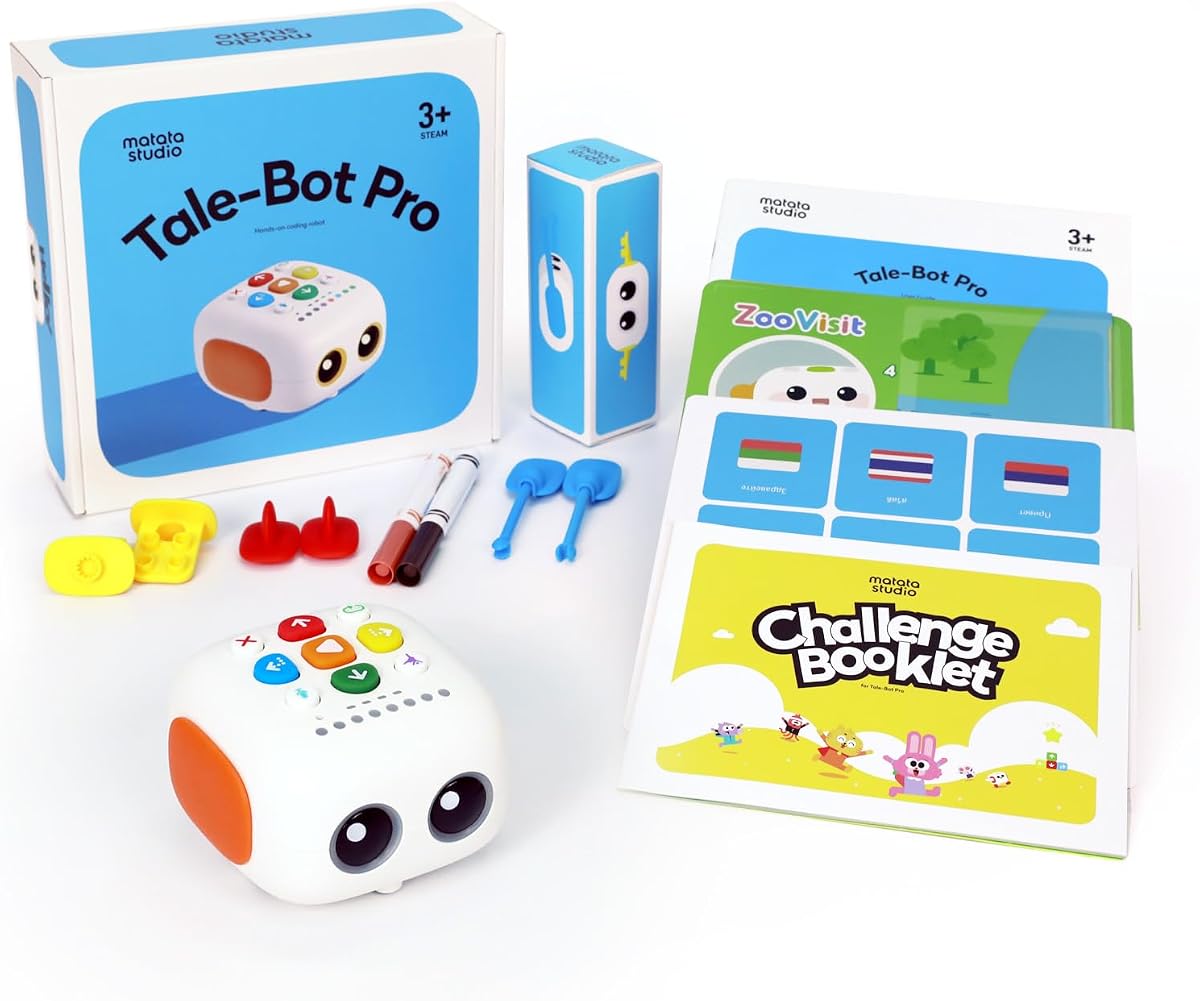
TaleBot Pro is a screen-free coding robot created specifically for children ages 3 to 5. It holds the highest customer rating in this roundup at 4.7 out of 5, combining command buttons, an interactive map, voice feedback, and recording features. Rather than competing with older robotics systems, it uses touch-based interaction to make early sequencing and looping approachable for preschoolers.
We may earn a commission when you buy through this link, at no additional cost to you.
Children can press commands to make the robot walk, draw, sing, dance, speak, and record. A double-sided interactive map and 14 challenge missions provide structured activities, while the recording function lets children bring imaginative stories to life. The kit supports up to 256 commands and teaches commands, sequences, and loops. Compatibility with LEGO blocks adds construction options, and the robot supports ten languages.
The programming remains basic, and the map-based setup does not provide the open-ended movement of a rover or spherical robot. A child seeking advanced sensors, JavaScript, or complex autonomous behavior would need a different platform. The touchscreen-free controls, visual feedback, tactile actions, and recorded storytelling are more important at this age because they reduce dependence on complex language and abstract interfaces.
TaleBot Pro is best for preschoolers, children developing language and communication skills, and families seeking multisensory screen-free STEM play. It may also be useful for autistic children who respond well to touch-based activities, visual prompts, sound, and predictable cause-and-effect interaction. Choose it when storytelling and foundational sequencing matter more than advanced robotics.
Voice recording turns programming into a storytelling activity. Children can command the robot and create spoken narratives, connecting sequence planning with language, imagination, and performance.
Tactile buttons, map movement, sounds, lights, and spoken responses create several forms of feedback. This approach can make early concepts more accessible to children who benefit from varied sensory cues.
We may earn a commission when you buy through this link, at no additional cost to you.
The most useful coding toy depends on the learner's age, attention span, preferred learning style, available devices, and interest in construction, games, stories, or advanced programming. Consider those needs before comparing features.
Age labels provide a useful starting point, but readiness matters more than a birthday. Younger children benefit from large controls, immediate feedback, short sequences, and opportunities to move objects physically. Older children can handle longer instructions, visual code blocks, sensors, mechanical assembly, and more abstract concepts. Check the stated age range and consider whether the child can sustain the activity, understand cause and effect, and remain interested through repeated testing.
Screen-free toys use buttons, remotes, cards, markers, or physical mechanisms to communicate instructions. They can reduce screen time and make early sequencing unusually tangible. App-based systems provide richer code editors, more extensive lessons, sound and animation, and easier progress tracking, but they require a compatible device and may depend on software access. Decide whether the goal is tactile learning, a richer digital curriculum, or a balance of both.
A beginner product may rely on directional buttons, illustrated cards, or color codes, while an advanced system can support JavaScript, variables, algorithms, and Arduino. The best option is not always the one with the most features. A child benefits more from a platform with a coherent progression than from a complicated interface that exceeds their current skills. Look for multiple levels, tutorials, sample projects, and a way to introduce new concepts gradually.
Some coding toys are ready to use, while others require assembly, wiring, or careful alignment. Construction can teach valuable engineering and persistence skills, but it can also delay the first coding session. Children who love models, gears, and construction may relish a multi-hour build. Younger children or impatient learners may respond better to a robot that works immediately and offers challenges through programming.
Robots that detect color, objects, lines, touch, orientation, or sound can teach more about real-world conditions than a robot that only moves and stops. However, extra sensors are valuable only when children can understand and experiment with them. Look for clear cause-and-effect behavior, challenge cards, and activities that connect sensor input to programmable outcomes.
A platform with additional parts, modules, apps, or compatible building components can remain useful for longer. Expansion is particularly important for a child who learns quickly or for a classroom sharing one system among many learners. Verify that compatible accessories are available and understand whether expansion requires advanced software, specialist components, or additional construction before making the purchase.
For classrooms, consider reusable parts, organized storage, clear activity sequences, durability, and the number of children who can rotate through the robot. Home users may care more about quick setup, storage, rechargeable or replaceable power, and how easily the toy connects to a device. Check battery requirements, included accessories, storage cases, and any required applications before purchasing.
Begin with the product's assembly instructions, age guidance, and included lessons. Build the robot in a clear space, install the specified batteries or charge the device, and verify that every connection or moving part operates correctly before beginning a coding challenge. For card-based systems, arrange the physical commands in order and explain each instruction aloud so the child connects the sequence with the robot's behavior.
Use a simple predict-test-observe cycle. Ask the child what they think will happen, run the program, compare the result with the prediction, and identify the first command that needs adjustment. Introduce one new concept at a time, such as sequencing, loops, sensing, or variables, and save more complex features for after the child feels comfortable with basic commands. Rotate between guided activities and open-ended challenges to maintain motivation.
Store components in labeled containers or the supplied case, keep sensors and wheels free from dust, and follow the manufacturer's battery and charging guidance. Replace depleted batteries promptly when performance becomes inconsistent. Avoid immersing electronic toys unless the instructions explicitly permit it, and check moving joints, connectors, and coding accessories periodically for looseness or damage.
Beginner coding can be introduced as early as age three with tactile, screen-free products, while age four to five is common for directional robots and simple command cards. Children around six to eight are often ready for visual block coding, and older children can explore sensors, more advanced logic, JavaScript, or Arduino. Age labels are only a guide, so consider attention span, reading ability, motor control, and interest as well.
Screen-free toys are especially useful for teaching that a program is a physical sequence rather than only lines of digital code. They can support early learners, reduce screen dependence, and make commands easy to rearrange. App-based products generally offer deeper programming tools, more lessons, and clearer progress tracking, so the best choice often depends on the child's age and the balance between tactile and digital learning.
Common concepts include commands, sequencing, loops, conditionals, debugging, algorithms, variables, and cause and effect. More advanced systems can introduce sensor inputs, functions, and text-based programming. The depth depends on the product, so check whether the included lessons teach concepts explicitly or merely provide open-ended robot control.
It depends on the product. Chameleon, Code & Go, Mech-5, Botley, Botley 2.0, and TaleBot Pro offer screen-free operation. Sphero Mini, Makeblock mBot, Ozobot Evo, and Dash use apps for at least some functions. Before buying, confirm device compatibility, operating-system requirements, app availability, and whether essential features remain accessible without a screen.
Look for signs that the child can follow multi-step directions, predict outcomes, troubleshoot a failed program, and remain interested after the novelty fades. A child ready for text-based coding should also be comfortable with a device and able to connect program blocks or commands to visible results. Moving to a new platform too early can create frustration, while waiting too long can limit challenge.
Many are, especially systems with reusable cards, modular obstacles, organized storage, and age-appropriate lesson sets. Ozobot Evo is particularly oriented toward teachers, while Botley, Code & Go, Dash, and mBot can also support structured activities. Teachers should consider robot-to-student ratios, app licensing or device access, charging procedures, and how easily activities can be reset between groups.
Encourage them to predict what should happen, run the program once, and compare the result with the prediction. They can then check the order of commands, isolate the first incorrect action, and change only one part of the program. This process teaches that mistakes are useful information rather than failure and builds a repeatable approach to technical problem-solving.
The useful life of a coding toy depends on its platform, available challenges, and the child's development. Sets with cards, modular pieces, sensors, apps, and expansion options tend to support varied activities longer. When a child begins repeating the same sequence, introduce a new sensor, obstacle, story, or coding concept rather than replacing the toy immediately.
The strongest all-around option is the Makeblock mBot because it combines an approachable build, engaging autonomous behavior, beginner software, Arduino progression, and an extensive expansion system. The Coding Chameleon is a compelling screen-free choice for children who enjoy animals and physical construction, while Ozobot Evo is the premium selection for structured lessons, progressive skill levels, and broad classroom use.
Prioritize the learning experience that matches the child rather than the product with the longest feature list. Preschoolers may benefit most from TaleBot Pro, early learners may thrive with Code & Go or Botley, and school-age children may be ready for mBot, Sphero Mini, Ozobot, or Dash. Check age guidance, device needs, assembly expectations, and whether the included activities can grow with the learner.
Before making a final purchase, review the current product details, included components, power requirements, app compatibility, and available resources. Customer ratings and feature sets can change over time, and prices and promotions also vary. Comparing the current listing against the needs identified in this guide will help narrow the field without overlooking the right learning path.
