
Atelus Wired Typewriter Keyboard
4.6Editor score
Detachable colorful keycaps
Large number pad
Reliable wired connection
Explore the best colorful keyboards, comparing wireless and wired designs, retro styling, mechanical features, compatibility, comfort, and everyday usability.
Colorful keyboards transform an ordinary workstation into a more personal setup, combining expressive styling with the practical demands of typing, gaming, and everyday computer use. The right model should look distinctive without compromising key layout, responsiveness, compatibility, cleaning, or comfort.
This guide compares ten colorful keyboards spanning retro typewriter-inspired wireless sets, wired full-size models, an illuminated gaming board, and a customizable mechanical option. We evaluated the supplied specifications, layouts, connectivity, feature sets, compatibility, and design details to help readers find a suitable match.
Each pick highlights a different path: the KNOWSQT offers a detachable-keycap wireless set, the MOFII models emphasize full-size productivity, the Womier adds customization and RGB effects, and the HUO JI focuses on gaming illumination. Product availability and prices can change, so confirm current details before buying.
4.6Editor score
4.6Editor score

4.7Editor score
The comparison below places all ten keyboards side by side, focusing on connection style, layout, visual treatment, and the most relevant functional details. It helps distinguish simple wired productivity boards from wireless sets, retro-inspired models, illuminated gaming keyboards, and a feature-rich mechanical option.


The KNOWSQT MilkTea combination is a colorful retro keyboard and mouse set with a 4.4 rating, combining a full-size 104-key layout with a 2.4GHz connection. Its most unusual feature is the removable keycap design, which gives it a practical advantage over many decorative typewriter-style keyboards that must be cleaned with a brush alone.
We may earn a commission when you buy through this link, at no additional cost to you.
The wireless connection reaches up to 35 feet, and a single nano receiver supports both the keyboard and mouse. Either device can also operate separately with the same receiver, making the set practical for desks where fewer cables are preferred. Automatic sleep activates after one minute of keyboard inactivity, while a low-battery indicator helps alert the user before the keyboard stops responding.
Compatibility is broad for a 2.4GHz set, covering Windows 10, 8, 7, XP, and Vista through a USB 2.0 port. The listed devices include PCs, desktops, laptops, notebooks, Chromebooks, computers, and smart TVs. Some USB-C-only systems require an adapter, and the product information does not explicitly confirm macOS support, so buyers with those devices should verify expectations before purchasing.
This set is a good fit for someone who wants the expressive look of round keycaps and a coordinated mouse without giving up a conventional number pad. It is especially appealing to users who value detachable, washable caps and straightforward setup. Those wanting native USB-C support or a more compact footprint should consider other options, but for a colorful full-size wireless set with flexible cleaning, it remains a compelling choice.
Every keycap can be disassembled, allowing the user to clean the board more thoroughly than a fixed-cap layout. The included brush also helps remove debris that collects between keys.
The keyboard and mouse share one nano receiver but may be used independently. This gives desk users cable-free operation while retaining the option to position each device separately.
We may earn a commission when you buy through this link, at no additional cost to you.
The MOFII Blue wired keyboard earns a 4.6 rating and stands out as a balanced, productivity-focused colorful keyboard. It combines nostalgic round keycaps with a conventional full-size layout, making it more suitable for frequent number entry than many compact or 75-percent designs.
We may earn a commission when you buy through this link, at no additional cost to you.
Its foldable stands and anti-slip pads support a comfortable typing angle, while the number pad, three indicator lights, and twelve multimedia shortcuts expand everyday functionality. Media playback, volume, web browsing, and email controls can be reached without repeatedly navigating software menus. The wired USB connection also removes charging and battery-management concerns entirely.
Compatibility is listed across Windows 7, 8, 10, 11, XP, Vista, Server, Chrome OS, and Linux, as well as devices such as desktops, Chromebooks, PCs, and laptops. Plug-and-play operation requires no driver or additional software. A dust brush is included for basic maintenance, and the product is backed by a stated 12-month warranty.
This is the strongest general recommendation for someone who wants color, retro character, and a genuinely useful full-size layout without relying on batteries or wireless reception. Its only clear compromises are the permanent cable and absence of a bundled mouse. For office-focused typing, it balances appearance, comfort, and useful controls particularly well.
The number pad, indicator lights, and twelve media shortcuts create a practical layout for spreadsheet work, document editing, and general office use while preserving the colorful retro appearance.
A wired USB interface provides consistent operation without batteries, charging, driver installation, or wireless interference, making this model straightforward for everyday workstations.
We may earn a commission when you buy through this link, at no additional cost to you.
This black-colorful keyboard and mouse combination has a 4.4 rating and follows the familiar retro typewriter theme with a more understated palette than the brighter rainbow alternatives. Its full-size numeric keypad and multimedia hotkeys make it suitable for office work, home productivity, and users who want useful controls without a large number of dedicated buttons.
We may earn a commission when you buy through this link, at no additional cost to you.
The set uses one 2.4GHz USB receiver for both devices, with a stated working distance of 30 meters. No drivers or installation software are required. Noise-reduction keys, a stability-focused switch structure, and quick rebound are intended to support responsive typing, while concave round caps follow the shape of the fingertips.
The keyboard enters sleep mode after five minutes of inactivity and resumes when a key is pressed. It uses one AAA battery, while the mouse uses one AA battery; neither is included. The product is compatible with PCs, Macs, desktops, laptops, notebooks, and other computers, though its listed range is less detailed than some competing descriptions.
This is a useful option for someone who wants a colorful retro keyboard, a matching mouse, and a generous stated wireless range. The absent batteries and receiver location require a little setup planning, but the shared receiver keeps the desktop uncluttered. It is best suited to users who appreciate the classic black keyboard with colorful accents.
The keyboard and mouse operate through a shared 2.4GHz receiver, reducing cable clutter and simplifying the initial computer connection.
Dedicated hotkeys provide quick access to music, volume, and email functions, complementing the numeric keypad for a more productive full-size setup.
We may earn a commission when you buy through this link, at no additional cost to you.
The UBOTIE Purple Rainbow combo is built for shoppers who want color to be the defining feature of the desk. It has a 4.2 rating and pairs a bright rainbow keyboard with a matching wireless mouse, using round keycaps to create a playful retro appearance.
We may earn a commission when you buy through this link, at no additional cost to you.
The listed fade-resistant coating is intended to preserve the vivid color over regular use. A stable 2.4GHz connection provides a stated range of 33 feet, while auto-sleep and quick reconnection help manage energy use. Independent power switches on the keyboard and mouse allow each device to be turned off separately when it is not needed.
Compatibility covers Windows and macOS laptops, desktops, tablets, and smartphones, although a USB adapter is required for certain devices. The set includes one year of product support and access to the listed customer service team. Its broad platform language makes it appealing for a mixed-device workspace, but the requirement for adapters should be considered before purchase.
This combo is ideal for dorm rooms, creative offices, home gaming areas, and gift shoppers who prioritize an expressive rainbow finish. It offers the right balance of color, wireless convenience, and independent device control. Buyers seeking the highest rating or more specialized customization should examine the Womier, while those wanting a subtler retro look may prefer the black-colorful UBOTIE alternative.
The stated fade-resistant coating is a practical advantage for a rainbow design because it addresses the appearance changes that can occur with repeated daily use.
Separate power switches for keyboard and mouse let users conserve battery life and decide when each device should be active.
We may earn a commission when you buy through this link, at no additional cost to you.
The MOFII Green wireless combo brings a coordinated, colorful look to a retro full-size keyboard and mouse set. Its 4.2 rating reflects a practical product centered on a numeric keypad, wireless freedom, and an ergonomic desktop footprint rather than advanced mechanical customization.
We may earn a commission when you buy through this link, at no additional cost to you.
The keyboard uses a folding holder and anti-slide pads to maintain a comfortable slope during extended work. Removable keycaps assist with cleaning, while the mouse has a contoured shape. The 2.4GHz receiver is stored inside the mouse and supports a stated range of 10 meters, or 33 feet, with plug-and-play setup.
Auto-sleep activates after eight to ten minutes of inactivity. The keyboard and mouse each use one AA battery, and their stated battery life can reach 18 months depending on use and computing conditions. Compatibility is listed for Windows 2000, XP, Vista, 7, 8, and 10, plus Raspberry Pi 3 and 4, PCs, desktops, and laptops.
This set is best for a green-themed office or home setup that values a coordinated appearance and removable caps. It is less suitable for someone whose computer relies on a modern version not listed in the compatibility details or who requires explicit macOS assurance. Even so, the ergonomic support and wireless convenience make it a solid retro productivity choice.
The folding keyboard holder and anti-slide pads create an adjustable typing angle, while the contoured mouse is designed for sustained productivity use.
The green keyboard and matching mouse provide a more unified aesthetic than a bright rainbow layout, making the set suitable for coordinated workspaces.
We may earn a commission when you buy through this link, at no additional cost to you.
The FOPETT Blue wireless set has a 4.3 rating and combines a colorful full-size keyboard with a matching mouse. Its 105-key layout, large number pad, and twelve function keys make it a credible choice for productivity, while the stated 10-meter range and shared receiver keep the setup relatively uncluttered.
We may earn a commission when you buy through this link, at no additional cost to you.
A large anti-slip silicone base improves stability, and laser-engraved keycap characters are designed to resist fading. The product information also describes an imported chip and environmental noise-reduction algorithm intended to reduce key sound and interference in offices with multiple sets. The mouse offers near-silent micro-motion clicks and a stated 1600 DPI level.
The keyboard has a tilted design and a skin-friendly, contoured mouse shape. A conductive waterproof film is included beneath the membrane to allow liquid to drain, adding a layer of spill protection. It requires two AAA batteries for the keyboard and one AA battery for the mouse, neither of which is included.
Compatibility includes Windows XP, ME, Vista, 7, 8, 10, and 11, along with PCs, laptops, MacBooks, desktops, Chromebooks, and smart TVs. Some hotkeys may not work fully with Mac systems. This set works well for shared offices and quiet home environments where a mouse, full-size layout, and splash-resistant design are priorities.
Noise-reduction keyboard technology and near-silent mouse clicks are intended to reduce distraction in offices, dorm rooms, and homes where others share the space.
The keyboard's conductive waterproof film allows liquid to flow out from the membrane, providing useful protection against accidental drink spills.
We may earn a commission when you buy through this link, at no additional cost to you.
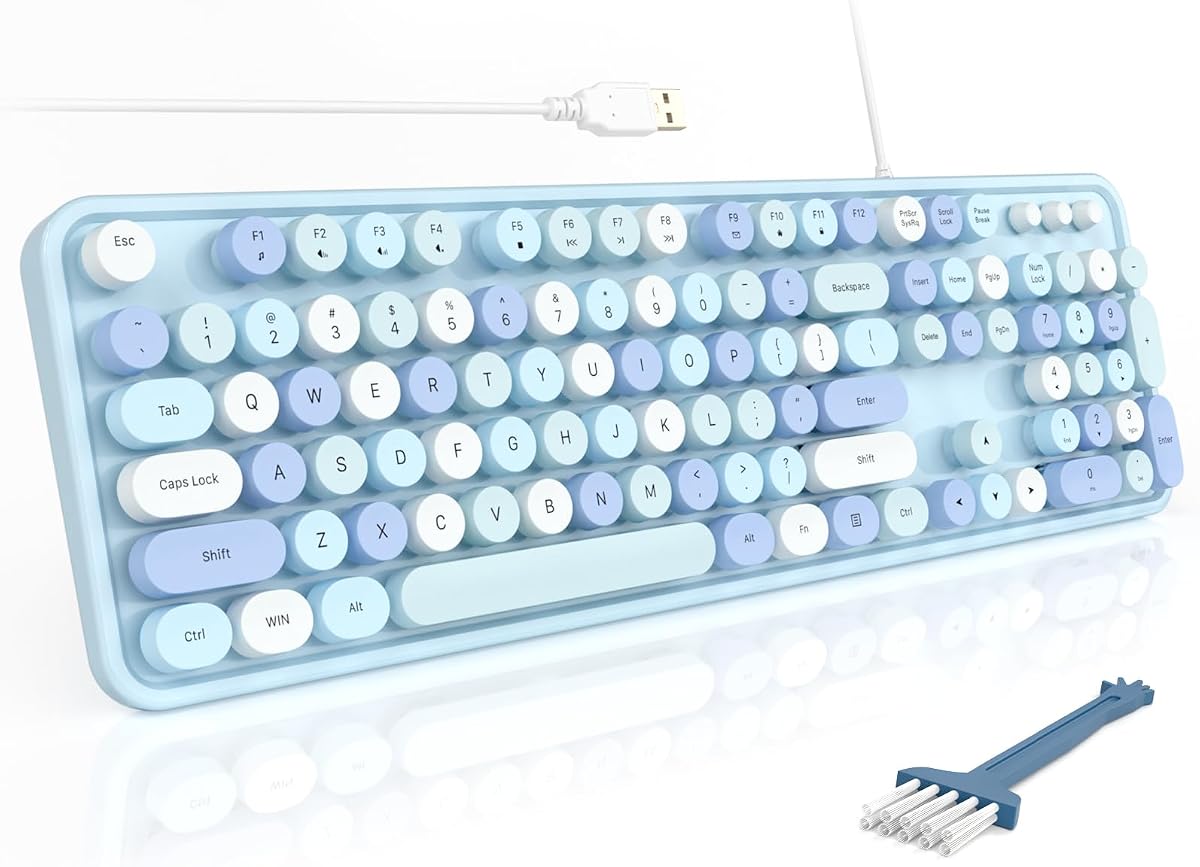
The Atelus Purple wired keyboard delivers a colorful retro design with a 4.6 rating. It combines round typewriter-inspired keycaps, a large numeric keypad, and foldable stands in a full-size package that feels especially appropriate for work, study, and general productivity.
We may earn a commission when you buy through this link, at no additional cost to you.
Its keycaps are detachable, allowing the user to clean the board more easily, and the ABS construction is described as ergonomic and comfortable to the touch. Cap indicators show relevant keyboard states, while the number pad provides dedicated numerical input. A single wired USB connection supplies reliable operation without batteries, charging, or wireless pairing.
The board plugs in without extra software and is listed for Windows 7, 8, 10, XP, Vista, and later computers, laptops, desktops, PCs, and notebooks. The fixed cable is the principal trade-off for users seeking wireless flexibility, and the product is a keyboard only rather than a complete keyboard-and-mouse package.
For a shopper focused on color, retro styling, and useful full-size features without unnecessary complexity, the Atelus is a strong budget-oriented choice. Its 4.6 rating places it among the best-reviewed products in this guide. Choose it when dependable wired operation and easy keycap cleaning matter more than a bundled mouse or wireless range.
The detachable round keycaps preserve the nostalgic typewriter look while making routine cleaning and individual cap handling more convenient.
A wired USB interface starts working through plug-and-play setup, avoiding battery replacement, charging, and wireless receiver management.
We may earn a commission when you buy through this link, at no additional cost to you.
The Womier SK80 has a 4.7 rating, the highest customer score among the products in this guide, and offers the most advanced customization features. Its 75% layout preserves a compact footprint while integrating a color multimedia display that can present custom GIF imagery, lighting information, connection mode, volume, language, and other status details.
We may earn a commission when you buy through this link, at no additional cost to you.
Pre-installed full POM switches use a hot-swap PCB, allowing compatible three-pin and five-pin switches to be replaced without soldering. Gasket mounting is described as improving stability and reducing typing noise, while the Frog Green design gives the board a distinctive appearance for work, streaming, or gaming setups.
The RGB system provides 19 lighting effects and nine colors, with adjustable brightness and flow rate. Detachable USB-C connectivity supports flexible device use, and Windows and Mac systems are compatible. The customization driver is Windows-only, however, so macOS users can use the keyboard but cannot access all display, macro, or GIF settings.
This is the best choice for an enthusiast who values personalization, mechanical construction, live visual information, and RGB control. The 75% format omits the conventional number pad, so spreadsheet-heavy office users should check that trade-off. For a premium colorful experience with meaningful customization rather than decorative color alone, the SK84 stands apart.
The angled multimedia screen can show custom images and useful status details such as connection mode, lighting state, volume, language, and system status.
Hot-swappable sockets allow compatible three-pin and five-pin switches to be replaced more easily, giving mechanical keyboard users room to tune feel and sound.
We may earn a commission when you buy through this link, at no additional cost to you.
The UBOTIE Black-Colorful combo combines a dark, modern keyboard body with colorful accents, giving the familiar retro round-keycap format a more understated appearance. It has a 4.3 rating and includes both a keyboard and mouse, making it a convenient option for creating a coordinated setup.
We may earn a commission when you buy through this link, at no additional cost to you.
Its mirror-finish panel subtly reflects the keycaps and adds a more decorative surface to the desk. The product information describes an updated color coating designed to resist fading, a stable wireless chip for responsive everyday use, and automatic sleep mode for reducing power consumption when the keyboard is inactive.
The keyboard and mouse share a USB nano receiver stored near the mouse battery compartment. Setup requires no drivers. Compatibility is listed for Windows 7, 8, 10, and 11 as well as macOS, although some shortcut keys may not function properly with updated macOS versions.
This set suits users who like vintage key shapes but prefer something less flamboyant than a full rainbow keyboard. It works well for office work, school, messaging, and everyday typing. Those who depend heavily on Mac shortcuts should verify compatibility, and buyers seeking extensive lighting or switch customization should look toward a mechanical model instead.
The predominantly black design retains colorful personality through its accents while remaining easier to coordinate with a wider range of office accessories.
One nano receiver supports both the keyboard and mouse and is stored near the mouse batteries, reducing desktop clutter while keeping setup simple.
We may earn a commission when you buy through this link, at no additional cost to you.
The HUO JI wired gaming keyboard delivers colorful design through rainbow LED illumination rather than multicolored keycaps. It has a 4.4 rating and uses a familiar 104-key standard layout, including a number pad and twelve multimedia combinations that can support both gaming and office tasks.
We may earn a commission when you buy through this link, at no additional cost to you.
Backlighting includes rainbow-color and breathing modes, with adjustable brightness and the option to turn the light off. This makes the keyboard useful in dim rooms or as a visual centerpiece during gaming sessions. Double-shot injected keycaps are designed to resist character fading, while a thick base plate and ABS construction support durability.
Two rear feet adjust the keyboard height. Its stepped and curved keycap profile is intended to fit the hands comfortably, and the core water-resistant design adds protection from accidental spills. Removable keycaps make cleaning easier, although the product information does not specify a detachable USB connector.
This is a strong pick for a gamer or office user who wants dramatic lighting in a familiar full-size layout. Wired operation gives it a familiar low-latency connection, though it lacks the wireless flexibility of several retro sets. It is less appealing for users seeking mechanical switch customization or a permanent desktop color scheme that remains visible when lighting is off.
Rainbow and breathing illumination modes create a strong visual effect, while brightness adjustment and an off setting provide practical control in different settings.
The 104-key layout retains a dedicated number pad and twelve multimedia combinations, making the board more versatile than a gaming-focused compact model.
We may earn a commission when you buy through this link, at no additional cost to you.
The best colorful keyboard balances visual personality with the layout, connection method, and features you use every day. Consider typing habits, desk space, platform compatibility, maintenance needs, and whether color comes from keycaps, lighting, or both before making a selection.
Wired keyboards provide a consistent connection without batteries, charging, receiver storage, or interference concerns. They are a sensible choice for fixed desks, office computers, and users who want to plug in and begin working. The MOFII Blue, Atelus Purple, and HUO JI models use this approach. Wireless sets offer more freedom in positioning and can reduce cable clutter, but they require battery management and a clear line to the USB receiver. The listed wireless ranges vary from 10 to 35 meters, but real-world performance also depends on the environment.
In short, choose wired for simplicity and dependability, or wireless for a cleaner, more flexible desktop.
A full-size keyboard includes a dedicated number pad and function row, making it the most useful choice for spreadsheets, accounting, data entry, and shortcuts that rely on the number row. It takes more desk space than a compact model. The 75-percent Womier SK80 removes the number pad to create more room for mouse movement while keeping essential function keys. Retro typewriter styles are often full-size because they imitate traditional writing machines, but the layout should still be judged by the functions you actually need rather than appearance alone.
Choose a full-size layout for maximum productivity, or a compact layout when desk space and frequent mouse movement matter more.
Round keycaps create the nostalgic typewriter appearance shared by many colorful keyboards in this guide. They can feel distinctive and visually engaging, but adjust your expectations if you are accustomed to flat laptop keys or modern sculpted gaming boards. Some models offer concave surfaces intended to follow fingertip contours, while others emphasize a crisp, clicking feel. A foldable stand, anti-slip pad, or tilted chassis can improve the overall typing angle when using round caps.
If vintage style is your priority, round keycaps deliver the intended effect; if key shape and feel are nonnegotiable, research the specific mechanism before purchasing.
Color is not limited to a single rainbow finish. The KNOWSQT offers a milk-tea aesthetic, the FOPETT uses a blue design, the MOFII Green set brings a coordinated natural accent, and the Atelus model uses purple. The UBOTIE Purple Rainbow is the most explicitly multicolored option, whereas the UBOTIE Black-Colorful provides a more restrained interpretation. The Womier uses a Frog Green chassis and RGB effects, while the HUO JI relies on rainbow backlighting. Think about your monitor, desk, mouse, room lighting, and whether the color should dominate or blend into the background.
Select a finish that complements your existing setup and reflects your personality without overwhelming the rest of your workspace.
Mechanical customization is the Womier SK80's defining advantage. It includes pre-installed full POM switches, a hot-swap PCB, and sockets that accept compatible three-pin and five-pin switches without soldering. Its gasket mount is designed to enhance stability and reduce typing noise. RGB settings, brightness, flow rate, macros, and the multimedia display can be configured through Windows software, while the board itself supports both Windows and Mac systems.
Choose the SK80 when switch feel, programmable visuals, and future customization matter; choose a conventional membrane or simulated mechanical design when simplicity is more important.
Lighting can add color and improve visibility in dim environments. The HUO JI provides rainbow and breathing LED modes with adjustable brightness, while the Womier offers nine RGB colors, 19 effects, and adjustable brightness and flow rate. Retro typewriter-inspired products generally emphasize static keycap color rather than active illumination. Multimedia shortcuts on the MOFII Blue, generic black-colorful combo, FOPETT, and HUO JI provide quick access to common functions, although compatibility may vary by operating system.
Prioritize lighting for gaming and visual effects, or media keys for productivity; most retro-style sets prioritize the former look over elaborate lighting.
Check the operating systems and ports listed for the exact model rather than assuming every colorful keyboard behaves identically. Some products explicitly include macOS, while others list Windows versions in detail and may not promise full Mac support. USB-C users should also note that certain 2.4GHz sets require an adapter. Most products use a standard USB-A receiver and offer plug-and-play setup. Multimedia shortcuts can vary between Windows and Mac even when basic typing works properly.
Confirm operating system, port type, and shortcut expectations before buying to avoid compatibility surprises.
A colorful keyboard should also be practical to maintain. The KNOWSQT, Atelus, MOFII Green, and HUO JI feature detachable or removable keycaps, while the MOFII Blue and FOPETT include a dust brush. The FOPETT adds a conductive waterproof film intended to help liquid drain from the membrane, and the HUO JI describes a water-resistant core. Removable caps are helpful for cleaning, but users should follow the product guidance and avoid immersing a complete electronic keyboard unless the manufacturer explicitly permits it.
Choose detachable caps for easier routine cleaning, and prioritize spill-resistant construction if drinks frequently share your workspace.
Begin by unpacking the keyboard in a clear workspace and checking the included receiver, cables, batteries, stands, and documentation. For a wired model, connect the USB plug to an available port and wait for the computer to recognize the keyboard. For a 2.4GHz set, insert the shared receiver into a USB-A port, install any specified batteries, and switch on the keyboard and mouse. Confirm the receiver is positioned where it can maintain a clear connection before arranging the devices.
Adjust the stance to suit the keyboard and the user. Foldable feet or stands can alter the typing angle, while a full-size board may benefit from being placed slightly lower than the monitor to reduce wrist strain. Test the number pad, multimedia keys, indicators, and mouse controls after installation. On the Womier SK80, install the configuration software on Windows if advanced RGB, macro, and display settings are desired, and confirm the detachable USB-C connection is secure before use.
For care, disconnect a wired keyboard or switch off and remove batteries from a wireless model before cleaning. Use a soft, dry cloth for the exterior and a brush or suitable vacuum tool for debris between keys. Removable keycaps can be cleaned individually according to the manufacturer’s instructions, and liquid should not be poured into the keyboard. If a spill occurs, disconnect power, remove external power sources, and allow the device to dry before attempting further use.
No. Many colorful keyboards are designed for office work, study, and everyday productivity. Retro typewriter models often include full-size layouts, numeric keypads, and multimedia shortcuts, while the Womier SK80 supports work, streaming, and gaming. Choose based on layout, switch feel, lighting, and compatibility rather than assuming color is limited to gaming equipment.
Most wireless options in this guide use replaceable batteries, although the exact type and included status vary. The black-colorful combo requires one AAA battery for the keyboard and one AA for the mouse, while the FOPETT requires two AAA batteries for the keyboard and one AA for the mouse. Batteries are not included with every set, so check the product details before ordering.
It depends on the model. The black-colorful wireless combo, UBOTIE Purple Rainbow, UBOTIE Black-Colorful, and Womier SK80 explicitly include Mac compatibility. Other products primarily list Windows versions, and some multimedia shortcuts may not work fully on macOS. Basic typing and USB operation should still be checked against the manufacturer's current compatibility information.
Comfort depends on the key shape, switch action, stand angle, and personal preference. Round caps can feel familiar to people who enjoy vintage writing machines and may provide a pronounced tactile response. A folding stand, anti-slip pad, or tilted design can improve the experience. Users accustomed to low-profile laptop keys may need time to adjust.
A hot-swappable board lets users replace compatible switches without soldering, making it easier to experiment with switch feel and sound. The Womier SK80 supports three-pin and five-pin switches and arrives with full POM switches installed. Buyers should confirm switch compatibility and follow the manufacturer's instructions before changing components.
Start by disconnecting a wired keyboard or turning off and removing batteries from a wireless model. Use a brush or soft cleaning tool between keys, and wipe the case with a dry cloth. Several models have removable keycaps, but they should be cleaned individually according to the product guidance. Avoid pouring liquid into the keyboard, even when the product has water-resistant features.
A wired keyboard is usually simpler for a permanent desk because it needs no batteries, charging, or receiver pairing. Wireless models reduce cable clutter and allow more flexible positioning, but require battery maintenance and a dependable USB receiver connection. The 75-percent Womier is also wired and compact, while the retro sets provide both wired and wireless alternatives.
A full-size model is useful if you regularly enter numbers, use spreadsheets, or depend on a dedicated function row. It is less essential for users who primarily write, browse, and game because compact layouts free up desk space. The Womier SK80 offers a 75-percent format, while most retro options include a number pad and can serve productivity-focused tasks.
The MOFII Blue wired keyboard is the most balanced overall choice, combining a highly rated full-size retro layout, multimedia shortcuts, adjustable stands, and dependable USB operation. The Atelus Purple model offers a similarly strong budget-oriented experience with detachable caps, while the Womier SK80 is the premium option for users who want hot-swappable switches, RGB customization, and a dedicated multimedia display.
For cable-free setups, the KNOWSQT stands out with detachable washable keycaps and a separate mouse, while the FOPETT adds quiet mouse operation and spill-resistant construction. The UBOTIE models serve different visual preferences, the black-colorful option for understated retro styling and the Purple Rainbow model for a bold finish. Whatever the color, layout and daily needs should come first.
Before purchasing, verify the current operating-system support, required port, receiver or battery arrangement, and desired number pad layout. Product details, availability, and prices can change, so checking the latest listing ensures the keyboard fits both your computer and your expectations.