HDMI KVM Switch for 4 Computers 1 Monitor
4.8Editor score
4K resolution at 60Hz
Three USB-A and one USB-C
Front buttons and wired remote
Complete cable package
Discover the best KVM switch for 4 computers, comparing HDMI, DisplayPort, USB, EDID, resolution, and setup features.
A KVM switch for 4 computers can turn a crowded workstation into a more controlled and productive setup by sharing displays, keyboards, mice, and USB peripherals. The right model depends on your monitor count, graphics outputs, preferred switching method, resolution requirements, and the devices you regularly connect.
We compared ten four-computer KVM switches across core factors including video support, USB connectivity, EDID behavior, display modes, remote controls, compatibility, and installation requirements. The list includes single-monitor, dual-monitor, triple-monitor, and four-monitor options for office, creative, testing, gaming, and compact workstation needs.
Each review shows which setup the switch is best suited for, along with its most useful features and practical limitations. Product availability and prices can change, so check the current listing and confirm that your computers, monitors, and cables support the resolutions and ports you need before purchasing.
4.8Editor score
4.7Editor score

4.7Editor score
The table below compares the number of supported computers, display configuration, maximum video capability, and USB connectivity of each switch, making it easier to identify the model that matches your workstation.


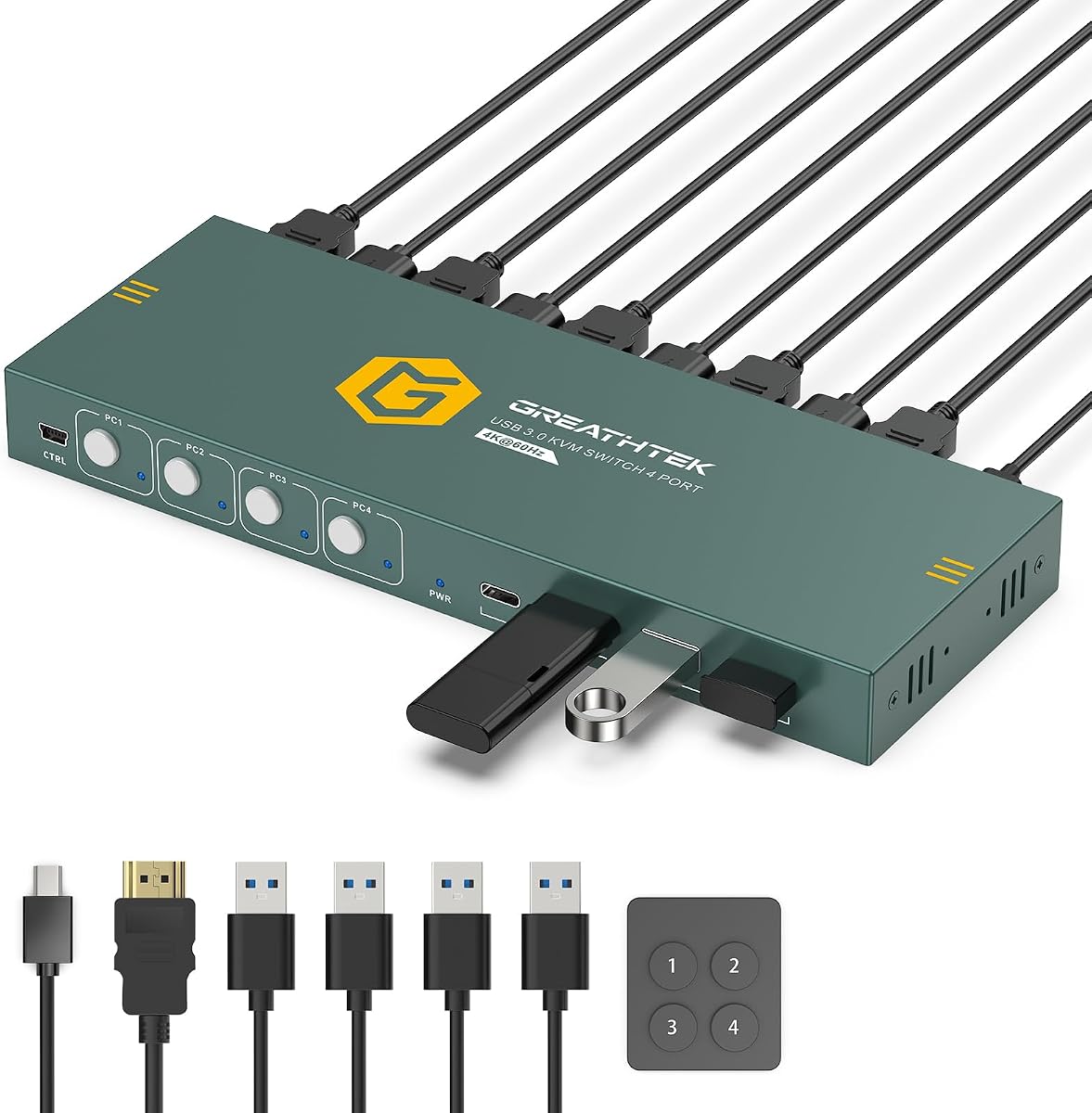
This four-port HDMI KVM switch is a strong all-around choice for a workstation that combines four computers with one display. Its 4.8 rating is the highest in this group, and the product directly addresses the core KVM promise: one keyboard, one mouse, and one monitor can be shared without physically reconnecting equipment every time you change tasks.
We may earn a commission when you buy through this link, at no additional cost to you.
Video support extends to 4K at 60Hz through HDMI 2.0, with 4K at 30Hz, 1080p, and lower resolutions also supported. Adaptive EDID is designed to help each computer recognize the connected display and retain suitable display settings. For peripherals, the switch provides three USB-A 3.0 ports and one USB-C data port, allowing a keyboard, mouse, storage device, webcam, printer, or other USB accessory to move with the selected computer.
The front-panel PC selection buttons and included wired desktop remote make the switch easy to operate, while numbered LEDs identify the active system. Hotkey switching is not available, which may inconvenience users accustomed to keyboard commands, but the physical controls are direct and dependable. The package also includes an HDMI cable, four USB 3.0 cables, a power cable, the remote, and under-desk mounting hardware.
This is the most practical recommendation for a user who wants one reliable display and four computers without creating a complicated multi-monitor installation. It is especially well suited to home offices, IT benches, and test environments where tidy cable management and straightforward computer selection matter more than advanced display modes.
The included cables reduce the number of extra purchases needed for a standard four-PC setup. Once the four computers and shared peripherals are connected, front buttons or the wired remote provide direct access to each system.
Adaptive EDID helps maintain display recognition between computers, while the mixed USB-A and USB-C arrangement offers flexibility for common peripherals. Four USB 3.0 connections are useful for everything from basic input devices to external storage.
We may earn a commission when you buy through this link, at no additional cost to you.
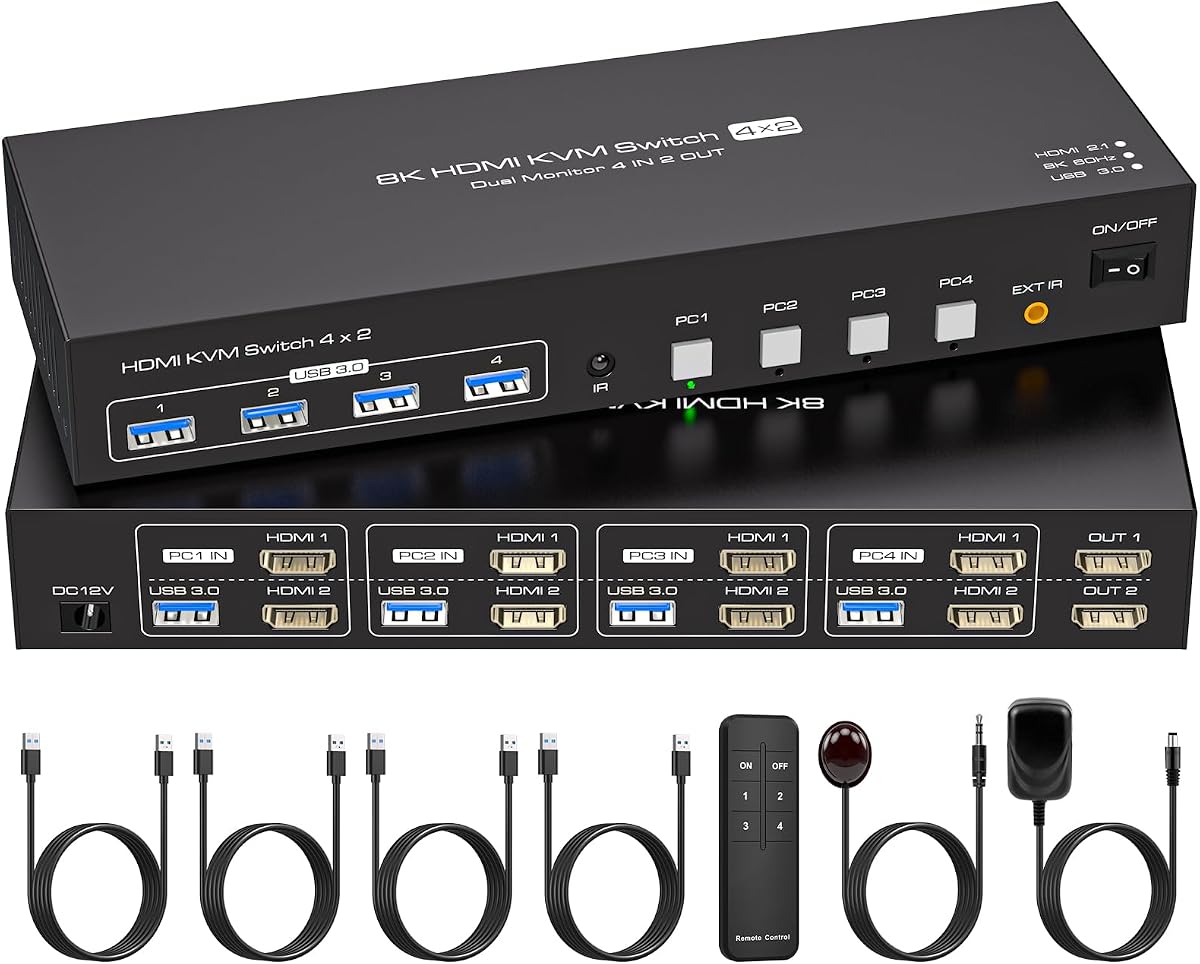
This dual-monitor KVM is the strongest fit for users who need four computers but want only two screens. It carries a 4.7 rating and combines broad video support with the display flexibility that single-monitor switches cannot provide. Each computer connects to two HDMI inputs, while the switch sends video to two HDMI-equipped monitors.
We may earn a commission when you buy through this link, at no additional cost to you.
Maximum video support is listed at 8K at 60Hz and 4K at 120Hz, with lower resolutions also supported. The ability to use duplicate mode or extended mode is valuable for multitasking, synchronized monitoring, design work, and other situations where the same content may need to appear on both displays or separate tasks need additional space. EDID emulation is included to recognize and preserve monitor parameters, helping prevent window rearrangement when switching sources.
Four USB 3.0 ports operate at up to 5Gbps and are compatible with USB 2.0 and 1.1 devices. Users can share keyboards, mice, printers, webcams, and flash drives across the four systems. A front button and an infrared remote provide two switching methods, and LEDs reveal the active computer. Hotkey switching is not supported, and stable operation requires the included 12V 1A external power supply.
Choose this model if your goal is a capable four-PC, two-screen command center rather than the simplest one-screen setup. It suits offices, monitoring stations, and creative systems where extended workspaces and high-resolution output matter. Confirm that every computer has two suitable HDMI outputs and that both monitors accept HDMI.
Duplicate mode can present the same image on both screens, while extended mode expands the desktop across them. That flexibility makes the switch useful for control rooms, editing environments, and offices where visual comparisons or multiple application windows are common.
The stated 8K and 4K support is only achievable when the source computer, monitor, and cable also support the target resolution. Checking the full signal chain prevents disappointing results after installation.
We may earn a commission when you buy through this link, at no additional cost to you.
UGREEN's four-computer, one-monitor KVM stands out for its six shared USB ports, making it the best option in this list for users who regularly attach more than a keyboard and mouse. It has a 4.7 rating and supports 4K at 60Hz, 4K at 30Hz, and even 1080p at 240Hz when the entire connected chain supports those modes.
We may earn a commission when you buy through this link, at no additional cost to you.
The USB arrangement consists of four USB 3.0 ports and two USB 2.0 ports, while the product description also identifies a total of five USB-A connections and one USB-C connection. This gives users room to share storage drives, a webcam, a printer, a flash drive, and other peripherals. A front-panel button or included wired desktop controller can change computers, and the latter is useful when the switch is installed away from the keyboard.
EDID emulation is activated by holding the first switch button for approximately five seconds until the indicators flash three times. Once enabled, it is intended to retain monitor identification, resolution, and configuration across source changes, although actual results can vary with graphics hardware, operating system, and system configuration. The switch is driver-free and compatible with Windows, macOS, and Linux.
This model is best for a single-monitor productivity station that needs unusually flexible USB sharing. Its main inconveniences are practical: HDMI cables and the power adapter are not included, every computer needs the specified data connections, docking stations are unsupported, and laptops should be awake before switching.
The larger port count reduces the need to constantly exchange external devices. It is particularly helpful for shared workstations that alternate among desktops, a laptop, and accessories such as a webcam, portable drive, or printer.
The wired desktop controller allows the switch itself to be placed outside the immediate work area. Users can therefore keep the main desk uncluttered without giving up direct access to all four computers.
We may earn a commission when you buy through this link, at no additional cost to you.
The KCEVE is the premium choice for users who want four computers connected to four monitors through a single switching system. Its 4.7 rating reflects a feature set aimed at demanding professional configurations rather than a simple one-screen desk. The design supports DisplayPort and HDMI, along with copy mode, extend mode, shared USB devices, and a 3.5mm audio connection.
We may earn a commission when you buy through this link, at no additional cost to you.
Video modes extend to 4K at 144Hz, while the product information also describes support for 8K at 60Hz when compatible monitors, computers, HDMI cables, and DisplayPort cables are used. Each source computer needs three DisplayPort outputs and one HDMI output to make all four displays operational. That requirement is substantial, so the KVM is best suited to workstations with modern multi-GPU or high-end graphics configurations.
A larger wired controller provides more comfortable physical switching and allows the main unit to be concealed under a desk. Four USB 3.0 ports share devices such as keyboards, mice, hard drives, printers, and scanners at up to 5Gbps. The 3.5mm audio jack can support sound for remote meetings, live streaming, online education, and similar activities. The unit is plug-and-play and does not require drivers.
This is the appropriate choice for a professional four-monitor command center where display density and mixed interfaces are central. It is less suitable for ordinary home users because of the number of cables, source outputs, and compatible high-end components required. The product also includes a one-year professional warranty and manufacturer support.
The four-monitor architecture is aimed at users who routinely move between demanding production, monitoring, simulation, or finance systems. It consolidates a large amount of visual and peripheral control into one desktop workflow.
Copy mode is useful for matching screens, while extend mode allows windows to occupy separate outputs. The included audio jack adds another shared connection, making the unit more useful for communication and presentation tasks.
We may earn a commission when you buy through this link, at no additional cost to you.
This single-monitor KVM is aimed at users who need one high-end display and four possible computers. It supports up to 8K at 60Hz and 4K at 120Hz, giving it relevance for specialized graphics, high-detail media, and demanding desktop workflows where refresh rate matters alongside resolution.
We may earn a commission when you buy through this link, at no additional cost to you.
All four source systems need HDMI connections, and conversion cables are not supported. The switch adds four USB 3.0 ports for a keyboard, mouse, printer, and removable storage, with stated transfer speeds up to 5Gbps. A controller and an IR extension receiver allow the unit to be positioned away from the desk while preserving convenient source selection.
The product is plug-and-play and compatible with Windows, Mac, and Linux. The package includes a 12V 1A power supply, controller, IR cable, four USB 3.0 cables, a manual, and an after-sales card. Manufacturer support is advertised for up to 24 months. These package details make it more complete than some competing options that require users to source additional cables or a power adapter.
This switch makes sense when your monitor, graphics card, and cables all support the high target mode. If your everyday display is limited to 4K at 60Hz, you may find a more conventional four-port HDMI model easier to justify. Its 4.2 rating is lower than those of the leading options, so compatibility should be checked particularly carefully.
4K at 120Hz can make interaction feel more fluid for compatible applications, while 8K support provides very high pixel density. Neither mode is automatic; every part of the signal path must support the intended format.
The included IR extension receiver is helpful when the switch itself must be hidden or positioned awkwardly. It keeps source selection accessible without requiring the unit to sit directly beside the monitor.
We may earn a commission when you buy through this link, at no additional cost to you.
UGREEN's 8K HDMI KVM is the most compelling option here for a single-monitor gaming or high-refresh system. Although its 4.0 rating is modest, the stated video support is extensive, including 8K at 60Hz, 4K at 240Hz, 2560 by 1440 at 120Hz, and 1080p at 240Hz. Actual results depend entirely on the source device, graphics hardware, display, and cables.
We may earn a commission when you buy through this link, at no additional cost to you.
Four computers share one HDMI display and four USB 3.0 devices through three USB-A and one USB-C connection. The switch can be operated from a front button or a wired desktop controller. It is compatible with Windows, macOS, and Linux without drivers, and the listed source compatibility extends beyond desktop PCs to laptops, Mac systems, Nintendo Switch, PlayStation models, and Xbox One.
There are several restrictions to consider. It is not a DisplayPort KVM, does not support EDID emulation, does not support hotkey switching, and is not intended for use with docking stations. A laptop should be awakened from sleep before switching, and high-power USB equipment may require the USB-C connection to deliver adequate power. Each PC also needs an HDMI cable and the specified USB A-to-C data cable.
Choose this unit for gamers, competitive users, or high-refresh creative systems that prioritize frame rate. It is less attractive for multi-monitor users and for anyone who depends on EDID emulation to preserve desktop arrangements across several computers.
The unusually broad list of supported refresh rates makes this switch more relevant to fast displays than most alternatives. Users should verify that the graphics output and monitor can actually produce the selected mode.
The listed game-console support adds flexibility for a media and gaming hub. Connecting a console still requires compatible video and control arrangements, and the switch's core design remains focused on sharing one display.
We may earn a commission when you buy through this link, at no additional cost to you.
This four-port KVM is a straightforward option for users who want one 4K display, four computers, and a manageable collection of shared USB devices. It has a 4.2 rating and focuses on the essentials: 3840 by 2160 at 60Hz video, front-panel selection, a wired remote, and plug-and-play operation.
We may earn a commission when you buy through this link, at no additional cost to you.
The shared peripheral section includes three USB 3.0 ports and one USB-C port. These connections are suitable for a keyboard, mouse, camera, flash drive, and other common accessories. Adaptive EDID can identify connected displays, while the numbered remote and LEDs make it easy to tell which computer is selected. Hotkey switching is not supported, so the front buttons or remote serve as the only listed methods.
Its package is unusually complete for this category. It includes one HDMI cable, four USB 3.0 cables, a power cable, a USB controller cable, and a wired desktop controller. That reduces setup friction and makes the model accessible to first-time KVM users who may not know which host cables are required.
This KVM is best for a straightforward home office, service bench, or productivity desk that does not need 8K output or multiple displays. Its limitation is video headroom: 4K at 60Hz is appropriate for most office work, but users with high-refresh or very high-resolution monitors should consider a more advanced model.
The four USB host cables and HDMI cable cover the core connections for a four-computer setup. This can make the initial installation more predictable and reduce the need to identify compatible cables independently.
Numbered front buttons, a clearly labeled wired controller, and status LEDs remove ambiguity from the switching process. This is helpful in shared offices where several users may operate the same workstation.
We may earn a commission when you buy through this link, at no additional cost to you.
The Hearvo S7415H is a four-computer, one-monitor KVM aimed at ordinary productivity and media setups. Its 4.0 rating places it among the lower-rated products here, but the stated feature set covers the central requirements: 4K at 60Hz, shared keyboard and mouse control, four USB 3.0 connections, and two switching methods.
We may earn a commission when you buy through this link, at no additional cost to you.
Video support includes 4K at 60Hz, 4K at 30Hz, 2K, 3D, and 1080p, with HDCP 2.2 compliance for protected content. Adaptive EDID is included to optimize display recognition and maintain a smoother image when the active source changes. Source selection is available from the switch itself or through a wired remote, which allows the main unit to be hidden or placed farther away.
The USB section comprises three USB-A ports and one USB-C data port, with stated transfer rates up to 5Gbps. It is designed for sharing keyboards, mice, scanners, printers, flash drives, headsets, and webcams. The package includes the switch, an HDMI cable, four high-speed USB cables, a wired remote, a manual, a protection plan card, and anti-slip rubber pads.
This model suits users who want a conventional four-PC setup without paying for multi-monitor complexity. One point to clarify before purchase is the inconsistent wording in the product information, which refers to both two and four input devices in different sections despite clearly identifying it as a four-port model. Checking the current package and connection diagram is advisable.
The combination of HDMI switching, shared peripherals, and a wired controller covers the most common needs of a multi-computer desk. It is especially useful for users moving between several office systems.
HDCP 2.2 support can be helpful for compatible protected media, while adaptive EDID is designed to reduce display reconnection issues. Neither feature eliminates the need to use cables and monitors capable of the selected output mode.
We may earn a commission when you buy through this link, at no additional cost to you.
The AOOCOO triple-monitor KVM fills the gap between basic dual-screen and full four-screen control. It allows four desktops to share three monitors, two DisplayPort outputs, one HDMI output, and four USB 3.0 device connections. Its 4.5 rating is solid for a more specialized model in this roundup.
We may earn a commission when you buy through this link, at no additional cost to you.
The HDMI path supports 8K at 60Hz, 4K at 120Hz, and 4K at 60Hz, while the DisplayPort path supports up to 8K at 30Hz or 4K at 144Hz. The appropriate mode depends on which output and which display are being used. Users are advised to use HDMI 2.1 and DisplayPort 1.4 cables, with shorter runs preferred where possible.
Each computer needs two DisplayPort and one HDMI connection, and systems using both integrated and discrete graphics may need all three outputs to belong to the discrete card. The switch supports copy and extended modes. A front-panel button and wired remote control provide source selection, while the package includes four USB 3.0 cables, a remote, a manual, and a 12V power adapter.
This is a compelling option for a four-PC, three-screen office or creative workstation that does not require the extensive cabling of a four-monitor system. It is particularly relevant to users who value high refresh rates and flexible display layouts, provided their graphics hardware can output all three signals.
The three-monitor layout provides additional workspace while requiring fewer source connections than a four-display system. It is a practical middle ground for multi-PC desks used for analysis, editing, monitoring, or general office work.
Maximum refresh rates differ by interface, so users should match each physical output to the display and task it serves. This is particularly important for fast gaming or detailed high-refresh work.
We may earn a commission when you buy through this link, at no additional cost to you.
This four-computer, dual-monitor KVM is built for users who care about retaining a consistent screen arrangement. Its EDID emulator stores the monitor's resolution and refresh rate, helping preserve window order when switching among four computers. That makes it a useful alternative to the dual-screen AOOCOO model for users who want straightforward HDMI connections and stable layouts.
We may earn a commission when you buy through this link, at no additional cost to you.
The switch supports two HDMI displays, copy mode, and extended mode. Maximum video output is listed at 8K at 60Hz, with 4K at 144Hz, 4K at 60Hz, 1080p at 60Hz, and 720p at 60Hz also supported. As with any high-resolution KVM, achieving the top mode requires a compatible source computer, monitor, and HDMI cable.
Four USB 3.0 ports share wired or wireless keyboard and mouse receivers, printers, scanners, and other peripherals at up to 5Gbps. The enclosure is made from metal for a durable feel. Source selection works through front-panel keys or an infrared remote, and the included IR cable allows the switch to be hidden while the remote remains in use.
This is a good fit for finance, engineering, administration, and creative users who want two screens per computer and value EDID behavior. Its main requirement is strict: every computer needs two HDMI ports. An active adapter may be used when a computer or display lacks sufficient connections, but the complete signal chain must still support the intended resolution and refresh rate.
EDID emulation is the defining feature in this model. By helping each source retain the display configuration, it can reduce the disruption caused by windows shifting or disappearing after a source change.
Copy mode supports synchronized viewing, while extended mode creates a broader working area. Both options make the switch useful for professional multitasking across several systems.
We may earn a commission when you buy through this link, at no additional cost to you.
The best KVM switch for 4 computers is defined by the complete hardware chain, not by the number of ports printed on the box. Begin with your display layout, then verify video standards, USB requirements, switching controls, EDID behavior, and source-device compatibility.
Single-monitor models are the easiest to install and generally work well for office systems, test benches, and compact desks. Dual-monitor switches are more useful for general productivity and creative work, while triple- and four-monitor models serve specialized multi-screen environments. The total number of outputs matters, but the number of outputs on each source computer matters just as much: every connected PC must provide the necessary HDMI or DisplayPort connections.
A listed maximum resolution does not guarantee that your setup will achieve it. Resolution, refresh rate, HDR, and color features must be supported by the graphics output, monitor, HDMI or DisplayPort version, and every intervening cable. The models here range from conventional 4K at 60Hz to 8K at 60Hz and high-refresh 4K modes. Multi-screen configurations may also impose different limits on each output.
HDMI is broadly convenient for PCs, laptops, and many media devices, while DisplayPort is common in high-end desktop workstations and supports high-refresh multi-monitor arrangements. Some switches use a mixture of both, but their maximum modes can differ by interface. A dual-screen HDMI switch is simple to connect, whereas a mixed HDMI and DisplayPort model may align better with a professional graphics setup.
A basic KVM usually needs two ports for the keyboard and mouse, leaving fewer for a webcam, printer, storage drive, scanner, or headset. Options with four, six, or more USB ports accommodate more simultaneous accessories. Pay attention to the mixture of USB-A and USB-C because it affects which host and device cables you need. Listed speeds of up to 5Gbps apply to USB 3.0 connections, and high-power equipment may require suitable power delivery.
EDID information tells a computer the identity, capabilities, and preferred settings of a display. Without emulation or an adaptive implementation, changing sources can cause a black screen, resolution reduction, or rearranged windows. A true EDID emulator is particularly useful in dual-monitor offices where each source must remember a stable layout. Some switches provide adaptive EDID instead, and some explicitly do not support emulation, so this distinction should influence your decision.
Front-panel buttons are reliable, visible, and easy to explain to another user. A wired desktop controller is better when the switch is mounted under a desk or positioned away from the monitor. Infrared remotes can also support hidden installations, although they require a clear line to the receiver. Several products in this list do not support hotkey switching, so keyboard-based command sequences should not be assumed.
Each computer normally needs one video cable and one USB data cable in addition to the monitor and peripheral connections. Some packages include these cables, while others require separate purchases, and external power is recommended for stable operation on several models. The supplied information also mentions restrictions involving docking stations, sleeping laptops, and source ports. Review the requirements before ordering to avoid a setup that cannot provide the advertised performance.
Most of these switches are driver-free and work with Windows, macOS, and Linux, but operating-system compatibility does not guarantee that every source device will behave identically. Some models also list consoles, game systems, and mini PCs as supported sources. Laptops should normally be awake when selected, and systems using integrated graphics may have limitations when several outputs are connected to different graphics adapters.
Begin by identifying the switch, monitor, and all four source computers. Place the KVM where its cables can reach each system without creating tension. Connect the monitor to the switch's output, attach the keyboard, mouse, and any other shared peripherals to the USB ports, and connect each computer's matching video and USB host cables.
Connect the appropriate power adapter if the model requires or recommends one. Turn on the monitor and source systems, then allow each computer to boot or wake fully. Use the front buttons, desktop controller, or remote to select a computer, checking the status indicators to confirm that the intended source is active. If a display is blank, verify the selected source, cable connections, monitor input, and whether the computer is asleep.
For long-term use, keep the unit ventilated, avoid placing it under heavy objects, and secure cables so they are not pulled from connectors. Clean the exterior with a dry or lightly damp cloth, and do not pour liquid into the ports. Periodically check that high-power USB devices remain connected to an appropriate port and that any firmware, driver, or compatibility changes on source computers have not affected operation.
In most four-computer HDMI setups, each computer needs its own HDMI connection to the KVM switch. The switch then sends the selected computer's signal to one monitor, so the monitor-side cable is separate from the four source-side cables. Cable quality matters at high resolutions, particularly for 4K at 120Hz, 4K at 240Hz, or 8K.
Only if the chosen model explicitly supports four displays. Some four-port switches manage four computers but share just one or two monitors, while a four-monitor KVM requires each computer to provide four compatible video outputs. A four-computer switch and a four-monitor switch are related terms, but they describe different hardware capabilities.
EDID emulation is designed to present stored or emulated display information to connected computers so that a display layout can remain stable. Adaptive EDID generally detects and adjusts to connected displays, which may also improve source switching. Neither approach guarantees identical results across every graphics card, operating system, cable, and monitor combination.
First, confirm that the target computer is awake and that the correct source indicator is selected. Next, check that every source and display cable supports the intended resolution and refresh rate. A power cycle of the computer, monitor, and switch can also help, while a compatible higher-quality HDMI or DisplayPort cable may resolve intermittent blank-screen or handshake problems.
Most driver-free KVM switches can be used with compatible laptops, but the product details should be checked for port and power limitations. Several models specifically advise waking a laptop from sleep before switching, and docking stations are unsupported by some products. A laptop may also need its display settings adjusted after the first source change.
The listed products are generally described as plug-and-play and driver-free, so no special KVM software is normally required. Your computer still needs the appropriate graphics and USB drivers, and compatibility can depend on its operating system and hardware. Enterprise machines with strict device-control policies may require administrator approval.
Yes, provided the switch has enough shared USB ports and the devices are compatible with the port type and USB speed. The peripheral connected to the KVM follows whichever computer is active. High-power devices may require a suitable port or additional power, and very high-speed storage may be limited by the source computer or cable.
A remote controller or desktop controller is easier to use when the KVM is mounted out of reach, while front buttons provide a simple local option. Hotkey switching is convenient for keyboard-focused users, but several models in this comparison do not support it. Confirm the listed controls before choosing based on hotkey convenience.
The four-computer HDMI KVM with a 4.8 rating is the most balanced recommendation for a standard one-monitor setup, especially because it includes cables, a wired remote, adaptive EDID, and four USB 3.0 connections. For two-screen users, the dual-monitor four-port model adds 8K support, EDID emulation, and copy or extended layouts, while the KCEVE model stands apart as the premium four-monitor option.
Prioritize the parts of the system you cannot easily change: monitor count, connector types, graphics outputs, and required refresh rate. Then choose the features that improve daily use, such as stable EDID behavior, enough shared USB ports, a controller that suits the switch's placement, and a package that includes the necessary cables. Simple needs deserve a simple model, but specialized multi-screen workstations benefit from more capable video and display controls.
Ratings, availability, bundle contents, and prices can change, so consult the current Amazon listing before ordering. Most importantly, verify compatibility across the complete chain of source computers, graphics adapters, monitors, cables, peripherals, and power requirements. A KVM switch is only as capable as the equipment connected to it.