
Keychron K1 Ultra 8K
4.7Editor score
Up to 8K wired polling
Hot-swappable POM switches
Tri-mode wireless connectivity
Explore the best low profile mechanical keyboards, comparing layouts, switches, connectivity, ergonomics, customization, and build quality for every need.
Low profile mechanical keyboards pair the compact height of laptop-style keys with the responsive feel of mechanical switches. The result can make typing more comfortable, conserve desk space, and suit travel setups, although switch feel, stability, and wireless performance vary considerably between models.
This guide compares ten low profile mechanical keyboards using their stated layouts, switch designs, connectivity, customization options, acoustic features, and intended uses. It covers compact 75% boards, 80% and 96% layouts, full-size alternatives, wired models, and wireless boards for gaming or productivity.
Each review explains the standout strengths and practical trade-offs so you can identify the right board for your desk and habits. Ratings reflect the supplied customer feedback, while feature details and availability may evolve; compare current listings and specifications before making a final purchase.
4.7Editor score

4.6Editor score

4.1Editor score
This side-by-side overview highlights the major differences in layout, switching, connectivity, and customization among the ten shortlisted low profile mechanical keyboards.




The Redragon K618 PRO is a compact wireless gaming keyboard built around a 60% layout, 20 dedicated macro keys, and media controls. With a 4.1 rating, it stands out for offering unusually broad control options without making software mandatory for every immediate task. Its low-profile red switches are designed to produce quick, linear feedback for fast input.
We may earn a commission when you buy through this link, at no additional cost to you.
The strongest feature is its four-by-five macro zone, which sits above the main typing area alongside dedicated media controls. Users can record combinations and adjust common functions directly from the keyboard, while the included software expands the possibilities through full key remapping and lighting effects. Tri-mode connectivity adds USB-C, Bluetooth, and 2.4GHz wireless, allowing the board to move among desktop and portable devices.
Its 30% slimmer switch and keycap design shortens travel and keeps the overall keyboard visually and physically restrained. The one-touch Windows and Mac switching control is useful for mixed-device setups. The trade-offs are inherent to the 60% format: there is no dedicated function row or full navigation cluster, and competitive buyers should verify that all essential keys are present before ordering.
This is a strong recommendation for gamers and power users who want macro control, wireless flexibility, and a compact physical footprint. It may be less suitable for spreadsheet-heavy users who rely on separate arrow and navigation keys. Even so, the combination of hardware macro keys, broad software support, and tri-mode connectivity makes it an accessible entry point into low profile gaming keyboards.
The dedicated macro block makes common commands easier to access during play or repetitive workflows. Although the supplied software is needed for deeper programming, basic recording can begin directly from the keyboard.
USB-C, Bluetooth, and 2.4GHz connectivity allow the K618 PRO to fit desktop, laptop, and tablet setups. This flexibility is especially useful for users who regularly move between fixed and mobile workspaces.
We may earn a commission when you buy through this link, at no additional cost to you.
The Keychron K3 Version 2 is a 75% wireless mechanical keyboard designed to balance compact dimensions with everyday productivity. It carries a 4.3 rating and differentiates itself through open-source QMK firmware, broad remapping support, a multi-device Bluetooth chipset, and a notably thin, lightweight construction.
We may earn a commission when you buy through this link, at no additional cost to you.
Its function row and right-side navigation area preserve more workflow utility than a minimal 60% layout while remaining smaller than a full-size board. The included Mac and Windows keycaps make it adaptable to mixed operating systems, and the floating keycap arrangement gives the low-profile body a distinctive appearance. QMK support opens the door to custom layers, macros, shortcuts, and key assignments through the Keychron Launcher web app.
Users should expect some initial configuration work if they want extensive personalization, and the 75% format still requires attention to function and navigation positioning. The product description also notes that firmware updates may be needed when layouts do not match a device exactly. Its reinforced aluminum upper body and plastic lower frame help keep weight manageable, but neither material alone guarantees the same rigidity as a thick full-size metal chassis.
The K3 is ideal for programmers, writers, and productivity-focused users who want a portable low-profile board without giving up advanced firmware tools. It may be less suitable for someone who wants a full-size board with maximum key spacing or immediate out-of-box simplicity. For its combination of compact size, open-source customization, and multi-device support, it remains one of the most versatile choices in this guide.
QMK firmware gives users deeper control over layers, remapping, macros, and shortcuts than a basic bundled interface. The Launcher web app makes those advanced options accessible without requiring command-line setup for ordinary customization tasks.
The 75% format keeps a function row and useful navigation keys while reducing the footprint of a full-size keyboard. That balance works well for documents, coding, and daily office tasks where a 60% layout would feel too limited.
We may earn a commission when you buy through this link, at no additional cost to you.
The Cherry MX 10.0N RGB is a full-size low profile mechanical keyboard built around Cherry MX Low Profile Speed switches. Its 4.3 rating reflects a well-rounded offering for users who prefer a complete key arrangement and established switch behavior, while the 0.87-inch body keeps the keyboard considerably slimmer than conventional mechanical designs.
We may earn a commission when you buy through this link, at no additional cost to you.
The linear Speed switches are described as quiet, responsive, and suitable for both typing and gaming. RGB lighting can be customized with different colors and effects, while the aluminum housing adds a refined appearance and sturdy base. A fold-out aluminum support bar provides an adjustable typing position without requiring a separate wrist rest, making the board more self-contained for a fixed desk.
The primary compromise is footprint. A full-size layout includes the function row, navigation cluster, and numeric keypad, so it will occupy more desk space than the 75%, 80%, 96%, and 60% alternatives in this roundup. The supplied information also does not identify wireless connectivity, making this a more conventional choice for users who prioritize the full layout and simple station-based setup.
Choose the MX 10.0N if you want familiar full-size functionality in a thin mechanical design, especially for gaming, spreadsheets, or mixed work that depends on the number pad. Users with limited desk area or a strong need for portable wireless operation should favor a compact model instead. For full-size coverage and a slim profile, it is one of the clearest choices available.
The standard arrangement preserves the numeric keypad, function row, and dedicated navigation keys. It is a more natural fit for spreadsheet work, shortcuts, and users who have learned the positions of a conventional desktop keyboard.
Cherry MX Low Profile Speed switches provide a short-travel, linear experience intended for responsive input. Their stated quiet operation may also appeal to shared offices, although individual sensitivity will vary by user.
We may earn a commission when you buy through this link, at no additional cost to you.
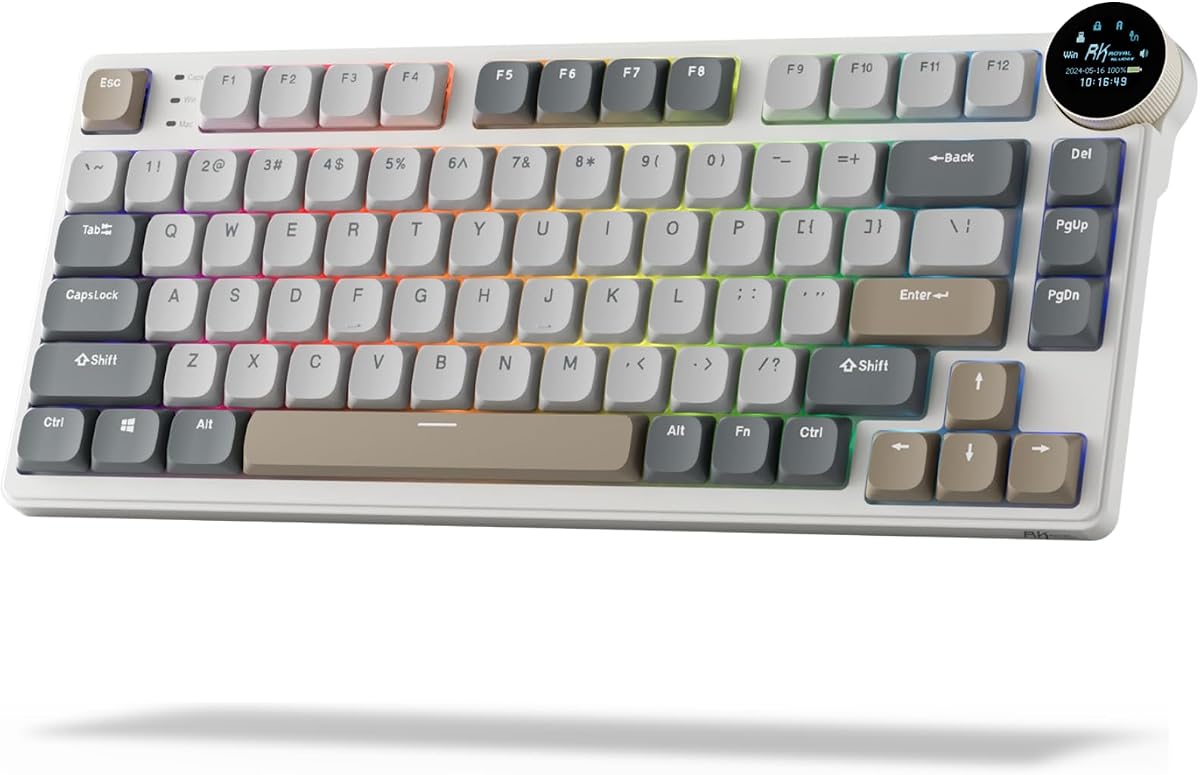
The RK Royal Kludge N80 combines an 80% low profile layout with a compact display and rotary knob. Its 4.1 rating makes it a practical choice for gamers and office users who value integrated controls, multiple connection modes, and a design intended to reduce the hollow or wobbling feel sometimes associated with low-profile boards.
We may earn a commission when you buy through this link, at no additional cost to you.
The display can present custom GIFs, the date, connection status, battery information, and operating-system layouts. The knob offers a second way to adjust volume, brightness, RGB modes, colors, and connection behavior. Bluetooth 5.0, 2.4GHz wireless, and USB-C wired modes provide broad device support, while the shorter actuation of the custom low-profile switches is intended to improve responsiveness.
A top-mounted structure is designed to support a firmer keystroke, and the heavy base is intended to counter wobble. Dual sound-absorbing foam layers and a silicone bottom pad work together to reduce internal noise. The trade-off is that the extra screen and knob make the top edge more complex, and users may need to configure or learn the controls before they feel effortless.
The N80 is well suited to someone who wants more personality and direct control than a conventional keyboard provides. It is particularly appealing for a mixed gaming and productivity station because the display, knob, and tri-mode connectivity serve both environments. Those wanting the simplest possible interface may prefer a board without an embedded screen, but the N80 adds useful functionality in a compact package.
Combining the screen and rotary knob reduces dependence on separate desktop widgets or mouse gestures. The result is a keyboard that can present status information and adjust common settings without taking up additional software-panel space.
The top-mounted construction and heavy base target a planted typing experience. Internal foam and a dampening pad further refine the acoustic profile by reducing cavity noise and unwanted movement.
We may earn a commission when you buy through this link, at no additional cost to you.
The Lofree Flow Lite 84 is a 75% wireless mechanical keyboard built around low-profile 40gf Specter linear switches. It carries a 4.3 rating and is especially interesting for users who want a light touch, adjustable switch feel, and a low front profile without giving up a function row or essential productivity keys.
We may earn a commission when you buy through this link, at no additional cost to you.
The stated 40gf operating force is designed to reduce finger and wrist strain during extended sessions. Hot-swappable sockets make it possible to change switches without soldering, while the gasket mount adds flexibility and cushions each keystroke. Two-tone double-shot keycaps combine illuminated letter sections with textured PBT areas, providing a matte surface and durable legends.
Connectivity includes 2.4GHz wireless, Bluetooth, and wired USB-C, and the 2.4GHz mode supports a stated 1000Hz polling rate. A 2000mAh battery is rated for up to 80 hours with the lights off and can be recharged in approximately three hours. The body uses textured ABS rather than aluminum, which helps manage weight and cost but may feel less substantial than a metal enclosure.
This is a strong fit for typists who favor gentle linear switches and want the freedom to tune their keyboard later. It also suits travel-oriented users because the charging cable, wireless receiver, and adjustable kickstand reduce the need for separate accessories. Those who prioritize a dense aluminum build or maximum battery duration may prefer the larger Flow Lite 100, but the 84-key model offers a balanced footprint and particularly light operating force.
The 40gf Specter switches are intended to feel light while retaining a linear path. This can make long text entry less demanding and provides a gentler starting point for users experimenting with low-profile mechanical switches.
Hot-swappable sockets allow switch changes without soldering, making the board easier to personalize as preferences change. The Lofree Configurator and Key Mapper extend that flexibility to key assignments and workflow shortcuts.
We may earn a commission when you buy through this link, at no additional cost to you.
The Keychron K1 Ultra 8K is an 80% TKL wireless mechanical keyboard offering up to 8K polling in wired mode. Its 4.7 rating is the highest among the products in this guide, reflecting a feature set aimed at users who value polling performance, compact desk space, and extensive customization in a premium low-profile package.
We may earn a commission when you buy through this link, at no additional cost to you.
The K1 supports 8K wired polling alongside 2.4GHz and Bluetooth 5.2 connections, making it adaptable across gaming, work, and everyday use. Its 80% layout removes the number pad while retaining commonly used keys, and the programmable knob can control volume, lighting, media, or custom actions. ZMK firmware and the Launcher web app support layers, macros, remapping, and shortcuts across macOS, Windows, and Linux.
Hot-swappable low-profile POM sockets allow the feel to be changed without soldering. North-facing RGB lighting offers 22 effects, while internal sound-dampening layers aim to reduce noise and resonance. Wax-oil-treated hardwood side panels add visual warmth, although the premium construction and advanced feature set may make the keyboard more complex than a buyer needs for basic office use.
This is the strongest recommendation for performance-minded users who can benefit from very high wired polling while still wanting wireless flexibility. Competitive gamers should note that the 8K figure applies to wired use rather than every connection mode, so latency expectations should be matched to the selected mode. For a premium board that combines speed, QMK-style programmability, and a compact workspace layout, the K1 Ultra 8K is the standout.
Support for up to 8K wired polling gives the K1 Ultra 8K a strong performance proposition for fast desktop setups. The 2.4GHz and Bluetooth modes remain useful for flexibility, though their polling characteristics should not be confused with the headline wired rate.
ZMK firmware and the Launcher web app provide access to layers, macros, shortcuts, and remapping on major desktop platforms. The AI-assisted customization option can also simplify setup for users who are new to keyboard firmware.
We may earn a commission when you buy through this link, at no additional cost to you.
The Keychron K17 Max uses a 96% layout to preserve a number pad and nearly full-size functionality in a low-profile body. Its 4.4 rating and combination of tactile Brown switches, QMK firmware, and wireless connectivity make it a compelling productivity board for users who find 60%, 75%, and 80% layouts too restrictive.
We may earn a commission when you buy through this link, at no additional cost to you.
The keyboard supports 2.4GHz, Bluetooth, and wired Type-C connections. The wireless gaming mode offers a stated 1000Hz polling rate, while Bluetooth 5.1 supports switching among up to three devices. Gateron low-profile Brown switches are 31% thinner than standard switches and provide tactile feedback, making the board more appropriate for mixed typing and general use than for players who strictly require linear switches.
An aluminum frame and ultra-slim body reduce visual bulk, while low-profile double-shot PBT keycaps are designed to resist shine and oil over time. QMK firmware and the cross-platform Launcher app provide key remapping, macros, shortcuts, and updates. The main limitation is footprint: a 96% board remains substantially wider and deeper than the compact alternatives, even without the large borders of some full-size keyboards.
Choose the K17 Max if you routinely enter numbers but want a shorter profile than a standard full-size keyboard. It is well matched to office productivity, financial workflows, and mixed desktop use where tactile feedback and multi-device switching matter. Competitive gaming is possible through the 2.4GHz mode, but users seeking a more forceful linear feel may prefer another switch option.
The 96% layout preserves the number pad while trimming away some of the physical separation found on conventional full-size keyboards. This makes the K17 Max a practical compromise for spreadsheet-heavy users with moderate desk space.
Gateron Brown switches add a tactile bump that many typists appreciate for confirming keystrokes. They are less universally suited to fast gaming than linear switches, but they can create a comfortable and deliberate typing experience.
We may earn a commission when you buy through this link, at no additional cost to you.
The Lofree Flow Lite 100 expands the low-profile productivity concept with 100 keys, a larger 3000mAh battery, and the same gentle 40gf Specter linear switch approach. Its 4.4 rating makes it a compelling choice for wireless users who want more key coverage and a stated battery life of up to 100 hours with the lights off.
We may earn a commission when you buy through this link, at no additional cost to you.
The 100-key format offers a useful middle ground between a compact 75% board and a traditional full-size model. It retains an expanded workspace while avoiding the extreme width associated with some full-size designs. Hot-swappable sockets, a gasket mount, and the Lofree Key Mapper make the board easy to personalize, and its low front height is designed to support a more natural wrist position.
The 2.4GHz mode supports a stated 1000Hz polling rate, while Bluetooth and wired USB-C provide alternatives for travel and charging. The built-in adjustable kickstand and aluminum roller volume control improve everyday convenience without requiring loose desk accessories. As with the Flow Lite 84, the enclosure is textured ABS rather than aluminum, so buyers seeking a premium metal feel should look elsewhere.
The Flow Lite 100 is best for mobile productivity users who want reliable wireless operation, a relatively light switch, and a broader key arrangement than the 84-key model. Its larger battery and extended runtime make it especially attractive for long work sessions away from a charger. Those with a very small desk may find the 100-key footprint less convenient, but for many offices it offers the strongest balance of usability and endurance.
The larger 3000mAh battery is rated for up to 100 hours with lighting turned off. Actual runtime will vary with backlight level, connection mode, and activity, but the stated capacity supports the board's travel and workday ambitions.
The 100-key arrangement offers more room for shortcuts and navigation than the Flow Lite 84 while remaining smaller than many conventional full-size boards. It is a practical middle option for mobile users who do not want to give up a number-oriented workflow.
We may earn a commission when you buy through this link, at no additional cost to you.
The Keychron K3 Max SE is an ultra-slim 75% wireless mechanical keyboard with a 4.6 rating. It combines a 1000Hz 2.4GHz mode, Bluetooth 5.2, QMK firmware, hot-swappable low-profile switches, and revised stabilizer design, making it one of the strongest all-round choices for portable productivity and gaming.
We may earn a commission when you buy through this link, at no additional cost to you.
Its 2.4GHz connection targets low-latency competitive use, while Bluetooth can connect to up to three devices for switching among a computer, phone, and tablet. The QMK platform enables remapping, macros, layers, and shortcuts through the Keychron Launcher web app. The launcher is normally accessed in wired mode using a recent Chrome, Opera, or Edge browser, which is worth knowing before setup.
The Milk POM switches are 31% slimmer than traditional full-profile switches and can be replaced without soldering. EPDM and bottom-case acoustic foam are designed to create a quieter, cushioned sound, while re-engineered stabilizers are intended to reduce wobble on the spacebar, Shift, Backspace, and Enter. Double-shot PBT keycaps offer durable, non-shine-through construction with resistance to oil and wear.
This board is a compelling recommendation for users who want a restrained footprint, advanced firmware, and dependable wireless flexibility. Mac users receive a suitable multimedia and function-key arrangement while retaining Windows compatibility. The 75% layout omits a number pad, so spreadsheet specialists may prefer the K17 Max, but for general work, travel, and responsive gaming, the K3 Max SE offers an unusually refined feature set.
Two acoustic foam areas work with the revised stabilizers to reduce hollow resonance and uneven movement. These details are especially relevant in low-profile designs, where internal space is limited and small construction choices have a noticeable acoustic effect.
The 1000Hz 2.4GHz mode provides a responsive option for gaming, while Bluetooth handles multi-device productivity. QMK and the Launcher add deep remapping and macro support for users who want shortcuts tailored to their applications.
We may earn a commission when you buy through this link, at no additional cost to you.
The Razer Ornata V3 is a full-size gaming keyboard with slim keycaps, short switches, and a magnetic soft-touch wrist rest. Its 4.5 rating and focus on natural hand positioning make it worth considering for gamers who prioritize a traditional layout, convenient media controls, and an integrated comfort accessory.
We may earn a commission when you buy through this link, at no additional cost to you.
The keyboard uses Razer mecha-membrane switches, which combine mechanical-style construction with the familiar feel of a membrane keyboard. The stated benefit is snappy, clicky feedback without requiring a full mechanical switch. Slimmer keycaps and shorter switches encourage a more natural hand angle and are intended to reduce strain during extended play.
UV-coated keycaps are designed to resist fading and everyday wear, while dedicated backlit media keys handle play, pause, skip, brightness, and volume. The magnetic wrist rest attaches directly to the matching surface and adds support without taking up separate desk space. The trade-off is important: because this model uses mecha-membrane switches rather than true mechanical switches, it is less suitable for buyers who require mechanical switch construction or hot-swappable sockets.
The Ornata V3 is best for a gamer who values a complete layout, integrated wrist support, and accessible media controls over open mechanical switch customization. It can also suit users who find taller conventional keyboards uncomfortable. For a true low-profile mechanical experience, choose one of the mechanical models in this roundup, but for gaming comfort and convenience, the Ornata V3 remains a polished option.
The soft-touch wrist rest uses a magnetic attachment to remain visually and physically connected to the keyboard. That design reduces desk clutter and helps create a consistent hand position during longer gaming sessions.
Dedicated backlit media keys make common playback and volume functions available without navigating software menus. Their illumination also makes them easier to locate during use, particularly in dimmer gaming environments.
We may earn a commission when you buy through this link, at no additional cost to you.
The right low profile mechanical keyboard depends on layout, switch behavior, connection method, desk space, and how much customization you need. Use the following factors to narrow the field before comparing final options.
Layout determines which functions fit on the board and how much space it occupies. A 60% design removes the function row and navigation cluster for maximum compactness, while a 75% model provides a better productivity balance. An 80% TKL keeps more dedicated keys without a number pad, and a 96% or full-size layout preserves numeric entry for spreadsheets and professional workflows. The Redragon K618 PRO represents the compact extreme, the Keychron K3 models offer 75%, and the Cherry MX 10.0N and Razer Ornata V3 favor full-size coverage.
Low-profile switches come with different tactile and acoustic characteristics. Linear switches move smoothly without an intentional bump, tactile switches add a noticeable resistance point, and clicky-style options emphasize audible feedback. The Redragon K618 PRO uses linear Redragon Red switches, the Cherry MX 10.0N uses linear MX Speed switches, and the Keychron K17 Max offers tactile Brown feedback. Switch choice should reflect whether the keyboard is mainly for fast gaming, office typing, or a mixed workload.
Wired-only boards offer a simple and consistently connected experience, while wireless models provide greater flexibility across a desktop, laptop, and tablet. Tri-mode boards support USB-C, 2.4GHz, and Bluetooth, as offered by the Redragon K618 PRO, RK Royal Kludge N80, Lofree Flow Lite models, and Keychron K17 Max and K3 Max SE. Bluetooth is convenient for switching devices, whereas 2.4GHz is generally the more appropriate mode for latency-sensitive gaming. Check the number of remembered devices and the stated polling rate before buying.
Polling rate describes how frequently the keyboard reports input to the computer. The Keychron K1 Ultra 8K stands apart with support for up to 8K wired polling, while the Lofree Flow Lite boards, Keychron K3 Max SE, and Keychron K17 Max state 1000Hz performance in their relevant wireless modes. High polling can benefit fast gaming, but it is only one part of perceived responsiveness. Switch travel, actuation, stability, and software latency also influence how the keyboard feels in everyday use.
Customization ranges from dedicated macro buttons to full remapping layers. The Redragon K618 PRO offers 20 onboard macro keys and deeper software controls, while the Keychron K3 Version 2 and K3 Max SE use QMK and the Keychron Launcher. The K1 Ultra 8K uses ZMK, Launcher, and AI-assisted setup tools. The Lofree boards support key mapping, and the RK N80 combines a knob and display with programmable controls. Consider whether you need simple onboard shortcuts or the ability to build detailed layers and application-specific commands.
Hot-swappable sockets let you replace compatible switches without soldering, making it easier to experiment with switch feel and sound. The Lofree Flow Lite 84, Flow Lite 100, Keychron K1 Ultra 8K, and Keychron K3 Max SE explicitly support hot-swappable low-profile switches. This is valuable for users who are unsure whether they prefer linear, tactile, or quieter behavior. Before changing switches, confirm that the replacements are designed for the board's low-profile socket format and that the keycaps and stabilizer system are compatible.
Low-profile designs can flex, wobble, or sound hollow if their internal structure is not carefully engineered. The RK N80 addresses this with a top-mounted structure, heavy base, dual foam layers, and a silicone dampening pad. The Lofree boards use gasket mounts for a softer, more cushioned feel, while the Keychron K1 Ultra 8K and K3 Max SE include dedicated sound-dampening materials. Rearranged or aligned stabilizers can also improve the consistency of larger keys such as the spacebar and Enter.
Wrist rests, kickstands, rotary knobs, and display screens can improve comfort and workflow, but they also affect desk space and portability. The Razer Ornata V3 includes a magnetic wrist rest, the Lofree boards have integrated kickstands and roller volume controls, and the RK N80 adds a screen and knob. If you already use a separate ergonomic wrist rest or prefer an uncluttered desk, verify the keyboard's height and included accessories before ordering. A low board without a raised rear edge can also fit more naturally on a standing desk.
Begin by selecting the correct operating-system profile in the Keychron Launcher or the relevant manufacturer's configuration software. For Bluetooth models, pair the keyboard with the intended devices and confirm whether the connection is remembered automatically. Users should update firmware when needed, then configure key layers, shortcuts, lighting, connection behavior, and any onboard macro controls before starting a demanding task.
For the best low-profile typing posture, place the keyboard flat or use only the manufacturer's integrated kickstand, keeping the front edge low and the wrists neutral. Avoid adding an unnecessarily tall wrist rest that forces the hands upward. Test the switch feel with short sessions first, then increase duration while paying attention to activation consistency, larger-key alignment, and any heat generated during extended wireless use.
Keep the keyboard away from liquids and food, and clean it with a soft, dry microfiber cloth. For deeper maintenance, power it down before removing keycaps, use gentle tools around low-profile switches, and follow the manufacturer's instructions. Do not pour liquid into the board, and recharge wireless models through their specified USB-C connection. Periodically check the receiver, firmware, and battery level so reliability does not gradually decline.
Low profile mechanical keyboards can suit gaming because their shorter travel may allow quick finger movement and can reduce wrist extension. Performance also depends on switch type, actuation, polling, and connection mode, so a low profile board is not automatically better than every standard-height model. Competitive users should favor responsive switches and a low-latency wired or 2.4GHz connection.
Comfort depends heavily on the front height, switch force, keycap shape, and the user's hand position. The Flow Lite models use 40gf linear switches, while other boards employ different low-profile mechanisms, so one board may feel lighter than another. A low front edge, neutral wrist angle, and gradual adjustment period can make the format more comfortable.
A 60% keyboard removes the function row and usually the separate navigation cluster, producing the smallest footprint. A 75% board retains a function row and adds some navigation keys, while an 80% TKL preserves a more complete navigation arrangement without a number pad. The best choice depends on how much desk space you value versus direct access to specific keys.
Some do, including the Lofree Flow Lite 84, Flow Lite 100, Keychron K1 Ultra 8K, and Keychron K3 Max SE. Hot-swappable sockets allow compatible switches to be changed without soldering. Always confirm the socket format, switch dimensions, and keycap compatibility before replacement, and follow the manufacturer's installation guidance.
Bluetooth is convenient for switching among portable devices, but 2.4GHz or wired mode is usually better for latency-sensitive gaming. Signal quality can also depend on distance and interference, so keep the keyboard reasonably close to the active computer. For fixed desks where consistent low latency matters, verify the stated polling rates and use the connection mode that fits your workflow.
Linear switches provide smooth movement without a deliberate bump and are commonly preferred for fast input. Tactile switches add a noticeable confirmation point that many typists appreciate during general office work. The best choice depends on your switch experience, preferred feedback, and whether gaming speed or deliberate typing sensation matters more.
Not necessarily. A slim keyboard with a low front edge may be used comfortably with a neutral wrist position and no raised support. A wrist rest can help some users, particularly when the hands otherwise rest on a hard desk edge, but an overly tall rest may raise the wrists and counteract the low-profile advantage.
Many models in this roundup support both systems, and the Keychron K3 Version 2 even includes Mac and Windows keycaps. Other boards provide an operating-system toggle or configurable layout indicators. Check that the keyboard includes the correct secondary legends and that its configuration utility recognizes the target system before relying on cross-platform switching.
The Keychron K1 Ultra 8K is the leading premium choice for users who prioritize up to 8K wired polling, hot-swappable switches, cross-platform firmware, and an 80% layout. The Keychron K3 Max SE stands out for its balanced 75% design, 1000Hz wireless mode, refined acoustic construction, and QMK customization. For value-focused wireless gaming with extensive macro control, the Redragon K618 PRO delivers an unusually feature-rich package.
Most buyers should prioritize layout first, followed by switch feel and connection method. A 60% or 75% keyboard maximizes desk space, an 80% or 96% layout preserves more navigation or numeric keys, and tri-mode connectivity is valuable if you move between devices. For gaming, favor responsive switches and wired or 2.4GHz operation; for typing, consider operating force, acoustics, and wrist posture.
Finally, compare the current listing, specifications, and availability before purchasing because configurations and firmware can evolve over time. The ratings and features summarized in this guide provide a useful starting point, but the best low profile mechanical keyboard is ultimately the one that fits your layout, comfort, connectivity, and customization needs.