
Andonstar AD249S-M Plus
4.7Editor score
Three interchangeable magnification lenses
Extended soldering-station work area
HDMI and 2160P video support
A microscope for mobile repairing should make tiny solder joints, connectors, flex cables, and board components easier to inspect without forcing you to work with your face pressed against the workpiece. The best models combine useful magnification, controlled LED illumination, stable positioning, and a display that remains clear during long repair sessions.
This guide compares ten digital microscopes based on the supplied specifications, emphasizing their suitability for phone and circuit-board work rather than general-purpose observation. The comparison covers magnification, imaging, lighting, screens, stands, device connectivity, recording features, and the accessories that affect day-to-day usability.
The top selections represent three different priorities: a feature-rich soldering station, a compact repair setup, and a value-focused option with a built-in display. Each numbered review explains the product's strongest benefits, practical limitations, ideal user, and best role on a mobile-repairing bench. Product availability and pricing can change.
4.7Editor score

4.7Editor score

4.4Editor score
As an Amazon Associate we earn from qualifying purchases.
The table below compares all ten microscopes across display format, optical versatility, repair-oriented construction, and recording or connectivity features. It is designed to help readers identify the right balance of magnification, stand stability, lighting, and portability.


The Andonstar AD246S-M earns a 4.5 rating and brings together a built-in display, three interchangeable lenses, and a rigid boom-arm stand. It is not limited to a single type of inspection: Lens L is intended for soldering and repair work, Lens A handles broader subjects, and Lens D is designed for biological slides. That versatility makes it useful on a mixed repair bench.
We may earn a commission when you buy through this link, at no additional cost to you.
Its most important mobile-repair feature is the dedicated Lens L, which operates at 15-60X on the microscope's own display and up to 60-240X when connected to a 28-inch HDMI monitor with 3X digital zoom. The 2160P recording capability, adjustable focus wheel, remote control, and eight brightness levels support both close inspection and documentation. The metal stand can be adjusted in several directions to keep the camera over a phone board while leaving working space open.
There are trade-offs. Swapping lenses requires removing and reinstalling screws, so users who frequently alternate between board repair and high-magnification observation should allow time for those changes. The unit is also a stationary microscope rather than a quick handheld tool. Nevertheless, the useful controls, broad accessory package, 32GB Micro SD card, HDMI capability, and repair-focused Lens L make the compromises reasonable for serious bench work.
This microscope is best for repair technicians, electronics hobbyists, and technically minded owners who want a comprehensive station rather than a minimal viewer. It works especially well when a large external display is available, since magnification and comfort can both improve. Buyers who need a single fixed lens and prioritize portability may prefer one of the smaller USB models, but the AD246S-M offers the most balanced feature set among the three-lens systems in this guide.
Lens L is the key advantage for mobile electronics because it is designed for solder joints, small components, and circuit boards. The lower working-distance range is generally more practical for active repair than viewing a biological slide through a high-power objective.
HDMI output allows the image to be moved to a larger monitor, making it easier to maintain a natural viewing posture. This is especially useful during extended soldering sessions or when another person needs to review a board.
We may earn a commission when you buy through this link, at no additional cost to you.
The Skybasic Wireless Microscope has a 4.2 rating and offers a different approach from bench-mounted systems: it sends its live image to a phone, tablet, or computer. For repairers who already rely on a phone as part of their toolkit, that can eliminate the need for a dedicated monitor. Its 50X-to-1000X advertised range is ample for inspecting common electronics details.
We may earn a commission when you buy through this link, at no additional cost to you.
The microscope operates through its own Wi-Fi hotspot and the Max-see application, while a USB connection supports Windows and Mac computers. It includes a 2MP HD CMOS sensor, one-button photo and video capture, and eight adjustable LED lights. The useful focal-distance range is 3-60 millimeters, giving the user a clear area in which a sharp image is most likely.
Its main limitation is that it behaves more like a fixed-focus digital magnifier than a traditional laboratory microscope. Digital magnification alone cannot compensate for a poor optical working distance, and the supplied information specifically says it is not intended for serious professional biology work. Mobile connectivity also depends on the current app, permissions, and operating-system settings, so setup may be less seamless than the broad compatibility wording initially suggests.
Choose the Skybasic for quick inspections, education, travel, or a compact bench where a phone is the preferred viewing device. It is particularly handy when a technician wants to show a customer a connector, corrosion area, or tiny component without carrying a separate microscope screen. A repairer who needs maximum control over focus and working distance should favor a microscope with a larger stand and dedicated focus adjustment.
The Wi-Fi hotspot and app provide a practical way to inspect work without a built-in LCD. The same unit can be connected by USB to a computer, making it useful for documenting a board or sharing a view in a more conventional repair workflow.
Eight adjustable LEDs help reveal edges and surface texture, but the specified 3-60 millimeter range must be respected. Users should move the camera slowly and adjust the angle rather than expecting software magnification to rescue an out-of-focus image.
We may earn a commission when you buy through this link, at no additional cost to you.
The TOMLOV DM9 carries a 4.4 rating and stands out for delivering a large, dedicated display at a relatively modest tier of the market. Its seven-inch LCD makes solder joints, scratches, and small board components easier to inspect without leaning toward the camera. The included metal base and 8.5-inch stand create a more stable working arrangement than a simple handheld viewer.
We may earn a commission when you buy through this link, at no additional cost to you.
The microscope supports up to 1200X magnification, 12MP still photographs, and 1080P video. Users can change the viewing height and focus to inspect coin dates, mint marks, solder joints, and small components. Eight built-in LEDs, two flexible gooseneck lights, and a light barrier work together to improve visibility and reduce shadows or glare from different angles. A Windows or Mac connection provides a larger live view for detailed circuit-board work.
The trade-off is that this is a single-lens system rather than a multi-lens repair station. Its screen occupies a substantial part of the workspace, and the metal structure is less convenient for mobile field use than the Skybasic or four-in-one USB microscope. Nevertheless, the included 16GB card, remote control, metal stand, lighting system, and dedicated display provide a more integrated experience than many budget alternatives.
The DM9 is an excellent choice for new repair technicians, students, and hobbyists who want a complete visual workstation without moving into a multi-lens professional setup. It also works for anyone who needs to inspect coins, jewelry, crafts, or other small objects between electronics jobs. It is less suitable for users who need interchangeable objectives, HDMI output, or the very compact footprint of a phone-connected microscope.
The seven-inch LCD gives board details a larger presentation than a phone screen and permits a more upright working posture. It is a practical middle ground between a compact handheld microscope and a large soldering station.
Two flexible lamps can be positioned around the workpiece, which helps reveal solder texture, edges, and surface marks that might disappear under one fixed light source. The light barrier can further improve clarity by blocking stray illumination.
We may earn a commission when you buy through this link, at no additional cost to you.
The Five-Inch LCD Digital Soldering Microscope earns a 4.5 rating and focuses on the parts of electronics work that matter most: a compact display, flexible positioning, and direct computer viewing. Its five-inch IPS panel is designed for close inspection of solder joints and other micro-details, while the C-clamp and flexible arm make it practical for crowded repair spaces.
We may earn a commission when you buy through this link, at no additional cost to you.
This is not an autofocus camera. Users create a sharp image by changing the lens-to-object distance with the flexible arm and then slowly rotating the silver focus wheel. Up to 1000X digital magnification is available, but the image quality ultimately depends on correct positioning and focus. For PC viewing, the microscope has a dedicated Camera mode that works with the built-in Windows Camera app or Mac Photo Booth without complicated third-party software.
There is an important storage caveat. A Micro SD card is required to record 1080P repair videos and save batches of high-resolution photographs, and the card is not included. The built-in memory supports temporary testing only. This is a meaningful limitation for users who expect the microscope to function as a complete documentation system out of the box. The non-autofocus controls also demand more practice than an automatic system.
This microscope is well suited to a compact electronics workstation where an IPS display and secure positioning matter more than interchangeable lenses. It is a strong option for board-level soldering, connector inspection, and component identification. Users who routinely create visual repair records should add a compatible memory card before beginning, while those wanting the broadest subject versatility should select a multi-lens model.
The flexible goose-neck arm changes the camera height and angle, while the clamp provides a firm base for a crowded bench. This lets the display remain in view even when a phone or circuit board cannot be freely repositioned.
Using the operating system's built-in camera application avoids the software setup associated with several competing microscopes. It creates a straightforward path from the microscope to a larger repair-monitor view.
We may earn a commission when you buy through this link, at no additional cost to you.
The Elikliv EDM4 has a 4.5 rating and combines a 4.3-inch LCD with up to 1000X magnification, eight adjustable LEDs, and a rechargeable battery. It is explicitly suited to circuit-board inspection, making it a relevant option for repairers who want a standalone viewer that can be moved around a bench without continually connecting to another screen.
We may earn a commission when you buy through this link, at no additional cost to you.
Its 720P HD imaging is presented on the built-in display, and the camera can connect to Windows or a MacBook for a larger live view and shared observation. A height-adjustable stand helps users set the object distance and obtain a useful viewing angle. The microscope can take photos and record videos, making it relevant for documenting solder joints, watch components, circuit boards, and other close-up subjects.
The main limitations are the modest screen size and storage arrangement. A memory card must be supplied separately if the user wants to save images or video, and the 4.3-inch panel cannot provide the spacious view of the seven-inch TOMLOV or larger Andonstar displays. Actual magnification also varies with screen size and camera-to-object distance, so the maximum headline figure should not be treated as a constant working condition.
The EDM4 is a good fit for mobile repairers who need a portable, rechargeable microscope with a built-in screen. It is useful for field inspection, quick bench checks, and users who want to avoid a permanently connected computer. Those who spend long periods examining tiny joints may prefer a larger IPS display, while a technician who never needs standalone viewing can save space with a phone-connected USB model.
The internal battery and compact 4.3-inch screen let the microscope operate without a separate display or power source from the viewing device. That makes it convenient for checking components away from a main work area.
Eight adjustable LED lights help reveal small features under different brightness levels. Adjusting illumination is often as important as magnification when distinguishing a clean solder joint from one with gaps, residue, or discoloration.
We may earn a commission when you buy through this link, at no additional cost to you.
The Bysameyee USB Digital Microscope receives a 4.0 rating and offers a direct, economical way to inspect phones, circuit boards, and other tiny subjects. It supports Windows, Mac, Linux, and compatible Android devices with OTG functionality, making it one of the more broadly connected entry-level options for a repairer who does not need a built-in display.
We may earn a commission when you buy through this link, at no additional cost to you.
Its eight built-in LEDs are controlled through a dimmer and shine through a diffuser to create softer illumination. The supplied metal stand, OTG adapter, ruler, driver, and carrying case support several practical tasks. Connected software can capture screenshots and record video, while the measurement function is specifically limited to Windows users.
Compatibility is the most significant constraint. It does not work with iPhone or iPad, so repairers in a predominantly Apple-based workflow should look elsewhere. The software-dependent experience also varies by operating system, and the need to install the appropriate application can make setup less immediate than a plug-and-play device. Its 4.0 rating suggests it is functional and useful but not as refined as the higher-rated models.
This microscope is best for Android users, students, electronics learners, and repair technicians seeking a lightweight visual aid without a large screen. It can be useful for checking solder joints, hairline cracks, and component placement before final assembly. Dedicated repair stations offer better viewing ergonomics and lighting control, but the Bysameyee remains a practical, portable option for compatible devices.
For a compatible OTG-enabled phone, the microscope turns the handset into a live inspection screen. This makes it convenient for quick checks without committing desk space to a separate LCD or monitor.
Photo, video, and measurement access depends on the installed software, and the measurement tool works only in Windows. Apple users should choose a microscope with explicit Lightning or broader multi-device support.
We may earn a commission when you buy through this link, at no additional cost to you.
The Four-in-One USB Microscope has a 4.4 rating and solves one of the most common compatibility problems in compact digital microscopes. Its supplied USB, Micro USB, Type-C, and Lightning connectors allow it to work with iPhone, iPad, Android, and multiple computer operating systems. Android devices still need OTG support.
We may earn a commission when you buy through this link, at no additional cost to you.
The microscope supports 1080P photos and video and uses eight adjustable LEDs to illuminate the workpiece. Buttons located on the USB cable allow the user to trigger the camera without touching the microscope body, reducing the chance of shifting the image when the subject is tiny or fragile. It draws power from the connected phone, tablet, or computer, so there is no internal battery to charge.
The trade-offs are the basic stand and the need to install corresponding software before operation. Although the process is described as driver-free, users must still connect the correct cable and configure the relevant application. The simple stand may not offer the same positioning freedom as a boom arm, clamp, or multi-axis stand. It is also more dependent on the viewing device's screen than a model with a dedicated display.
This microscope is a strong pick for users who repair mixed Android and Apple devices and want one compact tool that follows them around. It works well for quick inspections of connectors, small components, coins, jewelry, and circuit boards. Technicians who need prolonged, highly precise work should add a more capable stand, while those wanting a larger viewing surface may prefer a phone-independent model.
The four supplied connectors reduce the need to buy separate cables for different devices. That simplicity is particularly valuable for repair businesses that handle both iOS and Android hardware.
Because the microscope receives power through its cable, there is no battery capacity to monitor and no charging routine. Users only need a connected device with enough power for a stable image and recording session.
We may earn a commission when you buy through this link, at no additional cost to you.
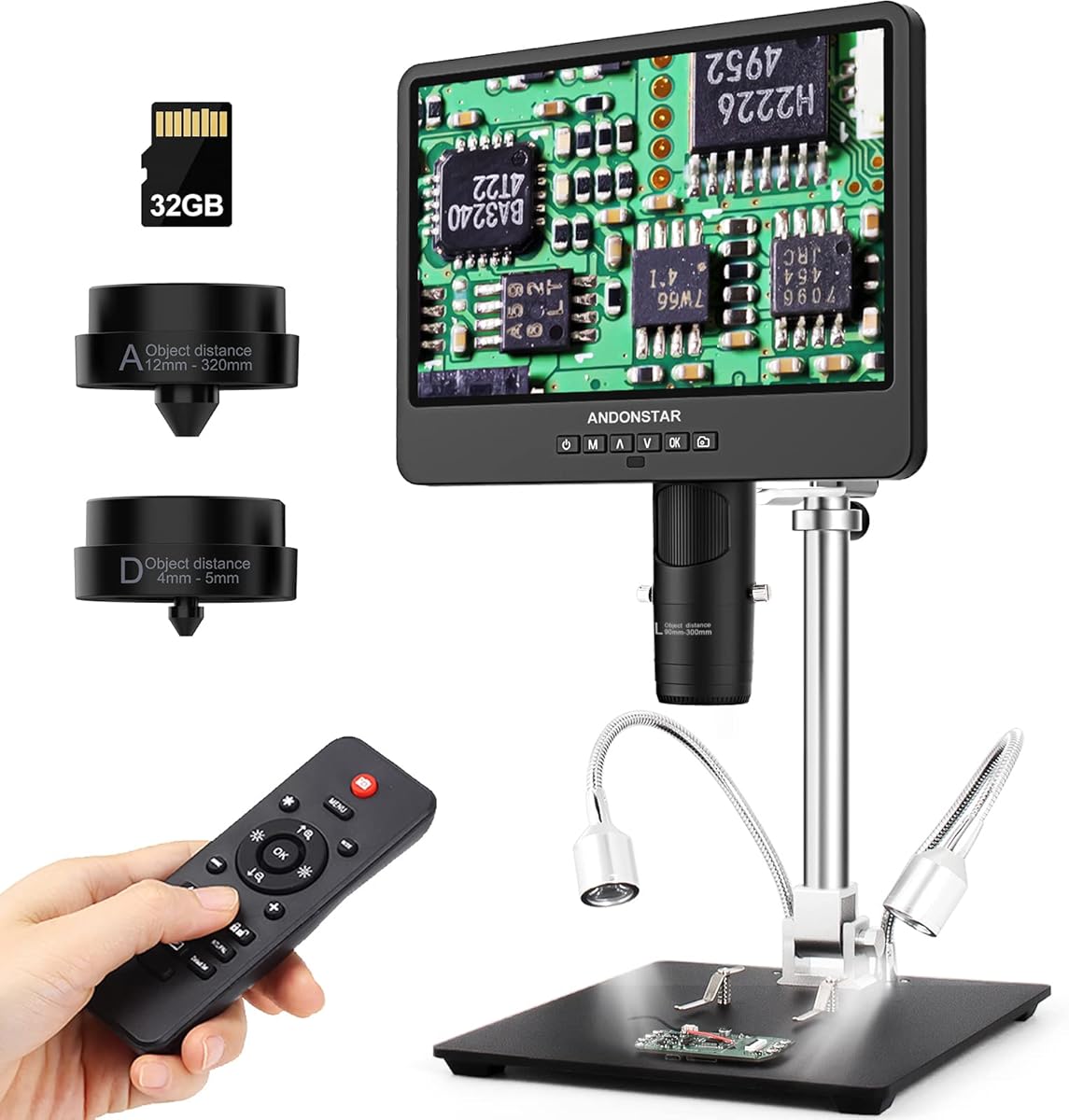
The Andonstar AD249S-M receives a 4.6 rating and centers on a 10.1-inch display, one of the largest screens among the products reviewed. That generous viewing area makes it a strong candidate for users who want to inspect solder joints and circuit-board details without leaning over a phone. It also supports HDMI output for an even larger external display.
We may earn a commission when you buy through this link, at no additional cost to you.
Three interchangeable lenses cover different needs. Lens L supports soldering and repair work, Lens A is intended for coins, plants, stones, and larger components, and Lens D is for biological slides. The microscope records 2160P video and includes a 32GB Micro SD card, a remote control, an adjustable metal boom stand, and multiple cables. Windows PC connectivity opens access to professional measurement software for length, area, photo, and video functions.
The main downside is size. A 10.1-inch screen and broad boom-arm structure require considerably more bench space than a compact USB microscope. The larger stand does provide stability and flexible positioning, but it is less convenient to move between work areas. Screw-secured lens changes also make rapid transitions between repair and high-magnification observation less convenient than on systems with simpler optical selection.
The AD249S-M is ideal for a permanent repair station, electronics classroom, or technician who frequently wants a large, shareable image. It can function as a dedicated display for long soldering sessions and extend to an HDMI monitor when necessary. Buyers with a small bench or a need for field portability will likely be better served by one of the compact screen-free options.
The 10.1-inch display gives the image more space than most built-in screens in this roundup. It can reduce eye and neck strain and makes it easier for a customer or coworker to review a repair from the same bench.
Having a dedicated soldering lens changes the workflow more than simply increasing the maximum magnification. Users can reserve high-power observation for exceptional cases while using the repair lens for routine board work.
We may earn a commission when you buy through this link, at no additional cost to you.
The Andonstar AD249S-M Plus has the highest rating in the group at 4.7 and is the most fully equipped dedicated soldering microscope listed. It combines a large 10.1-inch display, 2160P video, HDMI output, three interchangeable lenses, and a boom-arm system upgraded into a more organized repair station. For a technician who performs frequent soldering and board-level work, that combination is unusually complete.
We may earn a commission when you buy through this link, at no additional cost to you.
The stand's extension base expands the soldering-station area by 230% and adds component storage boxes to reduce clutter. A dedicated tool holder keeps frequently used items accessible, while rotatable soldering helping hands hold small parts in position. Lens L is specified for soldering and repair, Lens A for coins, plants, stones, and other broader subjects, and Lens D for biological slides. Eight LED intensity levels, a remote control, and a 32GB Micro SD card support comfortable operation and documentation.
Professional measurement software adds length, area, photo, and video functions when connected to a Windows PC. HDMI can extend the view to a 28-inch monitor, which is useful for demonstrations and comfortable extended sessions. As with the related Andonstar models, the system is large, and lens changes require removing and installing screws. It is a dedicated workstation rather than a portable inspection tool, so buyers need adequate bench space and appreciate the value of the surrounding accessories.
The AD249S-M Plus is the most suitable choice for a professional mobile-repairing bench, advanced electronics workshop, or serious hobbyist who wants a single integrated station. Its higher rating and comprehensive organization distinguish it from a general digital microscope. If a built-in display and soldering accessories are unnecessary, a more compact model would be more economical and easier to store.
The extension base, component boxes, tool holder, and helping hands turn the microscope into an organized working center rather than a camera on a basic stand. These additions reduce clutter and support common hand-soldering tasks.
The 10.1-inch panel offers comfortable local viewing, while HDMI provides a straightforward route to a larger monitor. A technician can therefore use the built-in screen for routine tasks and add a larger display when detailed collaboration is needed.
We may earn a commission when you buy through this link, at no additional cost to you.
The Andonstar AD246S-M Plus also earns a 4.7 rating, but its seven-inch screen makes it a particularly balanced version of the dedicated soldering station. It preserves the 2160P recording, HDMI connectivity, interchangeable lenses, adjustable boom arm, and extensive repair accessories of the larger model while taking up somewhat less display space. It is a compelling choice for a permanent but space-conscious electronics bench.
We may earn a commission when you buy through this link, at no additional cost to you.
Its repair-focused upgrade adds an extension base that expands the soldering-station area by 230%, along with component storage boxes. The included tool holder, soldering helping hands with rotatable clamps, soldering mat, and bottom light stage create a more deliberate working environment. Lens L is intended for soldering and repair, while Lens A and Lens D cover general observation and biological slides. Windows measurement software, eight lighting levels, remote control, photo and video capture, and a 32GB card complete the package.
The product still carries the practical limitations of a multi-lens bench system. It is larger than a phone-connected microscope, lenses are changed by removing and installing screws, and the built-in screen cannot cover an entire large component at once. The listed package is extensive, so buyers should verify that they have the space to use it effectively. A separate external display can be added through HDMI for a larger presentation.
This is the best all-around recommendation for a repair technician who wants a dedicated microscope and soldering workstation without opting for the largest built-in screen. It is appropriate for routine phone repair, board inspection, soldering, documentation, and occasional observation of non-electronics subjects. Users who need maximum portability should choose a small USB unit, while those wanting the biggest local display can step up to the 10.1-inch AD249S-M Plus.
Seven inches provides ample room for close inspection while remaining less dominant on a crowded workbench than a 10.1-inch model. It is a practical middle ground for frequent mobile electronics work.
Helping hands, a tool holder, component boxes, a soldering mat, and a bottom light stage support a more organized process. The station is not just a viewer; it is designed to keep small parts and tools within reach during demanding jobs.
We may earn a commission when you buy through this link, at no additional cost to you.
The right microscope depends on the size of your work area, the devices you already use, and the level of control you need. The most important choices are optical focus, working distance, illumination, display ergonomics, stand stability, and reliable connectivity.
Working distance is the space between the microscope lens and the object being inspected. It determines whether a camera can sit above a phone board, inside a crowded device housing, or only over a small object mounted flat. A digital microscope with a narrow or fixed focus range can be frustrating when the camera must be held at a precise height. Models with adjustable stands and separate focus controls generally provide more reliable results. The Skybasic has a stated 3-60 millimeter focal range, while the Andonstar soldering lenses are described with lower magnification ranges intended for close work.
Prioritize a stand that can change height smoothly and a focus control that can be adjusted gradually. Avoid treating the headline magnification as the only measure of detail.
Advertised magnification can combine optical and digital enlargement, and the visible result changes with screen size and viewing distance. Repairers need enough magnification to distinguish tiny components, solder bridges, damaged connectors, and residue, but excessive magnification without good focus simply enlarges an unclear image. The listed products range from 40X-to-1000X and 50X-to-1000X devices to 1200X or 2000X multi-lens systems. The Andonstar models separate a low-power soldering lens from higher-power observation lenses, which is often more useful than relying on one lens across every task.
Choose a dedicated low-distance lens for routine board work and reserve high magnification for unusually small subjects. Judge clarity, illumination, and focus before deciding that more magnification is better.
Phone and circuit-board surfaces reflect light, and deep components can fall into shadow. A microscope with eight adjustable LEDs gives users a way to control brightness as the camera moves closer. Flexible gooseneck lights, as found on the TOMLOV DM9, can illuminate from two directions and help reveal texture, solder shape, and surface damage. The Andonstar systems provide eight intensity levels and a remote control, reducing the need to touch the stand while reviewing an image.
Look for adjustable rather than merely fixed lighting, and consider glare control. Diffusers, light barriers, side lights, and bottom illumination can each solve a different visibility problem on a reflective PCB.
A dedicated LCD can reduce the need to bend over a phone and may make a microscope more comfortable during extended work. The reviewed built-in screens range from 4.3 inches on the Elikliv EDM4 to 10.1 inches on the Andonstar AD249S-M models. Larger screens are easier to read but occupy more bench space. External HDMI or computer viewing offers another route to a large image. The choice depends on whether the microscope will stay in one permanent location or move among different work areas.
Match the screen to your workspace. A seven-inch panel is a balanced middle ground, while compact phone-connected cameras prioritize portability over dedicated viewing comfort.
A shaky microscope image is difficult to use when diagnosing a hairline defect or checking a tiny component. Metal bases, multi-direction boom arms, flexible goose necks, and clamps each offer different degrees of stability. The TOMLOV DM9 uses a metal base and tall stand, the five-inch repair microscope uses a clamp, and the Andonstar models use adjustable metal boom arms. A simple desktop stand is enough for occasional inspection, while soldering or two-handed component placement benefits from a rigid arm that can remain fixed over the work.
Check reach, height, and angle before purchasing. The best stand is one that can hold the subject steadily while leaving the technician's hands and tools free.
Some microscopes have built-in displays and work independently, while others require a phone, tablet, or computer. The Skybasic uses Wi-Fi with the Max-see application and also supports USB computer use. The Bysameyee works with Windows, Mac, Linux, and OTG-capable Android devices but explicitly excludes iPhone and iPad. The four-in-one USB microscope includes USB, Micro USB, Type-C, and Lightning connectors, offering broader mobile support. Windows users may also want measurement software, while PC camera modes can sometimes avoid complicated third-party application installation.
Confirm both the connector and the software workflow before buying. A nominally compatible camera can still be awkward if permissions, apps, or operating-system settings are not configured as expected.
Recording solder joints before and after a repair can help document the work, share a diagnosis, or create a training record. The reviewed microscopes offer still photographs and video, but storage arrangements differ. The TOMLOV DM9 includes a 16GB card, while the Andonstar models include a 32GB card. The five-inch soldering microscope requires a card of up to 32GB for saving 1080P video and larger batches of photos, and the Elikliv requires users to supply their own memory card. Some capture tools work only with Windows software.
Check whether storage is included before buying, and verify the card format and capacity limit. A model with no included card may be perfectly usable for live inspection, but it is less convenient for documentation.
A microscope becomes more useful when it integrates with the rest of a soldering station. The Andonstar Plus models include extension bases, component storage, a tool holder, helping hands, a soldering mat, and a bottom light stage. The TOMLOV includes a light barrier, remote control, metal base, and stand. These accessories help keep parts organized and support two-handed work. They also add size, so buyers should assess whether the added organization justifies a larger footprint compared with a compact USB microscope.
Prioritize accessories that solve daily workflow problems. A helping hand or component box may be more valuable than a feature that is rarely used, particularly for an active repair technician.
Begin with a clean, stable work surface and a device that is powered off, disconnected from power, and secured so it cannot move. Position the microscope over the area to be inspected, then adjust the stand height before turning on the illumination. Begin at a lower magnification than the maximum, focus on a recognizable component, and refine the image before examining fine details. This establishes orientation and reduces the chance of interpreting blur as a real defect.
For the best image, control both angle and light. Move a ring light or side illuminator across the workpiece to identify glare, shadow, and color changes caused by reflections. Keep the lens a consistent distance from the board, use the manual focus wheel slowly, and avoid touching the lens surface. If the image remains unclear, verify the stated working-distance range, clean the lens, and reset the stand before increasing magnification.
Capture reference images before beginning a repair and take additional images after each significant stage. Save organized files to the microscope's supported storage, use the included card only if it is compatible, and avoid removing the card while recording. Disconnect cables carefully, clean the lens and body with a dry or lightly dampened lint-free cloth, and keep the microscope away from excessive heat, moisture, and conductive debris. Do not immerse the unit, and consult the product instructions before changing lenses or modifying the stand.
The best choice depends on the detail being inspected and, more importantly, on focus, working distance, and lighting. A lower-range soldering lens is usually more practical for routine board work than simply choosing the highest advertised magnification. Use high magnification for very small components, connectors, or suspected hairline damage after establishing a clear, well-lit image at a comfortable working distance.
You may still be able to use one if the phone supports the required wireless application or a compatible adapter. The Skybasic uses a Wi-Fi hotspot and the Max-see app, while the four-in-one USB model includes several cable types, including Lightning. Check the phone's operating system, connector arrangement, application requirements, and permissions before purchasing or attempting to connect the microscope.
No. Digital magnification can enlarge an image, but it cannot replace proper optical focus or sufficient illumination. A stable image at moderate magnification is more useful for soldering than an unstable high-magnification view. A multi-lens system can provide a practical low-power repair lens alongside higher-power lenses for exceptional close inspection.
Focus control, working distance, stand stability, and adjustable lighting are the most important practical features. A large display can improve comfort, while HDMI or computer viewing can make collaboration easier. Helpful accessories include a rigid boom arm, helping hands, a tool holder, and space for organizing small components. Recording and storage are useful for documentation but should not replace a clear live image.
They can reveal scratches, cracks, particles, edge defects, and other surface details when lighting is angled properly. They are not intended to assess large areas as a replacement for the phone's own display or specialized screen-testing equipment. A built-in screen or larger external display is generally more comfortable for examining an entire panel, while a small USB microscope is better for localized inspection.
HDMI is helpful but not essential for every repairer. It can provide a larger view on an external monitor, reduce fatigue, and make it easier to demonstrate a fault to a customer or colleague. Models with USB computer viewing or a good built-in display can also support a comfortable workflow. Choose HDMI when a large shared image or permanent monitor setup is a priority.
Verify whether a compatible memory card is included and whether the microscope supports its format and capacity. The five-inch soldering microscope requires a card of up to 32GB for 1080P recording and larger photo batches, while the Elikliv requires a user-supplied card for saving. Also check whether measurement or capture software is limited to Windows, and save files regularly rather than relying on temporary internal memory.
Yes, particularly if it includes interchangeable lenses. The Andonstar systems provide a soldering lens alongside lenses for general observation and biological slides. The TOMLOV and Elikliv also support uses such as coin, jewelry, stamp, and craft inspection. Choose based on how often you need each lens, since dedicated repair optics remain more important than general versatility for a specialist.
The Andonstar AD249S-M Plus stands out as the most complete premium station, with a large display, three lenses, HDMI connectivity, and extensive soldering organization. The AD246S-M Plus delivers a similar feature-rich repair setup on a more manageable seven-inch screen, making it the most balanced general recommendation. For a lower-cost dedicated microscope, the TOMLOV DM9 pairs a seven-inch LCD with a stable metal stand, multi-angle lighting, and included storage.
Before buying, prioritize the features that affect your actual work. A repairer with a crowded bench may value a clamp or compact phone-connected design, while a technician working for hours at a permanent station may prefer a boom arm, larger screen, external display, and organized accessories. Focus and lighting should come before a high magnification number, and compatibility with your existing phone or computer deserves careful verification.
Prices, availability, bundle contents, and software behavior can change, so verify the current listing and included accessories before making a purchase. With the right working distance, stable positioning, and controlled illumination, a digital microscope can substantially improve board inspection and make delicate mobile repair work more precise and comfortable.