
OMOTON Portable Laptop Stand
4.5Editor score
Adjustable viewing height
Slim foldable travel profile
Ventilated aluminum composite frame
Mini compact laptop stands bring a better viewing position, useful airflow, and a smaller desk footprint to almost any workspace. The right model should stay stable, fit your device, fold down for travel, and support the viewing angle and typing arrangement that feels most comfortable in your routine.
We compared all ten products across the factors that matter most in a compact stand: height range, portability, material, stability, ventilation, device compatibility, and versatility. The list includes full-size folding stands, ultra-thin travel models, keyboard-height risers, and an expandable four-purpose stand for people who switch between work and travel.
Each review explains the stand's strongest qualities, practical limitations, and most suitable user so you can judge it against your own setup. Ratings and availability can change, so confirm the current product details and seller information before making a final purchase decision.
4.5Editor score

4.8Editor score

4.5Editor score
As an Amazon Associate we earn from qualifying purchases.
The comparison below highlights the major differences in format, adjustability, portability, cooling, and device support. Full folding stands provide larger height ranges, while keyboard feet and low-profile risers are easiest to carry and best suited to users who already work with an external keyboard.





The Tonmom Adjustable Laptop Riser is a straightforward, portable stand for users who want more screen height without committing to a large permanent riser. Its 4.5 rating reflects a generally favorable balance of adjustment, stability, and portability. The triangular frame supports a laptop above the desk while the open construction leaves the underside exposed to moving air.
We may earn a commission when you buy through this link, at no additional cost to you.
Seven height settings raise the notebook from 2.78 to 6.5 inches, providing a much broader working range than low keyboard feet. The support bar can be repositioned according to the user's preferred screen height, while the forward-tilt position encourages an open airflow path underneath the computer. A large silicone pad helps keep the laptop from sliding and reduces the chance of scratches against the supporting surface.
The main compromise is that this is still a full folding stand rather than an ultra-thin keyboard accessory. When folded, it measures 10.5 by 1.96 by 0.68 inches, so it can enter a backpack but may not disappear into a small laptop sleeve as easily as the smallest products in the roundup. Its 0.53-pound weight remains travel-friendly, and the smooth edges and compact footprint make it practical for occasional mobile work.
This is a strong choice for students, office workers, and travelers who need a conventional laptop riser with several height choices. It works particularly well for reading, browsing, video calls, or light typing when an external keyboard is available. Buyers who need something smaller for a pocket or who must type directly on the raised laptop should instead consider the keyboard-foot designs.
Seven levels make it easier to change the screen position as the user alternates between a seated desk, a shared table, and a temporary travel workspace. The higher settings are especially useful for bringing the display closer to eye level without committing to a permanently elevated monitor position.
The open triangular frame supports passive airflow beneath the laptop, while the broad silicone contact area grips the device and desk. This combination helps limit sliding and surface scratching without sealing the computer against the platform.
We may earn a commission when you buy through this link, at no additional cost to you.
The Portable Adjustable Laptop Riser is a compact folding stand built around a simple triangle support and an open frame. It holds notebooks from 10 to 15.6 inches and has earned a 4.5 rating for its straightforward combination of height adjustment, portability, and device protection. It is best suited to users who understand the relationship between an elevated screen and an external keyboard.
We may earn a commission when you buy through this link, at no additional cost to you.
The stand offers six levels, raising the notebook from 4.34 to 6.59 inches. That range can bring the top of the display closer to eye level, potentially reducing the need to lean forward during long sessions. The forward-tilt arrangement and open underside allow air to circulate around the laptop, while the large silicone pad helps prevent movement and scratches. Smooth edges also reduce the chance of uncomfortable contact with the hands.
One important operating detail is that both support bars must be inserted at the same height. This keeps the platform balanced and prevents uneven loading, but it also means users should check the slots after changing the angle. The folded size of 9.96 by 1.98 by 0.68 inches and weight of 0.49 pounds make it easier to carry than a permanent desk riser, although it is still larger than a pair of keyboard feet.
This model is a practical choice for commuters, students, and hybrid workers who move regularly between desks. It also works well for presenting documents, watching videos, or joining calls on a laptop that would otherwise sit low on the surface. For frequent travel, buyers who need a full-screen riser but want to pack as lightly as possible should also examine the more compact SODI models.
Six levels spanning 4.34 to 6.59 inches provide enough movement for different seating positions and desk heights. The support mechanism is direct and easy to understand, although the matched-bar requirement deserves attention whenever the stand is adjusted.
At less than half a pound, the stand is easy to include in a work bag. Once unfolded, it provides a much larger viewing position than a minimal keyboard riser while remaining substantially more compact than a full monitor arm.
We may earn a commission when you buy through this link, at no additional cost to you.
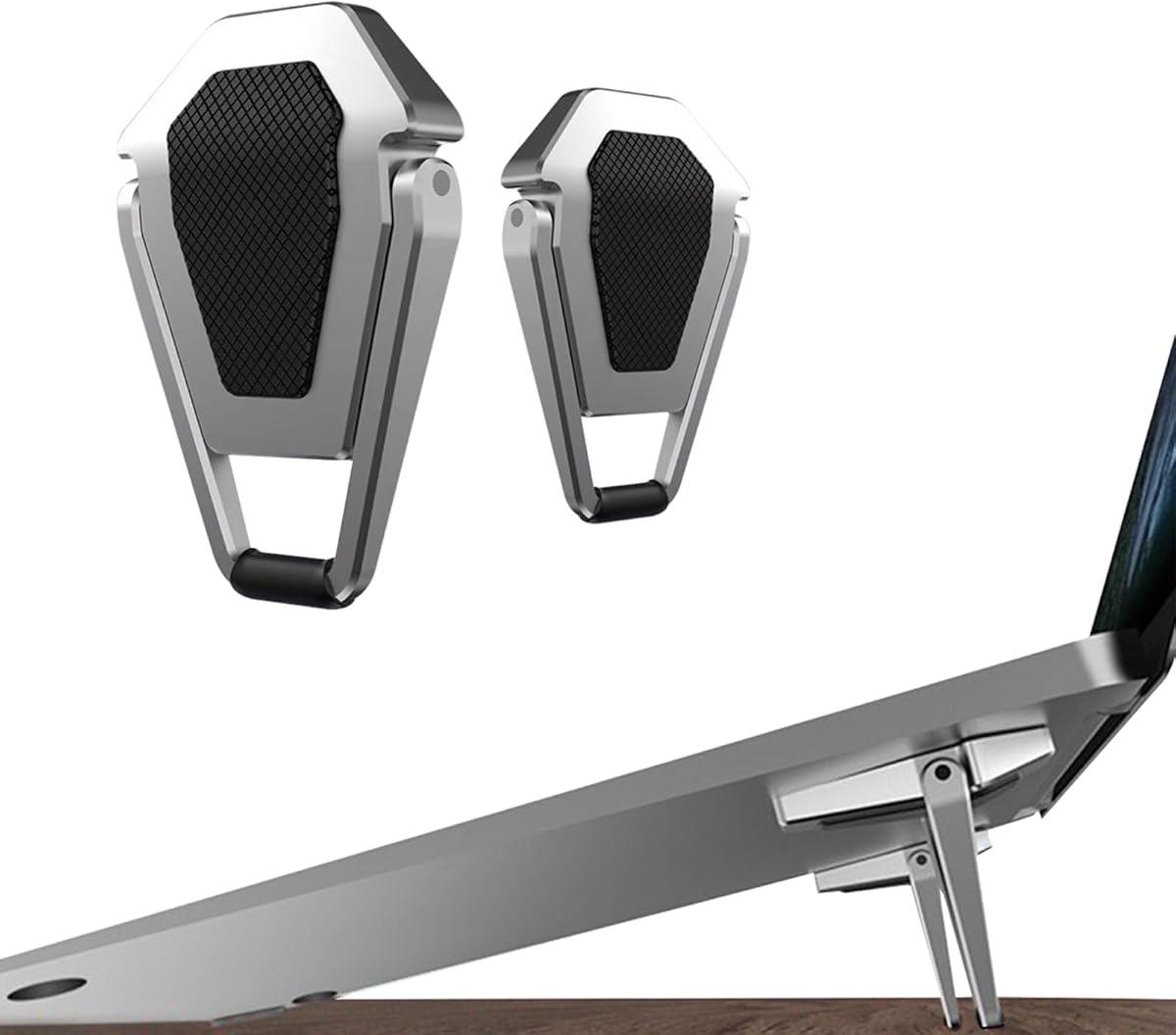
The Bewudy Dual-Angle Keyboard Riser is one of the smallest products in the roundup, offering a subtle lift rather than a full-height laptop platform. Its two zinc-alloy pieces weigh 30 grams and can fold into a very small package. The 4.5 rating reflects a versatile design that can support a laptop, desktop keyboard, tablet, or phone.
We may earn a commission when you buy through this link, at no additional cost to you.
Each riser offers two possible heights, 35 and 60 millimeters, allowing the user to select a moderate incline. The metal construction can function as a thermal contact point, and the forward-tilted, open shape promotes airflow around the device. Because the pieces are separate, they can also be arranged under the front corners of a keyboard to create a typing wedge without elevating the entire display.
The key limitation is scale. While this approach is excellent for modest ergonomic improvements and highly portable workspaces, it does not bring a laptop screen near eye level like a taller folding stand. Users who type extensively may also find that a 60-millimeter rise becomes uncomfortable over a long session. Its value lies more in subtle elevation, flexible placement, and low carrying weight than in dramatic height changes.
This pair is best for people who use an external keyboard, travel frequently, work in classrooms, or need a small lift for a tablet. It can also create a compact workstation without the bulk of a conventional laptop stand. People seeking a large screen-height improvement should choose a full folding stand, while those who prioritize portability will find this one of the easiest options to carry.
The 35 and 60 millimeter settings create a meaningful choice without the bulk of a larger mechanism. They are particularly useful for a desktop keyboard, where even a small incline can improve the relationship between the user's hands and the desk.
The two independent pieces can be positioned under a laptop, tablet, phone, or keyboard. That flexibility makes the risers useful in temporary offices, shared study spaces, and travel setups where a permanent accessory is impractical.
We may earn a commission when you buy through this link, at no additional cost to you.
The SODI Bi-Fold Aluminum Stand stands out as the most complete travel stand in the group, combining a 4.8 rating with a 185-gram weight and a compact 12.7 by 4.4 by 2-centimeter folded profile. Its aluminum H-frame is engineered to feel stable while leaving open space beneath the notebook. It is designed for users who need a meaningful screen elevation without carrying a bulky accessory.
We may earn a commission when you buy through this link, at no additional cost to you.
A spring-loaded arm adjusts through six heights in about a second, allowing the screen to be raised closer to eye level with little effort. The open construction supports passive heat dissipation, and silicone contact areas help prevent scratches and sliding. The frame is advertised as stable during typing or gaming, although its raised position is most comfortable when paired with a separate keyboard and mouse. Compatibility extends across 10- to 16-inch laptops and tablets.
The most noticeable trade-off is that the sophisticated spring mechanism and aluminum construction place it above basic plastic stands in the comparison. Buyers who want the absolute smallest possible riser may prefer the keyboard-foot designs, and those who expect a large screen rise may need to compare its maximum elevation with their own eye level. Even so, the foldable profile is unusually compact for a stand that supports a full notebook.
This is the strongest all-around recommendation for business travelers, students, and hybrid workers who frequently change locations. The included velvet storage bag makes transport easier, while the quick adjustment makes the stand practical in libraries, cafés, and temporary offices. Choose it when portability, stability, height control, and understated metal construction all matter.
The spring mechanism lets the user move among six positions almost instantly, which is valuable when moving between a café table, library desk, and office. A stand that takes several awkward adjustments can discourage regular use, so this speed is more useful than it may first appear.
The stand folds into a compact package and includes a velvet bag for protection. Aluminum provides a refined, lightweight structure, while silicone pads preserve grip and reduce the chance of scratching the notebook during placement.
We may earn a commission when you buy through this link, at no additional cost to you.
The Four-Purpose Laptop Riser is the most versatile device in the roundup, converting among a laptop riser, tablet easel, magnetic phone holder, and handheld vlogging support. Its 4.5 rating reflects an ambitious design that goes beyond simply elevating a notebook. The additional functions make it especially interesting for frequent travelers and hybrid workers who want a compact suite of desk accessories.
We may earn a commission when you buy through this link, at no additional cost to you.
Eight height levels can raise the screen as much as 5.5 inches, while the open X-frame permits airflow beneath larger laptops and tablets. Aerospace aluminum and custom-tensioned hinges are designed to resist sagging when supporting notebooks from 15.6 to 17 inches. Strategically placed silicone pads protect the device, and the integrated N52 magnetic core attaches to compatible recent iPhone models or MagSafe cases for a secondary-screen arrangement.
The versatility introduces more complexity than a conventional stand. Users need to learn how the magnetic, easel, handheld, and laptop configurations relate to one another, and the magnetic phone feature is of little value to someone without a compatible handset or case. It also folds to 5.9 by 1.4 by 0.5 inches, which is excellent for travel but still larger than a tiny keyboard-foot accessory.
This model is ideal for a mobile professional who wants to travel with one adaptable object instead of several separate accessories. It works especially well for video calls, phone-assisted tasks, tablet viewing, and laptop use with an external keyboard. Buyers seeking a simpler permanent desk riser may prefer the SODI or OMOTON options, while those who value multi-device versatility will find this the most distinctive choice.
The stand can support a laptop, hold a tablet at an angle, display a magnetic phone, or function as a handheld support. This makes it useful for creators and commuters who would otherwise carry several separate accessories for calls, viewing, and content capture.
The aluminum structure and tensioned hinges are intended to support heavier notebooks without visible sagging. Silicone pads at contact points add grip and surface protection, while the open X-frame leaves the underside available for airflow.
We may earn a commission when you buy through this link, at no additional cost to you.
The OMOTON Ultra-Slim Stand combines a 4.5 rating with a particularly thin folded thickness of 0.7 inches. It is designed for people who want a full laptop riser that slips into a bag without becoming a noticeable packing burden. The adjustment range also makes it more versatile than the smallest keyboard-only accessories.
We may earn a commission when you buy through this link, at no additional cost to you.
Users can raise the laptop from 0.79 to 4.72 inches, creating a broad range of viewing positions for a home office, classroom, or shared workspace. A breathable platform permits airflow under intensive workloads, and the adjustable angle lets the display sit closer to natural eye level. Soft silicone pads grip the laptop and desktop, reducing sliding and helping protect both surfaces from scratches.
The stand is rated to support up to 4 kilograms, or 8.8 pounds, which is appropriate for most personal notebooks but may be less generous than the claims of heavier-duty metal models. The product is intended for 10- to 15.6-inch laptops, so users with larger gaming systems or unusually wide devices should check dimensions. The manufacturer also recommends an external keyboard for intense typing, which is sensible at higher elevations.
This is a compelling selection for commuters, students, and office workers who prioritize a thin, uncomplicated stand. It folds flatter than most conventional risers while still providing enough adjustment to improve screen positioning. It is less specialized than the four-purpose model and less refined mechanically than the spring-loaded SODI designs, but it offers a balanced combination of portability, height range, and everyday usefulness.
The 0.7-inch folded thickness is a practical advantage for people who switch between home, office, and travel workspaces. Unlike many full stands, it can slide into a laptop sleeve or fit into a narrow section of a backpack without taking up much room.
The height adjustment brings the screen closer to eye level, but prolonged typing is usually more comfortable with a separate keyboard. This setup lets users retain the ergonomic benefit of a raised display without accepting an awkward wrist and shoulder position.
We may earn a commission when you buy through this link, at no additional cost to you.
The SODI Pocket-Sized Bi-Fold is a minimalist travel stand with a 4.8 rating, a 6.3-ounce weight, and a folded size of 5.0 by 1.7 by 0.8 inches. Its dark aluminum H-frame looks more like a compact travel accessory than a bulky desk riser. The design is aimed at people who work from cafés, libraries, co-working spaces, and changing hybrid-office locations.
We may earn a commission when you buy through this link, at no additional cost to you.
The spring-loaded arm moves through six height settings in about one second, making it easy to align the display with a changing line of sight. The open H-shape minimizes contact with the bottom of the device and supports passive heat dissipation. The listed compatibility covers 10- to 16-inch laptops, tablets, and e-readers, including MacBook and ThinkPad systems. The stand can also be used vertically with a standing desk for additional placement options.
Compared with the silver SODI bi-fold, this version is presented with an even more compact folded description, but it also does not list an included velvet storage bag. Buyers should therefore consider a separate sleeve if the aluminum frame will be placed loose inside a bag. The compatibility range also stops at 16 inches, so larger gaming laptops and tablets need separate verification.
This stand is well suited to frequent travelers who value a refined, low-profile design and quick adjustments. It is a good match for reading, browsing, note-taking, and video calls, especially when a compact keyboard is carried separately. For a slightly more accessory-complete package, the related silver SODI model includes a storage bag; for a larger range of devices, the four-purpose stand may be more appropriate.
The compact folded profile can fit into a backpack or even a coat pocket, according to the product details. That makes it easy to keep a consistent elevated-screen arrangement across multiple locations rather than relying on whatever flat surface is available.
The dark aluminum H-frame has a restrained appearance that blends more easily into a professional or minimalist desk. Its open geometry also keeps the notebook visible from the sides and allows air to circulate underneath.
We may earn a commission when you buy through this link, at no additional cost to you.
The Ventilated Metal Laptop Riser is a sturdy, conventional stand for users who place more emphasis on load capacity and cooling than on pocket-sized packing. It has a 4.6 rating, making it one of the higher-rated products in the list. The metal construction and stated 17.6-pound load limit give it a reassuringly solid character.
We may earn a commission when you buy through this link, at no additional cost to you.
Both height and angle can be adjusted to suit the user and desk. Multiple ventilation holes in the top platform, combined with the open design, allow more air to reach the laptop during operation. Two rubber mats on the hooks and anti-skid silicone pads on the top and bottom help keep the stand and computer secure while protecting surfaces from scratches. Smooth edges are intended to reduce contact discomfort.
The tradeoff is portability. Although the stand folds for transport, metal construction and the more substantial support structure make it less attractive for people who routinely work from cafés or need to pack every item into a small bag. Buyers should also store or handle the folded product carefully to avoid damage to its edges. Its support range covers 10- to 15.6-inch laptops and many popular models from major brands.
This is a strong option for fixed home offices, studios, classrooms, and shared desks where stability matters. It is especially useful for people who already use an external keyboard and want the display elevated without worrying about a lightweight stand flexing. Travelers should favor one of the smaller folding models, while buyers who keep one stand at a permanent workstation may appreciate the metal frame and ventilated platform most.
The perforated top provides direct openings beneath the laptop, and the open frame prevents the device from being enclosed on all sides. This passive design is useful for regular work sessions, although it cannot replace the internal cooling system of the computer.
An 8-kilogram load limit gives the stand a substantial feel and accommodates most personal notebooks. Adjustable height and angle let the user refine the position rather than relying on a single fixed platform.
We may earn a commission when you buy through this link, at no additional cost to you.
The Invisible Zinc Alloy Riser is an exceptionally light 24-gram accessory that provides a modest lift without the bulk of a conventional folding stand. Its 4.4 rating reflects a generally favorable response, and the compatibility with 12- to 20-inch laptops makes it unusually accommodating across a wide range of device sizes.
We may earn a commission when you buy through this link, at no additional cost to you.
The stand offers an adjustable tilt from 15 to 25 degrees, allowing the user to select a small incline rather than one fixed angle. A space in the middle of the design supports airflow beneath the laptop, and upgraded rubber pads help secure the device on the desk. The stated 10-kilogram maximum load is also notably high relative to the stand's very light body.
The central limitation is the amount of elevation. At 15 to 25 degrees, this riser is more appropriate for improving wrist position, viewing a screen slightly above desk level, or adding airflow than for bringing a laptop display to eye level. People experiencing pronounced neck discomfort from a low screen may need a taller folding model. Direct typing at the raised angle may also be less comfortable over extended periods.
This product is best for travelers, students, and home-office users who want a discreet lift with minimal bag space. It is particularly useful with larger laptops because the listed compatibility extends to 20 inches. For a dramatic ergonomic improvement, choose a full-height stand; for subtle adjustment, easy portability, and broad device support, this invisible zinc-alloy riser is a focused and practical option.
The narrow tilt range is intended to improve the relationship between the laptop and the user's wrists without creating a steep typing position. It can make a flat-screen setup more comfortable, especially when the user is seated for extended periods.
The 24-gram construction is among the lightest options in the roundup, and the small folded dimensions make storage simple. Compatibility with 12- to 20-inch devices also gives it more flexibility than several stands limited to common notebook sizes.
We may earn a commission when you buy through this link, at no additional cost to you.
The Bremorou Eight-Piece Riser Set uses eight small adhesive wedges to create a modest incline for laptops, keyboards, or tablets. Four black and four silver pieces are included, and each measures about 1.17 by 1.65 by 0.98 inches. With a 4.4 rating, it is best understood as a flexible set of compact ergonomic feet rather than a full laptop riser.
We may earn a commission when you buy through this link, at no additional cost to you.
Each piece offers two angle settings, allowing users to select a more comfortable typing posture. The adhesive backing is intended to keep the feet stable on a variety of surfaces after installation. Because there are eight separate risers, the set can be divided among multiple devices or distributed across a shared office, classroom, or travel kit. The foldable shape also allows the feet to be used or stored compactly.
The primary disadvantage is the limited elevation. These feet are not intended to bring a laptop display close to eye level, and the adhesive may make frequent repositioning less convenient than with a removable stand. Direct typing is generally the main use case, where the incline may help reduce wrist strain. The set is less relevant for users who need a broad screen-height adjustment or a stable platform for a larger tablet.
This set is best for people who want multiple small lifts rather than one substantial stand. It suits keyboard-focused users, shared workspaces, classroom accessories, and travel kits where equipment must be divided between several users. Anyone seeking a stronger screen elevation should choose a full folding stand, while buyers who value flexible placement and multiple color options will appreciate the eight-piece approach.
The dual-angle design gives a desktop keyboard a more natural wrist position while remaining too low to serve as a meaningful laptop screen riser. It is especially useful for extended keyboard sessions in a fixed or shared office.
Eight independent feet can support several laptops or keyboards without requiring a large one-piece platform. This makes the set useful for offices, families, classrooms, and travel groups that need to equip more than one workstation.
We may earn a commission when you buy through this link, at no additional cost to you.
The right compact stand depends on how you work, what devices you use, and how much screen elevation you need. Consider portability, adjustment range, stability, cooling, and typing comfort together rather than focusing on a single feature.
Choose enough height to avoid looking downward for long periods, but do not assume a higher position automatically improves comfort. If you type directly on the laptop, a steep angle may strain the wrists and shoulders. A moderate lift plus an external keyboard often creates a more balanced workstation.
For daily commuting, prioritize low weight and a flat folded profile. For occasional travel, a slightly larger folding stand may provide a more useful height range. Check whether a storage pouch is included and allow room for the device's charger and keyboard.
Look for multiple silicone contact points and a wide base. If your device is heavier or you work in a shared space, choose a model with a clearly stated load limit. Remember that the stand must support the computer safely at its highest setting, not only when nearly flat.
Choose an open or perforated design if the computer regularly handles demanding workloads. Make sure the raised position does not block the laptop's underside intake or exhaust. A modest airflow gap is generally more useful than a stand whose decorative surface traps heat.
Most products support common notebooks from 10 to 15.6 inches, while several compact models extend to 16 inches and one reaches larger gaming laptops. Tablets and e-readers may be supported, but only if the platform provides enough grip. Confirm the dimensions and avoid forcing an unsupported device onto a small stand.
Inspect the contact pads for full coverage and correct positioning. Smooth edges also matter because users may rest their forearms near the frame. Metal stands are durable but can deform if dropped, so a protective pouch is valuable for travel.
Decide how you will type before selecting a height range. For direct typing, look for a modest, stable incline. For external-keyboard setups, prioritize eye-level positioning, a ventilated platform, and enough clearance for a mouse. Keyboard-foot products are primarily intended for the former use.
Multi-purpose designs are most valuable to frequent travelers and content creators who can use every mode. For a permanent desk, a simpler, purpose-built stand may be more reliable and easier to adjust. Choose adaptability when it solves a recurring problem rather than merely adding possible functions.
Begin by placing the stand on a level, clean surface and unfolding it fully before adding the laptop. Confirm that all support bars or adjustable arms are locked at the same height. For adhesive feet, install each piece on a flat, clean area and allow the backing to bond before placing a device on top.
Position the laptop so its weight is centered over the support platform. Adjust the height to bring the upper portion of the screen close to eye level while keeping the keyboard and mouse at a comfortable level. If typing directly on the raised laptop causes wrist or shoulder discomfort, use an external keyboard and lower the viewing position slightly.
Clean the stand with a soft, dry or lightly damp cloth and avoid abrasive cleaners that could damage the finish or silicone pads. Do not place liquids where they can seep into slots or openings. When folding a spring-loaded or hinged model, support both sides and keep fingers clear of pinch points. Store the device in a sleeve or pouch when carrying it to protect its edges and contact surfaces.
They can be, but the answer depends on the elevation and whether you type directly on the laptop. Small keyboard risers create a modest incline that suits direct typing better than tall folding stands. If you raise the screen substantially, an external keyboard and mouse usually create a more comfortable and ergonomic arrangement.
Most models support laptops from 10 to 15.6 inches, while several are rated for devices up to 16 inches. The listed size is not the only consideration: check the stand's base width, weight limit, and supported screen depth, especially for larger gaming laptops or tablets.
They can improve passive airflow by keeping the bottom of the laptop above the desk and reducing heat buildup against a solid surface. Open frames and perforated platforms are more helpful than closed designs, but no external stand replaces the laptop's internal cooling system or proper ventilation around its vents.
Choose a folding stand if you want a higher screen position and use an external keyboard. Choose keyboard feet if you value minimal bag space, a subtle typing incline, or a compact accessory for several devices. Folding stands generally provide more adjustment, while feet are lighter and easier to distribute.
A properly sized stand with a stable base, secure supports, and non-slip contact pads should hold a compatible laptop securely. Avoid devices that exceed the stated size or weight range, and make sure adjustable bars are inserted at matching levels. For demanding use, test the desired height before beginning a long session.
Many products are designed for more than laptops. Small dual-angle risers can support keyboards, tablets, and phones, while larger folding stands usually focus on notebooks and larger tablets. Confirm that the platform is wide and stable enough for the device, and check whether any magnetic function requires a compatible phone or case.
Aluminum usually offers a better strength-to-weight balance and a more refined appearance, making it a common choice for portable folding stands. Durable ABS can be perfectly adequate for tiny keyboard feet because those products carry less weight. The more important considerations are stability, grip, and the fit of your actual device.
Fully collapse or fold the stand according to its instructions, then store it in a protective sleeve or the included pouch. Keep it away from moisture and heavy objects that could bend the frame. Before the next use, check that hinges, support bars, and silicone pads remain aligned and intact.
The SODI Bi-Fold Aluminum Stand is the strongest all-around choice for travelers because it combines a 4.8 rating, six quick spring-adjusted levels, a stable H-frame, and an unusually compact folded package. The OMOTON Ultra-Slim Stand is a compelling budget-oriented option for people who want a thin profile and broad height range, while the Four-Purpose Laptop Riser earns the premium position through its laptop, tablet, magnetic phone, and handheld functions.
Your priorities should guide the decision. Choose a tall folding model for eye-level positioning with an external keyboard, keyboard feet for a subtle typing incline, and a full aluminum stand for a fixed workstation that emphasizes cooling and stability. Always confirm device size, load capacity, and the ergonomics of your own desk before ordering.
Ratings, seller information, product details, and costs can change over time, so verify the current listing before making a final purchase. A compact stand is most valuable when it is convenient enough to travel with and comfortable enough to use every day, so consider both the device support and your working habits rather than focusing on portability alone.