
IWGAME Back Paddles
4.2Editor score
Four programmable back paddles
Macros, remaps, and turbo
Works across major platforms
Discover the best PS5 controller with back paddles, comparing remapping, macro features, connectivity, ergonomics, and compatibility.
A PS5 controller with back paddles can turn familiar face buttons into faster, game-specific commands without requiring constant thumb movement. The right accessory depends on whether you want a simple plug-in upgrade for an existing DualSense or a complete wireless gamepad with remapping, macros, hall-effect sticks, and motion controls.
This guide compares ten back-paddle options, including standalone remap kits, full replacement controllers, and premium esports models. We evaluated their programming depth, button counts, connection methods, platform support, stick technology, battery features, installation demands, and physical controls, while noting important compatibility limitations.
The list includes a product for nearly every setup: a budget-friendly four-button add-on, capable wireless controllers, an OLED-equipped installation kit, and licensed premium gamepads. Ratings and availability can change, and current prices should be checked before buying because promotions and bundle contents may vary.
4.2Editor score

4.4Editor score
3.9Editor score
The comparison below separates full wireless controllers from add-on remap kits, highlights the number and programmability of rear buttons, and identifies the major connection and compatibility differences among all ten products.
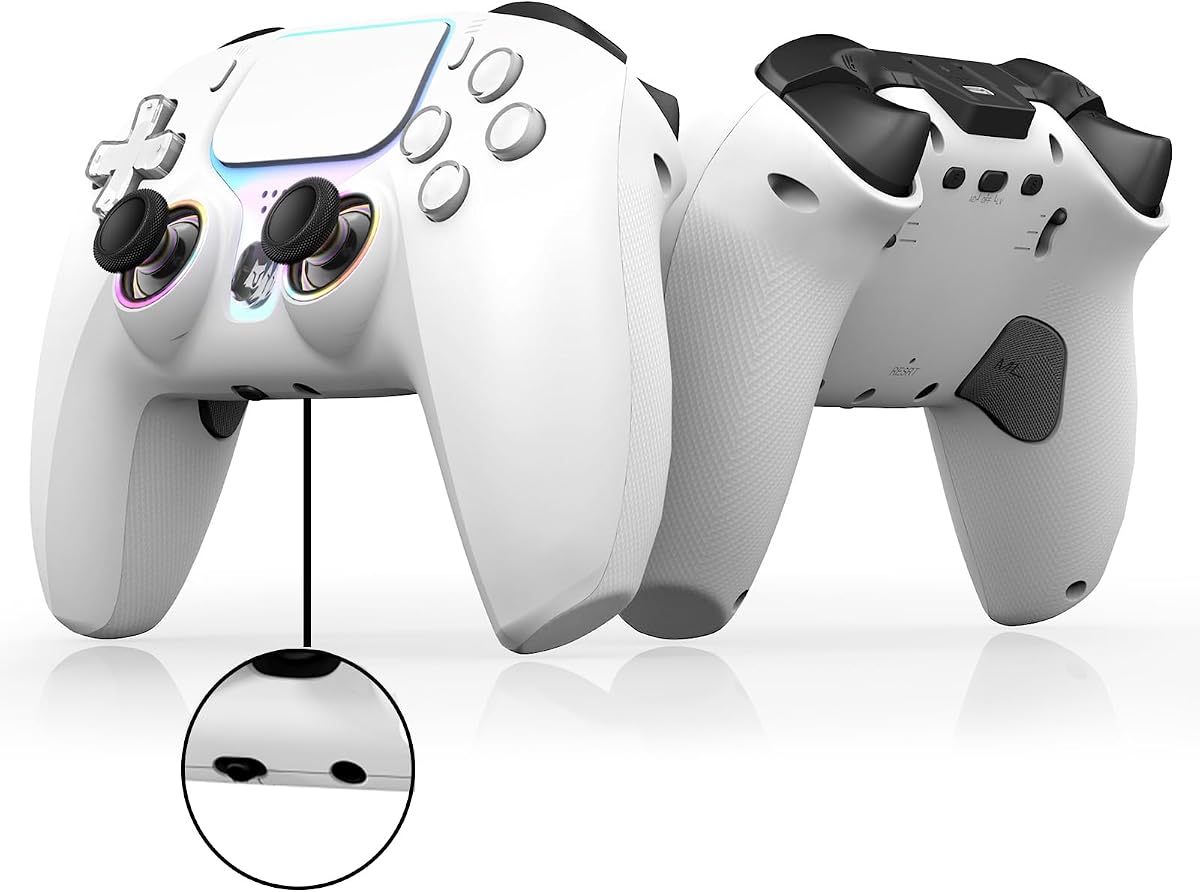


The IWGAME Back Paddles are a straightforward way to add four rear controls to a compatible PS5 controller without replacing the entire gamepad. With a 4.2 rating, this kit stands out for supporting remapping, macro recording, turbo functions, and button swaps in one wired accessory. It is especially appealing to players who want advanced control options but do not want to open their controller.
We may earn a commission when you buy through this link, at no additional cost to you.
Programming is the kit's strongest feature. Each M1, M2, M3, and M4 paddle can be assigned a single input or a multi-button sequence, with storage for as many as 25 recorded inputs per paddle. That makes it possible to create shortcuts for actions, combinations, or repeated functions. Semi-automatic and fully automatic turbo modes add another layer of utility, while the stated 8Hz rapid-fire output suits games where repeated inputs are useful.
The main compromise is dependence on a wired connection. Before using the paddles, the PS5's communication method must be changed to “Use USB Cable.” The 7.2-foot cable provides ample reach, and the kit preserves the controller's headphone microphone for communication. It also supports all listed PS5 controller revisions and works with PS5, PC, Mac, and Android TV, but it does not support the Edge Controller.
This is the best choice for gamers who want four deeply programmable paddles while keeping a standard controller in hand. It avoids the complexity of soldering and provides more programming flexibility than most affordable full-controller alternatives. Buy it if you already own a compatible DualSense and prefer a simple external upgrade.
The four-paddle layout can store short button combinations as well as individual commands. That means players can build useful shortcuts without dismantling the controller or replacing its original rear shell.
A wired design can be reassuring for competitive play because it avoids wireless pairing concerns. The necessary USB communication setting is a small setup step, and the included long cable supports comfortable play.
We may earn a commission when you buy through this link, at no additional cost to you.
The NBCP Wireless Controller offers a full-gamepad alternative for players who want rear paddles along with modern stick technology and wireless freedom. Its defining features include two programmable back paddles, hall-effect joysticks, a 6-axis gyroscope, dual vibration, RGB joystick rings, and a rechargeable 1000mAh battery. It supports PS5 Pro and Slim models as well as Windows PC.
We may earn a commission when you buy through this link, at no additional cost to you.
The controller can work over Bluetooth 5.0 or through a USB-C wired connection, making it suitable for different gaming habits and platforms. Android and iOS support are also listed, subject to the setup guide. Its hall-effect sticks use magnetic sensing to reduce the drift associated with conventional potentiometer sticks, while the gyroscope supports motion aiming in compatible games.
Only two rear paddles are provided, so it offers less rear-control capacity than the four-button IWGAME and GMVOX kits or the four-button premium controllers. Its macro system can bind sequences and quick actions, but the available information does not describe a deeper on-controller display or multiple profile system. The lack of a published customer rating also makes established user feedback harder to assess.
This controller is a solid match for someone who wants to replace an aging DualSense with a wireless, rechargeable gamepad featuring hall-effect sticks. It is less suitable for players whose main priority is the largest possible number of rear buttons. For general PS5 gaming, it combines practical customization with flexible connectivity.
Magnetic hall-effect sensing is designed to limit drift and maintain consistent input. That can be valuable in shooters, racing games, and long sessions where stick accuracy is important.
Bluetooth keeps the controller cable-free, while USB-C offers a stable alternative. The choice lets players use one gamepad across compatible consoles, PCs, Android devices, and iOS devices.
We may earn a commission when you buy through this link, at no additional cost to you.
This second NBCP listing combines two rear paddles with a broad set of controls and features. It is designed for PS5 Pro, PS5 Slim, and Windows PC, with Android and iOS use available through Bluetooth or USB. Hall-effect joysticks, a 1000mAh battery, dual rumble, RGB rings, and a 6-axis gyroscope make it a complete alternative to a standard wireless controller.
We may earn a commission when you buy through this link, at no additional cost to you.
The programmable paddles can map complex combinations and quick actions, while macro recording provides a way to automate repeatable sequences. Connectivity options include Bluetooth 5.0 and USB-C, and a 3.5mm audio jack allows a wired headset to be connected. The rechargeable battery and fast charging through USB-C reduce the disruption associated with replacing disposable batteries.
The main limitation is its two-paddle configuration, which may feel limited compared with the four-button kits and premium esports controllers in this list. It also provides no customer rating, so buyers cannot rely on a visible consensus of user experiences. As with the other NBCP option, setup requirements for non-PS5 platforms should be reviewed in the manual.
Choose this model if you want a complete wireless controller with macro support, anti-drift sticks, and multi-platform use rather than a simple add-on. It is most appropriate for players who view rear buttons as one feature within a broader gamepad rather than the sole reason for buying.
The same controller can serve a PS5, Windows PC, and supported mobile setup. Bluetooth and USB-C options broaden its usefulness beyond a single console.
Macro-capable paddles, illuminated stick rings, mechanical-style face buttons, rumble, and gyro aiming create a feature set aimed at players who value both control and feedback.
We may earn a commission when you buy through this link, at no additional cost to you.
The Wireless Controller for PS5 combines two rear paddles with macro programming, turbo, hall-effect sticks, motion sensing, and a rechargeable battery. Its 3.8 rating makes it a practical all-around option for PS5, PS5 Pro, Slim, and Windows PC, with additional PS4 and Android support. A built-in speaker and 3.5mm headset jack add practical audio options.
We may earn a commission when you buy through this link, at no additional cost to you.
Its two paddles can be mapped to combinations or instant actions, and the macro keys help reduce repetitive inputs. Hall-effect sticks seek to avoid drift, while the 6-axis gyroscope enables supported motion controls. Bluetooth 5.0 provides wireless use, and USB-C offers a wired connection. The 1000mAh rechargeable battery supports extended play without disposable battery replacements.
One important caveat concerns newer PS5 system software. The manufacturer notes that updates may cause temporary vibration and audio compatibility issues, and provides a firmware upgrade through the product's user guide. Buyers should therefore expect a possible firmware step. With only two paddles, the controller also offers less rear-button flexibility than the four-paddle alternatives.
This controller fits players who want a complete replacement with a broad feature set rather than a specialized esports peripheral. Its macro, turbo, hall-effect stick, and wireless capabilities make it versatile for several genres, provided the buyer follows the firmware guidance and verifies game-specific support.
Rear buttons can handle individual commands, bound actions, or saved sequences. Turbo adds a fast repetition option for games where that function is permitted and useful.
Compatibility can be affected by console updates, but the supplied guidance includes a firmware package and full instructions. Checking the guide before setup helps prevent avoidable vibration or audio issues.
We may earn a commission when you buy through this link, at no additional cost to you.
The SCUF OMEGA is an officially licensed PS5 performance controller that combines four rear paddles with two side action buttons and G-Keys. Its 4.4 rating and extensive customization options place it among the most complete options here. The SCUF Mobile App adjusts trigger and thumbstick response curves, face-button mapping, and the thumbstick deadzone in real time.
We may earn a commission when you buy through this link, at no additional cost to you.
Endurance TMR thumbsticks are designed to resist the wear associated with drift and jitter, while Omron mechanical switches provide crisp activations on the Instant Trigger, Instant D-Pad, and Instant Action Buttons. Players can interchange concave or domed sticks in short or tall formats, allowing the feel to be matched to movement style and preferred precision.
Connectivity is optimized for PS5 through 2.4GHz wireless, while PC use supports 1K wireless or wired polling. Bluetooth 5.0 expands compatibility to other devices. The controller also includes a tournament lock for cable retention, although the physical footprint and grip shape may be less comfortable for players who prefer a compact official-style controller.
The SCUF OMEGA is the most versatile premium pick for competitive and customization-focused players. It goes well beyond basic remapping with swappable components, response-curve control, numerous additional inputs, and tournament-oriented features. Choose it when performance, adjustability, and long-term component flexibility matter more than a minimal design.
The mobile app lets players modify response curves, deadzone behavior, and button assignments without relying only on simple on-controller shortcuts. This is particularly useful for games with different movement or aiming demands.
Mechanical switches, TMR sticks, 1K PC polling, and a tournament lock are intended to support precise and dependable play. Interchangeable thumbsticks and magnetic faceplate parts make it easier to tune the controller over time.
We may earn a commission when you buy through this link, at no additional cost to you.
The Wireless PS5 Controller is a lower-cost full gamepad featuring hall-effect anti-drift sticks, two programmable back paddles, macro and turbo functions, dual vibration, a 6-axis gyro, RGB lighting, and a 1000mAh rechargeable battery. It supports PS5, PS5 Slim, PS5 Pro, and Windows PC, with additional PS4 and Android options.
We may earn a commission when you buy through this link, at no additional cost to you.
The remapping system allows players to bind actions or sequences to the two rear buttons, while turbo supports rapid repeated input. Hall-effect sticks are intended to improve consistency and resist drift. A gyroscope adds motion-control support for compatible games, and the 3.5mm jack makes it possible to use a wired headset.
The product has a 3.0 rating, the lowest visible score in the lineup, so buyers should consider its user feedback carefully. Recent PS5 system updates may also require a firmware download from the user guide to address vibration and audio issues. Those considerations add some uncertainty compared with more established premium options.
This model is most relevant to budget-conscious players who want an all-in-one wireless controller with rear controls, rechargeable power, and anti-drift sticks. It may satisfy players content with two paddles, but those seeking four rear buttons, a higher visible rating, or deeper physical customization should choose another product.
The controller combines wireless and USB-C operation with a rechargeable battery, gyro sensing, vibration, lighting, and a headset jack. It covers many replacement-controller needs in a single unit.
The supplied user guide contains an update package intended to address newer-console vibration and audio concerns. Installing it before relying on the controller's feedback features is the safest approach.
We may earn a commission when you buy through this link, at no additional cost to you.
The GMVOX Paddles provide four programmable rear buttons for compatible PS5 controllers, with a design that emphasizes quick installation and flexible input storage. Each M1 through M4 paddle can hold up to 25 controller inputs, and individual recordings are limited to five seconds. Remapping, macro combinations, and turbo functions are all supported.
We may earn a commission when you buy through this link, at no additional cost to you.
Unlike installation-based remap kits, this unit connects through USB and does not require the controller to be opened. The added housing preserves communication through the controller's headphone microphone. Compatibility extends across BDM-010, BDM-020, BDM-030, BDM-040, and BDM-050 controller versions, with support listed for PS5, PC, Mac, and Android TV.
The 2.7 rating is the lowest in this roundup, which deserves attention. A wired connection is also required, and the PS5 communication method must be set to “Use USB Cable” before the paddles function. As with other external remap products, the controller itself is not included, limiting the value for someone shopping for a complete gamepad.
GMVOX is most attractive to owners of a compatible controller who prioritize four remappable buttons and a simple external setup. Its feature set overlaps closely with the IWGAME option, so buyers should compare ratings, controller compatibility, cable arrangement, and micro support before deciding.
Each rear paddle can store numerous individual inputs or a longer sequence. This provides enough room to maintain several game-specific shortcuts without repeated remapping.
A USB-connected design means no soldering or internal modification. The tradeoff is the need to remain within cable reach and use the correct console communication setting.
We may earn a commission when you buy through this link, at no additional cost to you.
The eXtremeRate SPARK is an internal back-paddle kit for newer PS5 DualSense revisions, combining four programmable paddles with an OLED display and switchable clicky trigger stops. Its 4.2 rating reflects a feature-rich approach, and the display is particularly useful for checking mappings directly on the controller. Up to eight customizable profiles can map as many as 15 buttons to the four paddles.
We may earn a commission when you buy through this link, at no additional cost to you.
The installation modifies the controller rather than attaching through a simple cable. A step-by-step video guide is referenced in the listing, and the kit provides soldering options. On BDM-060 controllers, the original battery bracket must be replaced with the eXtremeRate component, making the process more involved. The controller and other additional parts are not included.
Compatibility is narrower than that of the external add-on kits. It supports BDM-030, BDM-040, BDM-050, and BDM-060, but not the older BDM-010 or BDM-020 versions. Players without electronics experience may find installation intimidating, and a mistake could affect fit or function. The clicky trigger stops and rubberized grips add value after installation.
The SPARK is ideal for an enthusiast who can install electronics and values visible mapping, multiple profiles, and a fully integrated premium feel. Check the controller's BDM model before buying and ensure you are comfortable with the required installation process.
The built-in display shows the current profile, mapped functions, and control layout. That visibility makes it easier to confirm a setup without returning to a computer or phone.
The kit supports only four listed DualSense revisions, and BDM-060 owners must also replace the battery bracket. Confirming the exact model before opening the controller prevents an incompatible purchase.
We may earn a commission when you buy through this link, at no additional cost to you.
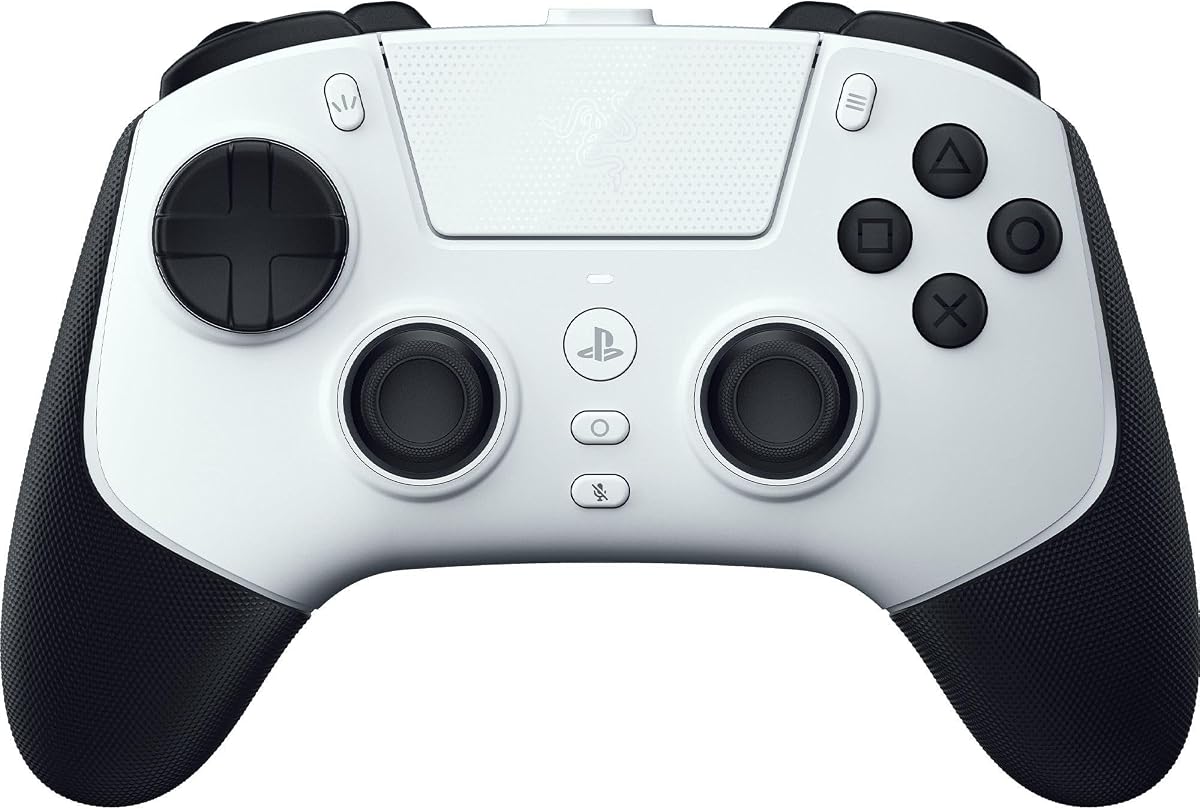
The Razer Raiju V3 Pro is an officially licensed PS5 and PC esports controller with four removable mouse-click back buttons and two claw-grip bumpers. Its 3.9 rating reflects a specialized premium design. The back buttons and extra bumpers are remappable, giving players more control options than a conventional standard controller without relying on a separate add-on.
We may earn a commission when you buy through this link, at no additional cost to you.
Symmetrical magnetic TMR thumbsticks are designed for consistent micro-adjustments and reduced drift, while swappable caps let players tune the feel. Razer Pro HyperTriggers switch between rapid mouse-click actuation and full analog pulls, making the controller adaptable to shooters, racing, sports, and precision games. Mecha-Tactile PBT action buttons and an eight-way floating D-pad add tactile control.
Connectivity includes a 2.4GHz dongle for low-latency PS5 play and a 2000Hz wired polling rate for PC tournaments. The Razer Mobile App or Razer Synapse 4 supports stick sensitivity changes, programmable-button remapping, trigger calibration, and up to four onboard profiles. The physical claw-grip shape and extensive feature set are less suitable for players who prioritize a compact, familiar shape.
This is the premium recommendation for competitive players who want clicky rear controls, analog and digital trigger choices, and serious low-latency performance. Its removable-button design also allows users to change the configuration rather than being locked into one rear-control layout.
The rear buttons can be removed and remapped, while the claw-grip bumpers provide additional programmable inputs. This flexibility is useful for different genres and changing play styles.
HyperTriggers can behave like fast digital switches or traditional analog triggers. The change is particularly valuable when moving between shooters and games that depend on gradual braking or acceleration.
We may earn a commission when you buy through this link, at no additional cost to you.
The Turtle Beach Victrix Pro BFG Reloaded is a modular wireless controller that pairs four mappable quick-action buttons with a broad collection of interchangeable components. Its 3.9 rating reflects a capable design, and the system is officially licensed by PlayStation. It supports both wired and wireless play, with a rechargeable battery rated for up to 20 hours.
We may earn a commission when you buy through this link, at no additional cost to you.
Three customizable modules allow the controller's central control area to be changed. Available configurations include an ergonomic six-button fightpad with Kailh microswitches and a five-stop hall-effect clutch-trigger module with a hair-trigger mode. Hall-effect technology appears in the modules, while the rear quick-action buttons provide four additional remappable inputs.
The modular approach is the main trade-off. It provides exceptional flexibility but requires users to learn how to attach and remove parts, keep track of components, and select the configuration that suits each game. The package also includes a carrying case and module tool, which helps with storage and changes. A 3.5mm audio jack and Sony 3D Audio support are also listed.
The Victrix Pro BFG is best for a player who changes genres often or wants to convert one controller between fightpad, traditional, and other supported layouts. It may feel excessive for standard console gaming, but its hall-effect controls, four rear buttons, and interchangeable system offer a distinctive long-term upgrade path.
Replaceable modules allow the controller's face controls to be configured for different game types. This is more involved than fixed button layouts, but it provides long-term adaptability.
Both wireless and wired modes are supported, and the long advertised battery life reduces charging interruptions. The included case makes the modular controller easier to transport between gaming sessions.
We may earn a commission when you buy through this link, at no additional cost to you.
The right choice depends on whether you want to enhance an existing DualSense or replace it entirely. Compatibility, rear-button count, programming depth, installation complexity, and connection method should be considered before making a purchase.
A standalone back-paddle kit is usually the most economical way to add rear controls to a controller you already enjoy. These products can preserve the shape, sticks, triggers, and familiar feel of the original DualSense while introducing remapping and macros. They are particularly attractive if the main goal is moving less-used actions to buttons under the index fingers. Complete wireless controllers offer a broader package, but you are choosing every aspect of the gamepad at once rather than upgrading one feature.
Choose a kit if your existing controller is in good condition; choose a full controller if you also want hall-effect sticks, a rechargeable battery, updated triggers, or a different grip.
PS5 controller compatibility is more nuanced than the shared DualSense name suggests. The IWGAME and GMVOX kits support long lists of BDM revisions, while the eXtremeRate SPARK kit works only with BDM-030, BDM-040, BDM-050, and BDM-060. The SPARK explicitly does not fit BDM-010 or BDM-020. Wireless replacement controllers may list support for PS5 Pro, Slim, and standard versions but still require checking their setup instructions.
Identify the controller revision before ordering, especially for an installation-based kit. A broad wording such as “PS5 compatible” is not enough when a product excludes specific hardware revisions.
Four rear paddles provide more binding space than a two-paddle design, allowing separate assignments for movement, abilities, camera controls, or communication shortcuts. Two paddles can still eliminate awkward combinations, particularly when one handles a frequently used action and the other triggers a macro. The premium esports options improve the experience further with removable clicky buttons, additional bumpers, or side-facing placement.
Think about how many distinct commands you actually use. More buttons are useful only if the software and your game support can make them meaningful.
Remapping assigns existing controller functions to the rear buttons. Macros go further by recording a sequence of inputs and replaying it from one button. Profile support is especially useful for games with different control schemes because it can avoid rebuilding mappings for every title. The eXtremeRate SPARK can store eight mapping profiles and visualize them on an OLED display, while the Razer Raiju V3 Pro can save four onboard profiles through its software.
Prioritize the programming method that matches your routine. Simple remapping is enough for many players, but frequent game switching makes profiles and clear on-screen or app-based management far more convenient.
External kits such as the IWGAME and GMVOX use a wired USB connection, which eliminates wireless pairing questions but requires the console's USB communication setting to be changed. Full replacement controllers generally support both Bluetooth and USB-C. The SCUF OMEGA and Razer Raiju V3 Pro also emphasize low-latency 2.4GHz operation for competitive play, while the Razer model offers 2000Hz wired polling on PC.
Choose wired operation for consistency or when cable reach is not an issue. Choose wireless for a cleaner setup, and verify that the controller supports the specific console and connection mode you need.
Hall-effect and magnetic TMR sticks are designed to resist the drift associated with conventional potentiometer sticks. The SCUF OMEGA uses Endurance TMR sticks, while the Razer Raiju V3 Pro uses symmetrical magnetic TMR sticks. Trigger design also matters: the Razer model switches between digital and analog behavior, and the Turtle Beach module offers five hall-effect trigger stops. Mechanical switches can provide a crisp, fast action that some shooters and fighting-game players prefer.
Match the hardware to your genre. Drift resistance helps broadly, but trigger travel, click speed, and stick shape can matter even more in specialized competitive games.
Plug-and-play kits are the easiest way to add rear buttons because they connect externally. Installation-based systems can look more integrated and support larger on-controller displays, but they require disassembly and possibly soldering. The eXtremeRate SPARK lists soldering options and requires a battery-bracket replacement on BDM-060 controllers. It is not appropriate for buyers who want a completely tool-free upgrade.
If you dislike opening a controller or own several systems, favor an external kit. If you enjoy tinkering and want the most integrated result, verify model compatibility and watch the installation guide before starting.
A controller that works well on PS5 may have different behavior on PC, Mac, Android, iOS, or PS4. The external kits list broad platform support, while the premium esports controllers focus more heavily on PS5 and PC. Several wireless options mention Android and PS4 support through Bluetooth or USB, but their setup notes may impose extra steps. Features such as gyro aiming, turbo, hall-effect sticks, and Sony 3D Audio depend on both the game and the connected device.
Check every platform and feature you plan to use instead of assuming full cross-platform parity. The primary controller and two most common games are the most important compatibility targets.
Begin by confirming the controller revision and whether the product is an external kit or a full replacement. For a wired add-on, connect the USB cable and follow the prompt to change the PS5 communication method to “Use USB Cable.” For a wireless controller, complete the platform's pairing process, update any required firmware, and test the face buttons before assigning rear controls.
Assign rear paddles gradually, starting with simple actions that are inconvenient to combine on the face buttons. Learn the custom menu's record, remap, macro, profile, and turbo functions one at a time. Keep a written list or screenshot of useful bindings, and create separate profiles for games with different control needs. Avoid assigning a turbo function until confirming that the game permits repeated inputs.
For long-term care, keep the controller away from moisture, dust, and excessive heat, and avoid yanking cables from either connection point. Remove batteries from non-rechargeable devices before storing them for long periods, and update wireless controllers when the manufacturer provides new firmware. Installation-based kits should be checked periodically for loose connections, and removable modules should be stored in the supplied case.
No. Compatibility depends on the exact BDM revision and the design of the kit. The IWGAME and GMVOX products list several revisions, while the eXtremeRate SPARK supports BDM-030, BDM-040, BDM-050, and BDM-060 but excludes BDM-010 and BDM-020. Always verify the controller model before purchasing an installation-based product.
Usually yes, because a remap kit sends the commands through the standard controller connection rather than presenting new buttons to the game. The console sees a normal controller input, so the game must support remapping through the accessory's own programming menu. A few games or restrictive modes may not accept rapid-fire or automated sequences, so those functions should be used carefully.
It depends on priorities. Wired kits are simple to add to an existing controller and avoid pairing and charging concerns, but they need cable reach and may require a USB communication setting. Wireless full controllers offer broader hardware features, rechargeable power, and a cleaner setup, but they introduce battery management, firmware updates, and possible pairing considerations.
Remapping moves or assigns a standard controller function to a rear paddle. A macro records a sequence of inputs and then replays the sequence when one button is pressed. Remapping is generally more predictable and easier to troubleshoot, while macros can save time on repeatable combinations but may conflict with games that restrict automated input.
Hall-effect and magnetic sensing designs are intended to reduce drift and improve consistency, but no stick system can guarantee perfect behavior forever. Stick wear, dirt, calibration, and physical damage can still affect input. Periodically cleaning the controller and checking the deadzone and response settings remains useful even with anti-drift hardware.
Four paddles offer the most binding flexibility, while two can be enough for frequently used shortcuts. The right count depends on the commands you use and the size of your hands. Four-button add-ons are especially useful for existing controllers, while complete premium controllers may add extra bumpers or removable buttons to increase the available input layout.
Many products in this guide support PC, Mac, Android, or additional platforms, but the support varies by model. The IWGAME and GMVOX kits explicitly list several platforms, and the NBCP controllers support Windows plus mobile use. Setup differs between wired and Bluetooth connections, so review the included guide and verify that the specific game supports the required controller functions.
Internal installation is more involved than attaching an external wired kit. It commonly requires opening the controller, positioning the rear assembly, reconnecting components, and possibly soldering. The eXtremeRate SPARK provides an installation guide, but buyers should still have basic electronics experience and should not attempt the process if they are unwilling to work carefully inside the controller.
The IWGAME Back Paddles provide the strongest budget-focused balance of four programmable buttons, macro support, turbo, and broad compatibility. The SCUF OMEGA is the most complete overall performance option, combining extensive customization with swappable parts and competition-oriented hardware, while the Razer Raiju V3 Pro delivers a specialized premium experience with removable clicky back buttons and dual-mode triggers.
For an existing DualSense, prioritize a compatible external kit and simple programming. For a full replacement, compare the number of paddles, hall-effect stick design, trigger behavior, wireless options, software profiles, and platform requirements. The eXtremeRate SPARK suits experienced installers, while the Turtle Beach Victrix Pro BFG appeals to players who want to transform the central control layout between game types.
Ratings, product revisions, firmware guidance, and current prices can change over time, and promotions may affect the value of one option over another. Before ordering, confirm your controller's BDM model, check the latest setup notes, read current customer feedback, and compare the current price with the features you will actually use.